Yes! You can use AI to fill out New Jersey Judiciary Incorrect Transcript Request Notice

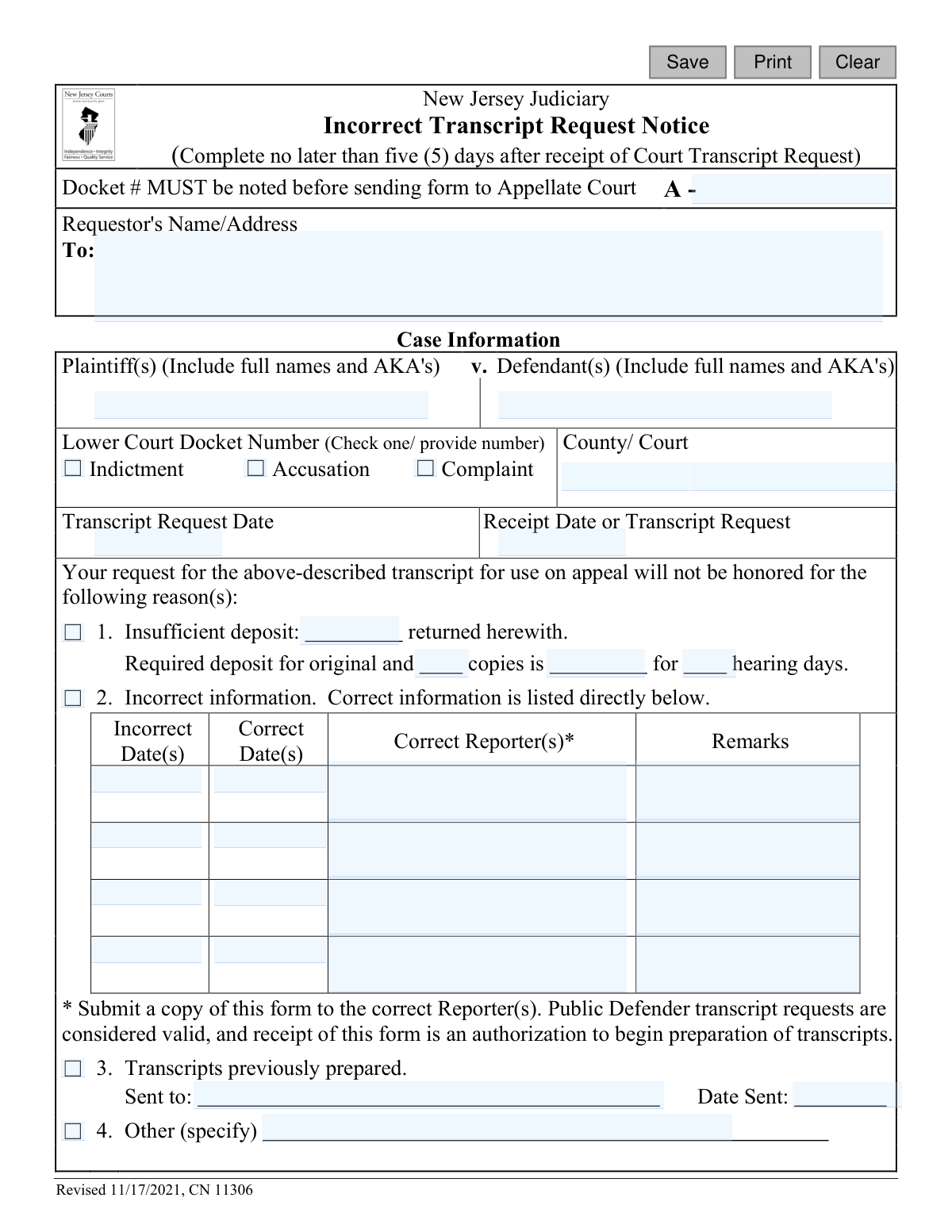
The Incorrect Transcript Request Notice is an official form from the New Jersey Judiciary used by court reporters, clerks, or transcribers to formally reject a request for a court transcript. It details the specific reasons for the rejection, such as an insufficient deposit, incorrect case information, or the fact that the transcript was previously prepared. The notice guides the original requestor on the necessary corrections they must make to submit a valid amended request. Today, this form can be filled out quickly and accurately using AI-powered services like Instafill.ai, which can also convert non-fillable PDF versions into interactive fillable forms.
CN 11306 is part of the New Jersey forms category on Instafill.
Our AI automatically handles information lookup, data retrieval, formatting, and form filling.
It takes less than a minute to fill out CN 11306 using our AI form filling.
Securely upload your data. Information is encrypted in transit and deleted immediately after the form is filled out.

Form specifications

Form name: New Jersey Judiciary Incorrect Transcript Request Notice
Number of fields: 50
Number of pages: 1
Language: English
main-image

Instafill Demo: How to fill out PDF forms in seconds with AI

How to Fill Out CN 11306 Online for Free in 2026

Are you looking to fill out a CN 11306 form online quickly and accurately? Instafill.ai offers the #1 AI-powered PDF filling software of 2026, allowing you to complete your CN 11306 form in just 37 seconds or less.
Follow these steps to fill out your CN 11306 form online using Instafill.ai:
  1. 1 Navigate to Instafill.ai and upload or select the 'Incorrect Transcript Request Notice' form.
  2. 2 Use the AI assistant to automatically populate the Requestor's name and address, and the case information, including docket number, plaintiff/defendant names, and lower court details.
  3. 3 Enter the date of the original transcript request and the date it was received.
  4. 4 Select the checkbox that corresponds to the reason for the rejection (e.g., insufficient deposit, incorrect information, etc.).
  5. 5 If the deposit was insufficient, specify the required amount. If information was incorrect, fill in the table with the incorrect and corrected details.
  6. 6 Identify your role by checking the 'Reporter', 'Court Clerk', or 'Transcriber' box, then type or print your name and sign the document.
  7. 7 Review the completed form for accuracy before submitting it to the requestor and other required parties as listed in the CC section.

Our AI-powered system ensures each field is filled out correctly, reducing errors and saving you time.

Why Choose Instafill.ai for Your Fillable CN 11306 Form?

Speed

Complete your CN 11306 in as little as 37 seconds.

Up-to-Date

Always use the latest 2026 CN 11306 form version.

Cost-effective

No need to hire expensive lawyers.

Accuracy

Our AI performs 10 compliance checks to ensure your form is error-free.

Security

Your personal information is protected with bank-level encryption.

Frequently Asked Questions About Form CN 11306

This notice informs you that your request for a court transcript cannot be processed as submitted. It details the specific reasons for the rejection, such as an insufficient deposit or incorrect case information, so you can correct them.

A Court Reporter, Court Clerk, or an official Transcriber from the New Jersey Judiciary completes this form. It is sent to the person or party who originally submitted the incorrect transcript request.

You must correct the errors indicated on the notice and submit a new, amended Court Transcript Request form promptly. Failing to do so could lead to the dismissal of your appeal.

This means the payment you sent was not enough to cover the cost of the transcript. The notice will specify the required deposit amount that you must include with your new, corrected request.

The form will list the incorrect details you provided and specify the correct information, such as the right hearing dates or court reporter. You must use this corrected information when you fill out your amended transcript request.

The form states you must submit an amended request "promptly." Any delay could put your appeal at risk of being dismissed, so you should act as soon as possible.

Ignoring this notice is highly discouraged, as your appeal could be dismissed for 'lack of prosecution.' You must submit a corrected transcript request to move forward with your case.

This indicates the transcript you asked for has already been created. The notice will state who it was sent to and on what date, so you may need to request a copy from that party.

According to court rules, you must serve the amended form to the court and provide copies to the correct court reporter, the Appellate Division, and all other attorneys or pro se parties involved in the case.

Yes, services like Instafill.ai use AI to accurately auto-fill form fields, which can save time and help you avoid the simple errors that may have caused your initial request to be rejected.

You can upload the blank amended Court Transcript Request form to the Instafill.ai platform. The AI will make the form fillable, allowing you to quickly and accurately enter the corrected information from this notice.

Tools like Instafill.ai can convert flat, non-fillable PDFs into interactive, fillable forms. This allows you to easily type your information into the document before printing it for submission.

Compliance CN 11306
Validation Checks by Instafill.ai

1
Mandatory Appellate Docket Number
Validates that the Appellate Docket Number field (`docketNum`) is not empty. The form explicitly states this number MUST be noted before sending. This is a critical identifier for the Appellate Division to associate the notice with the correct appeal file, and its absence would make the form un-fileable.
2
At Least One Reason for Rejection Required
Ensures that at least one of the main reason checkboxes (`depositInsuff`, `incorrectDeny`, `transDeny`, `otherDeny`) is selected. The entire purpose of the form is to communicate why a transcript request was incorrect. If no reason is selected, the form fails its primary function and provides no useful information to the requestor.
3
Conditional Requirement for 'Insufficient Deposit'
If the 'Insufficient deposit' checkbox (`depositInsuff`) is selected, this validation ensures that the 'Required deposit' (`depositReq`), 'number of copies' (`numCopies`), and 'hearing days' (`hearingDays`) fields are all filled. This information is essential for the requestor to understand the exact cost and submit a correct amended request.
4
Conditional Requirement for 'Incorrect Information'
If the 'Incorrect information' checkbox (`incorrectDeny`) is selected, this check verifies that at least one row in the correction table is filled out (e.g., `incorrectDt`, `correctDt`). The requestor needs to know what specific information was wrong to be able to correct it on an amended form. Simply stating 'information is incorrect' is not sufficient.
5
Conditional Requirement for 'Transcripts Previously Prepared'
When the 'Transcripts previously prepared' checkbox (`transDeny`) is checked, this validation requires the 'Sent to' (`transSent`) and 'Date Sent' (`sentDt`) fields to be completed. This provides the requestor with crucial information on who already has the transcript and when it was sent, preventing duplicate work and unnecessary expense.
6
Conditional Requirement for 'Other' Reason
If the 'Other' checkbox (`otherDeny`) is selected as the reason for rejection, the corresponding text field (`otherDesc`) must contain an explanation. Selecting 'Other' without specifying the reason leaves the requestor with no actionable information to correct their request, defeating the purpose of the notice.
7
Logical Date Sequence for Request and Receipt
Ensures the 'Receipt Date' (`recptDt`) is on or after the 'Transcript Request Date' (`reqDt`). It is logically impossible to receive a request before it was made. This check prevents common data entry errors and ensures the timeline of events recorded on the form is accurate and credible.
8
Valid Date Formatting
Checks that all date fields on the form (`reqDt`, `recptDt`, `sentDt`, `sigDt`, and all `correctDt`/`incorrectDt` fields) contain a valid date in an expected format (e.g., MM/DD/YYYY). This prevents data corruption and ensures dates can be processed, stored, and compared correctly by the system and by staff.
9
Mandatory Sender Identification
Validates that one of the 'From' checkboxes (`formFrom`) is selected (Reporter, Court Clerk, or Transcriber) and that the Name/Address/Agency field (`agencyInfo`) is filled. This identifies the source of the notice, which is necessary for accountability and for the requestor to direct any follow-up questions.
10
Mandatory Case Identification
Ensures that essential case details, including Plaintiff name (`plaName`), Defendant name (`defName`), and the Lower Court Docket Number/County (`typeCounty`), are provided. Without this information, the transcript request cannot be uniquely identified, making the entire notice ambiguous and unusable.
11
Lower Court Docket Type Selection
Ensures that one of the lower court docket types (`docketType` - Indictment, Accusation, or Complaint) is checked and the corresponding number is provided in the `typeCounty` field. This provides a complete identifier for the case at the lower court level, which is necessary to locate the correct records.
12
Logical Signature Date
Verifies that the 'Date Submitted' (`sigDt`) is on or after the 'Receipt Date' (`recptDt`). The notice can only be prepared and signed after the original incorrect request has been received. This check maintains the logical integrity of the form's timeline and prevents invalid data entry.
13
Mandatory Requestor Information
Ensures the 'Requestor's Name/Address' field (`reqName`) is not empty. This information is fundamentally required to know who the notice should be sent to. A notice without a recipient is undeliverable and fails its primary purpose of informing the requestor.

Common Mistakes in Completing CN 11306

Missing the Appellate Docket Number

The form explicitly states 'Docket # MUST be noted before sending form to Appellate Court.' Court staff, often working quickly, may overlook this critical field at the top of the form. Failure to include the appellate docket number can cause significant processing delays, as the Appellate Division will be unable to correctly file the notice to the corresponding case file, potentially jeopardizing appeal timelines. To prevent this, always double-check that the 'A -' docket number is clearly entered before submission.

Incomplete Plaintiff or Defendant Names

Users may enter just a last name or forget to include 'Also Known As' (AKA) designations for the plaintiffs and defendants. This happens due to haste or assuming the docket number is sufficient for identification. Incomplete names can lead to confusion and misidentification, especially in courts with a high volume of cases or parties with common names, delaying the processing of the corrected transcript request. Always enter the full legal names and any known AKAs as they appear on the official court documents.

Incorrect Calculation of Required Deposit

When checking 'Insufficient deposit,' the filler must manually calculate the required amount based on the number of copies and hearing days. Mathematical errors are common and result in providing the requestor with yet another incorrect figure. This forces a second round of corrections, further delaying the transcript preparation and the appeal itself. Using a calculator or a standardized fee sheet is crucial to ensure the calculated deposit is accurate the first time.

Illegible Handwritten Information

Since this form is a PDF, it is often printed and filled out by hand, leading to illegible entries for dates, names, and docket numbers. Poor handwriting makes the notice incomprehensible to the recipient, defeating its purpose and causing severe delays or even dismissal of an appeal if the requestor cannot act on the information. Using a tool like Instafill.ai can convert this non-fillable PDF into a fillable format, allowing for clear, typed entries that eliminate any ambiguity.

Vague or Incomplete Corrections for 'Incorrect Information'

In section 2, a filler might enter a corrected date but neglect to provide the corresponding 'Correct Reporter(s)' name, or vice-versa. This partial information is unhelpful, as the requestor needs all correct details to submit an amended request successfully. This oversight forces the requestor to do more research or guess, leading to more errors. To be effective, ensure every column in the correction table is filled out completely for each incorrect item.

Forgetting to Identify the Sender

The 'From' section requires the sender to check a box identifying themselves as a Reporter, Court Clerk, or Transcriber and provide their details. Forgetting to check a box or provide a name and address leaves the recipient unsure of the notice's origin. This makes it difficult for them to follow up with questions, hindering their ability to promptly correct their transcript request. Always complete the 'From' section fully to ensure clear communication.

Omitting Signature or Submission Date

An unsigned notice is not legally valid, and a missing date makes it impossible to verify if the notice was sent within the required five-day period. This fundamental error can invalidate the entire notice, creating procedural chaos and potentially giving the requestor grounds to challenge the rejection. Always sign and date the form upon completion to ensure it is official and its timeline is properly documented.

Failing to Distribute Copies (CCs)

The bottom of the form lists four parties who must or may receive a copy (CC) of the notice, including the Supervisor of Court Reporters and the Appellate Division. Overlooking this step means key stakeholders are left out of the loop, breaking the official communication chain. This can disrupt case management and lead to procedural issues, so it's vital to ensure copies are sent to all parties listed.

Using an Ambiguous 'Other' Reason

Fillers sometimes select 'Other' and write a vague reason like 'form incorrect' or a reason that is already covered by another checkbox, such as 'wrong date.' This lack of specificity fails to give the requestor actionable guidance on what needs to be fixed. This can lead to another incorrect submission and further delays. The 'Other' section should only be used for unique issues not covered by options 1-3, and the description must be clear and detailed.

Incorrectly Transcribing Key Dates

The form requires entering the 'Transcript Request Date' and 'Receipt Date.' A simple data entry error, such as transposing numbers or writing the wrong month, can create confusion about the timeline of the original request. This can lead to disputes over whether deadlines were met. To avoid this, carefully cross-reference the original request document to ensure all dates are transcribed with 100% accuracy. AI-powered tools like Instafill.ai can help by automatically capturing and validating date formats to prevent such errors.
Saved over 80 hours a year

“I was never sure if my IRS forms like W-9 were filled correctly. Now, I can complete the forms accurately without any external help.”

Kevin Martin Green

Your data stays secure with advanced protection from Instafill and our subprocessors

Robust compliance program

Transparent business model

You’re not the product. You always know where your data is and what it is processed for.

ISO 27001, HIPAA, and GDPR

Our subprocesses adhere to multiple compliance standards, including but not limited to ISO 27001, HIPAA, and GDPR.

Security & privacy by design

We consider security and privacy from the initial design phase of any new service or functionality. It’s not an afterthought, it’s built-in, including support for two-factor authentication (2FA) to further protect your account.

Fill out CN 11306 with Instafill.ai

Worried about filling PDFs wrong? Instafill securely fills new-jersey-judiciary-incorrect-transcript-request-notice forms, ensuring each field is accurate.