Yes! You can use AI to fill out New Jersey Judiciary - Notice of Parental Rights in Adoption Proceeding - Agency Placement

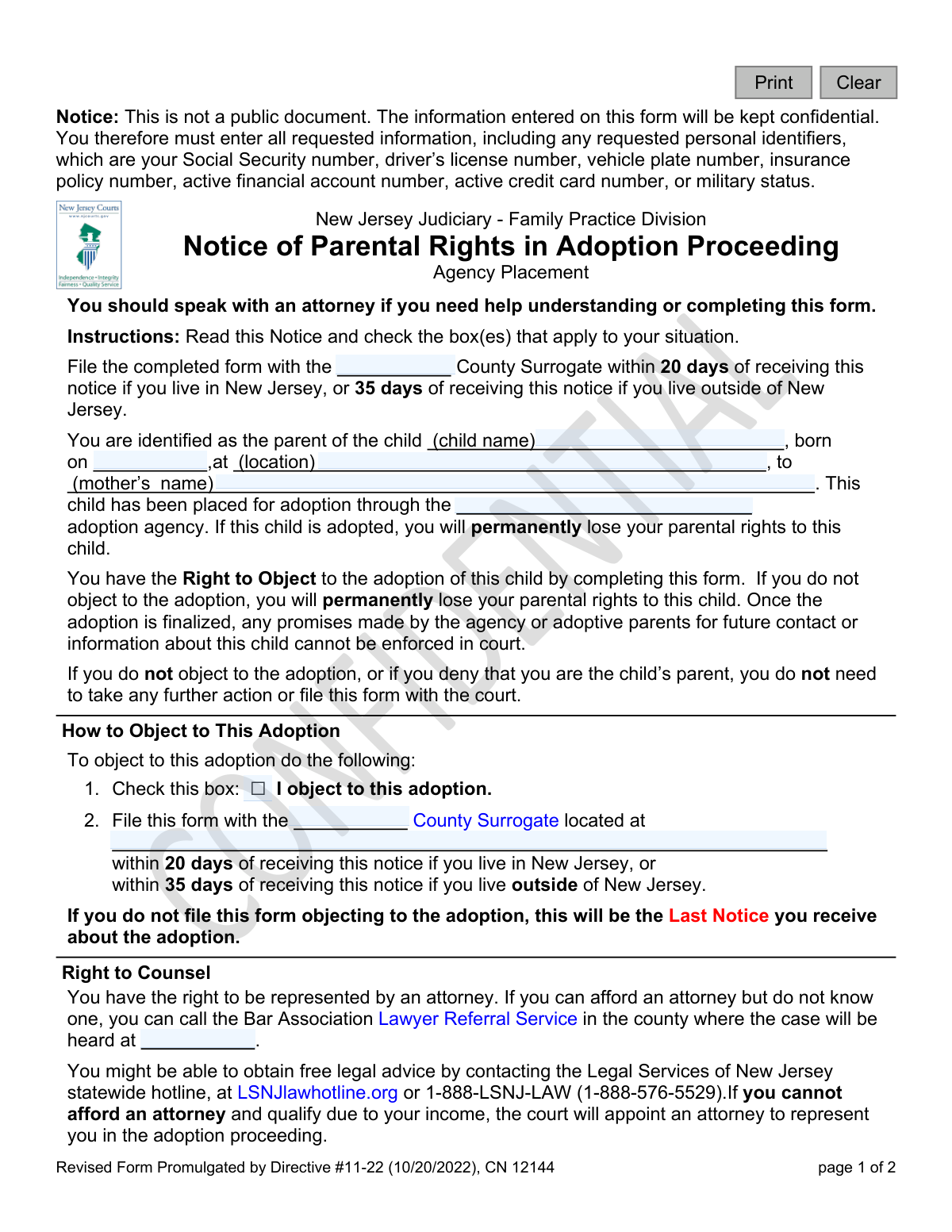
This is an official New Jersey Judiciary form for parents involved in an agency-led adoption proceeding. It outlines a parent's legal rights, including the right to object to the adoption, the right to counsel, and the option to consent. Completing this form is a critical step in either contesting or agreeing to the termination of parental rights. Today, this form can be filled out quickly and accurately using AI-powered services like Instafill.ai, which can also convert non-fillable PDF versions into interactive fillable forms.
CN 12144 is part of the New Jersey forms category on Instafill.
Our AI automatically handles information lookup, data retrieval, formatting, and form filling.
It takes less than a minute to fill out CN 12144 using our AI form filling.
Securely upload your data. Information is encrypted in transit and deleted immediately after the form is filled out.

Form specifications

Form name: New Jersey Judiciary - Notice of Parental Rights in Adoption Proceeding - Agency Placement
Number of fields: 24
Number of pages: 1
Language: English
main-image

Instafill Demo: How to fill out PDF forms in seconds with AI

How to Fill Out CN 12144 Online for Free in 2026

Are you looking to fill out a CN 12144 form online quickly and accurately? Instafill.ai offers the #1 AI-powered PDF filling software of 2026, allowing you to complete your CN 12144 form in just 37 seconds or less.
Follow these steps to fill out your CN 12144 form online using Instafill.ai:
  1. 1 Navigate to Instafill.ai and upload or select the 'Notice of Parental Rights in Adoption Proceeding - Agency Placement' form.
  2. 2 Provide the child's name, date of birth, location of birth, and the mother's name as identified in the notice.
  3. 3 Clearly indicate your decision by checking the appropriate box, such as 'I object to this adoption' if you wish to contest it.
  4. 4 If you need legal representation and cannot afford it, check the box to apply for a court-appointed attorney.
  5. 5 Indicate whether you want to receive counseling sessions by checking the 'Yes' or 'No' box.
  6. 6 Carefully review all the information you have entered for accuracy, then provide your printed name, signature, and the date.
  7. 7 Download the completed form and ensure it is filed with the correct County Surrogate within the specified deadline (20 days if in NJ, 35 days if outside NJ).

Our AI-powered system ensures each field is filled out correctly, reducing errors and saving you time.

Why Choose Instafill.ai for Your Fillable CN 12144 Form?

Speed

Complete your CN 12144 in as little as 37 seconds.

Up-to-Date

Always use the latest 2026 CN 12144 form version.

Cost-effective

No need to hire expensive lawyers.

Accuracy

Our AI performs 10 compliance checks to ensure your form is error-free.

Security

Your personal information is protected with bank-level encryption.

Frequently Asked Questions About Form CN 12144

This form notifies you that you have been identified as a parent of a child placed for adoption through an agency. It explains your rights and provides a way for you to formally object to the adoption, request a court-appointed attorney, or indicate your wishes regarding counseling.

You need to respond to this notice if you have been identified as the parent of the child named in the form and you wish to object to the adoption or apply for a court-appointed attorney. If you do not object to the adoption, you do not need to take any action or file this form.

If you do not file this form to object within the specified timeframe, the court will assume you do not object to the adoption. The adoption will proceed uncontested, and you will permanently lose your parental rights to the child.

To object, you must check the box next to 'I object to this adoption' and file the completed form with the specified County Surrogate's office. You must file it within 20 days of receiving it if you live in New Jersey, or within 35 days if you live outside of New Jersey.

No, the form states that it is not a public document and the information you enter will be kept confidential. You are required to provide all requested information, including personal identifiers like your Social Security number.

You have the right to an attorney. If you cannot afford one, you can apply for a court-appointed attorney by checking the appropriate box on this form and completing the separate 'Application for Assignment of Counsel' form.

You must file the form with the County Surrogate within 20 days of receiving the notice if you live in New Jersey. If you live outside of New Jersey, you have 35 days to file it.

Not filing the form means the adoption proceeds uncontested, and the court assumes you do not object. Alternatively, you can actively consent by signing a 'Voluntary Surrender' form from the adoption agency, which is a formal, irreversible act of relinquishing your rights.

If you deny you are the parent, you do not need to take any action, and the adoption will proceed uncontested. You also have the option to sign a formal 'Denial of Parentage' form, which you can get from the adoption agency.

Yes, if you are considering signing a 'Voluntary Surrender' form, you are entitled to three free, face-to-face counseling sessions. You can indicate whether you want counseling by checking the 'Yes' or 'No' box on the form.

You must file the completed form with the County Surrogate's office for the county where the adoption proceeding is taking place. The form should specify the county and the address of the Surrogate's office.

Yes, you can use AI-powered services like Instafill.ai to help you accurately fill in the form fields. These tools can save time and help reduce errors by auto-filling your information.

You can use a service like Instafill.ai to complete this form digitally. Simply upload the form to the platform, and its AI will help you fill in the required fields before you print it for submission.

If you have a non-fillable or 'flat' PDF, you can use a tool like Instafill.ai to convert it into an interactive, fillable form. This allows you to type your answers directly into the fields before printing.

Compliance CN 12144
Validation Checks by Instafill.ai

1
Child's Name Presence
Validates that the 'child name' field is not empty. This is a critical identifier for the legal proceeding, and a missing name makes the form ambiguous and legally void. If this field is empty, the form cannot be processed as it's impossible to link it to a specific adoption case.
2
Child's Birth Date Format and Plausibility
Ensures the 'born on' date is in a valid format (e.g., MM/DD/YYYY) and represents a date in the past. This check prevents data entry errors and confirms the child has been born. A submission with a future date or an invalid format would be rejected, requiring the user to correct the date before processing.
3
Mother's Name Presence
Verifies that the 'mother's name' field has been completed. This information is essential for correctly identifying the parties involved in the adoption proceeding and establishing legal context. A form lacking this information would be considered incomplete and returned for correction.
4
Adoption Agency Name Presence
Checks that the 'adoption agency' field is populated. The agency is a central party in the proceeding, and its name is required for all correspondence and potential contact. If the agency name is missing, the form is invalid as it's unclear which entity is facilitating the adoption.
5
Signature Date Logic
Validates that the 'Date' field next to the signature is a valid date and is not set in the future. This ensures the signature is timestamped accurately at the time of signing. A future date is impossible and indicates an error, which would cause the submission to be flagged for review or rejected.
6
Conditional Signature and Name Requirement
Ensures that if the user checks 'I object to this adoption' or 'I want to apply for a court-appointed attorney', the 'Signature' and 'Print Name' fields must be completed. These actions require filing the form, which is legally invalid without a signature. If the boxes are checked but the signature is missing, the user will be prompted to sign before the form can be submitted.
7
Counseling Selection Mutual Exclusivity
Verifies that for the 'Do you want counseling?' question, only one of the two options ('Yes' or 'No') is selected. Allowing both selections would create ambiguity about the user's intent. If a user attempts to select both, the system should either prevent it or clear the previous selection automatically.
8
Agency Phone Number Format
Validates that the 'adoption agency’s telephone number' field contains a number in a recognizable phone number format (e.g., 10 digits with optional formatting). This ensures the contact information is usable if the parent needs to contact the agency. An invalid format would trigger an error message prompting for a valid phone number.
9
County Surrogate Presence
Checks that the 'County Surrogate' field is populated, indicating where the form must be filed. This information is critical for the user to take the correct action. If this field is blank, the form is considered incomplete and cannot be properly acted upon by the recipient.
10
Actionable Submission Logic
Prevents the form from being filed if it is signed but no action requiring filing (objecting or applying for an attorney) has been selected. The form instructions state that no action is needed if not objecting. This check prevents unnecessary or confusing filings and would prompt the user to either select an action or confirm they do not need to file.
11
Chronological Date Consistency
Performs a logical check to ensure the signature date is after the child's birth date. While seemingly obvious, this validation catches significant data entry errors that could invalidate the document. If the signature date precedes the birth date, the system will return an error and require correction.
12
Printed Name Validity
Ensures the 'Print Name' field is not empty and contains a plausible text string when a signature is required. This confirms the identity of the signatory in a legible format, which is crucial for legal records. A failure would occur if the field is empty, contains gibberish, or only non-alphabetic characters, prompting the user for a valid entry.

Common Mistakes in Completing CN 12144

Missing the Strict Filing Deadline

This form has a strict deadline of 20 days for New Jersey residents and 35 days for non-residents. People often miscalculate the date or procrastinate due to the emotional nature of the situation. Missing this deadline means you permanently lose your right to object to the adoption, and the case will proceed without your input.

Failing to File with the Correct County Surrogate

The form must be filed with the correct County Surrogate's office, but the fields for the county and address are left blank. Individuals may not know which county is appropriate (e.g., where the child resides vs. where they live), leading them to file in the wrong location. This can cause the form to be rejected or severely delayed, potentially causing the filing deadline to be missed.

Forgetting to Check the 'Object to Adoption' Box

To formally object, the user must check the box next to 'I object to this adoption.' Simply signing and filing the form is not enough and will be considered an invalid or ambiguous submission. This oversight results in the court not recognizing the objection, leading to the permanent loss of parental rights as if no objection was ever made.

Incomplete Application for a Court-Appointed Attorney

A person may check the box to apply for a court-appointed attorney but fail to complete and submit the separate 'Application for Assignment of Counsel' form mentioned in the instructions. This mistake happens because they overlook the instruction about an attached form. Consequently, their request for legal representation will not be processed, and they will be left without an attorney for the proceedings.

Omitting the Signature, Printed Name, or Date

Forgetting to sign, print your name, and date the form is a frequent and critical error on legal documents. An unsigned or undated form is legally invalid and will be rejected by the court. If the error isn't corrected and the form isn't refiled before the deadline, the individual forfeits their right to object.

Misunderstanding 'No Action' for Non-Objection

The instructions clearly state that if you do not object, you do not need to take any action or file the form. However, some individuals file the form with no boxes checked, believing they are actively confirming their non-objection. This is unnecessary, creates administrative confusion, and wastes time for both the filer and the court.

Leaving Critical Identifying Information Blank

Fields for the child's name, date of birth, location of birth, and mother's name are often left incomplete due to emotional distress or not having the information readily available. An incomplete form can be rejected for being ambiguous, causing delays that risk missing the filing deadline. Using a tool like Instafill.ai can help ensure all required fields are populated correctly before submission.

Submitting Only the First Page of the Form

This is a two-page document, with the signature block and other important options located on the second page. People sometimes mistakenly print or send only the first page, rendering the submission incomplete and invalid. To avoid this, ensure both pages are completed and filed together; AI-powered tools can help by presenting the entire form as a single, guided digital workflow.

Ignoring the Right to Counseling

The form offers the right to three counseling sessions before a parent decides to sign a Voluntary Surrender. Individuals under stress may overlook this section or check 'No' without fully considering the benefit of professional guidance. Forgoing this right means making a permanent, life-altering decision without the support system the law provides to ensure it is a fully informed choice.

Incorrectly Entering Adoption Agency Information

The form requires the name and phone number of the adoption agency, which is crucial for requesting other forms like a Voluntary Surrender or Denial of Parentage. Entering this information incorrectly or leaving it blank can prevent or delay crucial communications with the agency. If the form is a non-fillable PDF, a tool like Instafill.ai can convert it to a fillable version and help validate data formats like phone numbers.
Saved over 80 hours a year

“I was never sure if my IRS forms like W-9 were filled correctly. Now, I can complete the forms accurately without any external help.”

Kevin Martin Green

Your data stays secure with advanced protection from Instafill and our subprocessors

Robust compliance program

Transparent business model

You’re not the product. You always know where your data is and what it is processed for.

ISO 27001, HIPAA, and GDPR

Our subprocesses adhere to multiple compliance standards, including but not limited to ISO 27001, HIPAA, and GDPR.

Security & privacy by design

We consider security and privacy from the initial design phase of any new service or functionality. It’s not an afterthought, it’s built-in, including support for two-factor authentication (2FA) to further protect your account.

Fill out CN 12144 with Instafill.ai

Worried about filling PDFs wrong? Instafill securely fills new-jersey-judiciary-notice-of-parental-rights-in-adoption-proceeding-agency-placement forms, ensuring each field is accurate.