Yes! You can use AI to fill out New Jersey Judiciary Publications Request
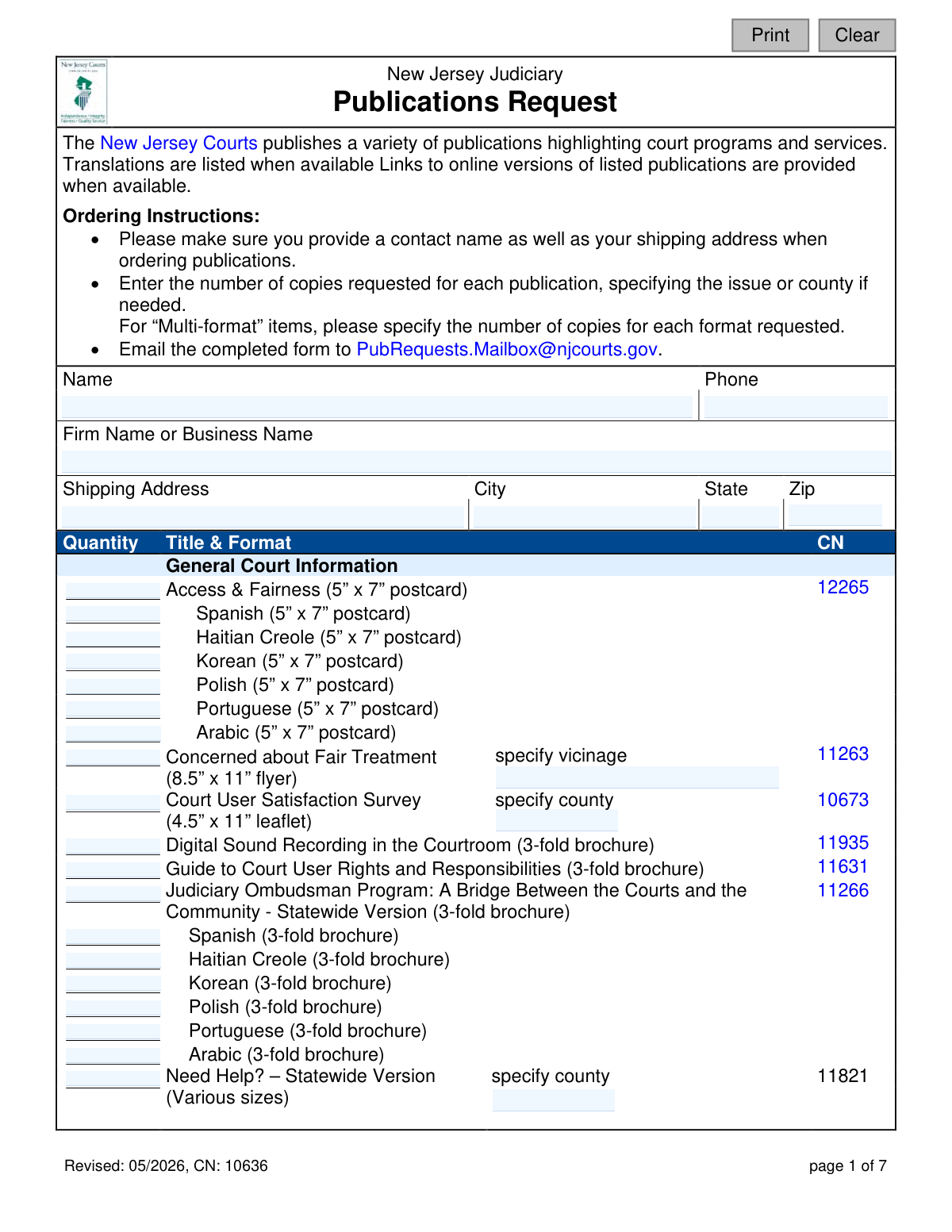
This is the New Jersey Judiciary Publications Request form, identified as CN 10636. It allows individuals and organizations to order physical copies of a wide range of informational materials, including brochures, booklets, and flyers, covering topics from general court information to specific divisions like Civil, Criminal, and Family Court. Today, this form can be filled out quickly and accurately using AI-powered services like Instafill.ai, which can also convert non-fillable PDF versions into interactive fillable forms.
CN 10636 is part of the
New Jersey forms category on Instafill.
Our AI automatically handles information lookup, data retrieval, formatting, and form filling.
It takes less than a minute to fill out CN 10636 using our AI form filling.
Securely upload your data. Information is encrypted in transit and deleted immediately after the form is filled out.
Form specifications
| Form name: | New Jersey Judiciary Publications Request |
| Number of fields: | 269 |
| Number of pages: | 1 |
| Language: | English |
Instafill Demo: How to fill out PDF forms in seconds with AI
How to Fill Out CN 10636 Online for Free in 2026
Are you looking to fill out a CN 10636 form online quickly and accurately? Instafill.ai offers the #1 AI-powered PDF filling software of 2026, allowing you to complete your CN 10636 form in just 37 seconds or less.
Follow these steps to fill out your CN 10636 form online using Instafill.ai:
- 1 Navigate to Instafill.ai and upload the Publications Request form or select it from their template library.
- 2 Use the AI assistant to automatically fill in your contact details, including name, phone number, business name, and complete shipping address.
- 3 Browse the extensive list of publications, which are organized by court division and topic, to find the materials you need.
- 4 Enter the quantity for each desired publication in the corresponding field, specifying the format, language, or county if required.
- 5 Carefully review the entire form, ensuring your contact information and the quantities of requested publications are correct.
- 6 Download the completed form to your device.
- 7 Email the filled-out form to the New Jersey Judiciary at [email protected] as instructed on the form.
Our AI-powered system ensures each field is filled out correctly, reducing errors and saving you time.
Why Choose Instafill.ai for Your Fillable CN 10636 Form?
Speed
Complete your CN 10636 in as little as 37 seconds.
Up-to-Date
Always use the latest 2026 CN 10636 form version.
Cost-effective
No need to hire expensive lawyers.
Accuracy
Our AI performs 10 compliance checks to ensure your form is error-free.
Security
Your personal information is protected with bank-level encryption.
Frequently Asked Questions About Form CN 10636
This form allows individuals and organizations to order free physical copies of publications from the New Jersey Judiciary. These documents provide information about court programs, services, and legal processes.
Anyone can order publications, including individuals, law firms, or other businesses. You simply need to provide a contact name and a valid shipping address.
No, the form does not indicate any fees. The publications offered by the New Jersey Judiciary are typically provided free of charge.
After filling out the form with your contact information and desired quantities, you must email the completed form to [email protected].
You must provide your name, phone number, firm/business name (if applicable), and a full shipping address. Most importantly, you need to enter the number of copies you want for each requested publication.
This means the publication has versions tailored to specific court locations. You must write in the name of the county or vicinage to ensure you receive the correct, localized information.
A 'Multi-format' item is available in more than one layout, such as a small booklet and a full-size 8.5" x 11" page. You need to specify the quantity you want for each specific format you are ordering.
Yes, the form states that links to online versions are provided when available. It is a good idea to check the New Jersey Courts website for a digital PDF before ordering a physical copy.
The form does not provide a specific timeframe for processing or shipping. If you need an estimate, you can contact the Publications Unit staff listed at the end of the form.
For general inquiries or questions about the publications, you can contact the designers listed in the contact section at the end of the form via phone or email.
Yes, services like Instafill.ai use AI to help you accurately auto-fill form fields with your information, which can save you time and prevent errors.
You can upload the PDF of the Publications Request form to the Instafill.ai website. The platform will make the form interactive, allowing you to easily type in your contact details and the quantities for each publication.
If you have a non-fillable or 'flat' PDF, a tool like Instafill.ai can convert it into an interactive, fillable form. This allows you to complete and save it digitally without needing to print it.
Compliance CN 10636
Validation Checks by Instafill.ai
1
Contact Name Presence
This check ensures the 'Name' field (orderedName) is not empty. A contact name is mandatory for processing the request and ensuring the shipment reaches the correct individual. If this field is left blank, the form submission will be rejected with a message prompting the user to provide their name.
2
Complete Shipping Address
Validates that all parts of the shipping address, including 'Shipping Address' (orderedAddrStr), 'City' (orderedAddrCity), 'State' (orderedAddrSt), and 'Zip' (orderedAddrZip), are filled out. A complete and valid address is critical for the successful delivery of the requested publications. Failure to provide a complete address will prevent form submission and require the user to fill in the missing information.
3
Phone Number Format
This check verifies that the 'Phone' field (orderedPhone) contains a valid 10-digit US phone number, allowing for common formats like (XXX) XXX-XXXX or XXX-XXX-XXXX. A valid phone number is important for the publications unit to contact the requester if there are questions about the order. An invalid entry will trigger an error message asking the user to correct the phone number.
4
ZIP Code Format
Ensures the 'Zip' field (orderedAddrZip) contains a valid 5-digit or 9-digit (ZIP+4) numeric code. Correct ZIP code formatting is essential for postal services to route the shipment accurately and avoid delivery delays or failures. If the entry does not match a valid ZIP code format, the user will be notified to enter a correct value.
5
Minimum Order Requirement
This validation confirms that at least one publication has been requested by checking if at least one quantity field on the form has a value greater than zero. Submitting a form with no items ordered is an invalid action that wastes processing time. If no quantities are entered, the submission will be blocked and a message will inform the user they must select at least one publication.
6
Quantity Fields are Positive Integers
Verifies that all entered values in the 'Quantity' fields are positive whole numbers. This prevents users from entering text, decimals, or negative numbers, which are invalid for an order quantity. This check ensures data integrity for inventory and order fulfillment systems, and an invalid entry will be flagged for correction.
7
Conditional Vicinage for 'Concerned about Fair Treatment'
This rule checks that if a quantity is entered for 'Concerned about Fair Treatment' (gen11263), the corresponding 'specify vicinage' field (gen11263Vic) must also be filled. This publication is specific to a vicinage, and failing to specify which one makes the request impossible to fulfill correctly. If the quantity is entered but the vicinage is missing, the user will be prompted to provide the required specification.
8
Conditional County for 'Court User Satisfaction Survey'
This validation ensures that if a quantity is requested for the 'Court User Satisfaction Survey' (gen10673), the 'specify county' field (gen10673Cnty) is not left empty. The survey materials are tailored by county, so this information is necessary for fulfillment. A missing county specification will result in a validation error, requiring the user to complete the field before submission.
9
Conditional County for 'Need Help?' Publication
Checks that if a quantity is entered for any format of the 'Need Help?' publication (gen11821-*), the 'specify county' field (gen11821Cty) is populated. Since these materials are county-specific, the order cannot be processed without this information. The validation prevents incomplete requests and prompts the user to specify a county if one is not provided.
10
Conditional Issue for 'Judiciary Times'
This rule ensures that if a quantity is entered for 'Judiciary Times' (ccrJT), the 'specify issue' field (judTimesIssue) is also filled out. 'Judiciary Times' is a periodical, and the specific issue being requested must be known to fulfill the order. If the quantity is specified without an issue, the form will return an error asking the user to provide the issue details.
11
Logical Consistency for Specification Fields
This check works in reverse of conditional checks, ensuring that if a specification field (e.g., 'specify county' or 'specify vicinage') is filled out, its corresponding publication quantity field must have a value greater than zero. This prevents orphaned data where a specification is provided for an item that has not actually been ordered. If a specification is present without a quantity, the user will be prompted to either add a quantity or clear the specification.
12
Multi-Format Quantity Check
For items listed as 'Multi-format' (e.g., 'Collecting a Money Judgment'), this check ensures that if a user interacts with that item group, a quantity is specified for at least one of the available formats (e.g., 'booklet' or 'full size'). This prevents ambiguity in the order and ensures the user's intent is captured correctly. If a user attempts to order a multi-format item without specifying quantities for any of its versions, a validation message will appear.
13
Valid State Abbreviation
This validation checks that the 'State' field (orderedAddrSt) contains a valid 2-letter US state or territory abbreviation. Using a standardized abbreviation is crucial for the address validation and shipping systems to work correctly. An invalid entry will cause a validation failure, prompting the user to enter a standard 2-letter code.
14
Total Order Quantity Limit
This check calculates the sum of all quantity fields on the form and ensures the total does not exceed a predefined reasonable limit (e.g., 1000 items). This serves as a safeguard against accidental typos (e.g., ordering 100 instead of 10) and prevents potential abuse that could deplete publication stock. If the total exceeds the limit, a confirmation or warning message will be displayed to the user.
Common Mistakes in Completing CN 10636
Several publications, such as 'Concerned about Fair Treatment' or 'Judiciary Times,' require additional details like a county, vicinage, or issue number. Users often overlook these 'specify' instructions and only enter a quantity, assuming a default version will be sent. This leads to delays as staff must follow up for clarification, or the user may receive a generic version that doesn't meet their specific needs. To avoid this, carefully review each line item for instructions in italics and provide the requested information in the corresponding field.
Items marked 'Multi-format' (e.g., 'Collecting a Money Judgment') offer different versions like 'booklet' and 'full size' and require a separate quantity for each. A common error is to enter a total quantity in only one box or in the main quantity column, leading to an incorrect mix of formats being shipped. To prevent this, decide which formats you need and enter the specific number of copies desired for each format in its designated box.
Requesters sometimes forget to fill out their name, phone number, or complete shipping address at the top of the form. Without this information, the publications unit cannot process the request or ship the materials, rendering the submission useless. Always double-check that every field in the contact and shipping address section is filled out accurately before submitting the form. AI-powered form fillers like Instafill.ai can help prevent this by ensuring all required fields are completed.
The form lists translated versions (e.g., Spanish, Korean) indented below the English title, each with its own quantity box. People may mistakenly enter a quantity only for the English version, assuming it includes translations, or not realize they must specify a quantity for each language desired. This results in not receiving the necessary translated materials. Ensure you enter a specific quantity in the box next to each individual language you require.
The form asks for a 'Shipping Address' to deliver physical publications, but users may enter a P.O. Box out of habit. Many delivery services used for bulk shipments cannot deliver to P.O. Boxes, which can cause the order to be returned or significantly delayed. To ensure successful delivery, always provide a complete physical street address, including any suite or apartment numbers.
The instructions clearly state to email the completed form to a specific address, but contact information for individuals is also listed for inquiries. Some users might mistakenly print and mail the form to the physical address or email it to one of the individual contacts. This can cause the request to be lost or severely delayed, as it is not sent to the correct processing mailbox. Always follow the submission instructions and email the form to [email protected].
If the form is only available as a non-fillable PDF, users may print it and fill it out by hand, but poor handwriting can make quantities, names, or addresses unreadable. This leads to shipping errors, incorrect items being sent, or the inability to process the request at all. To avoid this, use a tool like Instafill.ai, which can convert flat PDFs into interactive, fillable forms to ensure all entries are clear and legible.
Instead of entering a specific number like '10' or '25' in the quantity field, users sometimes write ambiguous terms like 'a few,' 'one pack,' or simply place a checkmark. This forces the fulfillment staff to guess the intended amount or delay the order to request clarification. Always enter a precise, numerical digit for the quantity of each publication you are requesting.
Users may accidentally omit the area code, transpose digits, or enter an old number in the phone field. If there is an issue with the order, such as a missing county specification, an invalid phone number prevents the publications unit from contacting the requester for clarification, which can lead to the order being canceled. Double-check that the phone number is complete and correct; AI-powered tools like Instafill.ai can help by automatically validating phone number formats.
Saved over 80 hours a year
“I was never sure if my IRS forms like W-9 were filled correctly. Now, I can complete the forms accurately without any external help.”
Kevin Martin Green
Your data stays secure with advanced protection from Instafill and our subprocessors

Robust compliance program
Transparent business model
You’re not the product. You always know where your data is and what it is processed for.
ISO 27001, HIPAA, and GDPR
Our subprocesses adhere to multiple compliance standards, including but not limited to ISO 27001, HIPAA, and GDPR.
Security & privacy by design
We consider security and privacy from the initial design phase of any new service or functionality. It’s not an afterthought, it’s built-in, including support for two-factor authentication (2FA) to further protect your account.
Fill out CN 10636 with Instafill.ai
Worried about filling PDFs wrong? Instafill securely fills new-jersey-judiciary-publications-request forms, ensuring each field is accurate.