Yes! You can use AI to fill out New Jersey Judiciary Registration Form for Inclusion in the Registry of Interpreting Resources

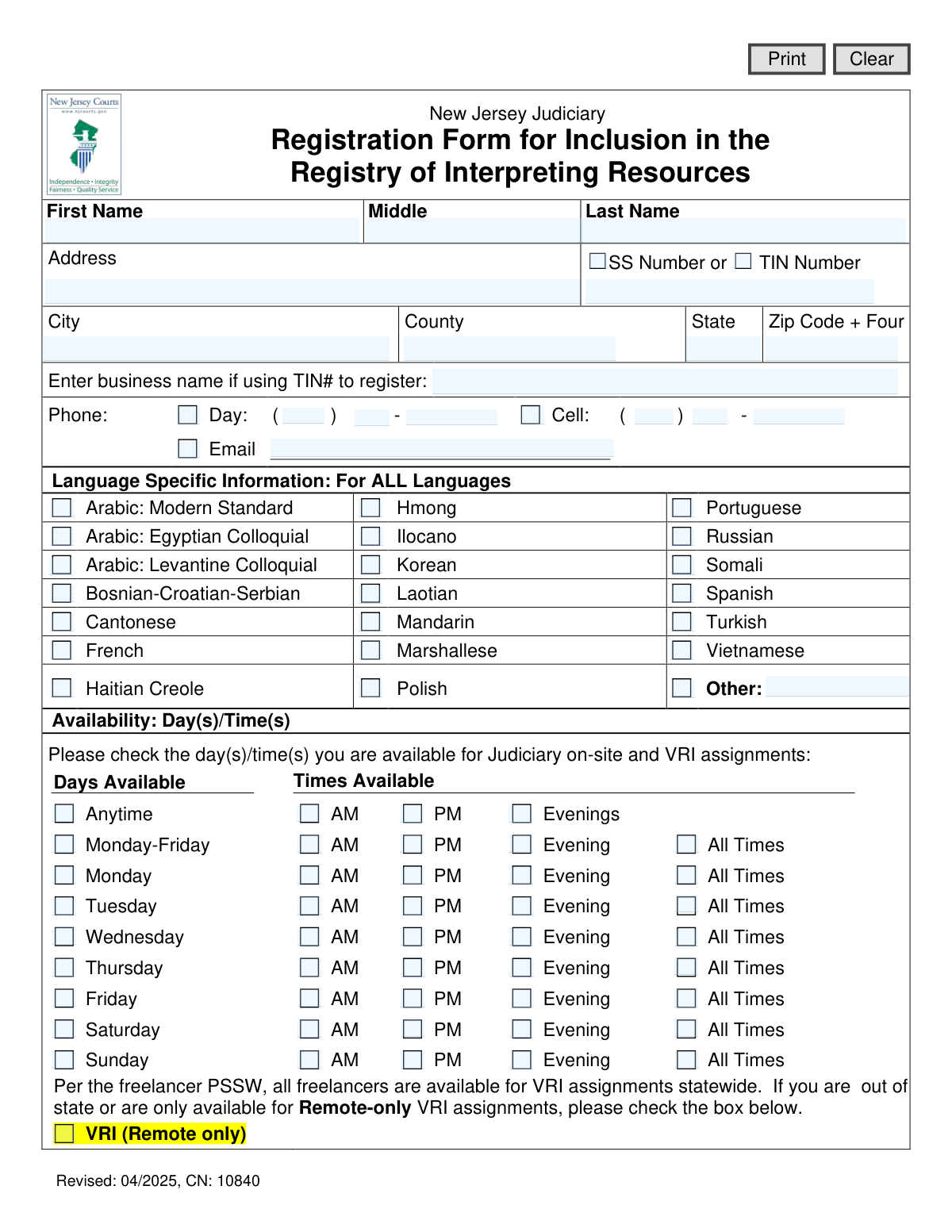
This form is used by the New Jersey Judiciary to register freelance interpreters for its Registry of Interpreting Resources. It collects essential information such as personal details, contact information, tax identification, language specializations, and availability for both on-site and remote assignments. Completing this form is a crucial step for interpreters seeking to provide services within the New Jersey court system. Today, this form can be filled out quickly and accurately using AI-powered services like Instafill.ai, which can also convert non-fillable PDF versions into interactive fillable forms.
CN 10840 is part of the New Jersey forms category on Instafill.
Our AI automatically handles information lookup, data retrieval, formatting, and form filling.
It takes less than a minute to fill out CN 10840 using our AI form filling.
Securely upload your data. Information is encrypted in transit and deleted immediately after the form is filled out.

Form specifications

Form name: New Jersey Judiciary Registration Form for Inclusion in the Registry of Interpreting Resources
Number of fields: 91
Number of pages: 1
Language: English
main-image

Instafill Demo: How to fill out PDF forms in seconds with AI

How to Fill Out CN 10840 Online for Free in 2026

Are you looking to fill out a CN 10840 form online quickly and accurately? Instafill.ai offers the #1 AI-powered PDF filling software of 2026, allowing you to complete your CN 10840 form in just 37 seconds or less.
Follow these steps to fill out your CN 10840 form online using Instafill.ai:
  1. 1 Navigate to Instafill.ai and upload the Registration Form for Inclusion in the Registry of Interpreting Resources or select it from their template library.
  2. 2 Provide your personal information, including your full name, address, and Social Security Number (SSN) or Taxpayer Identification Number (TIN).
  3. 3 Enter your contact details, such as phone number and email address.
  4. 4 Specify your language proficiencies by checking the appropriate boxes or writing in other languages.
  5. 5 Indicate your availability for on-site and Virtual Remote Interpreting (VRI) assignments by selecting the days and times you are available.
  6. 6 Review all the information auto-filled by the AI to ensure accuracy and completeness.
  7. 7 Download or print the completed form for submission to the New Jersey Judiciary.

Our AI-powered system ensures each field is filled out correctly, reducing errors and saving you time.

Why Choose Instafill.ai for Your Fillable CN 10840 Form?

Speed

Complete your CN 10840 in as little as 37 seconds.

Up-to-Date

Always use the latest 2026 CN 10840 form version.

Cost-effective

No need to hire expensive lawyers.

Accuracy

Our AI performs 10 compliance checks to ensure your form is error-free.

Security

Your personal information is protected with bank-level encryption.

Frequently Asked Questions About Form CN 10840

This form is used to register as a professional interpreter with the New Jersey Judiciary. Completing it allows you to be listed in their official registry for potential on-site and remote interpreting assignments.

Any professional interpreter who wishes to offer their language services for court proceedings and other legal matters within the New Jersey Judiciary system should complete this form.

You must provide either your Social Security Number (SSN) or a Taxpayer Identification Number (TIN) for registration and payment purposes. If you are registering as a business, provide the business TIN.

If your specific language or dialect is not listed, check the box next to 'Other' and write the name of the language in the space provided.

To specify that you are only available for remote assignments, you must check the 'VRI (Remote only)' box at the bottom of the form. This is especially important if you live out of state.

VRI stands for Video Remote Interpreting. It refers to assignments where you provide interpreting services remotely using video conferencing technology rather than being physically present.

In the availability grid, check the boxes that correspond to the days and times you are available for assignments. You can select broad ranges like 'Monday-Friday' or specific days, along with time blocks like 'AM', 'PM', or 'All Times'.

The form does not specify a submission address. Please refer to the official New Jersey Judiciary website or contact the Language Services Section for the most current submission instructions.

Processing times can vary. After submission, it may take several weeks to be added to the registry, and you can contact the NJ Judiciary for a status update if needed.

You should only enter a business name if you are registering using your business's Taxpayer Identification Number (TIN) instead of your personal Social Security Number (SSN).

Yes, services like Instafill.ai use AI to accurately auto-fill form fields with your personal information, which saves time and helps reduce errors.

Upload the form to the Instafill.ai platform, and its AI will populate fields like your name, address, and contact details from your profile. You can then complete the remaining sections, review for accuracy, and download the finished document.

If you have a non-fillable or 'flat' PDF, you can use a tool like Instafill.ai. It can convert the document into an interactive, fillable form that you can easily complete on your computer.

If your details change, you should submit a new, updated registration form to the New Jersey Judiciary. This ensures the registry has your most current information for assignments.

Compliance CN 10840
Validation Checks by Instafill.ai

Common Mistakes in Completing CN 10840

Incomplete or Incorrect Tax Information

Applicants often forget to check the box for either 'SS Number' or 'TIN Number,' or they provide a TIN without entering the required business name. This mistake leads to significant processing delays and payment issues, as the Judiciary cannot correctly set up the freelancer for compensation. To avoid this, double-check that you have selected the correct tax ID type and, if using a TIN, that the associated business name is entered exactly as registered.

Forgetting the 'Zip+4' Format

The form specifically requests the 'Zip Code + Four' format, but many people only enter the standard 5-digit zip code because the '+4' is often optional on other forms. An incomplete address can delay important mail, including credentialing documents or payments. Always look up your full nine-digit zip code on the USPS website before filling out the form. Using an autofill tool like Instafill.ai can also prevent this error, as it often populates addresses using the complete, validated Zip+4 format.

Ambiguous or Contradictory Availability Selections

The availability grid is complex, and applicants frequently make contradictory selections, such as checking both 'Anytime' and specific time slots like 'AM' for the same day. This confusion forces registry staff to guess or make follow-up calls, delaying the applicant's inclusion for assignments. Carefully review your selections, ensuring they accurately and non-redundantly reflect your true availability for on-site and VRI work.

Misunderstanding the 'VRI (Remote only)' Checkbox

Applicants may check the 'VRI (Remote only)' box thinking it indicates their willingness to accept remote assignments, when it actually restricts them exclusively to remote work. The form states all freelancers are considered for VRI by default; checking this box removes you from consideration for all on-site assignments. Only check this box if you are physically unable or unwilling to accept any in-person work statewide.

Neglecting to Specify an 'Other' Language

It is common for applicants to check the 'Other' language box but then forget to write the specific language in the provided text field. This makes the selection invalid, as the registry has no way of knowing which language the interpreter is proficient in, rendering that part of the application useless. If your language is not listed, ensure you both check the 'Other' box and clearly type the name of the language in the space next to it.

Incorrect Phone Number Formatting

The form provides separate fields for the area code, prefix, and last four digits of phone numbers, but users often try to enter the full number in the first box. This can cause data entry errors or rejection by the system. To prevent this, carefully enter each part of your phone number into its designated field. AI-powered tools like Instafill.ai can help by automatically parsing and placing phone number components into the correct fields, reducing formatting errors.

Failing to Differentiate Language Dialects

The form lists specific dialects for languages like Arabic (Modern Standard, Egyptian, Levantine). An applicant might not notice this and simply check the first Arabic option they see, even if their proficiency is in a different dialect. This can lead to being matched with an assignment they are not qualified for, resulting in poor performance and potential removal from the registry. Carefully read the full language list and select only the specific languages and dialects you are professionally fluent in.

Leaving the County Field Blank

Applicants, especially those focused on the city and state, sometimes overlook the 'County' field. The New Jersey Judiciary operates on a county-based vicinage system, so this information is critical for determining appropriate on-site assignments. Leaving it blank can delay registration or lead to being overlooked for local work, so ensure you enter the correct county corresponding to your address.

Using a Casual or Unprofessional Email Address

An email address is a primary point of contact for professional assignments, yet some applicants provide personal or unprofessional email addresses. This can create a poor first impression and may cause important notifications about assignments or credentials to be missed or filtered as spam. Always use a professional email address, preferably one that includes your name, for all business-related registrations.

Submitting an Outdated Form Version

This form has a revision date ('Revised: 04/2025') and a control number ('CN: 10840'). Applicants might find and use an older, flat PDF version of the form from an unofficial source, which may lack current fields or contain outdated information. Submitting an obsolete form will be rejected, requiring you to start the process over. Always download the form directly from the official NJ Judiciary website. If the official form is a non-fillable PDF, tools like Instafill.ai can convert it into an interactive version, but you must still verify you have the latest revision.
Saved over 80 hours a year

“I was never sure if my IRS forms like W-9 were filled correctly. Now, I can complete the forms accurately without any external help.”

Kevin Martin Green

Your data stays secure with advanced protection from Instafill and our subprocessors

Robust compliance program

Transparent business model

You’re not the product. You always know where your data is and what it is processed for.

ISO 27001, HIPAA, and GDPR

Our subprocesses adhere to multiple compliance standards, including but not limited to ISO 27001, HIPAA, and GDPR.

Security & privacy by design

We consider security and privacy from the initial design phase of any new service or functionality. It’s not an afterthought, it’s built-in, including support for two-factor authentication (2FA) to further protect your account.

Fill out CN 10840 with Instafill.ai

Worried about filling PDFs wrong? Instafill securely fills new-jersey-judiciary-registration-form-for-inclusion-in-the-registry-of-interpreting-resources forms, ensuring each field is accurate.