Yes! You can use AI to fill out New Jersey Judiciary - Request for Audio or Video Records of Proceedings
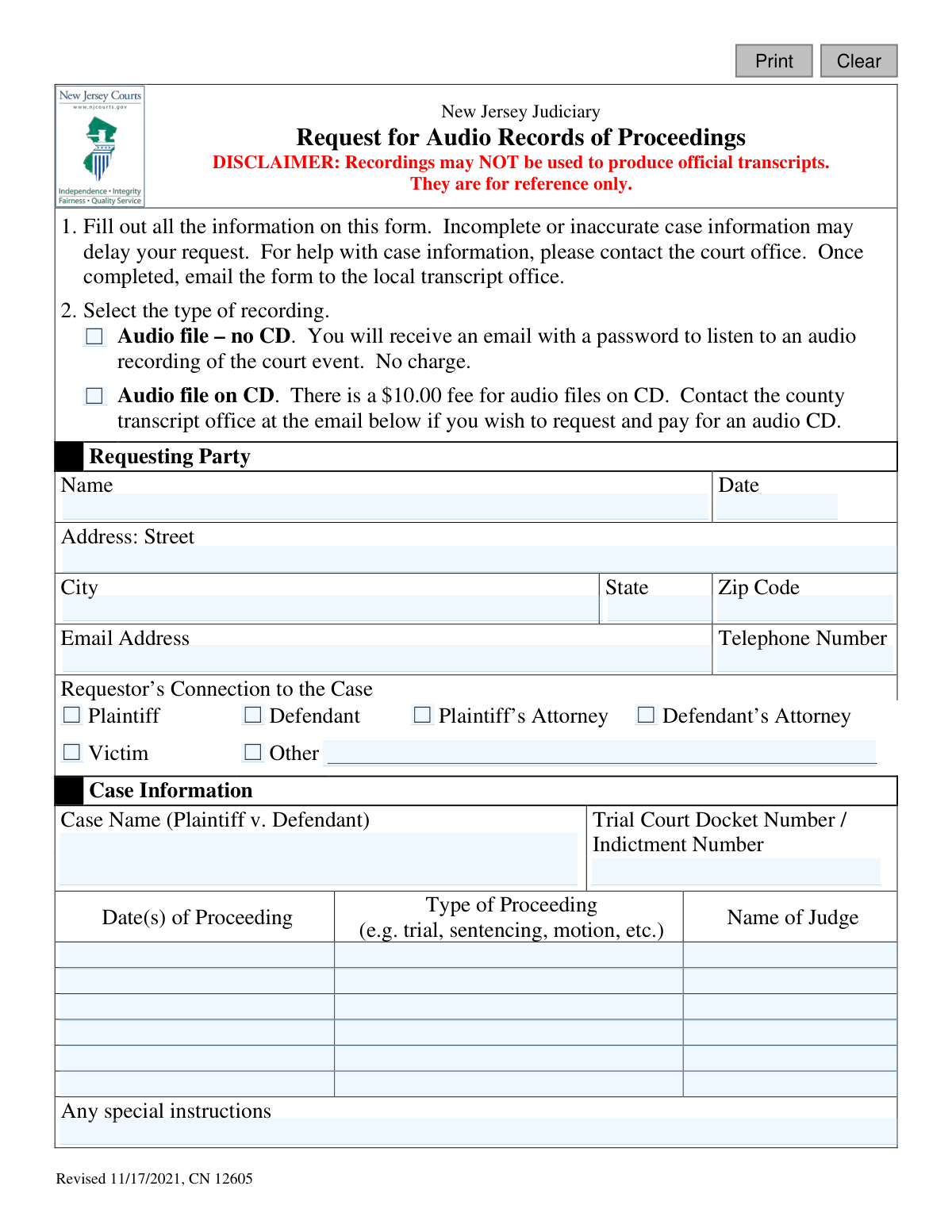
This form, officially known as the Request for Audio or Video Records of Proceedings (CN 12605), is used within the New Jersey Judiciary system to request a copy of an audio or video recording of a court event. It's important to note that these recordings are for reference only and cannot be used to produce official transcripts. Today, this form can be filled out quickly and accurately using AI-powered services like Instafill.ai, which can also convert non-fillable PDF versions into interactive fillable forms.
CN 12605 is part of the
New Jersey forms category on Instafill.
Our AI automatically handles information lookup, data retrieval, formatting, and form filling.
It takes less than a minute to fill out CN 12605 using our AI form filling.
Securely upload your data. Information is encrypted in transit and deleted immediately after the form is filled out.
Form specifications
| Form name: | New Jersey Judiciary - Request for Audio or Video Records of Proceedings |
| Number of fields: | 45 |
| Number of pages: | 1 |
| Language: | English |
Instafill Demo: How to fill out PDF forms in seconds with AI
How to Fill Out CN 12605 Online for Free in 2026
Are you looking to fill out a CN 12605 form online quickly and accurately? Instafill.ai offers the #1 AI-powered PDF filling software of 2026, allowing you to complete your CN 12605 form in just 37 seconds or less.
Follow these steps to fill out your CN 12605 form online using Instafill.ai:
- 1 Navigate to Instafill.ai and upload or select the 'Request for Audio or Video Records of Proceedings' form.
- 2 Provide your personal information as the requesting party, including your name, contact details, and address.
- 3 Indicate your connection to the case by checking the appropriate box (e.g., Plaintiff, Defendant, Attorney).
- 4 Enter the specific case information, such as the case name, trial court docket number, and the name of the judge.
- 5 List the dates and types of the proceedings for which you are requesting the recording.
- 6 Select the type of recording you need (e.g., audio file via email or on CD) and choose the correct county transcript office.
- 7 Review all entered information for accuracy before downloading or emailing the completed form to the designated transcript office.
Our AI-powered system ensures each field is filled out correctly, reducing errors and saving you time.
Why Choose Instafill.ai for Your Fillable CN 12605 Form?
Speed
Complete your CN 12605 in as little as 37 seconds.
Up-to-Date
Always use the latest 2026 CN 12605 form version.
Cost-effective
No need to hire expensive lawyers.
Accuracy
Our AI performs 10 compliance checks to ensure your form is error-free.
Security
Your personal information is protected with bank-level encryption.
Frequently Asked Questions About Form CN 12605
This form is used to request audio or video recordings of court proceedings from the New Jersey Judiciary. These recordings are intended for personal reference only.
No, the form explicitly states that these recordings are for reference only. They cannot be used to produce official transcripts for legal purposes.
Parties directly involved in the case, such as the plaintiff, defendant, their attorneys, or victims, can request recordings. If you have a different connection, you can select "Other" and specify your role.
Receiving an audio file via a password-protected email is free. However, if you request a physical audio CD, there is a $10.00 fee that must be paid to the county transcript office.
You will need your contact details, your connection to the case, the case name, the docket number, and the specific date(s) of the proceedings you are requesting. Incomplete information may cause delays.
If you are missing key case information, you should contact the relevant court office for assistance before submitting your request to ensure it can be processed correctly.
Once you have filled out the form, you must email it to the local transcript office for the county where the proceeding occurred. The form helps you select the county to find the correct office email.
Yes, the form provides space to list up to six different proceeding dates. Be sure to include as much detail as possible for each date requested.
Processing time can vary. To avoid delays, ensure all information on the form is complete and accurate before submitting it.
Yes, services like Instafill.ai use AI to accurately auto-fill form fields, which can save you time and help prevent errors in your submission.
You can use a service like Instafill.ai to complete the form digitally. Simply upload the PDF, and the tool will allow you to type your information directly into the fields before saving or printing.
If you have a non-fillable or 'flat' PDF, tools like Instafill.ai can convert it into an interactive, fillable form. This allows you to easily type your answers instead of printing and writing by hand.
The 'Audio file – no CD' option is a free digital file sent via a password-protected email. The 'Audio file on CD' is a physical disc that costs $10 and requires you to coordinate payment with the transcript office.
Compliance CN 12605
Validation Checks by Instafill.ai
1
Ensures a Recording Type is Selected
This check verifies that the user has selected one of the recording types, either 'Audio file – no CD' or 'Audio file on CD'. This selection is fundamental to the request as it determines the delivery method and associated fees. If no selection is made, the form cannot be processed, and the user should be prompted to choose an option.
2
Requestor Name Completeness
Validates that the 'Name' field under 'Requesting Party' is not empty. The requestor's name is essential for identifying who is making the request for court records and for any necessary follow-up communication. A submission with a blank name would be anonymous and cannot be processed.
3
Request Date Format and Logic
This check ensures the 'Date' field next to the requestor's name contains a valid date in a recognized format (e.g., MM/DD/YYYY). It also verifies that the date is not in the future. This is important for logging when the request was officially made, and an invalid or future date would compromise record-keeping accuracy.
4
Email Address Format and Requirement
Verifies that the 'Email Address' field is not empty and contains a string that conforms to a standard email format (e.g., [email protected]). This is critically important because the primary method of delivery for non-CD audio files is via an email link. An invalid or missing email address would make it impossible to fulfill the request.
5
Telephone Number Format
This validation checks that the 'Telephone Number' field, if filled, adheres to a standard US phone number format (e.g., 10 digits, possibly with parentheses, spaces, or hyphens). While not always mandatory, a valid phone number is crucial for contacting the requestor if there are issues with the request or payment. An incorrectly formatted number could prevent communication and delay the request.
6
Requestor's Connection to Case Selection
Ensures that at least one checkbox is selected for the 'Requestor’s Connection to the Case' section. This information establishes the requestor's standing or relationship to the legal proceedings, which can be important for determining eligibility to receive certain records. The form cannot be properly evaluated without this context.
7
Conditional 'Other' Connection Detail
This is a logical check that requires the text field next to 'Other' to be filled out if the 'Other' checkbox is selected in the 'Requestor’s Connection to the Case' section. This provides necessary clarification that is missing from the predefined roles. Failure to provide this detail would leave the requestor's connection ambiguous.
8
Docket Number Requirement
Validates that the 'Trial Court Docket Number / Indictment Number' field is not empty. The docket number is the primary unique identifier for a case within the court system, and it is essential for locating the correct proceedings. A request without a docket number is ambiguous and cannot be accurately fulfilled.
9
Minimum Proceeding Information
This check ensures that at least the first row of proceeding information ('Date(s) of Proceeding', 'Type of Proceeding', 'Name of Judge') is completely filled out. A request for a recording is meaningless without the specific date and context of the court event. If this information is missing, staff cannot locate the correct audio file.
10
Proceeding Date Validity
Verifies that any entered 'Date(s) of Proceeding' is a valid calendar date and is not a date in the future. Court proceedings must have already occurred to be recorded. This prevents users from requesting records for future events and ensures the data is logically sound for record retrieval.
11
Proceeding Row Consistency
For any proceeding row where a date is entered, this validation ensures that the corresponding 'Type of Proceeding' and 'Name of Judge' fields are also filled. All three pieces of information are required to pinpoint the exact recording. Incomplete rows can lead to ambiguity and an inability to find the correct record.
12
County Selection Requirement
This check ensures that a county has been selected from the 'Select County' dropdown menu. The county selection is used to determine the correct local transcript office to which the request should be emailed. Without this selection, the request cannot be routed, and the form submission would fail to reach the appropriate destination.
13
Zip Code Format Validation
Validates that the 'Zip Code' field contains a valid 5-digit or 9-digit (ZIP+4) US postal code. This is particularly important for requests involving a physical CD, as an accurate address is required for mailing. An invalid zip code can lead to delivery failure and delay.
14
Conditional Address Requirement for CD
This logical check makes the full street address, city, and state fields mandatory if the user selects 'Audio file on CD'. A physical mailing address is required to send the CD to the requestor. If this option is chosen without a complete address, the request cannot be fulfilled.
Common Mistakes in Completing CN 12605
The Docket or Indictment Number is the primary identifier for a case, but people often make typos or omit parts of it. This happens due to rushing or transcribing from memory. An incorrect number will cause the request to be rejected or significantly delayed, as staff cannot locate the case file. To avoid this, carefully copy the full, exact number from official court documents before submitting the form.
Requestors often provide a range of dates or an incorrect date, making it impossible for staff to find the specific recording. This mistake usually occurs when relying on memory. The consequence is a delayed or rejected request, as staff cannot search through days of audio. Always verify the exact date(s) of the proceeding from a calendar, court notice, or legal correspondence before filling out the form.
Despite a clear disclaimer, some individuals request the audio file believing it can be used to create or substitute for an official transcript in legal proceedings. This fundamental misunderstanding leads to wasted time and effort. The recording is for reference only and cannot be submitted to the court. To avoid this, read the disclaimer at the top of the form and understand the limitations of the audio file provided.
The form requires the user to select a county, which then reveals the specific email address for submission. Many people overlook this step and either don't know where to send the form or email it to a generic court address. This causes the request to be lost, ignored, or severely delayed. To prevent this, always use the 'Select County' dropdown and send the completed form only to the email address it provides.
Since the free audio file is delivered via an email containing a link and password, a single typo in the requestor's email address field is a critical error. This common mistake means the user will never receive the requested audio, even after it has been processed. Always double- or triple-check your email address for accuracy before submitting. AI-powered tools like Instafill.ai can help by validating email formats and saving your correct information for future use.
Filling in the 'Type of Proceeding' field with generic terms like 'court date' or 'hearing' is not specific enough for court staff. On any given day, a case may have multiple short events. This ambiguity forces staff to guess or follow up, delaying the request. To ensure accuracy, use specific legal terms like 'Sentencing,' 'Motion to Dismiss,' or 'Arraignment,' which can be found on court notices.
The form explicitly asks for the 'Plaintiff v. Defendant' format, but requestors often enter only one party's name, reverse the order, or use informal abbreviations. This makes it more difficult for staff to match the request to the correct case in their system. To avoid this, copy the full case name exactly as it appears on official court documents.
When a requestor's role is not listed, they must select 'Other' and explain their connection in the space provided. It is a common mistake to check 'Other' but leave the details blank. This forces court staff to halt the request and contact the person for clarification, causing unnecessary delays. If you select 'Other,' always provide a clear and concise explanation of your connection to the case.
The judge's name is a crucial piece of information used to verify the correct proceeding, especially in busy courts where multiple judges may hear matters on the same day. Omitting or misspelling the name makes the search process less efficient for court staff. This can lead to longer processing times or confusion. Always include the judge's full name, spelled correctly, as found on court records.
Often, court forms are only available as flat, non-fillable PDFs, forcing users to print them, fill them out by hand, and then scan them, which can result in illegible handwriting and data entry errors. This leads to processing delays and rejections. To avoid this, an AI tool like Instafill.ai can convert any non-fillable PDF into an interactive, fillable form, ensuring all entries are clear, legible, and correctly formatted before submission.
Saved over 80 hours a year
“I was never sure if my IRS forms like W-9 were filled correctly. Now, I can complete the forms accurately without any external help.”
Kevin Martin Green
Your data stays secure with advanced protection from Instafill and our subprocessors

Robust compliance program
Transparent business model
You’re not the product. You always know where your data is and what it is processed for.
ISO 27001, HIPAA, and GDPR
Our subprocesses adhere to multiple compliance standards, including but not limited to ISO 27001, HIPAA, and GDPR.
Security & privacy by design
We consider security and privacy from the initial design phase of any new service or functionality. It’s not an afterthought, it’s built-in, including support for two-factor authentication (2FA) to further protect your account.
Fill out CN 12605 with Instafill.ai
Worried about filling PDFs wrong? Instafill securely fills new-jersey-judiciary-request-for-audio-or-video-records-of-proceedings forms, ensuring each field is accurate.