Yes! You can use AI to fill out New Jersey Lawyers’ Fund for Client Protection Address Change for Billing Under R. 1:28-2
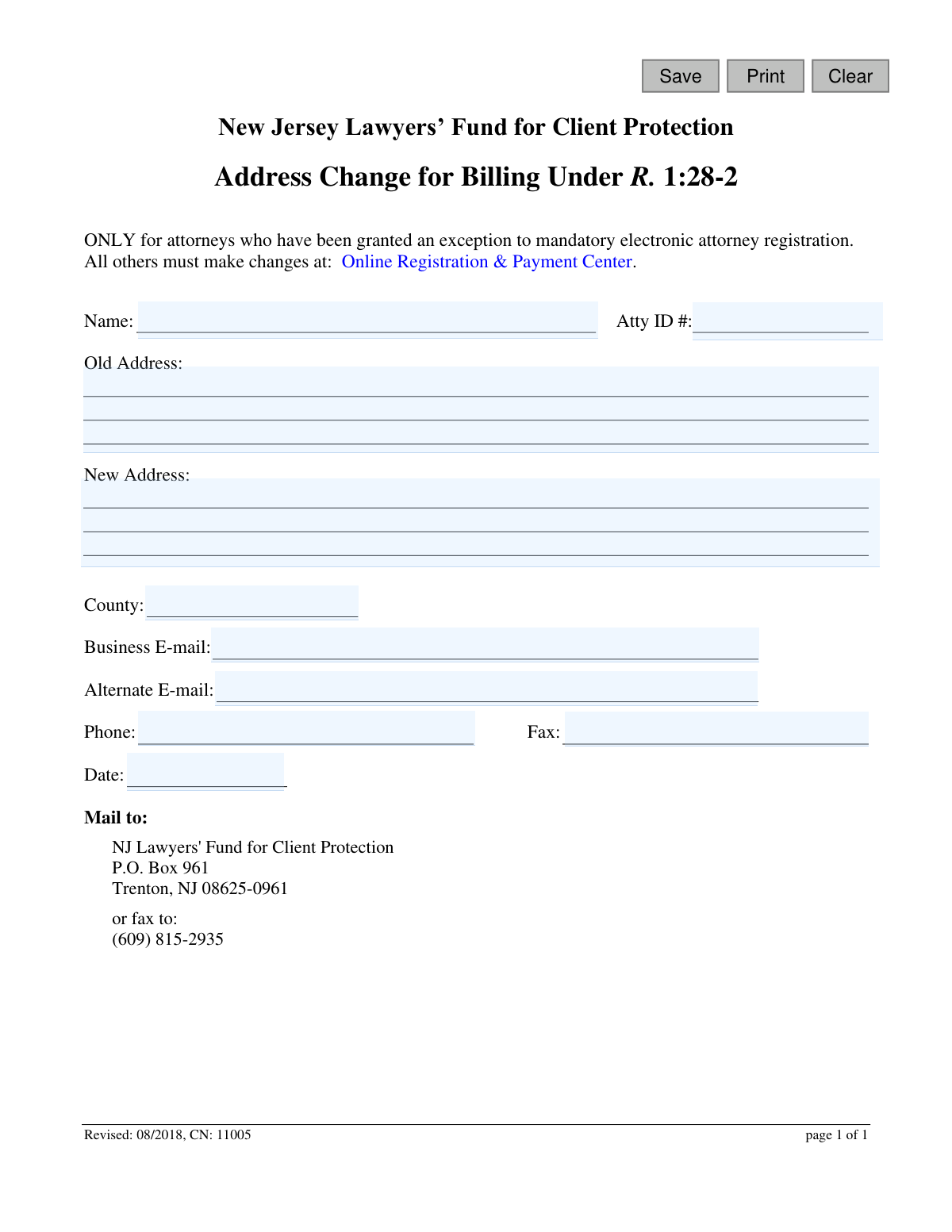
This form is the 'Address Change for Billing Under R. 1:28-2' for the New Jersey Lawyers’ Fund for Client Protection. It is specifically for attorneys who have been granted an exception to mandatory electronic registration and need to manually report a change in their billing address. Today, this form can be filled out quickly and accurately using AI-powered services like Instafill.ai, which can also convert non-fillable PDF versions into interactive fillable forms.
CN: 11005 is part of the
New Jersey forms category on Instafill.
Our AI automatically handles information lookup, data retrieval, formatting, and form filling.
It takes less than a minute to fill out CN: 11005 using our AI form filling.
Securely upload your data. Information is encrypted in transit and deleted immediately after the form is filled out.
Form specifications
| Form name: | New Jersey Lawyers’ Fund for Client Protection Address Change for Billing Under R. 1:28-2 |
| Number of fields: | 13 |
| Number of pages: | 1 |
| Language: | English |
Instafill Demo: How to fill out PDF forms in seconds with AI
How to Fill Out CN: 11005 Online for Free in 2026
Are you looking to fill out a CN: 11005 form online quickly and accurately? Instafill.ai offers the #1 AI-powered PDF filling software of 2026, allowing you to complete your CN: 11005 form in just 37 seconds or less.
Follow these steps to fill out your CN: 11005 form online using Instafill.ai:
- 1 Navigate to Instafill.ai and upload the 'Address Change for Billing' form or select it from their template library.
- 2 Provide your full name and New Jersey Attorney ID number in the designated fields.
- 3 Enter your complete old billing address as it is currently on file.
- 4 Input your complete new billing address, including the street, city, state, and zip code, along with the new county.
- 5 Fill in your current business and alternate email addresses, as well as your phone and fax numbers.
- 6 Enter the current date, then use the AI to review all information for accuracy before downloading the completed form to mail or fax to the NJ Lawyers' Fund for Client Protection.
Our AI-powered system ensures each field is filled out correctly, reducing errors and saving you time.
Why Choose Instafill.ai for Your Fillable CN: 11005 Form?
Speed
Complete your CN: 11005 in as little as 37 seconds.
Up-to-Date
Always use the latest 2026 CN: 11005 form version.
Cost-effective
No need to hire expensive lawyers.
Accuracy
Our AI performs 10 compliance checks to ensure your form is error-free.
Security
Your personal information is protected with bank-level encryption.
Frequently Asked Questions About Form CN: 11005
This form is used to officially update your billing address with the New Jersey Lawyers’ Fund for Client Protection. This ensures your annual assessment notices are sent to the correct location.
This form is exclusively for attorneys who have been granted a special exception to the mandatory electronic attorney registration system. All other attorneys must update their information online.
You must change your address through the official Online Registration & Payment Center provided by the New Jersey Judiciary. You should not use this paper form.
You will need your full name, Attorney ID number, your old and new addresses, county, business and alternate email addresses, and your phone and fax numbers.
Your Attorney ID number is a unique identifier assigned by the New Jersey Judiciary. It can typically be found on previous correspondence from the NJ Lawyers' Fund or your annual billing statement.
You can either mail the form to the NJ Lawyers' Fund for Client Protection at P.O. Box 961, Trenton, NJ 08625-0961, or fax it to (609) 815-2935. Email is not listed as a submission option.
The form does not specify a processing time. For an estimated timeframe or to confirm receipt, you should contact the NJ Lawyers' Fund for Client Protection directly a few days after submission.
No, this form is specifically for updating your billing address with the NJ Lawyers’ Fund for Client Protection under Rule 1:28-2. Other address changes must be handled through the appropriate channels.
Yes, services like Instafill.ai use AI to accurately auto-fill form fields from your saved profile, which helps save time and reduce the chance of errors.
You can use a service like Instafill.ai to upload the PDF and fill it out on your computer. The platform allows you to type directly into the fields and then download the completed document for printing and mailing or faxing.
If you have a non-fillable or 'flat' PDF, you can use a tool like Instafill.ai. It can convert the document into an interactive, fillable form online, allowing you to easily type in your information.
Your 'Business E-mail' should be your primary professional email address for official correspondence. The 'Alternate E-mail' serves as a secondary contact point to ensure you can be reached if there is an issue with your primary address.
Compliance CN: 11005
Validation Checks by Instafill.ai
1
Attorney ID Presence and Format
Verifies that the 'Atty ID #' field is not empty and conforms to the expected format, such as a specific number of digits. This ID is the primary key for identifying the attorney's record. A missing or malformed ID will result in an immediate failure to locate the correct record for updating.
2
Attorney Name Completeness
Ensures the 'Name' field is filled out, typically with at least a first and last name. The name is used as a secondary verification point alongside the Attorney ID. Submitting the form without a name would make it difficult to confirm the identity of the requestor, potentially delaying the update.
3
Old Address Completeness
Validates that the 'Old Address' field is not empty. This information is critical for locating and verifying the specific record that needs to be updated in the database. Without the old address, the system cannot confirm which record to change, making the request impossible to process.
4
New Address Completeness
Checks that the 'New Address' field contains a value, as this is the core purpose of the form. Submitting a change request without providing the new information would be a pointless action. This validation ensures the form submission is meaningful and actionable.
5
New Address Distinct from Old Address
Compares the 'New Address' and 'Old Address' fields to ensure they are not identical. This check prevents redundant submissions where no actual change is being made, which can happen due to user error. If the addresses are the same, the user should be notified that no update is necessary.
6
Date Format and Plausibility
Ensures the 'Date' field contains a valid date in a standard format (e.g., MM/DD/YYYY) and is not a date set in the future. This is important for maintaining an accurate audit trail of when changes were requested. An invalid or future date could lead to incorrect record-keeping.
7
Valid New Jersey County
Verifies that the value entered in the 'County' field matches a predefined list of valid New Jersey counties. This data is often used for jurisdictional reporting and statistics. An invalid county name would lead to data corruption and classification errors.
8
Business Phone Number Format
Validates that the 'Phone' field, if filled, contains a properly formatted 10-digit phone number. A valid contact number is essential if the office needs to contact the attorney regarding the submission. This check prevents the storage of useless, incorrectly formatted data.
9
Fax Number Format (If Provided)
If a value is entered in the 'Fax' field, this check validates that it conforms to a standard 10-digit phone number format. While faxing is less common, ensuring any provided data is correctly formatted is crucial for data integrity. An incorrectly formatted number is unusable.
10
Business E-mail Format Validation
Checks that the 'Business E-mail' field contains a string that follows the standard email address format (e.g., [email protected]). Since email is a primary channel for billing notifications, a valid address is critical. An invalid format would lead to failed deliveries and missed communications.
11
Alternate E-mail Format and Uniqueness
If an 'Alternate E-mail' is provided, this check ensures it is a valid email format and is different from the 'Business E-mail'. This provides a valid secondary contact point while preventing the entry of redundant data. The check fails if the format is invalid or if it's a duplicate of the primary email.
12
Attorney Name and ID Cross-Verification
Performs a back-end check to ensure the provided 'Atty ID #' and 'Name' correspond to the same attorney in the database. This is a critical validation to prevent both fraud and user error, ensuring the address is updated for the correct individual. A mismatch would block the submission until the information is corrected.
Common Mistakes in Completing CN: 11005
Many attorneys mistakenly use this paper form when they are required to use the online portal. This form is explicitly reserved for those granted an exception to mandatory electronic registration, causing submissions from other attorneys to be rejected. To avoid this, always verify your eligibility and use the 'Online Registration & Payment Center' if you do not have a specific exemption.
The Attorney ID is the primary identifier used to locate and update your record. Simple typos, transposed numbers, or omitting the ID entirely will make it impossible for the Fund to process the address change, leading to delays and continued use of the old address. Double-check this number against your official records before submitting the form.
Attorneys sometimes enter a slightly different or incomplete version of their old address that doesn't perfectly match the one on file. This discrepancy can be flagged as a security concern, causing the update to be denied for verification reasons. Ensure the 'Old Address' field is an exact copy of the address currently registered with the NJ Lawyers' Fund.
It's common to forget crucial details like a suite number, building name, or to enter an incorrect ZIP code in the 'New Address' field. These small errors can result in important billing statements and official correspondence being misdirected or returned as undeliverable. Carefully review every component of your new address for accuracy and completeness.
After filling out the multi-line address field, people often overlook the separate 'County' field, assuming the city and state are sufficient. This information is specifically requested and may be required for jurisdictional or administrative purposes, and its omission can lead to an incomplete record. Always ensure you fill out the dedicated county field corresponding to your new address.
A single typo in an email address, such as '.con' instead of '.com' or a misspelled name, is a frequent and critical error. This mistake will prevent you from receiving vital electronic notifications and confirmations from the Fund. To prevent this, type carefully and consider using an AI-powered tool like Instafill.ai, which can help validate email formats and reduce data entry errors.
Users often enter phone numbers in various formats (e.g., with/without dashes, parentheses, or spaces). This inconsistency can cause problems for automated data processing systems and lead to an improperly stored number. It is best practice to use a standard format, such as (XXX) XXX-XXXX, to ensure the data is captured correctly.
Forgetting to fill in the 'Date' field is an easy oversight that can create ambiguity about when the change was requested. An undated form might be delayed or even returned with a request for a dated signature, slowing down the entire process. Always fill in the current date to establish a clear record of your submission.
Since this form is for those exempt from electronic filing, it is often printed and filled out by hand, where poor handwriting can make names, addresses, and ID numbers unreadable. This leads to data entry errors by the staff processing the form, potentially sending mail to the wrong address. Using a tool like Instafill.ai can convert this non-fillable PDF into a fillable version, allowing you to type directly and ensure perfect legibility.
Saved over 80 hours a year
“I was never sure if my IRS forms like W-9 were filled correctly. Now, I can complete the forms accurately without any external help.”
Kevin Martin Green
Your data stays secure with advanced protection from Instafill and our subprocessors

Robust compliance program
Transparent business model
You’re not the product. You always know where your data is and what it is processed for.
ISO 27001, HIPAA, and GDPR
Our subprocesses adhere to multiple compliance standards, including but not limited to ISO 27001, HIPAA, and GDPR.
Security & privacy by design
We consider security and privacy from the initial design phase of any new service or functionality. It’s not an afterthought, it’s built-in, including support for two-factor authentication (2FA) to further protect your account.
Fill out CN: 11005 with Instafill.ai
Worried about filling PDFs wrong? Instafill securely fills new-jersey-lawyers-fund-for-client-protection-address-change-for-billing-under-r-128-2 forms, ensuring each field is accurate.