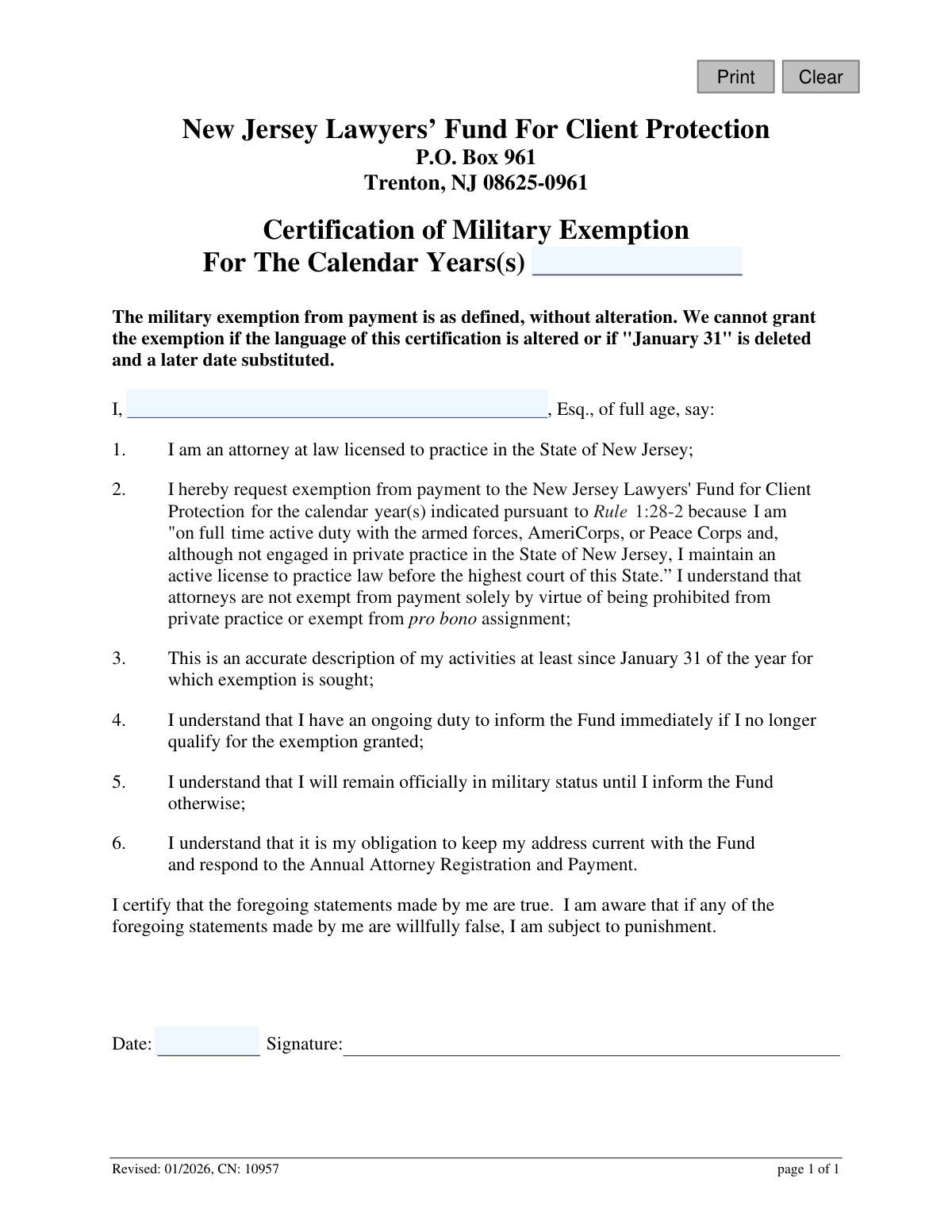
Yes! You can use AI to fill out New Jersey Lawyers’ Fund For Client Protection Certification of Military Exemption

This form is a legal certification for attorneys licensed in New Jersey who are on full-time active duty with the armed forces, AmeriCorps, or the Peace Corps. By submitting this document, they request an exemption from payment to the New Jersey Lawyers' Fund for Client Protection for a specified calendar year, as permitted under Rule 1:28-2. Today, this form can be filled out quickly and accurately using AI-powered services like Instafill.ai, which can also convert non-fillable PDF versions into interactive fillable forms.
CN-10957 is part of the New Jersey forms category on Instafill.
Our AI automatically handles information lookup, data retrieval, formatting, and form filling.
It takes less than a minute to fill out CN-10957 using our AI form filling.
Securely upload your data. Information is encrypted in transit and deleted immediately after the form is filled out.

Form specifications

Form name: New Jersey Lawyers’ Fund For Client Protection Certification of Military Exemption
Number of fields: 5
Number of pages: 1
Language: English
main-image

Instafill Demo: How to fill out PDF forms in seconds with AI

How to Fill Out CN-10957 Online for Free in 2026

Are you looking to fill out a CN-10957 form online quickly and accurately? Instafill.ai offers the #1 AI-powered PDF filling software of 2026, allowing you to complete your CN-10957 form in just 37 seconds or less.
Follow these steps to fill out your CN-10957 form online using Instafill.ai:
  1. 1 Navigate to Instafill.ai and upload or select the NJ Certification of Military Exemption form.
  2. 2 Use the AI assistant to automatically populate your full name and other personal details.
  3. 3 Enter the specific calendar year or years for which you are claiming the exemption.
  4. 4 Carefully review the six certification statements to ensure they accurately describe your status and you understand your obligations.
  5. 5 Apply your digital signature and the current date in the designated fields to certify the document.
  6. 6 Download the completed form and submit it to the New Jersey Lawyers’ Fund For Client Protection at the address provided.

Our AI-powered system ensures each field is filled out correctly, reducing errors and saving you time.

Why Choose Instafill.ai for Your Fillable CN-10957 Form?

Speed

Complete your CN-10957 in as little as 37 seconds.

Up-to-Date

Always use the latest 2026 CN-10957 form version.

Cost-effective

No need to hire expensive lawyers.

Accuracy

Our AI performs 10 compliance checks to ensure your form is error-free.

Security

Your personal information is protected with bank-level encryption.

Frequently Asked Questions About Form CN-10957

This form is used by New Jersey-licensed attorneys to certify that they are on full-time active duty with the armed forces, AmeriCorps, or Peace Corps, which makes them eligible for an exemption from payment to the New Jersey Lawyers' Fund for Client Protection.

You are eligible if you are a New Jersey-licensed attorney on full-time active duty with the U.S. armed forces, AmeriCorps, or the Peace Corps. You must not be engaged in private practice in New Jersey but must maintain an active law license in the state.

You must provide the calendar year(s) for the exemption, your full name, the date, and your signature. The form does not require any other supporting documents to be attached.

Mail the completed and signed form to the New Jersey Lawyers’ Fund For Client Protection at P.O. Box 961, Trenton, NJ 08625-0961.

The form requires your active duty status to be accurate as of January 31 of the exemption year. It is best to submit the form around the time of the Annual Attorney Registration to ensure your status is correctly recorded.

You have an ongoing duty to immediately inform the Fund if you no longer qualify for the exemption. Your military status will remain on record with the Fund until you notify them of a change.

No, the form explicitly states that the exemption cannot be granted if the language of the certification is altered. You must sign the form with the exact wording provided.

This exemption is specifically for those on 'full-time active duty.' If you are a reservist not currently on full-time active duty orders, you likely do not qualify for this exemption.

Yes, the form confirms that you are still obligated to keep your address current and respond to the Annual Attorney Registration and Payment notice. The exemption only applies to the payment itself.

Yes, services like Instafill.ai use AI to accurately auto-fill form fields with your information. This can help you complete the form quickly and reduce the chance of errors.

You can upload the PDF of the form to the Instafill.ai platform. Its AI will make the document interactive, allowing you to type your information directly into the fields before downloading the completed form for printing and signing.

If you have a non-fillable or 'flat' PDF, you can use a service like Instafill.ai. It can convert the document into an interactive, fillable form online, so you can easily type in your details.

Yes, the exemption criteria explicitly include attorneys on full-time active duty with the armed forces, AmeriCorps, or the Peace Corps. If you are serving full-time in any of these organizations, you can use this form.

Compliance CN-10957
Validation Checks by Instafill.ai

1
Ensures Calendar Year(s) for Exemption is Provided
This check verifies that the 'For The Calendar Years(s)' field ('certYrs') is not empty. This field is critical as it defines the specific period for which the military exemption is being requested. If this field is left blank, the submission cannot be processed as the scope of the exemption is unknown, and the form will be rejected.
2
Validates Format of Calendar Year(s)
This validation ensures the 'certYrs' field contains a valid year (YYYY) or a range of years (YYYY-YYYY). It prevents the entry of non-numeric characters or improperly formatted ranges, ensuring data consistency and accurate record-keeping. A failure would trigger an error message prompting the user to correct the format before submission.
3
Ensures Attorney's Full Name is Provided
This check confirms that the attorney's name field ('esqName') has been filled out. The name is required to identify the individual certifying the exemption request and link it to their bar record. An empty name field makes the certification invalid and will prevent the form from being submitted.
4
Validates Format of Attorney's Name
This validation ensures the 'esqName' field contains only characters appropriate for a name, such as letters, spaces, and hyphens. It prevents the entry of numbers or excessive special characters that would indicate a data entry error. This is important for maintaining the integrity of the attorney's record and ensuring proper identification.
5
Ensures Signature Date is Present
This check verifies that the 'Date' field ('sigDt') next to the signature line is not empty. The signature date is a legal requirement that attests to when the certification was made. A missing date invalidates the attestation, and the form will be rejected until a date is provided.
6
Validates Signature Date Format
This validation confirms that the 'sigDt' field is a real, correctly formatted date (e.g., MM/DD/YYYY). This prevents ambiguous or invalid date entries, which is crucial for legal and auditing purposes. If the date is not in a recognized format, the system will prompt the user for correction.
7
Prevents Future Signature Dates
This check ensures the date entered in the 'sigDt' field is not in the future. A certification cannot be dated for a future time, as it attests to a state of facts true as of the moment of signing. Submitting a future-dated form would be logically and legally invalid, so the system will block such entries.
8
Verifies Signature Completion
This validation confirms that the signature field has been completed, either through a digital signature or a manual checkbox attesting to the signature. The signature is the attorney's legally binding confirmation that the statements on the form are true. A submission without a signature is incomplete and has no legal effect.
9
Cross-Validates Signature Date Against Exemption Year
This is a critical logical check that ensures the signature date ('sigDt') is on or after January 31st of the year for which the exemption is sought ('certYrs'). The form explicitly states this as a condition for the exemption, as it confirms the attorney's military status for the relevant period. If the date is earlier than January 31st of the exemption year, the request is invalid and will be rejected.
10
Verifies Plausibility of Exemption Year
This check ensures the year(s) entered in 'certYrs' are within a reasonable timeframe, for example, not more than a few years in the past or future. This helps catch significant data entry errors, such as typing '1994' instead of '2024'. While not a hard failure, it may trigger a warning to the user to confirm the year is correct before proceeding.
11
Checks for Unauthorized Form Alterations
This system-level validation compares the submitted form's static text against the official template to ensure no language has been altered, as explicitly forbidden on the form. The exemption is only granted based on the precise wording of the certification. Any modification would invalidate the request and lead to automatic rejection.
12
Verifies Attorney's Active License Status
This advanced validation cross-references the provided attorney name ('esqName') and/or bar number against the New Jersey State Bar's official records. It confirms that the individual is a licensed attorney in good standing, as required by the form's first statement. If the attorney cannot be found or is not active, the exemption request cannot be processed.

Common Mistakes in Completing CN-10957

Entering Incorrect or Ambiguous Calendar Year(s)

Applicants often enter the wrong year, an invalid range, or use an ambiguous two-digit format like '24' instead of '2024'. This can lead to the exemption being applied to the wrong period or the form being rejected for clarification, delaying the process. To avoid this, carefully enter the full four-digit calendar year(s) for which you are eligible and are requesting the exemption.

Providing an Incomplete or Informal Name

The form requires the attorney's full legal name as it appears on their New Jersey bar license. Using nicknames, initials, or omitting a middle name can cause delays as the Fund struggles to match the certification to the correct attorney record. Always enter your full, official name to ensure prompt and accurate processing.

Submitting an Unsigned Certification

An unsigned form is legally invalid and will be immediately rejected. This common oversight happens when filers are in a hurry and forget to provide a physical or valid electronic signature after filling out the details. To prevent this, make signing the form the final step before submission; AI-powered tools like Instafill.ai can also highlight required signature fields to ensure they are not missed.

Misinterpreting Eligibility Criteria

Attorneys may mistakenly apply if they are reservists not on active duty or federal employees, without meeting the specific criteria of 'full time active duty with the armed forces, AmeriCorps, or Peace Corps.' Submitting an invalid claim will lead to rejection and could trigger a review for making a false certification. Carefully read the definition in item #2 to confirm your eligibility before completing the form.

Using an Obsolete Version of the Form

The form has a revision date ('Revised: 01/2026'), and using an older version may result in submitting outdated information or language, leading to rejection. Attorneys often save old PDFs or find them through search engines instead of the official source. Always download the latest version of the form directly from the New Jersey Lawyers' Fund for Client Protection website to ensure compliance.

Altering the Form's Official Language

The form explicitly warns that the exemption cannot be granted if the certification's language is altered. Some individuals may try to strike out or change clauses they feel don't apply, which automatically invalidates the entire document. The certification must be signed as-is; if you cannot attest to the statements, you are likely not eligible for the exemption.

Disregarding the January 31st Qualification Date

The certification requires the attorney to have been on active duty 'at least since January 31 of the year for which exemption is sought.' An attorney who begins active duty on February 1st or later is not eligible for the exemption for that calendar year. This critical detail is often missed, leading to an improper application that will be denied.

Leaving Required Fields Blank

Rushing through the form can lead to accidentally leaving the calendar year(s) or name fields blank. An incomplete form cannot be processed and will be returned, delaying the exemption and potentially causing issues with payment deadlines. Since this is a non-fillable PDF, using a tool like Instafill.ai can convert it into a smart, fillable version and flag all required fields before submission.

Entering an Ambiguous or Incorrect Signature Date

Filers often use ambiguous date formats like '03/04/25,' which can be interpreted as either March 4th or April 3rd, causing confusion and processing delays. To avoid this, use a clear MM/DD/YYYY format or write out the month (e.g., 'March 4, 2025'). AI form-filling tools like Instafill.ai can help by automatically formatting dates into a standardized, unambiguous format.

Neglecting the Ongoing Obligation to Update Information

A common mistake is failing to understand the ongoing duties outlined in items #4, #5, and #6. Attorneys who receive the exemption may forget to notify the Fund when their military service ends or if their contact information changes. This can lead to missed communications, non-compliance with registration requirements, and potential administrative consequences.
Saved over 80 hours a year

“I was never sure if my IRS forms like W-9 were filled correctly. Now, I can complete the forms accurately without any external help.”

Kevin Martin Green

Your data stays secure with advanced protection from Instafill and our subprocessors

Robust compliance program

Transparent business model

You’re not the product. You always know where your data is and what it is processed for.

ISO 27001, HIPAA, and GDPR

Our subprocesses adhere to multiple compliance standards, including but not limited to ISO 27001, HIPAA, and GDPR.

Security & privacy by design

We consider security and privacy from the initial design phase of any new service or functionality. It’s not an afterthought, it’s built-in, including support for two-factor authentication (2FA) to further protect your account.

Fill out CN-10957 with Instafill.ai

Worried about filling PDFs wrong? Instafill securely fills new-jersey-lawyers-fund-for-client-protection-certification-of-military-exemption forms, ensuring each field is accurate.