Yes! You can use AI to fill out New Jersey Lawyers' Fund for Client Protection Certification of Unearned Retainer/Fee

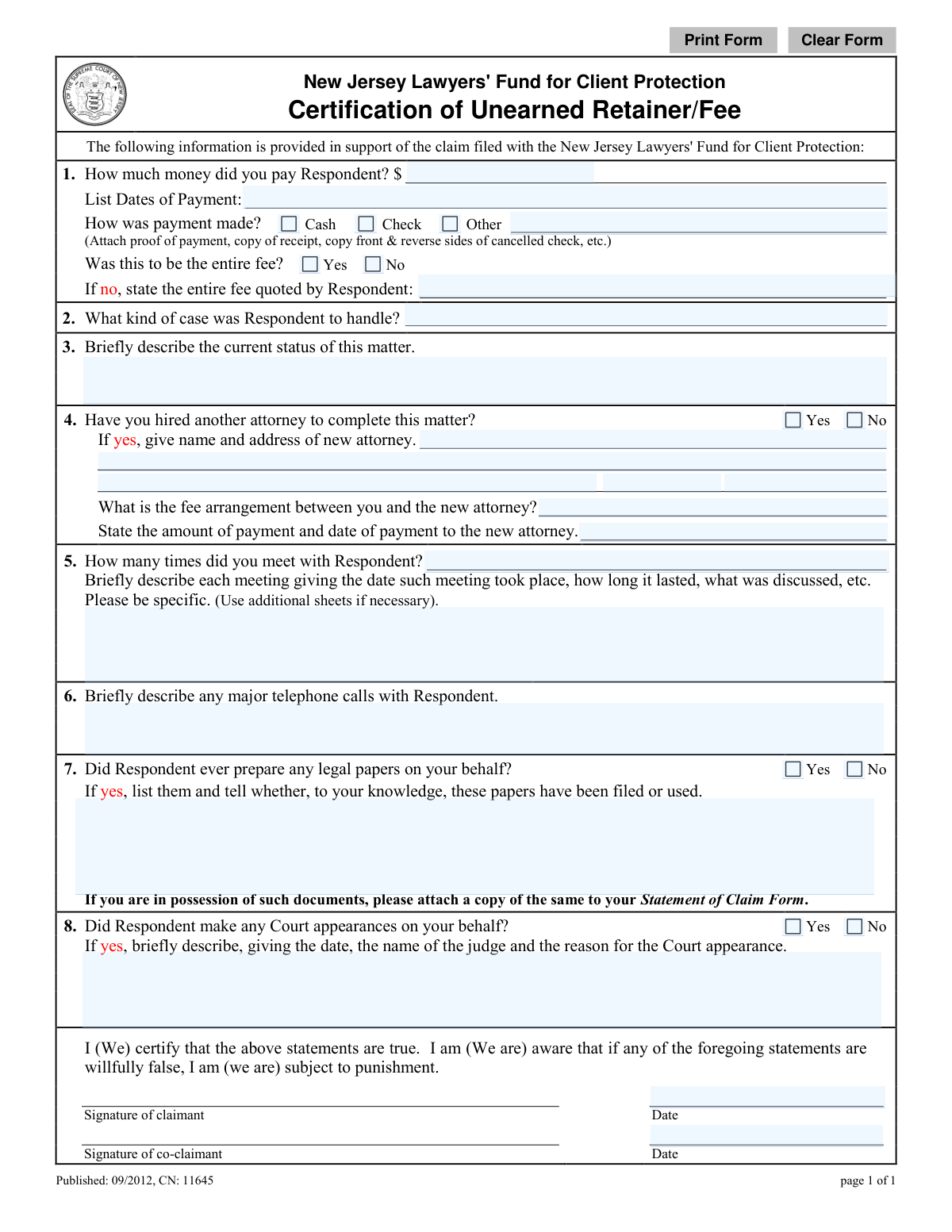
This form is a certification used to support a claim filed with the New Jersey Lawyers' Fund for Client Protection. It allows a client to formally document payments made to an attorney for legal services that were allegedly not performed, serving as crucial evidence in seeking reimbursement for an unearned retainer or fee. Today, this form can be filled out quickly and accurately using AI-powered services like Instafill.ai, which can also convert non-fillable PDF versions into interactive fillable forms.
CN 11645 is part of the New Jersey forms category on Instafill.
Our AI automatically handles information lookup, data retrieval, formatting, and form filling.
It takes less than a minute to fill out CN 11645 using our AI form filling.
Securely upload your data. Information is encrypted in transit and deleted immediately after the form is filled out.

Form specifications

Form name: New Jersey Lawyers' Fund for Client Protection Certification of Unearned Retainer/Fee
Number of fields: 33
Number of pages: 1
Language: English
main-image

Instafill Demo: How to fill out PDF forms in seconds with AI

How to Fill Out CN 11645 Online for Free in 2026

Are you looking to fill out a CN 11645 form online quickly and accurately? Instafill.ai offers the #1 AI-powered PDF filling software of 2026, allowing you to complete your CN 11645 form in just 37 seconds or less.
Follow these steps to fill out your CN 11645 form online using Instafill.ai:
  1. 1 Navigate to Instafill.ai and upload or select the 'Unearned Retainer Certification' form.
  2. 2 Use the AI assistant to automatically populate your personal information and details about the attorney in question.
  3. 3 Provide specific details about the payments made, including dates, amounts, and method of payment, and attach digital copies of receipts or cancelled checks.
  4. 4 Describe the legal matter, its current status, and whether you have hired a new attorney to complete the work.
  5. 5 Detail all interactions with the attorney, such as meetings, phone calls, and any legal documents that were prepared or court appearances made on your behalf.
  6. 6 Carefully review all the information entered by the AI to ensure accuracy and completeness before proceeding.
  7. 7 Certify the statements are true by digitally signing and dating the form, then download it for submission to the New Jersey Lawyers' Fund for Client Protection.

Our AI-powered system ensures each field is filled out correctly, reducing errors and saving you time.

Why Choose Instafill.ai for Your Fillable CN 11645 Form?

Speed

Complete your CN 11645 in as little as 37 seconds.

Up-to-Date

Always use the latest 2026 CN 11645 form version.

Cost-effective

No need to hire expensive lawyers.

Accuracy

Our AI performs 10 compliance checks to ensure your form is error-free.

Security

Your personal information is protected with bank-level encryption.

Frequently Asked Questions About Form CN 11645

This form is used to support a claim filed with the New Jersey Lawyers' Fund for Client Protection. It helps you document the money you paid a lawyer for legal services that were not completed or 'unearned'.

You should complete this form if you have filed a claim with the New Jersey Lawyers' Fund for Client Protection because you paid a lawyer for services that you believe were not performed.

You must attach evidence of your payment, such as a copy of your receipt, the front and back of a canceled check, or a bank statement showing the transaction.

If you paid in cash and lack a formal receipt, provide as much detail as possible about the payment, including the date, amount, and circumstances. Any related correspondence or witness information can also help support your claim.

Briefly describe where your legal case currently stands. For example, mention if the case was abandoned by the lawyer, if you have hired new counsel, or if no action has been taken.

Provide your best estimate for any dates or details you cannot recall precisely. It is important to be as thorough and honest as possible with the information you do remember.

The form allows you to use additional sheets if necessary. Clearly label the extra pages with the corresponding question number and attach them securely to your completed form.

No, you are not required to hire a new attorney to file this claim. This section is only for claimants who have already retained new counsel to complete the legal matter.

This certification is part of a larger claim package. You should submit it along with your main Statement of Claim Form to the New Jersey Lawyers' Fund for Client Protection according to their instructions.

By signing the form, you are legally certifying that all the information you have provided is true to the best of your knowledge. Be aware that providing willfully false statements can subject you to punishment.

Yes, services like Instafill.ai use AI to accurately auto-fill form fields from your saved profile, which can save you time and help ensure your information is entered correctly.

Simply upload the Unearned Retainer Certification PDF to the Instafill.ai platform. The AI will make the fields interactive, allowing you to type your answers, save, and print the completed document.

If you have a non-fillable PDF, you can use a service like Instafill.ai. It can convert flat PDFs into interactive, fillable forms so you can easily type your information directly into the document.

Compliance CN 11645
Validation Checks by Instafill.ai

1
Validates Payment Amount Format
This check ensures that the value entered in the 'How much money did you pay Respondent?' field is a valid, positive numerical currency value. It prevents the submission of non-numeric or negative values, which are invalid for a payment amount. If validation fails, the user will be prompted to enter a correct monetary value (e.g., '1500.00').
2
Ensures Payment Dates are Valid
This validation verifies that all dates entered in the 'List Dates of Payment' field are in a recognizable date format (e.g., MM/DD/YYYY) and are not future dates. This is crucial for establishing an accurate timeline of events for the claim. A failed validation would require the user to correct the date format or enter a date that is not in the future.
3
Requires Selection of Payment Method
This check confirms that the user has selected one of the payment methods: 'Cash', 'Check', or 'Other'. This information is required to understand the nature of the transaction and to correlate with the proof of payment. If no option is selected, the form submission will be blocked until a choice is made.
4
Conditional Requirement for Total Fee Quote
This validation rule is triggered if the user answers 'No' to the question 'Was this to be the entire fee?'. It ensures that the subsequent field, 'state the entire fee quoted by Respondent', is filled out. This provides essential context about the original agreement and the scope of the financial claim.
5
Completeness Check for Case Type and Status
This check verifies that the 'What kind of case was Respondent to handle?' and 'Briefly describe the current status of this matter' fields are not empty. This information is fundamental for the Fund to understand the legal context and urgency of the claim. Failure to provide this information would prevent submission and prompt the user to complete these required fields.
6
Conditional Requirement for New Attorney Information
If the user answers 'Yes' to 'Have you hired another attorney to complete this matter?', this validation ensures that the new attorney's name and address fields are filled out. This information is necessary for the Fund to potentially contact the new counsel for additional details about the case status. If the fields are empty after selecting 'Yes', the user will be prompted to provide the information.
7
Validates Meeting Count and Description Consistency
This check ensures that the 'How many times did you meet with Respondent?' field contains a non-negative integer. Furthermore, if the number entered is greater than zero, it validates that the 'Briefly describe each meeting' text area is not empty. This ensures that claims of meetings are substantiated with required details like date, duration, and topics discussed.
8
Conditional Requirement for Legal Papers Description
This rule activates if the user answers 'Yes' to 'Did Respondent ever prepare any legal papers on your behalf?'. It then requires that the corresponding text field for listing the papers and their status is not empty. This substantiates the claim and provides evidence of any work product generated by the respondent attorney.
9
Conditional Requirement for Court Appearance Details
If the user answers 'Yes' to 'Did Respondent make any Court appearances on your behalf?', this validation ensures the details are provided. The user must fill in the date, judge's name, and reason for the appearance. This provides specific, verifiable information about the attorney's performance on the case.
10
Validates Claimant Signature Date
This check ensures that the 'Date' field next to the claimant's signature is a valid date and is not set in the future. The signature date legally attests to the truthfulness of the statements on that day. An invalid or future date would render the certification invalid, so the user must correct it before submission.
11
Validates New Attorney ZIP Code Format
When a new attorney's address is provided, this check verifies that the ZIP code is in a valid 5-digit or 9-digit (ZIP+4) format. Correct formatting is essential for data integrity and for any mail correspondence the Fund may need to send. An invalid format would trigger an error message asking the user to correct the ZIP code.
12
Logical Check Between Payment and Signature Dates
This validation compares the signature date with the payment dates. It ensures that the signature date is on or after the last payment date listed. It is logically impossible to certify a payment that has not yet occurred, and this check prevents such inconsistencies in the claim timeline.

Common Mistakes in Completing CN 11645

Forgetting to Attach Required Proof of Payment

Claimants often fill out the form but neglect to attach the required evidence, such as copies of both the front and back of cancelled checks or receipts. Without this proof, the Fund cannot verify the payment, which is the primary basis of the claim, leading to significant delays or denial. To avoid this, gather all financial documents before starting and use a tool like Instafill.ai to easily digitize and attach them to your submission.

Using Vague Descriptions for Case Type and Status

In questions 2 and 3, claimants may write 'legal problem' instead of 'child custody dispute,' or 'it's ongoing' for the status. This lack of specificity makes it difficult for the Fund to evaluate what work was expected versus what was delivered. Always use precise legal terms and provide a clear, factual summary of the case's current state to strengthen your claim.

Providing Generalized Summaries of Lawyer Interactions

The form asks for specific details about meetings and phone calls (dates, duration, topics), but people often provide vague answers like 'we spoke a few times.' This fails to build a strong timeline of the lawyer's inaction and weakens the claim that the fee was unearned. Before filling, try to reconstruct a timeline of all interactions to provide the specific details requested in questions 5 and 6.

Submitting an Unsigned or Undated Certification

An unsigned or undated form is legally invalid and will be returned, causing significant processing delays. In the rush to complete the detailed questions, it's easy to overlook the final signature and date lines at the bottom of the page. Always perform a final review to ensure you have signed and dated the form correctly before submission.

Entering Inaccurate or Incomplete Payment Amounts and Dates

In question 1, claimants may guess the total amount paid or provide ambiguous payment dates like 'Spring 2022.' This financial data must be precise and match the attached proof of payment for the claim to be processed smoothly. AI-powered tools like Instafill.ai can help prevent these data entry errors by validating formats and ensuring consistency across the form.

Omitting Complete Details for the New Attorney

When a claimant indicates they've hired a new attorney in question 4, they frequently leave the contact information or fee arrangement fields incomplete. This information is crucial for the Fund to verify the status of the case and understand the full financial damages incurred by the claimant. Double-check that all fields, including the new attorney's full address and fee structure, are filled out completely.

Failing to List or Attach Legal Papers

In question 7, claimants might state that the lawyer prepared documents but then fail to list what they were or attach copies. These documents are critical evidence of any work that was actually performed, and their absence makes it harder to justify the claim for an unearned retainer. If you have these documents, ensure they are listed and attached; if not, state that clearly.

Submitting an Illegible, Handwritten Form

This form is often distributed as a non-fillable PDF, leading to submissions with illegible handwriting. If reviewers cannot read the claimant's responses, they cannot process the claim, leading to rejection or delays. To prevent this, use a service like Instafill.ai, which can convert flat PDFs into fillable forms, ensuring all your entries are clear, legible, and professional.

Lacking Specifics on Court Appearances

If the lawyer made a court appearance (question 8), claimants often don't know or forget to include the judge's name, the exact date, or the reason for the appearance. While this information can be difficult to recall, its absence leaves a gap in the record of the lawyer's activities. Try to find any old emails or documents that might contain these important details to make your claim as complete as possible.
Saved over 80 hours a year

“I was never sure if my IRS forms like W-9 were filled correctly. Now, I can complete the forms accurately without any external help.”

Kevin Martin Green

Your data stays secure with advanced protection from Instafill and our subprocessors

Robust compliance program

Transparent business model

You’re not the product. You always know where your data is and what it is processed for.

ISO 27001, HIPAA, and GDPR

Our subprocesses adhere to multiple compliance standards, including but not limited to ISO 27001, HIPAA, and GDPR.

Security & privacy by design

We consider security and privacy from the initial design phase of any new service or functionality. It’s not an afterthought, it’s built-in, including support for two-factor authentication (2FA) to further protect your account.

Fill out CN 11645 with Instafill.ai

Worried about filling PDFs wrong? Instafill securely fills new-jersey-lawyers-fund-for-client-protection-certification-of-unearned-retainerfee forms, ensuring each field is accurate.