
Instafill.ai
7 days free
AI form filling · 21 fields · 1 page · done in seconds

Yes! You can use AI to fill out Order Extending Discovery for Joinder of New Party and Setting New Discovery End Date Pursuant to R. 4:24-1(b)

Don't type 21 fields by hand. Tell our AI about yourself, or upload a document you already have, and it fills every field in seconds. You check it, then download, print or sign.
7 days free, then $19.99/month · Cancel anytime
AI fills it, no typingEncrypted, never used to train AICancel in two clicks
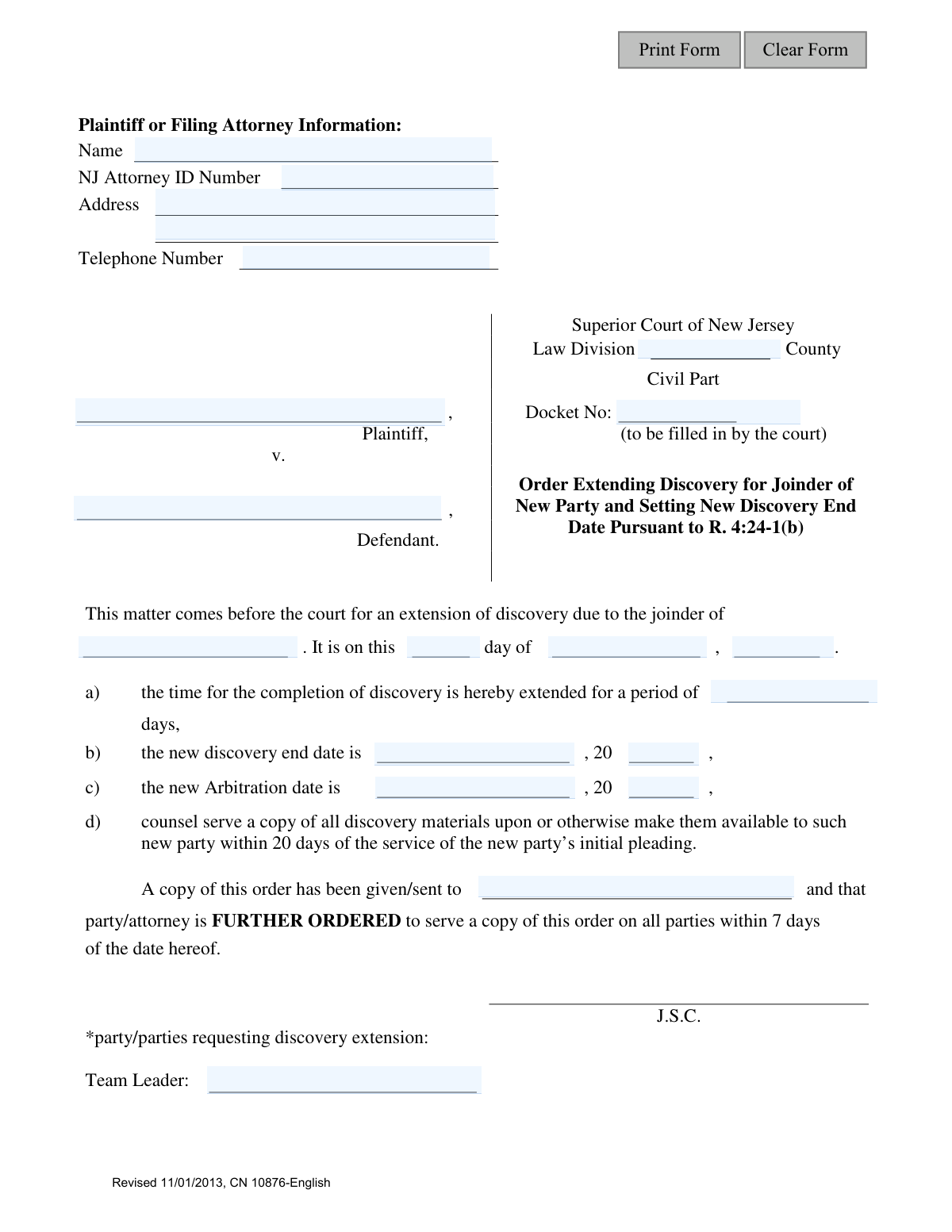
Order Extending Discovery for Joinder of New Party and Setting New Discovery End Date Pursuant to R. 4:24-1(b), page 1
Basic · 30/100Form Complexity Index

The AI does the filling. You just check it.

No typing into boxes, nothing to install.

Tell the AI about youAnswer a few questions in plain words, or upload a document you already have. That is all the typing there is.
AI fills every field in secondsIt puts each answer in the right box on every page, checkboxes included.
Check it and downloadReview every field, change anything, then download, print or sign the PDF.

What this form asks for

The AI fills all of it, from your answers or your documents.

The Order Extending Discovery (CN 10876-English) is a legal document filed in the Superior Court of New Jersey's Law Division. It is used to formally request and grant an extension of the discovery timeline in a lawsuit, specifically when a new party is added to the case, ensuring they have adequate time to participate. Today, this form can be filled out quickly and accurately using AI-powered services like Instafill.ai, which can also convert non-fillable PDF versions into interactive fillable forms.
Fillable fields21
Pages1
Form Complexity IndexBasic, 30/100

The AI checks your answers before you download

14 checks built for this form, so a wrong date or a missing answer is caught before anyone else sees it.

Docket Number Structure and Format

Validates that the 'caseDocket' number conforms to the expected format for the specified county's Civil Part, such as 'CTY-L-######-YY'. This check is critical to ensure the order is filed under the correct case within the court's system. An invalid docket number would cause the document to be misfiled or rejected by the court clerk, delaying the legal process.

NJ Attorney ID Number Format Validation

Ensures the 'filerIDNumber' field contains a valid New Jersey Attorney ID number format. This ID is the unique identifier for the attorney within the state bar's records, and its accuracy is paramount for official filings. An incorrect ID could lead to misidentification of the filing attorney, rejection of the document, or disciplinary action.

Completeness of Filing Attorney Information

Verifies that the attorney's name ('filerName'), NJ Attorney ID ('filerIDNumber'), address ('filerAddr'), and telephone number ('filerPh') are all provided. This contact information is mandatory for court communications and serving legal notices. Missing information can lead to the court being unable to contact the filer, causing significant delays or rejection of the order.

Completeness of Core Case Identifiers

Checks that the County ('TypeCounty'), Plaintiff Name ('plaName'), Defendant Name ('defName'), and Docket Number ('caseDocket') are all filled in. These fields are the primary identifiers for the case to which this order applies. Without this complete information, the order is ambiguous and cannot be correctly processed or filed by the court clerk.

Chronological Consistency of Dates

Validates that the 'new discovery end date' ('Date2', 'Year2') occurs after the order's effective date ('Date', 'Month', 'Year'). It is logically impossible for a discovery period to end before the order extending it is issued. This validation prevents clerical errors that would render the order nonsensical and legally invalid.

Arbitration Date Follows Discovery End Date

Ensures the 'new Arbitration date' is set for a date after the 'new discovery end date'. Arbitration typically occurs after the discovery phase is complete, so scheduling it earlier would be a procedural error. This validation prevents logical impossibilities in the case schedule and ensures the legal process follows the correct sequence.

And 8 more checks
  • Numeric Value for Extension Period
  • Valid Date and Year Format
  • Presence of Joined Party Name
  • Identification of Party Responsible for Service
  • US Phone Number Format Validation
  • Valid New Jersey County Selection
  • Order Date Cannot Be in the Future
  • Consistency Between Extension Period and New End Date

Let AI fill out your CN 10876-English

No typing. Every field filled in seconds, checked, ready to sign.

7 days free, then $19.99/month · Cancel anytime

How to Fill Out CN 10876-English Online for Free in 2026

What the AI walks you through.

  1. Navigate to Instafill.ai and upload or select the 'Order Extending Discovery' form for New Jersey.
  2. Provide the case details, including the County, Docket Number, and the names of the Plaintiff and Defendant.
  3. Enter the filing attorney's information, such as their name, NJ Attorney ID number, address, and telephone number.
  4. Specify the name of the newly joined party and the number of days you are requesting for the discovery extension.
  5. Indicate the party or parties requesting the extension at the bottom of the form.
  6. Review all the information auto-filled by the AI for accuracy, including the new discovery end date and arbitration date.
  7. Download the completed form to be signed by the judge and served to all relevant parties as per the court's instructions.

Common Mistakes in Completing CN 10876-English

The ones the AI is built to catch.

Incorrect or Incomplete Docket Number
Users frequently enter the docket number with transposed digits, incorrect prefixes (e.g., L, LT, DC), or an incorrect year suffix. This happens due to manual data entry errors or referencing outdated case documents. An incorrect docket number is a critical failure, as it can cause the filing to be rejected by the clerk's office or, worse, filed in the wrong case, leading to significant delays and potential legal complications. To avoid this, always double-check the docket number against the most recent court communication for that specific case.
Misidentifying the Filing Attorney
A common error is entering the law firm's name or a paralegal's name instead of the specific attorney of record. The form requires the individual attorney's name and their unique 'NJ Attorney ID Number'. This mistake occurs from a misunderstanding of the requirement or when support staff fills out the form. This can lead to rejection or confusion in court communications, as notices may be sent to the wrong individual. Always use the name and ID of the responsible attorney admitted to the NJ Bar.
Inconsistent Dates and Extension Period
Filers often make calculation errors where the number of days requested for the extension does not correctly correspond to the proposed 'new discovery end date'. For example, requesting a 60-day extension but setting a new end date that is only 50 days away. This creates an ambiguous and unenforceable order that the court will likely reject. To prevent this, carefully calculate the end date based on the extension period, accounting for weekends and holidays as per court rules. AI-powered tools like Instafill.ai can help automate these date calculations to ensure consistency.
Failing to Specify the Joined Party
The primary purpose of this specific order is to extend discovery due to the joinder of a new party. A critical mistake is leaving the line 'due to the joinder of ______' blank or filling it with a vague description. This omission makes the basis for the order unclear and can lead to its rejection by the judge. It is essential to clearly and accurately name the new party being brought into the litigation to justify the discovery extension.
Omitting or Incorrectly Setting the New Arbitration Date
When the discovery period is extended, the corresponding arbitration date must also be rescheduled. Filers often forget to fill in the 'new Arbitration date' field, leaving the schedule in limbo and requiring further motions to fix. This oversight disrupts the court's calendar and can cause significant delays. Always coordinate with the court and opposing counsel to set a realistic new arbitration date that follows the new discovery end date.
Incorrectly Filling Court-Use-Only Fields
The form contains fields intended for internal court use, such as 'Team Leader' and the signature block for the Judge ('J.S.C.'). Attorneys or their staff sometimes mistakenly fill in these sections. This can cause confusion for court clerks and may require the form to be resubmitted. Parties should only fill in the sections clearly designated for the plaintiff, defendant, or filing attorney. Modern form-filling tools can help by locking or highlighting fields that should not be edited by the user.
Using an Obsolete Form Version
This form is marked 'Revised 11/01/2013'. Courts periodically update their forms to comply with new rules or procedures, and using an outdated version is a frequent cause for rejection. This often happens when firms use old templates saved on their local drives. Before filling out any court form, always check the official judiciary website for the most current version to ensure compliance. This simple step can prevent the wasted time and effort of a rejected filing.
Submitting a Non-Fillable or Illegible Form
Many court forms are only available as flat, non-fillable PDFs. A common mistake is to print this document and fill it out by hand, often resulting in illegible handwriting that can lead to data entry errors by court staff and processing delays. To avoid this, it is best to use a tool that can convert the document into a fillable format. For instance, Instafill.ai can take a non-fillable PDF, make it interactive, and help you fill it out with clean, legible, typed text, ensuring clarity and professionalism.
Ambiguous Party Identification in the Caption
In the case caption ('Plaintiff, v. Defendant.'), filers sometimes invert the parties, use vague abbreviations like 'et al.' instead of the lead named party, or misspell names. This can create confusion and indexing errors, especially in complex cases with multiple parties. It is crucial to list the plaintiff and defendant exactly as they appear on the original complaint and all subsequent court documents. AI form-filling tools can help by saving and reusing correct party information across all related case documents.
Failing to Identify the Requesting Party
The form includes a line at the bottom: '*party/parties requesting discovery extension:'. This field is often overlooked and left blank. This omission makes it unclear to the judge and other parties who initiated the request for the extension. For clarity and proper record-keeping, the name of the party or parties making the motion must be clearly stated in this designated space.

Frequently Asked Questions About CN 10876-English


Is it really free for 7 days?
Yes. You pay $0 today. Cancel before Nov 6 and you are never charged. Keep it, and it is $19.99 a month for 5 fills of your CN 10876-English.
Can I fill other forms too?
This plan is for your CN 10876-English: your own AI agent fills it as often as 5 times a month. To fill other forms and upload your own, choose a Professional plan from your account.
How do I cancel?
From your account, in two clicks, any time. No email, no call.
How does the AI fill out CN 10876-English?
You answer a few questions in plain words, or upload a document you already have. The AI reads what you give it and puts each answer into the right field of CN 10876-English, on every page, in seconds. It checks the answers against the form's own rules, and you review and change anything before you download, print or sign.
What happens to my information?
It is encrypted in transit and at rest, and it is never used to train AI.
How complex is CN 10876-English to fill out?
CN 10876-English has a Form Complexity Index of 30 out of 100, in the basic tier: 21 fillable fields across 1 page. Instafill.ai's AI fills it in under a minute, with every field there for you to review before you download.
What is the purpose of the 'Order Extending Discovery' form?
This form is a court order used to officially extend the discovery period in a New Jersey civil lawsuit. It is specifically used when a new party is added to the case, allowing more time for all parties to exchange information.
Who should fill out this form?
An attorney or a party involved in the case who is requesting the extension will fill in the case details. However, it is an 'Order,' which means it must be submitted to the court for a judge's signature to become effective.
When is it appropriate to use this specific form?
You should use this form only when you need to extend the discovery deadline because a new plaintiff or defendant has been added to your case, as specified under New Jersey Court Rule 4:24-1(b).
What information do I need to have ready to complete this form?
You will need the court county, case docket number, plaintiff and defendant names, the name of the new party being joined, and the proposed length of the extension in days. You must also provide your contact information as the filing attorney or party.
Where do I find the 'Docket No.' for my case?
The Docket Number is a unique identifier assigned to your case by the court when it was first filed. You can find it on any previous court documents, notices, or correspondence related to your case.
What happens after the judge signs this order?
After a judge signs the order, the party who requested it is required to serve a copy on all other parties in the case within 7 days. You must also provide all existing discovery materials to the newly joined party.
Can I use this form if I need a discovery extension for a different reason?
No, this form is specifically for extensions due to the joinder of a new party. For other reasons, such as outstanding discovery or scheduling conflicts, you would need to file a different type of motion or consent order with the court.
Why does the form require a new 'Arbitration date'?
In many New Jersey civil cases, arbitration is scheduled after discovery is complete. Since this order extends the discovery period, the original arbitration date is no longer feasible and a new one must be set.
Who is the 'J.S.C.' that signs the form?
'J.S.C.' stands for Judge of the Superior Court. This signature line is reserved for the judge who approves the order; you should not sign here.
What does it mean to 'serve a copy of all discovery materials' on the new party?
This means you must provide the newly joined party with copies of all evidence and information already exchanged between the original parties. This ensures the new party has all the necessary information to participate in the case.
Can AI tools help me fill out this form?
Yes, services like Instafill.ai use AI to accurately auto-fill form fields with your case information, which helps save time and reduce the risk of errors. This is especially useful for repetitive information like your name, address, and case details.
How can I use Instafill.ai to complete this form online?
Simply upload the 'Order Extending Discovery' PDF to the Instafill.ai platform. The AI will identify the fields, allowing you to quickly fill them in online or have the system auto-fill them from your saved profile, then download the completed document.
The PDF version of this form I have is not fillable. What can I do?
If you have a flat, non-fillable PDF, you can upload it to a service like Instafill.ai. Its technology can convert the document into an interactive, fillable form that you can complete easily on your computer.
Encrypted in transit and at restNever used to train AIDelete your forms any time

Get your CN 10876-English filled out by AI

$0 today. Cancel before Nov 6 and you pay nothing.

7 days free, then $19.99/month · Cancel anytime