Yes! You can use AI to fill out Order to Appear and Show Cause (Form FM-AV-101)
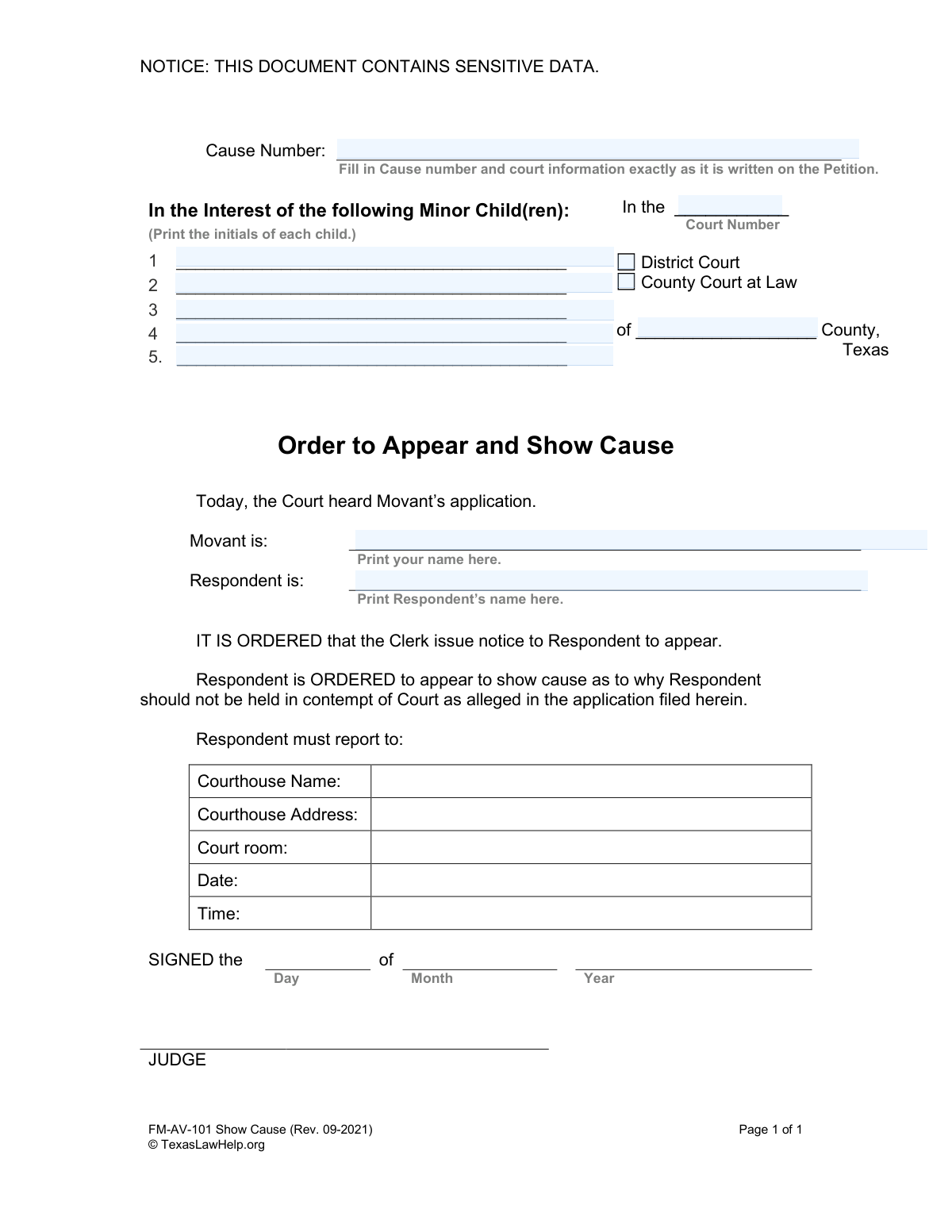
Form FM-AV-101, the Order to Appear and Show Cause, is a Texas court order compelling an individual (the Respondent) to appear before a judge. It is used in family law cases to require the Respondent to explain why they have not complied with a previous court order and why they should not be held in contempt. Today, this form can be filled out quickly and accurately using AI-powered services like Instafill.ai, which can also convert non-fillable PDF versions into interactive fillable forms.
FM-AV-101 is part of the
child custody forms category on Instafill.
Our AI automatically handles information lookup, data retrieval, formatting, and form filling.
It takes less than a minute to fill out FM-AV-101 using our AI form filling.
Securely upload your data. Information is encrypted in transit and deleted immediately after the form is filled out.
Form specifications
| Form name: | Order to Appear and Show Cause (Form FM-AV-101) |
| Number of fields: | 12 |
| Number of pages: | 1 |
| Language: | English |
Instafill Demo: How to fill out PDF forms in seconds with AI
How to Fill Out FM-AV-101 Online for Free in 2026
Are you looking to fill out a FM-AV-101 form online quickly and accurately? Instafill.ai offers the #1 AI-powered PDF filling software of 2026, allowing you to complete your FM-AV-101 form in just 37 seconds or less.
Follow these steps to fill out your FM-AV-101 form online using Instafill.ai:
- 1 Navigate to Instafill.ai and upload or select the Texas 'Order to Appear and Show Cause' form.
- 2 Provide the exact case information, including the cause number, court number, and county, as it appears on the original petition.
- 3 Enter the initials of all minor children involved in the legal matter.
- 4 Clearly identify the Movant (your name) and the Respondent (the person being ordered to appear).
- 5 Input the specific details for the court appearance, including the courthouse name, address, room number, date, and time as ordered by the court.
- 6 Review the entire document generated by the AI to ensure all information is accurate and complete before it is presented to a judge for signature.
Our AI-powered system ensures each field is filled out correctly, reducing errors and saving you time.
Why Choose Instafill.ai for Your Fillable FM-AV-101 Form?
Speed
Complete your FM-AV-101 in as little as 37 seconds.
Up-to-Date
Always use the latest 2026 FM-AV-101 form version.
Cost-effective
No need to hire expensive lawyers.
Accuracy
Our AI performs 10 compliance checks to ensure your form is error-free.
Security
Your personal information is protected with bank-level encryption.
Frequently Asked Questions About Form FM-AV-101
This form is a court order that commands a person (the Respondent) to appear in court at a specific date and time. They must provide a reason ('show cause') why the court should not hold them in contempt for allegedly violating a previous court order.
The person filing the motion for contempt (the Movant) typically prepares this form for the judge to review and sign. The judge is the one who ultimately signs it to make it an official order.
You will need the exact case information from your original petition, including the cause number, court number, and county. You also need your full name, the other party's full name (the Respondent), and the initials of any minor children involved.
You must copy the Cause Number and court details exactly as they are written on the Petition or other official documents from your case. This ensures the order is filed correctly within your existing case.
The form requests initials instead of full names to protect the privacy of the minor children, as this document is a public court record. This is a standard practice to safeguard sensitive data.
The 'Movant' is you, the person asking the court to take action by filing the motion. The 'Respondent' is the person you are filing against, who is being ordered to appear in court.
After you fill in the case information, you must present the form to the judge for their signature. Once signed, it becomes an official court order that must be formally served on the Respondent.
You will need to coordinate with the court clerk or the judge's coordinator to get an available date and time for the hearing. This information must be accurately filled in on the form before the judge signs it.
'Show cause' is a legal instruction for the Respondent to provide a valid reason or legal argument to the court explaining why they should not be found in contempt.
If the Respondent was properly served with the order and fails to appear, the judge may issue a warrant for their arrest. The court can also proceed with the hearing and make a ruling in their absence.
No, this form is the resulting order that schedules a hearing. You must first file a 'Motion for Enforcement' or 'Motion for Contempt,' and then you prepare this Order for the judge to sign.
Yes, services like Instafill.ai use AI to auto-fill form fields accurately and save time. This is especially helpful for entering repetitive information like case numbers, names, and court details without making errors.
Simply upload the 'Order to Appear and Show Cause' PDF to the Instafill.ai platform. The AI will identify the fields, allowing you to quickly type in your information, save your progress, and download the completed document.
You can use a tool like Instafill.ai, which can convert flat, non-fillable PDFs into interactive, fillable forms. This allows you to type your information directly into the fields for a clean and professional document ready for the court.
Compliance FM-AV-101
Validation Checks by Instafill.ai
1
Ensures Cause Number is Provided
This check verifies that the 'Cause.Number' field is not empty. The Cause Number is a unique identifier for the legal case and is essential for linking this order to the correct court file. Without it, the document cannot be processed or filed correctly by the court clerk, leading to rejection.
2
Requires Movant's Full Name
This validation confirms that the 'User.Name.Full' field, representing the Movant, is filled out. The Movant is the party initiating the action, and their identity must be clearly stated for the order to be legally valid. Failure to provide this name makes the application anonymous and unenforceable.
3
Requires Respondent's Full Name
This check ensures the 'Respondent.Name.Full' field is completed. The Respondent is the individual being ordered to appear in court, so their full legal name is required for proper identification and service of the order. An empty or incorrect name would render the order ineffective and could violate due process rights.
4
Requires Court County
This validation ensures the 'Court.County' field is not empty. The county specifies the legal jurisdiction where the court is located. Submitting the form without a county makes it impossible to determine the correct venue, resulting in an immediate filing rejection.
5
Requires Court Number
This check ensures the 'Court.Number' field is not left empty. Along with the county and court type, the court number is essential to uniquely identify the specific court handling the case (e.g., the 125th District Court). Omitting this number would make it impossible for the clerk to file the document in the correct venue.
6
Exclusive Court Type Selection
This validation ensures that the user selects either 'Court.Type.District' or 'Court.Type.County', but not both. A case is filed in a specific type of court, and selecting both creates ambiguity about the correct jurisdiction. The system should enforce a mutually exclusive choice to ensure the filing is directed to the single, correct court.
7
Requires Court Type Selection
This check verifies that at least one court type ('Court.Type.District' or 'Court.Type.County') has been selected. The court type is a fundamental piece of information needed to identify the court where the case is being heard. Omitting this information makes it impossible to determine the correct judicial level, leading to filing rejection.
8
Validates Child Initials Format
This check ensures that any entry in the 'Child.SEQ*.Initials' fields consists only of uppercase letters, with a reasonable length (e.g., 2-4 characters). The form explicitly requests initials, not full names, to protect the minor's privacy. This validation prevents the accidental inclusion of sensitive full names and maintains compliance with the form's instructions.
9
Requires at Least One Child's Initials
This validation checks that if the case is 'In the Interest of the following Minor Child(ren),' at least the first child initials field ('Child.SEQ001.Initials') is filled. The entire premise of this type of case rests on the involvement of a minor child. If no child is identified, the case type may be incorrect or the form incomplete, requiring user correction.
10
Prevents Identical Movant and Respondent Names
This logical check compares the 'User.Name.Full' (Movant) and 'Respondent.Name.Full' fields to ensure they are not identical. It is legally and logically impossible for a person to file a contempt motion against themselves in this context. This check prevents a significant logical error that would invalidate the entire purpose of the order.
11
Validates Full Name Format
This check applies to both 'User.Name.Full' and 'Respondent.Name.Full' to ensure they contain only letters, spaces, and common punctuation like hyphens or apostrophes. It prevents the entry of numbers or special characters that are not part of a legal name. This maintains data quality and ensures the names on the legal document are accurate and properly formatted.
12
Validates Court County is a Valid Texas County
This check ensures that the 'Court.County' field contains a valid county name from the official list of Texas counties. This is critical for establishing the correct jurisdiction for the case. An invalid or misspelled county name would lead to filing rejection or misdirection of the legal document.
13
Checks for Duplicate Child Initials
This validation scans all filled 'Child.SEQ*.Initials' fields and flags any duplicates for user review. While it's possible for siblings to have the same initials, it is uncommon and could indicate a data entry error. Alerting the user allows them to confirm the accuracy of the information before submission, preventing potential confusion in the legal record.
14
Ensures Cause Number is Not Placeholder Text
This check verifies that the 'Cause.Number' field does not contain generic placeholder text like 'Cause Number' or 'TBD'. The cause number must be the specific, official number assigned by the court from the original Petition. This validation prevents the submission of incomplete forms where the user has overlooked a critical piece of information.
Common Mistakes in Completing FM-AV-101
Filers often miscopy the cause number from the original Petition, transposing digits or omitting parts of the alphanumeric code. An incorrect cause number can lead to the order being misfiled, delayed, or rejected by the court clerk, potentially causing the hearing to be missed. To avoid this, double-check the cause number against the original Petition, ensuring every digit and letter matches exactly.
The form explicitly requests the initials of the minor children to protect their privacy in a public document, but filers often overlook this and write full names. This can lead to the document being rejected by the court or requiring redaction, delaying the legal process. Always use only the initials (e.g., J.D. for John Doe) as instructed on the form to maintain confidentiality.
The person filing the motion (the 'Movant') may accidentally write their name in the 'Respondent' field, or vice versa. This confusion causes significant legal and procedural problems, as it misidentifies the parties for the court and can invalidate the order. Carefully read the labels 'Print your name here' (Movant) and 'Print Respondent’s name here' to ensure accuracy.
The form requires selecting either 'District Court' or 'County Court at Law' and providing the specific court number and county. Filers may forget to check a box, check both, or enter the wrong court number, leading to the order being filed in the wrong jurisdiction. This mistake will cause rejection and significant delays, so it's crucial to copy this information precisely from the original Petition.
This form is an 'Order' that must be signed by a judge to become legally effective, but filers sometimes mistakenly sign their own name in the 'JUDGE' signature block. This invalidates the document and requires it to be redone, as only a judge can sign an order. The filer should leave the signature and date fields at the very bottom of the form completely blank for the judge to complete.
The section ordering the Respondent to appear requires a specific courthouse name, address, courtroom, date, and time. These details are often left blank because the filer doesn't know them yet, but they must be filled in before the order is signed by the judge and served. Submitting an incomplete order will result in it being unusable, as the Respondent won't know where or when to appear.
Since this form may be filled out by hand, poor or unclear handwriting can make it impossible for the court clerk and judge to read critical information like names, dates, and case numbers. This can lead to data entry errors in the court's system or outright rejection of the document. To ensure clarity, it is best to print in block letters or use a tool like Instafill.ai, which can convert a non-fillable PDF into a fillable version, allowing you to type directly onto the form.
The form explicitly states to fill in court information 'exactly as it is written on the Petition.' People may rely on memory or enter slight variations in names or court details, creating inconsistencies in the case file. These discrepancies can cause confusion, delays, or rejection by the clerk's office, so always have the original Petition in front of you and copy the required information verbatim.
Legal forms are periodically updated, as indicated by the revision date (e.g., 'Rev. 09-2021'). Using an old version may result in the court rejecting the filing because it doesn't comply with current rules or statutes. Always ensure you are using the most current version of any legal form, which can usually be found on the official court or legal aid website.
Saved over 80 hours a year
“I was never sure if my IRS forms like W-9 were filled correctly. Now, I can complete the forms accurately without any external help.”
Kevin Martin Green
Your data stays secure with advanced protection from Instafill and our subprocessors

Robust compliance program
Transparent business model
You’re not the product. You always know where your data is and what it is processed for.
ISO 27001, HIPAA, and GDPR
Our subprocesses adhere to multiple compliance standards, including but not limited to ISO 27001, HIPAA, and GDPR.
Security & privacy by design
We consider security and privacy from the initial design phase of any new service or functionality. It’s not an afterthought, it’s built-in, including support for two-factor authentication (2FA) to further protect your account.
Fill out FM-AV-101 with Instafill.ai
Worried about filling PDFs wrong? Instafill securely fills order-to-appear-and-show-cause-form-fm-av-101 forms, ensuring each field is accurate.