Yes! You can use AI to fill out Order to Enforce Litigant’s Rights - Appendix XI-O

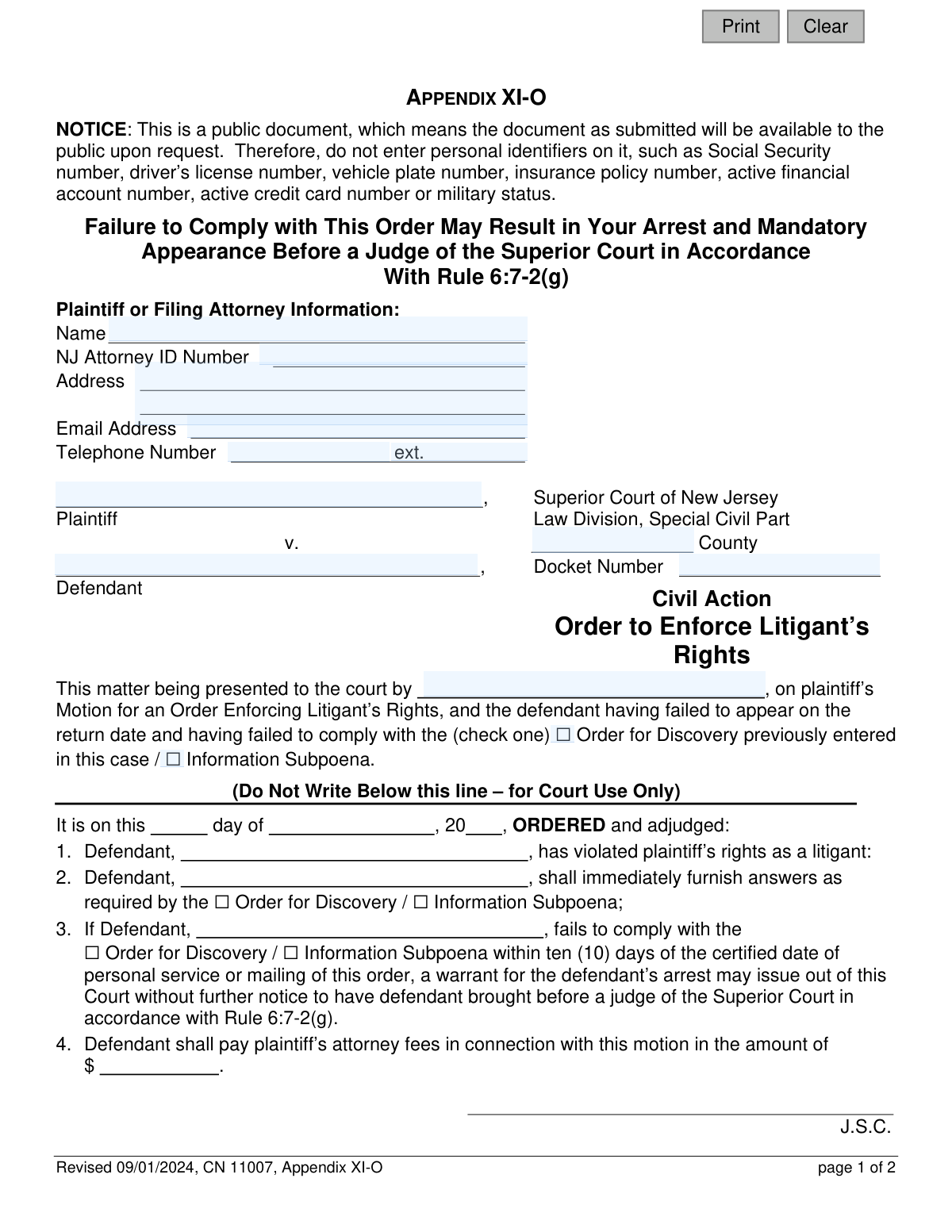
Appendix XI-O is a legal document used in the New Jersey Superior Court, Special Civil Part, to enforce a plaintiff's rights when a defendant has failed to provide required information. This order mandates the defendant to furnish answers as per a prior Order for Discovery or Information Subpoena, warning that failure to comply within ten days may result in a warrant for their arrest. Today, this form can be filled out quickly and accurately using AI-powered services like Instafill.ai, which can also convert non-fillable PDF versions into interactive fillable forms.
Appendix XI-O is part of the New Jersey forms category on Instafill.
Our AI automatically handles information lookup, data retrieval, formatting, and form filling.
It takes less than a minute to fill out Appendix XI-O using our AI form filling.
Securely upload your data. Information is encrypted in transit and deleted immediately after the form is filled out.

Form specifications

Form name: Order to Enforce Litigant’s Rights - Appendix XI-O
Number of fields: 23
Number of pages: 1
Language: English
main-image

Instafill Demo: How to fill out PDF forms in seconds with AI

How to Fill Out Appendix XI-O Online for Free in 2026

Are you looking to fill out a APPENDIX XI-O form online quickly and accurately? Instafill.ai offers the #1 AI-powered PDF filling software of 2026, allowing you to complete your APPENDIX XI-O form in just 37 seconds or less.
Follow these steps to fill out your APPENDIX XI-O form online using Instafill.ai:
  1. 1 Navigate to Instafill.ai and upload or select the 'Order to Enforce Litigant’s Rights - Appendix XI-O' form.
  2. 2 Use the AI assistant to accurately input the Plaintiff or Filing Attorney's information, including name, NJ Attorney ID, address, and contact details.
  3. 3 Enter the case details, such as the Superior Court County, Docket Number, and the names of the Plaintiff and Defendant.
  4. 4 Indicate the reason for the motion by checking the appropriate box for failure to comply with either the 'Order for Discovery' or the 'Information Subpoena'.
  5. 5 Once the order is signed by a judge, complete the 'Proof of Service' section, detailing the date and method of service on the defendant.
  6. 6 Review all entered information for completeness and accuracy before signing and dating the certification statement.
  7. 7 Securely download, print, or submit the completed form as required for filing with the court.

Our AI-powered system ensures each field is filled out correctly, reducing errors and saving you time.

Why Choose Instafill.ai for Your Fillable Appendix XI-O Form?

Speed

Complete your Appendix XI-O in as little as 37 seconds.

Up-to-Date

Always use the latest 2026 Appendix XI-O form version.

Cost-effective

No need to hire expensive lawyers.

Accuracy

Our AI performs 10 compliance checks to ensure your form is error-free.

Security

Your personal information is protected with bank-level encryption.

Frequently Asked Questions About Form Appendix XI-O

This form is a court order used when a defendant in a civil case fails to respond to a previous court-ordered discovery or an information subpoena. It compels the defendant to provide the required information and warns of serious consequences, like arrest, for continued non-compliance.

The plaintiff or their attorney initiates the process by filing a motion and filling in their information and the case details. However, the main body of the order is completed and signed by a Judge of the Superior Court.

You must provide the answers required by the original Order for Discovery or Information Subpoena within ten (10) days of receiving this order. Failure to do so can result in a warrant being issued for your arrest to bring you before a judge.

This form is a public document, meaning it can be accessed by the public upon request. To protect your privacy and prevent identity theft, you must not include sensitive personal information like SSNs, driver's license numbers, or active financial account numbers.

The plaintiff or their attorney must provide their name, NJ Attorney ID number, address, email, and phone number. They also need to fill in the plaintiff and defendant names, the county where the case is filed, and the court docket number.

The 'Proof of Service' section is completed by the person who delivers a copy of the signed order to the defendant. It serves as a sworn statement certifying when and how the defendant was served, either personally or by mail.

Yes, the judge can order the defendant to pay the plaintiff’s attorney fees associated with filing this motion. The amount will be determined by the judge and written on the order.

This means that if the defendant ignores this order, the court can authorize law enforcement to arrest the defendant. The purpose of the arrest is to bring the defendant to court to address their failure to comply with the order.

You must file a 'Motion for an Order Enforcing Litigant’s Rights' with the Superior Court, Special Civil Part, in the county where your case is pending. This form is the proposed order that you ask the judge to sign as part of your motion.

Yes, services like Instafill.ai use AI to help you accurately auto-fill form fields with your information, which saves time and reduces errors. However, AI cannot provide legal advice, so you should consult an attorney for guidance on your specific case.

You can use a service like Instafill.ai to complete this form online. Simply upload the form, and the AI will identify the fields, allowing you to type your information directly and then download the completed document for filing.

If you have a non-fillable or 'flat' PDF, you can use a tool like Instafill.ai. It can convert the static PDF into an interactive, fillable form, making it easy to complete on your computer.

An 'Order for Discovery' is a broad court order compelling a party to provide evidence during a lawsuit. An 'Information Subpoena' is a specific set of written questions used after a judgment is won to discover the debtor's assets for collection purposes.

Compliance Appendix XI-O
Validation Checks by Instafill.ai

1
Prohibits Personal Identifiers
Scans all text fields for patterns resembling Social Security numbers, driver’s license numbers, or financial account numbers as per the form's explicit notice. This is critical because the form is a public document and such information must be protected. If a forbidden identifier is detected, the submission is blocked and the user is prompted to remove the sensitive information before proceeding.
2
Validates NJ Attorney ID Number Format
Ensures the 'NJ Attorney ID Number' field (`attyId`) is not empty and follows the specific format for New Jersey attorneys. This validates the filer's credentials and ensures accurate record-keeping by the court. If the format is incorrect or the field is empty for an attorney filer, the system will flag the error, preventing submission until a valid ID is entered.
3
Attorney Contact Information Completeness
Verifies that the attorney's name (`attyName`), full address (`attyAddrFull`), email (`attyEmail`), and telephone number (`attyPh`) are all provided. This information is mandatory for the court and opposing parties to communicate with the filer. A failure will prevent form submission and highlight the specific missing fields.
4
Validates Email Address Format
Checks that the value entered in the 'Email Address' field (`attyEmail`) conforms to the standard email format (e.g., '[email protected]'). This is essential for ensuring that electronic notices and communications from the court are deliverable. An invalid format will trigger an error message asking the user to correct the entry.
5
Validates Docket Number Format
Verifies that the 'Docket Number' (`docketNo`) matches the expected format for a Special Civil Part action (e.g., 'DC-######-##'). A correct docket number is critical for linking the filing to the correct case file in the court's system. An incorrect format will block submission and instruct the user to review and correct the number.
6
Ensures a Valid NJ County is Entered
Validates that the 'County' field (`typeCounty`) contains one of the 21 official county names in New Jersey. This is crucial for routing the document to the correct court venue and ensuring proper jurisdiction. An invalid or misspelled county name will result in a validation error, prompting the user to select from a valid list or correct the entry.
7
Requires Selection of a Single Order Type
Ensures that the user has checked exactly one box for the underlying order, either 'Order for Discovery' or 'Information Subpoena' (`orderType`). The court needs to know the specific order the defendant failed to comply with to rule on the motion. If zero or both options are selected, the submission will be rejected with an error.
8
Presenter Name Consistency Check
Compares the name entered in the 'presented to the court by' field (`presentedName`) with the Plaintiff or Attorney name (`plaName` or `attyName`) provided at the top of the form. This is a logical check to catch potential typos or inconsistencies in who is presenting the motion. A mismatch would trigger a warning asking the user to confirm the names are correct.
9
Validates the Proof of Service Date
Checks that the date of service (`proofMoDay`, `proofYr`) is a valid calendar date and is not set in the future. This date is legally significant as it starts the clock for the defendant's compliance period. An invalid or future date will be rejected, as service cannot have occurred at that time.
10
Defendant Name Consistency in Proof of Service
Confirms that the defendant's name listed in the 'Proof of Service' section (`proofName`) is identical to the defendant's name at the top of the form (`defName`). This ensures there is no ambiguity about who was served with the order. A mismatch will trigger an error to prevent an incorrect or invalid certification of service.
11
Requires Selection of Service Method
Verifies that exactly one method of service ('personally' or 'by sending it...') is checked in the 'Proof of Service' section (`proofMail`). The method of service is a critical legal detail that must be recorded accurately. If no method or both methods are selected, the form will be considered incomplete and rejected.
12
Conditional Requirement for Service Address
This check is conditional: if the service method (`proofMail`) is marked as 'by sending it simultaneously by regular and certified mail', it then verifies that the service address field (`certMailAddr`) is not empty. This is critical for validating that mail service was directed to a specific location. If the box is checked but the address is missing, the form submission will fail.
13
Validates Signature Date Logic
Verifies that the signature date (`sigDt`) is a valid date and is on or after the 'Proof of Service' date. A person cannot legally certify that service was completed on a date that has not yet occurred. This logical check prevents chronological errors in the legal certification, and a failure would require the user to correct the dates.
14
Required Party Names
Checks that both the 'Plaintiff' (`plaName`) and 'Defendant' (`defName`) fields are filled in. These names are fundamental to identifying the parties in the legal action and must be present on the order. The form cannot be processed without this information, so a failure will halt submission until the names are entered.

Common Mistakes in Completing Appendix XI-O

Saved over 80 hours a year

“I was never sure if my IRS forms like W-9 were filled correctly. Now, I can complete the forms accurately without any external help.”

Kevin Martin Green

Your data stays secure with advanced protection from Instafill and our subprocessors

Robust compliance program

Transparent business model

You’re not the product. You always know where your data is and what it is processed for.

ISO 27001, HIPAA, and GDPR

Our subprocesses adhere to multiple compliance standards, including but not limited to ISO 27001, HIPAA, and GDPR.

Security & privacy by design

We consider security and privacy from the initial design phase of any new service or functionality. It’s not an afterthought, it’s built-in, including support for two-factor authentication (2FA) to further protect your account.

Fill out Appendix XI-O with Instafill.ai

Worried about filling PDFs wrong? Instafill securely fills order-to-enforce-litigants-rights-appendix-xi-o forms, ensuring each field is accurate.