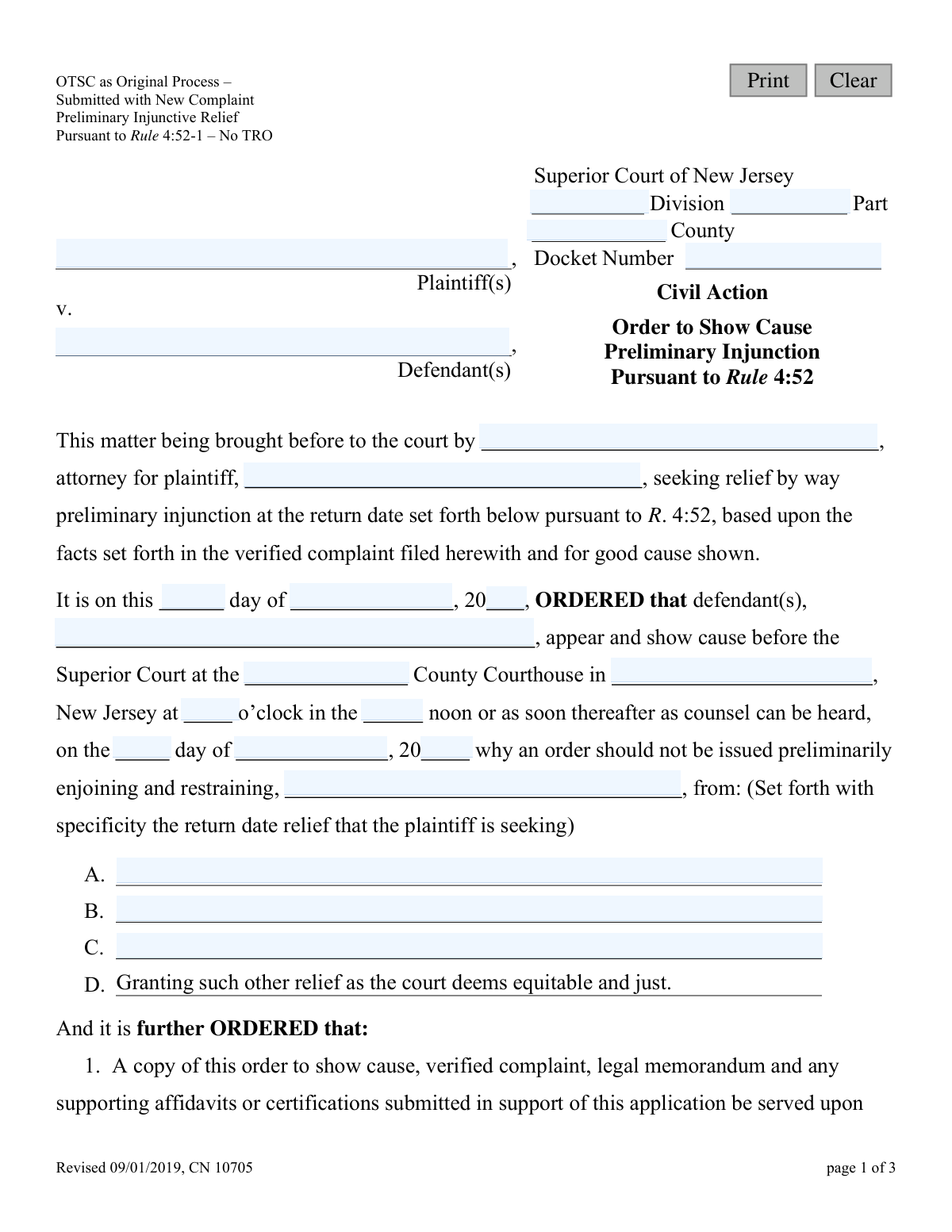
Yes! You can use AI to fill out Order to Show Cause Preliminary Injunction Pursuant to Rule 4:52

This form, officially titled 'Order to Show Cause Preliminary Injunction Pursuant to Rule 4:52', is used in the New Jersey Superior Court to compel a defendant to appear in court and provide reasons why a preliminary injunction should not be issued against them. It is a critical first step for a plaintiff seeking immediate court intervention to prevent potential harm by restraining a defendant's actions pending a full hearing. Today, this form can be filled out quickly and accurately using AI-powered services like Instafill.ai, which can also convert non-fillable PDF versions into interactive fillable forms.
CN 10705 is part of the New Jersey forms category on Instafill.
Our AI automatically handles information lookup, data retrieval, formatting, and form filling.
It takes less than a minute to fill out CN 10705 using our AI form filling.
Securely upload your data. Information is encrypted in transit and deleted immediately after the form is filled out.

Form specifications

Form name: Order to Show Cause Preliminary Injunction Pursuant to Rule 4:52
Number of fields: 38
Number of pages: 1
Language: English
main-image

Instafill Demo: How to fill out PDF forms in seconds with AI

How to Fill Out CN 10705 Online for Free in 2026

Are you looking to fill out a CN 10705 form online quickly and accurately? Instafill.ai offers the #1 AI-powered PDF filling software of 2026, allowing you to complete your CN 10705 form in just 37 seconds or less.
Follow these steps to fill out your CN 10705 form online using Instafill.ai:
  1. 1 Navigate to Instafill.ai and upload or select the New Jersey Order to Show Cause (CN 10705) form.
  2. 2 Use the AI assistant to input essential case details, such as the Superior Court Division, County, and Docket Number.
  3. 3 Enter the full names of the plaintiff(s), defendant(s), and the plaintiff's attorney.
  4. 4 Specify the details of the preliminary injunction being sought, clearly outlining the specific actions the defendant should be restrained from doing.
  5. 5 Fill in the court-ordered dates and times for the hearing, service of documents, and response deadlines.
  6. 6 Provide the judge's name and chambers address where opposition papers should be sent.
  7. 7 Review all the information populated by the AI for accuracy, including names, dates, and the specific relief requested, before downloading the completed form for filing with the court.

Our AI-powered system ensures each field is filled out correctly, reducing errors and saving you time.

Why Choose Instafill.ai for Your Fillable CN 10705 Form?

Speed

Complete your CN 10705 in as little as 37 seconds.

Up-to-Date

Always use the latest 2026 CN 10705 form version.

Cost-effective

No need to hire expensive lawyers.

Accuracy

Our AI performs 10 compliance checks to ensure your form is error-free.

Security

Your personal information is protected with bank-level encryption.

Frequently Asked Questions About Form CN 10705

This form is used by a plaintiff to ask a court to order a defendant to appear and explain why a preliminary injunction, which temporarily stops a specific action, should not be issued against them.

It means a plaintiff has filed a lawsuit against you and is asking the court to restrain you from doing something. You are ordered to appear in court on the 'return date' to present your case.

You must file a written response, pay the required filing fee, and serve your opposition papers on the plaintiff's attorney and the judge by the specified deadline. A phone call to the court will not protect your rights.

If you fail to file and serve an opposition, the court may grant the requested preliminary injunction against you by default, assuming the plaintiff has filed proof of service.

No, they are two separate requirements. You must file an opposition to the order, and you must also file a separate formal 'Answer' to the complaint within 35 days of being served.

You must submit this Order to Show Cause form along with a verified complaint, a legal memorandum, and any supporting affidavits or certifications.

The 'return date' is the scheduled court date when you must appear before the judge to argue for or against the request for a preliminary injunction.

Generally, no. The form states that the court will hear legal arguments, not testimony, on the return date unless the court advises otherwise.

The form advises that you can call the Legal Services office in your county or the Legal Services of New Jersey Statewide Hotline for assistance. You may also be able to get a referral from a Lawyer Referral Service.

In sections A, B, and C, you must describe with specificity the exact actions you want the court to order the defendant to stop doing.

Yes, services like Instafill.ai use AI to help you accurately auto-fill form fields, which saves time and reduces the chance of errors.

You can use a platform like Instafill.ai to upload the PDF and fill it out online. This allows you to easily type your information into the fields, save your progress, and print the completed document.

Services like Instafill.ai can convert non-fillable or 'flat' PDFs into interactive, fillable forms. Simply upload the document, and the tool will make the fields editable for you to complete on your computer.

Compliance CN 10705
Validation Checks by Instafill.ai

1
Docket Number Format Validation
Checks if the Docket Number follows the standard New Jersey court format, which typically includes a county code, division letter, and sequential number (e.g., 'COU-L-123456-23'). This validation ensures the document can be correctly filed and associated with the right case in the court's system. An incorrect format could lead to filing rejection or misfiling of the order.
2
Chronological Date Integrity
Ensures the hearing date (hearingDay, hearingMo, hearingYr) is set for a future date after the order signing date (orderDay, orderMo, orderYr). An order cannot schedule a hearing that has already passed. This check prevents logical impossibilities and ensures the order is procedurally valid and enforceable.
3
Required Party Information
Verifies that both the Plaintiff(s) name ('plaName') and Defendant(s) name ('defName') fields are completed. These fields are fundamental to any legal action, as they identify the parties involved in the dispute. Failure to provide this information makes the order legally meaningless and unenforceable.
4
Mandatory Relief Specification
Confirms that at least the first relief description field ('reliefDesc1') is filled out with the specific actions the plaintiff wants to restrain. The entire purpose of the Order to Show Cause is to request specific injunctive relief. Without this description, the court and the defendant do not know what is being asked, making the order void for vagueness.
5
County Consistency Check
Validates that the county entered in the case caption ('typeCounty') is identical to the county where the hearing is scheduled ('typeCounty2'). This ensures consistency and prevents confusion about the proper venue for the legal proceedings. A mismatch could lead to parties appearing at the wrong courthouse or the document being rejected by the clerk.
6
Conditional Service Description
Checks that if the service method ('serviceType') is selected as 'other' (the second checkbox), the corresponding description field ('serviceDesc') must be completed. This is crucial for the court to understand and approve an alternative method of service. If the description is missing when 'other' is checked, the order for service is incomplete and may be rejected.
7
Valid Response and Reply Deadlines
Verifies that the Defendant's Response Date ('defRespDt') is before the hearing date, and the Plaintiff's Reply Date ('plaReplyDt') is after the defendant's response date but no later than the hearing date. This maintains the proper procedural timeline for filings, ensuring each party has adequate time to respond. Incorrect dates would disrupt the legal process and violate procedural rules.
8
Judge Name Consistency
Ensures the judge's name entered in the defendant's response section ('jdgName') is the same as the judge's name in the plaintiff's reply section ('jdgName2'). This consistency is important for directing all subsequent filings to the correct judge's chambers. A mismatch could cause critical legal documents to be lost or delayed.
9
Numeric Fee Validation
Validates that the 'oppositionFee' and 'filingFee' fields contain valid numerical or currency values. These fields represent official court costs, and non-numeric entries would cause errors in processing payments and filing documents. The system should reject submissions with text like 'N/A' or alphabetic characters in these fields.
10
Valid New Jersey County
Checks that the value entered in the 'typeCounty' field is one of the 21 official counties in New Jersey. This prevents misspellings or the entry of invalid locations, ensuring the case is directed to a legitimate court venue. An invalid county would result in an immediate rejection of the filing by the court clerk.
11
Hearing Time Completeness
Ensures that both the time ('crtTime') and the AM/PM designator ('crtTime2') for the hearing are selected or entered. A specific time is required for scheduling the court appearance and providing proper notice to the defendant. Omitting either part makes the hearing time ambiguous and could cause parties to miss the proceeding.
12
Restrained Party Identification
Validates that the name of the party to be restrained ('restrainName') is filled in and logically corresponds to the defendant's name ('defName'). The order must clearly state who is being enjoined from taking certain actions. This check ensures the core command of the injunction is directed at the correct party and is not ambiguous.
13
Service Timeframe Logic
Verifies that the number of days specified for service ('serviceTime') is a positive integer (e.g., greater than 0). This timeframe is critical for ensuring the defendant receives timely notice of the lawsuit and hearing. The validation prevents impossible values like zero or negative days and ensures the service deadline is procedurally sound.

Common Mistakes in Completing CN 10705

Confusing the Opposition with the Answer

Filers, especially those without legal representation, often mistakenly believe that filing an opposition to the Order to Show Cause also serves as their Answer to the underlying complaint. The form explicitly states these are two separate documents with different deadlines and fees. This error can lead to a default judgment being entered against the defendant for failing to answer the lawsuit, even if they opposed the injunction.

Requesting Vague or Unenforceable Relief

In the sections detailing the requested injunction (A, B, C), filers often use broad, non-specific language like 'stop bothering me.' Courts require precise, actionable terms, such as 'prohibited from coming within 500 feet of the plaintiff's residence.' Vague requests are often denied because they are impossible for a court to enforce, rendering the entire application ineffective.

Improper Service of Process on the Defendant

The form requires serving the defendant according to specific court rules (R. 4:4-3 and R. 4:4-4) within a set number of days. Common mistakes include using regular mail when personal service is required, failing to serve all required documents, or missing the service deadline. Improper service violates the defendant's due process rights and can lead to the judge dismissing the order or postponing the hearing.

Missing Critical Filing Deadlines

This legal form contains several strict deadlines for the plaintiff and defendant, such as filing proof of service, submitting opposition papers, and filing a reply. People often miscalculate dates or simply forget, leading to their documents being rejected or not considered by the judge. Missing a deadline can result in the case being decided against you by default.

Forgetting to File Proof of Service

Paragraph 2 mandates that the plaintiff file a proof of service with the court no later than three days before the return date. Many filers successfully serve the defendant but forget to complete and file this separate document. Without proof of service, the court cannot verify that the defendant was properly notified, and will almost certainly refuse to hear the case or grant any relief on the scheduled date.

Submitting an Incomplete or Incorrect Case Caption

Filers frequently omit or enter incorrect information in the top section of the form, such as the County, Division, or Docket Number. This often happens due to oversight or not having the correct information readily available. An incorrect caption can lead to the document being rejected by the court clerk, causing delays and potentially jeopardizing timely relief.

Failing to Submit a Proposed Form of Order

Paragraph 6 requires the plaintiff to submit a separate, proposed order for the judge to sign if the requested relief is granted. Filers often overlook this requirement, assuming the court will draft the order itself. Forgetting this document means that even if the judge rules in your favor at the hearing, there is no order to sign, which significantly delays the injunction from taking effect.

Incorrectly Calculating or Omitting Filing Fees

The form mentions separate fees for filing the Answer and potentially for the opposition papers. A common mistake is to submit the filing without any fee or with an incorrect amount. The clerk's office will not accept the documents until the correct fee is paid, which can cause the filer to miss a mandatory deadline and have their papers rejected.

Using Illegible Handwriting on a Non-Fillable Form

If the form is only available as a non-fillable PDF, people must print and complete it by hand, often resulting in illegible entries. This can cause court staff to make data entry errors when docketing the case or lead a judge to misinterpret critical information. To avoid this, AI-powered tools like Instafill.ai can convert flat PDFs into fillable forms, ensuring all entries are clear, legible, and properly formatted.

Sending Documents to the Wrong Location

The form requires sending copies of documents to multiple parties, including the court clerk, the opposing party, and directly to the judge's chambers. A frequent error is sending all copies to the clerk's office and failing to send the required 'courtesy copy' to the judge. This means the judge may not have a chance to review the filings before the hearing, putting the filer at a significant disadvantage.
Saved over 80 hours a year

“I was never sure if my IRS forms like W-9 were filled correctly. Now, I can complete the forms accurately without any external help.”

Kevin Martin Green

Your data stays secure with advanced protection from Instafill and our subprocessors

Robust compliance program

Transparent business model

You’re not the product. You always know where your data is and what it is processed for.

ISO 27001, HIPAA, and GDPR

Our subprocesses adhere to multiple compliance standards, including but not limited to ISO 27001, HIPAA, and GDPR.

Security & privacy by design

We consider security and privacy from the initial design phase of any new service or functionality. It’s not an afterthought, it’s built-in, including support for two-factor authentication (2FA) to further protect your account.

Fill out CN 10705 with Instafill.ai

Worried about filling PDFs wrong? Instafill securely fills order-to-show-cause-preliminary-injunction-pursuant-to-rule-452 forms, ensuring each field is accurate.