Yes! You can use AI to fill out Partner Details form
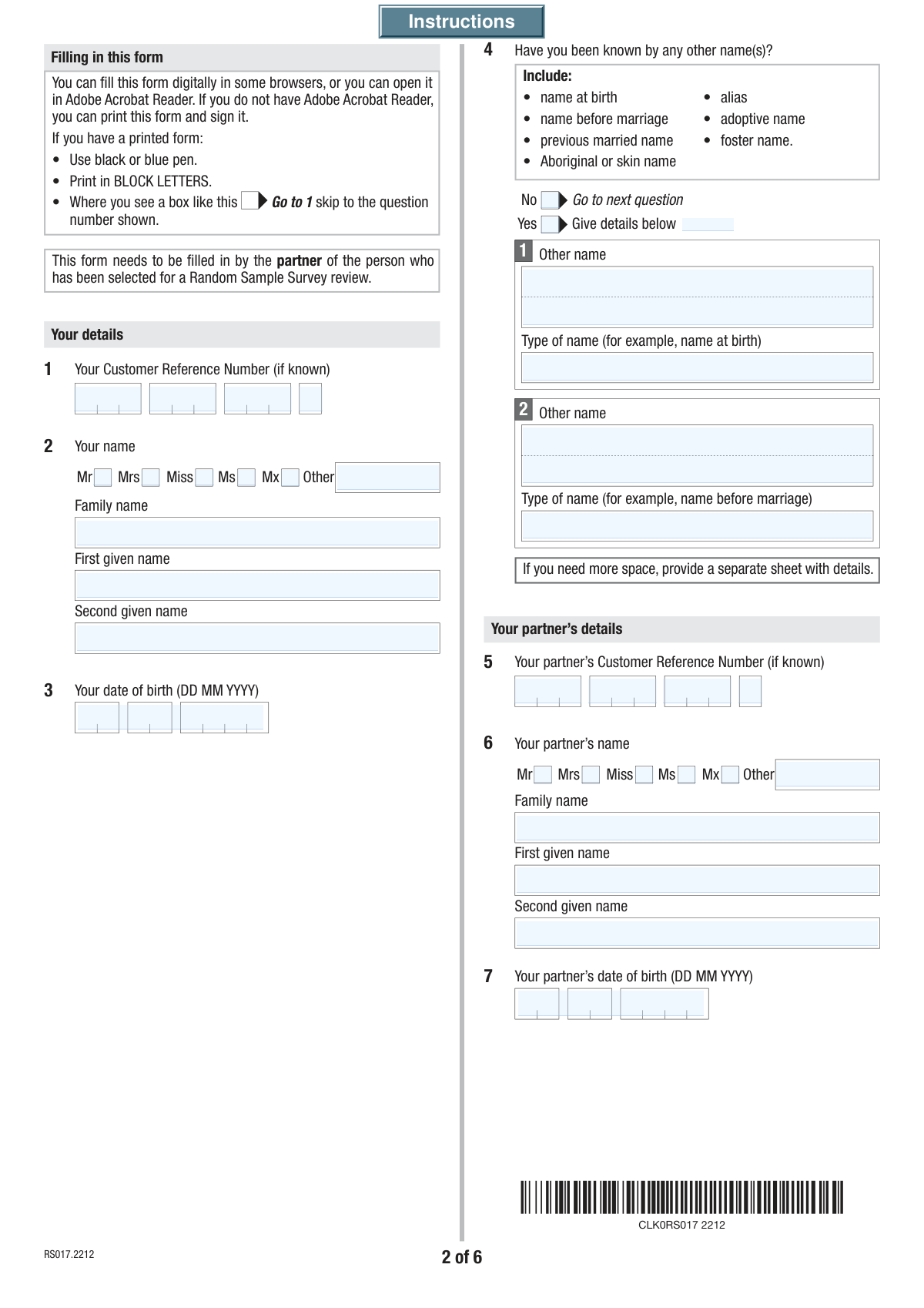
The Partner Details form (SS284) is a crucial document for individuals receiving or applying for payments from Services Australia (Centrelink). It is used to declare your relationship status—whether you are married, in a de facto relationship, or have a registered relationship—as this information directly impacts your payment rate and eligibility. Providing accurate details about your partner helps ensure you receive the correct entitlement. Today, this form can be filled out quickly and accurately using AI-powered services like Instafill.ai, which can also convert non-fillable PDF versions into interactive fillable forms.
SS284 is part of the
ETA forms category on Instafill.
Our AI automatically handles information lookup, data retrieval, formatting, and form filling.
It takes less than a minute to fill out SS284 using our AI form filling.
Securely upload your data. Information is encrypted in transit and deleted immediately after the form is filled out.
Form specifications
| Form name: | Partner Details form |
| Number of fields: | 147 |
| Number of pages: | 6 |
| Filled form examples: | Form SS284 Examples |
| Language: | English |
Instafill Demo: How to fill out PDF forms in seconds with AI
How to Fill Out SS284 Online for Free in 2026
Are you looking to fill out a SS284 form online quickly and accurately? Instafill.ai offers the #1 AI-powered PDF filling software of 2026, allowing you to complete your SS284 form in just 37 seconds or less.
Follow these steps to fill out your SS284 form online using Instafill.ai:
- 1 Navigate to Instafill.ai and upload or select the Partner Details (SS284) form.
- 2 Provide your personal information, including your full name, date of birth, and Customer Reference Number.
- 3 Enter your partner's details, such as their name, date of birth, and Customer Reference Number if applicable.
- 4 Specify your relationship status (married, de facto, registered) and provide relevant dates and details about your living arrangements.
- 5 Complete the sections on your residency status, citizenship, travel history, and employment information.
- 6 Carefully review all the information pre-filled by the AI to ensure it is accurate and complete.
- 7 Digitally sign and date the form before downloading or submitting it to Services Australia as required.
Our AI-powered system ensures each field is filled out correctly, reducing errors and saving you time.
Why Choose Instafill.ai for Your Fillable SS284 Form?
Speed
Complete your SS284 in as little as 37 seconds.
Up-to-Date
Always use the latest 2026 SS284 form version.
Cost-effective
No need to hire expensive lawyers.
Accuracy
Our AI performs 10 compliance checks to ensure your form is error-free.
Security
Your personal information is protected with bank-level encryption.
Frequently Asked Questions About Form SS284
This form is used to collect or update your personal details, contact information, relationship status, and residency information. It appears to be for a government agency to assess eligibility for services or benefits.
Your Customer Reference Number is a unique identifier assigned to you by the agency. You can typically find it on previous letters, emails, or other correspondence you have received from them.
You should list any other names you have been legally known by, such as your name at birth, a maiden name before marriage, an adoptive name, or a legal alias.
First, declare your relationship status (e.g., de facto, married). Then, in the 'Cohabitation Status' section, select 'No' and specify the reason you live apart, such as for work or health reasons.
Your permanent address is the physical address where you reside. Your postal address is where you wish to receive your mail, which can be the same as your permanent address or different, like a P.O. Box.
You will need to indicate your status as a New Zealand citizen who arrived on a NZ passport and provide the date you first arrived in Australia under this status.
Your visa subclass number is a three-digit code that identifies your visa type. You can find this number on your visa grant notification letter or by checking your visa details online through the Department of Home Affairs.
The form provides space for one employer. If you have had multiple employers, you may need to attach a separate sheet with the additional details or contact the issuing agency for specific instructions.
This form includes 'Print' and 'Clear' buttons, which suggests you should fill it out electronically, then print, sign, and mail it. Always refer to the agency's official website for the most up-to-date submission guidelines and mailing address.
Yes, services like Instafill.ai use AI to accurately auto-fill form fields with your saved information. This can help you complete the form faster and with fewer errors.
To use Instafill.ai, you would upload the form to their platform. The AI will automatically detect the fields, allowing you to click and fill them instantly using your securely stored personal profile.
If you have a flat or non-fillable PDF, you can use a service like Instafill.ai. It can convert the non-interactive document into a fillable form that you can complete on your computer.
This is the date you and your current partner got back together after being separated. You only need to provide this date if you have previously separated and then reconciled your relationship.
Compliance SS284
Validation Checks by Instafill.ai
1
Date of Birth Validity and Age Check
This validation ensures the 'Date of Birth' is a valid date in the past and not a future date. It also calculates the applicant's age to ensure they meet a minimum age requirement, such as 16 years old, to be eligible to complete the form. If the date is invalid or the applicant is too young, the submission is blocked with an error message explaining the requirement.
2
Exclusive Title Selection
This check verifies that only one title option (Mr, Mrs, Miss, Ms, Mx) is selected, or that the 'Other Title' text field is filled, but not both. It prevents ambiguous or conflicting data. If a user selects a checkbox and also types in the 'Other Title' field, an error should prompt them to choose only one method of providing their title.
3
Conditional Previous Name Requirement
This validation enforces a logical rule based on the 'Previous Names Inquiry'. If the user checks 'Yes' to having been known by other names, the system must verify that at least one 'Other Name' and 'Type of Name' field is completed. Conversely, if 'No' is checked, all 'Other Name' fields must be empty to ensure data consistency.
4
Customer Reference Number Completeness
This check ensures that all four parts of the 'Customer Reference Number' are filled out. It prevents incomplete submissions of a critical identifier. The validation might also check that each part conforms to a specific format (e.g., numeric, specific length) if such rules exist, ensuring the complete number can be correctly reconstructed and used for processing.
5
Logical Date Order for Employment
This validation checks the logical consistency between the 'Employment Start Date' and 'Employment End Date'. The 'Employment End Date', if provided, must be on or after the 'Employment Start Date'. This prevents illogical data entry, such as an employment period ending before it began, which would cause errors in processing work history.
6
Email Address Format Validation
This check verifies that the value entered in the 'Email Address' field conforms to the standard format of an email address (e.g., '[email protected]'). This is crucial for ensuring that communication sent to the applicant will be successfully delivered. An invalid format would result in an error message prompting the user to correct the entry before submission.
7
Australian Postcode Format
This validation ensures that the 'Postcode' fields for both the permanent and postal addresses contain a valid Australian postcode format, which is typically a 4-digit number. This is essential for mail delivery and address verification services. If the entry is not a 4-digit number, the form should display an error and request a correction.
8
Conditional Cohabitation Reason
This check is triggered if the user indicates they do not live with their partner by selecting 'No' for 'Cohabitation Status'. It then verifies that at least one of the checkboxes under 'Reason for Not Living with Partner' is selected. This ensures that the reason for the living arrangement is captured, which is often required for assessing relationship status for official purposes.
9
Partner Data and Relationship Status Consistency
If any field related to a partner (e.g., 'Partner's Family Name', 'Partner's Date of Birth') is filled, this validation ensures that a 'Relationship Status' (Married, Registered, or De facto) is also selected. This maintains logical integrity, as providing partner details implies a defined relationship. Failure to select a status would prompt the user to clarify the nature of their relationship.
10
Declaration Date Logic
This check ensures the 'Declaration Date' is a mandatory field, is a valid date, and is not set in the future. It also verifies that this date is not earlier than other significant dates entered on the form, such as a marriage date or employment start date. This confirms the declaration was made after all the reported events occurred, which is critical for legal and administrative validity.
11
Conditional Travel Details Requirement
This validation rule is activated when a user selects 'Yes' for the 'Travel History Outside Australia' question. It then checks that the 'Year Last Entered Australia', 'Passport Number', and 'Passport Country of Issue' fields are all filled in. This ensures that essential information for verifying residency and travel history is collected when required.
12
Visa and Citizenship Date Sanity Check
This validation cross-references dates related to residency status, such as 'Date Citizenship Granted' or 'Permanent Visa Grant Date', with the applicant's 'Date of Birth'. It ensures that any such grant date is logically after the applicant's birth date. This simple check prevents impossible data entry errors and maintains the integrity of the applicant's timeline.
13
Conditional 'Other Reason' Text Field
When a user selects the 'Other' checkbox under 'Reason for Not Living with Partner', this validation ensures the corresponding 'Other Reason' text field is not empty. This prevents users from selecting 'Other' without providing the necessary explanation. If the text field is left blank, an error message should appear, requiring the user to provide details.
14
Relationship Date vs. Birth Dates
This check ensures that any relationship commencement date (e.g., 'Married Date', 'De Facto Relationship Start Date') is after both the applicant's and their partner's 'Date of Birth'. This is a fundamental logical check to prevent data entry errors. A relationship cannot start before the individuals involved were born, and this validation prevents such impossible scenarios from being submitted.
Common Mistakes in Completing SS284
The form requires a Customer Reference Number to be entered across four separate fields. Users often make mistakes by transposing digits between the fields or misreading characters like '0' for 'O'. This error can prevent the system from matching the form to the correct file, causing significant processing delays or rejection. To avoid this, double-check the number against your source document, reading each segment carefully before entry.
Applicants frequently check 'No' to having been known by other names, forgetting about maiden names, previous married names, or legal name changes. This omission can lead to failed identity verification checks and may be interpreted as providing false information. It is crucial to list all names you have used to ensure a smooth background check and processing. AI-powered tools like Instafill.ai can help by storing this information securely and populating it consistently across all your forms.
A common error is entering the same address for both 'Permanent Address' and 'Postal Address' when they are different, or vice versa. This can result in important correspondence being sent to the wrong location, leading to missed deadlines and communications. Always verify if your mailing address (like a PO Box) is different from your residential address and fill in both sections accurately.
The form asks for a 'Married Date or Last Reconciled Date', which is a nuanced requirement. Many people enter only their original marriage date, even if they have separated and reconciled since, which is the more relevant date for the form's purpose. This mistake can affect the assessment of your relationship history and eligibility. Carefully read the field label and provide the most recent date applicable to your situation.
This form contains many conditional fields, such as providing details for not living with a partner only after selecting 'No'. A frequent mistake is answering the initial question (e.g., checking 'No') but failing to complete the required follow-up details. This leaves the application incomplete and will halt processing until the missing information is provided. To prevent this, review the form after filling it to ensure all triggered sections are fully completed.
The residence status section is complex, asking for specific visa subclass numbers and grant dates. Applicants often guess, leave fields blank, or select the wrong visa type because they don't have the documents handy. Incorrect information here can lead to an incorrect assessment of your residency status and potential rejection. Always refer to your official immigration documents or visa grant letters to ensure every detail is accurate.
This Australian form likely expects dates in DD/MM/YYYY format, but users, particularly from other countries, often use MM/DD/YYYY. This simple formatting error can cause dates like '04/08/2023' to be interpreted as April 8th instead of August 4th, leading to critical data errors in date of birth, visa dates, or relationship timelines. Using an AI form-filler like Instafill.ai can help prevent this by automatically formatting dates correctly based on regional standards.
When asked about travel outside Australia, people sometimes only consider long-term stays and forget to include short holidays or business trips. The form explicitly states to include 'short trips and holidays,' so omitting them results in an inaccurate declaration. This can cause discrepancies with immigration records and delay your application. Review your travel records and passport stamps to ensure all international travel is accounted for.
When filling out employer details, applicants often use the common trading name or brand name (e.g., 'McDonald's') instead of the full legal entity name (e.g., 'McDonald's Australia Limited'). This can cause issues during income or employment verification, as the name won't match official records. Always use the full legal name found on your payslip or employment contract to avoid verification delays.
The form distinguishes between a 'Registered relationship' (formally registered with an Australian state/territory) and a 'De facto' relationship. Users may not understand the legal difference and select the wrong status, which has significant implications for how their partnership is assessed. This can affect eligibility for certain benefits or services. It is vital to understand the definition of each status and choose the one that legally describes your situation.
Saved over 80 hours a year
“I was never sure if my IRS forms like W-9 were filled correctly. Now, I can complete the forms accurately without any external help.”
Kevin Martin Green
Your data stays secure with advanced protection from Instafill and our subprocessors

Robust compliance program
Transparent business model
You’re not the product. You always know where your data is and what it is processed for.
ISO 27001, HIPAA, and GDPR
Our subprocesses adhere to multiple compliance standards, including but not limited to ISO 27001, HIPAA, and GDPR.
Security & privacy by design
We consider security and privacy from the initial design phase of any new service or functionality. It’s not an afterthought, it’s built-in, including support for two-factor authentication (2FA) to further protect your account.
Fill out SS284 with Instafill.ai
Worried about filling PDFs wrong? Instafill securely fills partner-details-form forms, ensuring each field is accurate.



