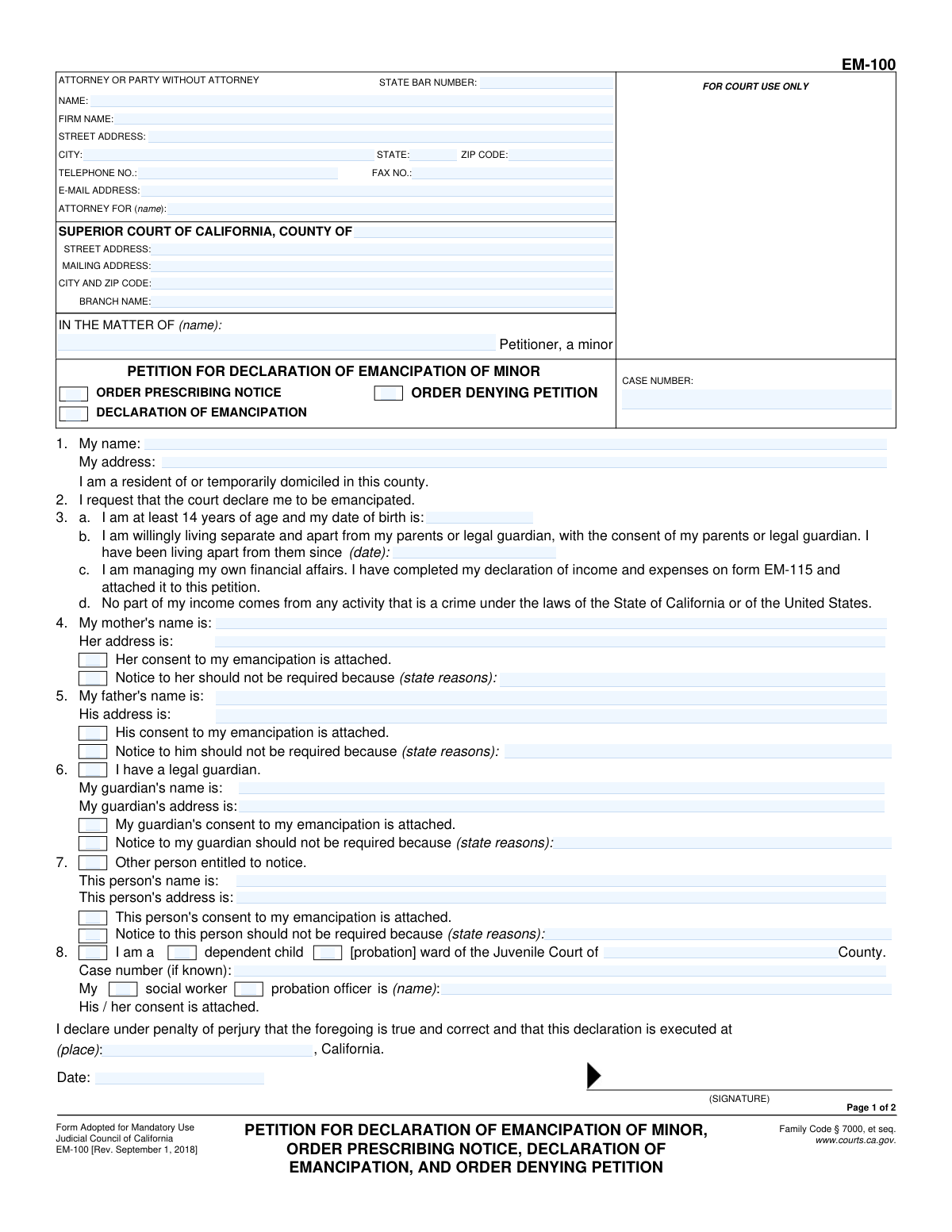
Yes! You can use AI to fill out Petition for Declaration of Emancipation of Minor, Order Prescribing Notice, Declaration of Emancipation, and Order Denying Petition

California Form EM-100 is a legal petition used by a minor, who is at least 14 years old, to ask a court to be declared legally independent from their parents or guardians. This process, known as emancipation, grants the minor certain adult rights and responsibilities, such as entering into contracts and managing their own finances. Today, this form can be filled out quickly and accurately using AI-powered services like Instafill.ai, which can also convert non-fillable PDF versions into interactive fillable forms.
EM-100 is part of the California court forms category on Instafill.
Our AI automatically handles information lookup, data retrieval, formatting, and form filling.
It takes less than a minute to fill out EM-100 using our AI form filling.
Securely upload your data. Information is encrypted in transit and deleted immediately after the form is filled out.

Form specifications

Form name: Petition for Declaration of Emancipation of Minor, Order Prescribing Notice, Declaration of Emancipation, and Order Denying Petition
Number of fields: 88
Number of pages: 1
Language: English
main-image

Instafill Demo: How to fill out PDF forms in seconds with AI

How to Fill Out EM-100 Online for Free in 2026

Are you looking to fill out a EM-100 form online quickly and accurately? Instafill.ai offers the #1 AI-powered PDF filling software of 2026, allowing you to complete your EM-100 form in just 37 seconds or less.
Follow these steps to fill out your EM-100 form online using Instafill.ai:
  1. 1 Navigate to Instafill.ai and upload or select the EM-100 form.
  2. 2 Provide your personal information, including your full name, current address, and date of birth.
  3. 3 Enter the names and addresses of your parents or legal guardians, and indicate if their consent is attached.
  4. 4 Detail your living situation, confirming you are living separately from your parents/guardians, and state that you are managing your own financial affairs (referencing form EM-115).
  5. 5 If applicable, provide information about any juvenile court dependency or wardship.
  6. 6 Review all the information populated by the AI for accuracy and completeness.
  7. 7 Electronically sign and date the petition under penalty of perjury before downloading it for filing with the appropriate California Superior Court.

Our AI-powered system ensures each field is filled out correctly, reducing errors and saving you time.

Why Choose Instafill.ai for Your Fillable EM-100 Form?

Speed

Complete your EM-100 in as little as 37 seconds.

Up-to-Date

Always use the latest 2026 EM-100 form version.

Cost-effective

No need to hire expensive lawyers.

Accuracy

Our AI performs 10 compliance checks to ensure your form is error-free.

Security

Your personal information is protected with bank-level encryption.

Frequently Asked Questions About Form EM-100

This form is a petition for a minor (a person under 18) to ask a California court to declare them legally emancipated. Emancipation grants a minor the legal rights and responsibilities of an adult.

You must be at least 14 years old, willingly living separate from your parents or guardian with their consent, managing your own finances, and have a legal source of income.

You must complete and attach Form EM-115, Declaration of Income and Expenses, to show the court that you are managing your own financial affairs.

While the form requires you to be living apart with your parents' consent, you can still file if you don't have their written consent. You will need to explain to the court why notice to them should not be required or why you are unable to get their consent.

In sections 4 and 5, you can state that a parent's address is unknown and provide reasons why the court should not require you to give them notice of the petition.

After you file, a judge will review your petition and issue an 'Order Prescribing Notice' to determine who must be notified. The court may grant the petition without a hearing if everyone consents, or it may set a hearing date for you to appear.

This means you are currently under the supervision of the juvenile court system, either through child protective services or probation. If this applies to you, you must provide the case number and the name of your social worker or probation officer.

You need to provide their full name and current address. If you have their written consent to your emancipation, you should attach it to the petition.

If the court finds that your petition does not meet the legal requirements for emancipation, it will issue an 'Order Denying Petition'. This means you will not be declared legally emancipated.

Yes, you can use AI-powered services like Instafill.ai to help you fill out this form. These tools can accurately populate form fields based on your information, which helps save time and reduce errors.

You can use a service like Instafill.ai to complete the form online. Simply upload the PDF to the platform, and its AI will allow you to fill in your information interactively before you download the completed document for filing.

If you have a non-fillable PDF, you can use Instafill.ai to convert it into an interactive, fillable form. This allows you to easily type your information directly into the fields.

This single form, EM-100, serves multiple purposes in the emancipation process. It includes your initial Petition, the court's Order about who to notify, and the final court decision, which can be either a Declaration of Emancipation or an Order Denying Petition.

Compliance EM-100
Validation Checks by Instafill.ai

1
Verify Petitioner's Age Eligibility
Calculates the petitioner's age based on the 'date of birth' in item 2 and the submission date. The age must be 14 years or older. This is a strict legal requirement for emancipation under California Family Code § 7120. If the petitioner is under 14, the petition is invalid on its face and will be denied.
2
Validate Date of Birth Format
Ensures the 'date of birth' in item 2 is entered in a valid date format (e.g., MM/DD/YYYY) and represents a real date that is not in the future. This is crucial for accurately calculating the petitioner's age, which determines legal eligibility. An invalid date format would block the age verification and halt the processing of the petition.
3
Confirm Attachment of Financial Declaration (Form EM-115)
Verifies that the submission includes the referenced Form EM-115, as stated in item 3. Managing one's own financial affairs is a core requirement for emancipation, and this form provides the necessary evidence for the court to evaluate the minor's financial independence. If the petition states the form is attached but it is missing, the filing will be considered incomplete and likely lead to denial.
4
Ensure Petitioner's Name and Address are Complete
Verifies that the petitioner's full name (in the header 'IN THE MATTER OF') and their current address (in item 1) are provided. This information is essential for identifying the minor and for all official correspondence and legal notices. Failure to provide this core identifying information makes the petition incomplete and un-fileable.
5
Validate 'Living Apart Since' Date
Validates that the date provided in item 2.b, indicating when the minor began living separately from their parents/guardian, is a valid date format and occurs in the past. This date helps establish the timeline and stability of the minor's independent living situation, a key factor for the court. An invalid, future, or nonsensical date would require correction.
6
Conditional Requirement for Guardian Information
Verifies that if the checkbox in item 6 ('I have a legal guardian') is marked, the guardian's name and address fields are also filled out. This ensures that all legally responsible parties are identified for notification purposes as required by law. If the box is checked but the information is missing, the petition is incomplete and cannot be properly served.
7
Require Justification for Waiving Notice
Checks that if any checkbox to waive notice for a parent or guardian (items 4, 5, 6, or 7) is selected, the corresponding text field explaining the reason is not empty. The court requires a compelling reason to bypass the legal requirement of notifying a parent or guardian. An empty justification will result in the waiver request being ignored and the petition being delayed for proper notice.
8
Conditional Requirement for Juvenile Court Details
Ensures that if the petitioner indicates they are a dependent or ward of the Juvenile Court (item 8), they must provide the corresponding county, case number, and the name of their social worker or probation officer. This information is critical as the Juvenile Court has jurisdiction and must be properly notified. Missing details would prevent required legal notifications and stall the emancipation proceedings.
9
Verify Petitioner's Signature and Execution Date
Confirms that the petitioner's signature is present and that the execution date at the bottom of page 1 is filled out with a valid date. The signature, made under penalty of perjury, legally attests to the truthfulness of the petition's contents. An unsigned or undated petition is legally invalid and will be rejected by the court clerk.
10
Ensure Case Number Consistency Across Pages
Verifies that the Case Number entered in the header of page 1 matches the Case Number entered in the header of page 2. Maintaining a consistent case number is crucial for document management and ensuring all pages are correctly associated with the same legal file. A mismatch could lead to administrative errors, delays, or misfiling of the document.
11
Prevent Contradictory Consent and Notice Waiver Selections
Ensures that for any single person (e.g., mother in item 4), the petitioner does not select both the 'consent is attached' checkbox and the 'notice should not be required' checkbox. These two options are logically contradictory. Selecting both indicates a user error that must be corrected before filing, as it creates ambiguity about how to proceed with notice.
12
Ensure Court County is Specified
Validates that the county of the Superior Court where the petition is being filed is specified at the top of the form. This is the most fundamental piece of information for routing the document to the correct legal jurisdiction. A petition without a specified county is un-fileable and will be immediately rejected.
13
Validate Email Address Format
Checks that any email address provided in the 'ATTORNEY OR PARTY WITHOUT ATTORNEY' section has a valid format (e.g., contains an '@' symbol and a domain). While not always mandatory, a valid email is essential for modern electronic court communications and notifications. An invalid format could cause the filer to miss important updates or rulings.

Common Mistakes in Completing EM-100

Forgetting to Attach Required Form EM-115

Section 4 of the petition explicitly requires the petitioner to complete and attach Form EM-115, the Declaration of Income and Expenses. Minors often overlook this requirement, focusing only on the main petition form. Submitting the petition without the mandatory financial declaration will result in an incomplete filing, causing the court to reject it and leading to significant delays.

Incomplete or Missing Parent/Guardian Information

Petitioners must provide the full name and current address for each parent or legal guardian in sections 6, 7, and 8. It's common for minors to leave an address blank for an estranged parent without providing a valid reason. This omission prevents the court from giving proper legal notice, which is a requirement for the case to proceed, and will halt the petition until the information is provided or a formal request to waive notice is approved.

Insufficient Justification for Waiving Notice

When a parent's location is unknown or there's a reason not to notify them, the petitioner must provide a detailed explanation. A common mistake is writing a vague reason like 'I don't know where they live' without describing the steps taken to find them. The court requires a compelling justification to waive a person's due process right to notice, and a weak explanation will cause delays or denial of the request.

Failing to Sign and Date the Petition

The signature line on the bottom of page 1, under the penalty of perjury clause, is one of the most critical parts of the form. Forgetting to sign and date the petition makes the document legally invalid. The court clerk will not accept an unsigned petition, forcing the minor to correct the error and refile, restarting the process.

Incorrectly Handling Consent Forms

In sections 6, 7, and 8, a petitioner might check the box indicating that a parent's or guardian's consent is attached but then fail to include the separate, signed consent document. This creates a direct contradiction in the filing that the court must address. To avoid this, ensure that for every 'consent is attached' box checked, a corresponding signed consent form is included with the submission.

Filing While Under the Minimum Age

The petition clearly states in section 2 that the minor must be 'at least 14 years of age' to qualify for emancipation. Some minors file the petition before their 14th birthday, not realizing this is a strict legal prerequisite. This results in an automatic denial of the petition, as the court has no jurisdiction to grant emancipation to someone younger than 14.

Omitting Juvenile Court Status

If the minor is a dependent or ward of the Juvenile Court, they must declare this in section 8 and provide the case number and social worker's name. Minors may forget this or believe it is irrelevant, but it is a critical piece of information. Failing to disclose this status can be seen as misleading the court and will stop the emancipation proceedings until the juvenile court is properly notified.

Incorrectly Filling the 'Attorney or Party' Section

Minors who are filing for themselves (in 'pro per') often get confused by the top-left box on page 1 and leave it blank, thinking it is only for lawyers. This section must be completed with the petitioner's own name, address, and phone number. Leaving it blank means the court has no primary contact information for the filer, which can cause major communication issues and delays.

Filling Out Court-Use-Only Sections

Page 2 of the form contains sections like 'Order Prescribing Notice' and 'Declaration of Emancipation' that are reserved for the judge's findings and orders. Petitioners sometimes mistakenly write in these areas, which can confuse court staff and may require the filer to submit a clean copy. It is crucial to only fill out the petitioner's sections on page 1 and the case header on page 2.

Using Vague or Incorrect Date Formats

The form requires specific dates for the petitioner's birth (section 2) and when they began living apart from their parents (section 3). Common errors include using an incorrect format (e.g., DD/MM/YYYY) or providing a vague timeframe like 'last summer' instead of a precise date. These inaccuracies can lead to requests for clarification and slow down the review process. AI-powered tools like Instafill.ai can help prevent these errors by auto-formatting dates correctly and ensuring all required fields are complete.
Saved over 80 hours a year

“I was never sure if my IRS forms like W-9 were filled correctly. Now, I can complete the forms accurately without any external help.”

Kevin Martin Green

Your data stays secure with advanced protection from Instafill and our subprocessors

Robust compliance program

Transparent business model

You’re not the product. You always know where your data is and what it is processed for.

ISO 27001, HIPAA, and GDPR

Our subprocesses adhere to multiple compliance standards, including but not limited to ISO 27001, HIPAA, and GDPR.

Security & privacy by design

We consider security and privacy from the initial design phase of any new service or functionality. It’s not an afterthought, it’s built-in, including support for two-factor authentication (2FA) to further protect your account.

Fill out EM-100 with Instafill.ai

Worried about filling PDFs wrong? Instafill securely fills petition-for-declaration-of-emancipation-of-minor-order-prescribing-notice-declaration-of-emancipation-and-order forms, ensuring each field is accurate.