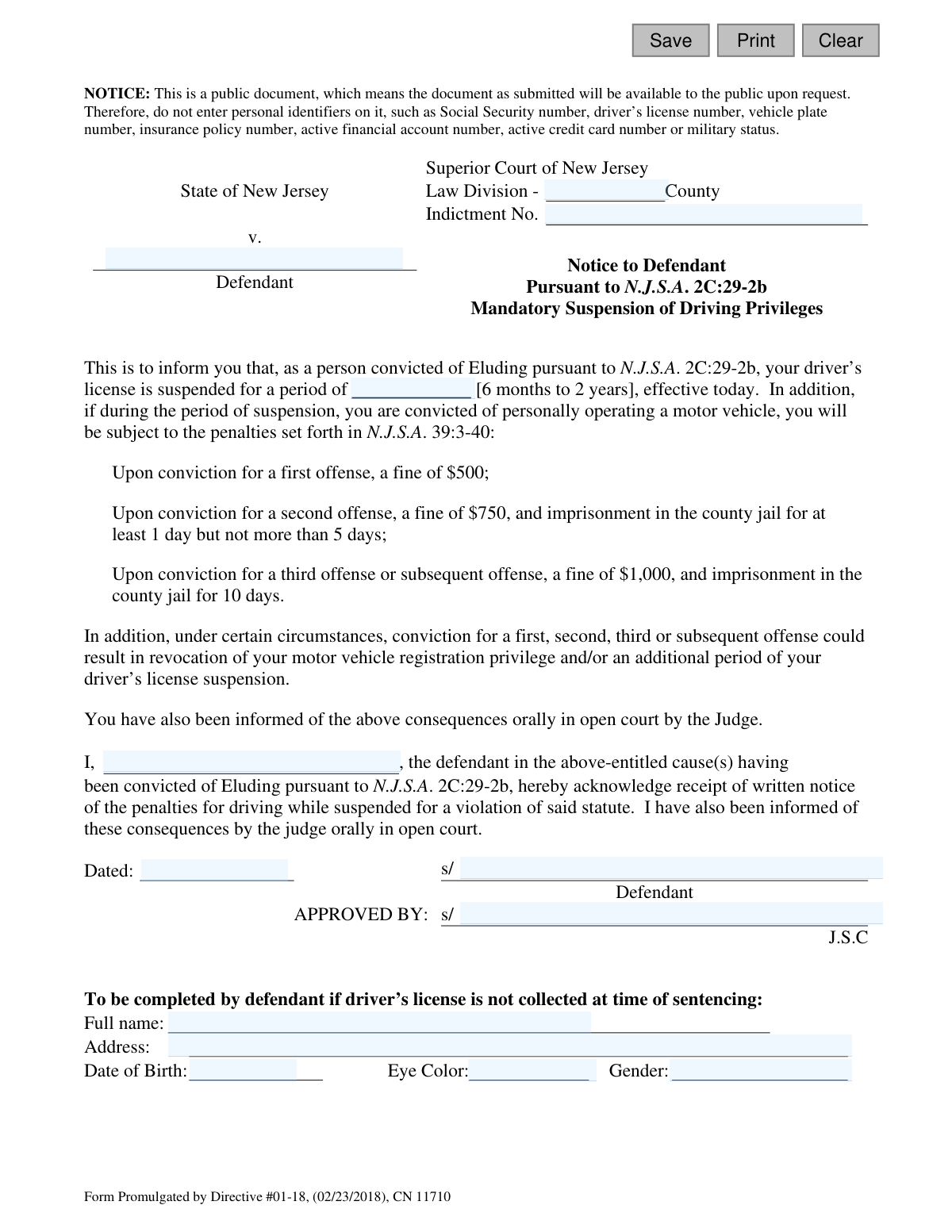
Yes! You can use AI to fill out Plea-13 Notice to Defendant Pursuant to N.J.S.A. 2C:29-2b Mandatory Suspension of Driving Privileges
The Plea-13 form is a legal document issued by the Superior Court of New Jersey to officially inform a defendant convicted of eluding (under N.J.S.A. 2C:29-2b) about the mandatory suspension of their driving privileges. It outlines the suspension period and the penalties for driving while suspended, and the defendant signs it to acknowledge receipt of this notice. Today, this form can be filled out quickly and accurately using AI-powered services like Instafill.ai, which can also convert non-fillable PDF versions into interactive fillable forms.
Plea-13 is part of the
New Jersey forms category on Instafill.
Our AI automatically handles information lookup, data retrieval, formatting, and form filling.
It takes less than a minute to fill out Plea-13 using our AI form filling.
Securely upload your data. Information is encrypted in transit and deleted immediately after the form is filled out.
Form specifications
| Form name: | Plea-13 Notice to Defendant Pursuant to N.J.S.A. 2C:29-2b Mandatory Suspension of Driving Privileges |
| Number of fields: | 16 |
| Number of pages: | 1 |
| Language: | English |
Instafill Demo: How to fill out PDF forms in seconds with AI
How to Fill Out Plea-13 Online for Free in 2026
Are you looking to fill out a PLEA-13 form online quickly and accurately? Instafill.ai offers the #1 AI-powered PDF filling software of 2026, allowing you to complete your PLEA-13 form in just 37 seconds or less.
Follow these steps to fill out your PLEA-13 form online using Instafill.ai:
- 1 Navigate to Instafill.ai and upload or select the Plea-13 form.
- 2 The AI will scan the document and identify all fillable fields, such as County, Indictment No., and Defendant's Name.
- 3 Follow the AI assistant's prompts to provide the necessary case information as required by the court.
- 4 Enter the defendant's personal details in the lower section, including full name, address, date of birth, eye color, and gender.
- 5 Carefully review all the information populated by the AI to ensure it is accurate and complete.
- 6 Electronically sign and date the form in the designated fields for the defendant's acknowledgment.
- 7 Download, print, or securely submit the completed Plea-13 form as directed by the court.
Our AI-powered system ensures each field is filled out correctly, reducing errors and saving you time.
Why Choose Instafill.ai for Your Fillable Plea-13 Form?
Speed
Complete your Plea-13 in as little as 37 seconds.
Up-to-Date
Always use the latest 2026 Plea-13 form version.
Cost-effective
No need to hire expensive lawyers.
Accuracy
Our AI performs 10 compliance checks to ensure your form is error-free.
Security
Your personal information is protected with bank-level encryption.
Frequently Asked Questions About Form Plea-13
This form serves as an official written notice to a defendant convicted of Eluding under N.J.S.A. 2C:29-2b. It confirms the mandatory suspension of their driving privileges and outlines the penalties for driving while suspended.
The defendant who has been convicted of Eluding must sign this form to acknowledge they have received notice of their license suspension. A Superior Court Judge also signs to approve the notice.
For a conviction of Eluding, your license will be suspended for a mandatory period of six months to two years. The exact duration will be determined by the judge and written on the form.
Driving while suspended for an eluding conviction carries severe penalties, including a $500 fine for a first offense and potential jail time for subsequent offenses. Your vehicle registration could also be revoked.
This form is a public document, meaning it can be accessed by the public upon request. To protect your privacy and prevent identity theft, you are instructed not to include sensitive personal identifiers like your Social Security or driver's license number.
If your physical license is not surrendered at the time of sentencing, you must complete the bottom section of the form. You will need to provide your full name, address, date of birth, eye color, and gender.
By signing, you are acknowledging that you have received this written notice about your license suspension and the penalties for driving while suspended. You are also confirming that the judge informed you of these consequences orally in court.
After you and the judge sign the form, it becomes part of your official court record for the case. It serves as legal proof that you were properly notified of your mandatory license suspension.
The form states that the suspension is 'effective today,' which means it begins on the date you are sentenced and sign the form in court.
The Indictment Number and County information will be provided by the court and should be on other legal documents related to your case. The court clerk or your attorney can help you locate this information.
Yes, services like Instafill.ai use AI to help you accurately auto-fill form fields with your case information, saving you time and reducing errors. This is especially useful for completing the personal information section if required.
Simply upload the Plea-13 form to the Instafill.ai platform. The AI will identify the fillable fields, allowing you to easily enter your information, sign electronically, and download the completed document.
You can use a service like Instafill.ai, which can convert flat, non-fillable PDFs into interactive forms. This allows you to easily type your information directly into the fields before printing or submitting.
Compliance Plea-13
Validation Checks by Instafill.ai
Common Mistakes in Completing Plea-13
The form explicitly warns users not to include personal identifiers like Social Security or driver's license numbers. This mistake often occurs when individuals, under stress, either overlook the warning or mistakenly believe the information is required. Including this data makes it part of a public document, exposing sensitive information and increasing the risk of identity theft. To avoid this, carefully read all notices on the form and only provide the exact information requested in the designated fields.
The defendant's name is required in multiple locations: the case caption, the acknowledgment paragraph, the signature line, and the personal details section. A common error is to use different variations, such as including a middle initial in one place but not another, or using a nickname. This inconsistency can lead to processing delays or rejection of the filing. Always use the full, official legal name as it appears on other court documents for all fields.
The Indictment Number is a critical piece of data for correctly filing the document with the court. These numbers have a specific format that must be followed precisely. People often make transcription errors or omit dashes, leading to the form being associated with the wrong case or rejected by the clerk's office. To prevent this, carefully copy the number from the official indictment or other court records without any changes.
The 'County' field, located at the top of the form, is frequently overlooked. Failing to specify the correct county can cause the document to be misrouted, significantly delaying the legal process and potentially causing non-compliance with court orders. Always start filling out the form from the top and ensure every field, especially jurisdictional ones like the county, is completed accurately.
The form requires entering the specific license suspension period, which must be between 6 months and 2 years. A mistake is to write an ambiguous term like 'one year' instead of a more precise '12 months', or to enter a duration outside the legally mandated range. This can create legal uncertainty and may require clarification from the judge. Ensure the exact term of suspension as stated by the judge in open court is entered clearly and precisely.
The bottom section for personal details (address, DOB, etc.) is conditional, only to be completed 'if driver’s license is not collected at time of sentencing.' Defendants often misunderstand this, either filling it out unnecessarily or, more critically, failing to complete it when required. Not providing this information when the license isn't surrendered can delay the suspension process with the Motor Vehicle Commission. Carefully read the instructions for this section and complete it only if the condition applies.
The 's/' notation before the signature lines indicates a conformed signature for electronic filing, meaning the name should be typed (e.g., '/s/ John Defendant'). Many people are unfamiliar with this convention and may try to draw a signature, leave it blank, or type their name without the '/s/'. This can lead to the document being deemed improperly executed and rejected by the court's e-filing system. Always follow the proper format for electronic signatures as required by the court.
When the address is required, it must be complete and accurate for the court and other agencies to send official notices. Common mistakes include omitting an apartment or unit number, forgetting the ZIP code, or using unclear abbreviations. An incomplete address can result in missed court dates or failure to receive critical documents, leading to further legal penalties. AI-powered tools like Instafill.ai can help prevent this by validating and standardizing addresses to ensure they are complete and mailable.
The form requires dates in two places: the signature date ('Dated:') and the defendant's Date of Birth. People often use inconsistent formats (e.g., MM-DD-YY vs. MM/DD/YYYY), which can cause data entry errors for court administration. The best practice is to use the full MM/DD/YYYY format for all dates to ensure clarity and avoid any ambiguity. Using a tool like Instafill.ai can help enforce a consistent and valid date format across the entire document.
Many court forms are distributed as flat, non-fillable PDFs, forcing users to print them and fill them out by hand. This often leads to illegible handwriting, which can cause transcription errors by court staff, and makes it impossible to save a digital copy. This manual process is also where many data entry mistakes occur. AI-powered form fillers like Instafill.ai can convert such non-fillable PDFs into interactive, fillable forms, making the process faster, more accurate, and legible.
Saved over 80 hours a year
“I was never sure if my IRS forms like W-9 were filled correctly. Now, I can complete the forms accurately without any external help.”
Kevin Martin Green
Your data stays secure with advanced protection from Instafill and our subprocessors

Robust compliance program
Transparent business model
You’re not the product. You always know where your data is and what it is processed for.
ISO 27001, HIPAA, and GDPR
Our subprocesses adhere to multiple compliance standards, including but not limited to ISO 27001, HIPAA, and GDPR.
Security & privacy by design
We consider security and privacy from the initial design phase of any new service or functionality. It’s not an afterthought, it’s built-in, including support for two-factor authentication (2FA) to further protect your account.
Fill out Plea-13 with Instafill.ai
Worried about filling PDFs wrong? Instafill securely fills plea-13-notice-to-defendant-pursuant-to-njsa-2c29-2b-mandatory-suspension-of-driving-privileges forms, ensuring each field is accurate.