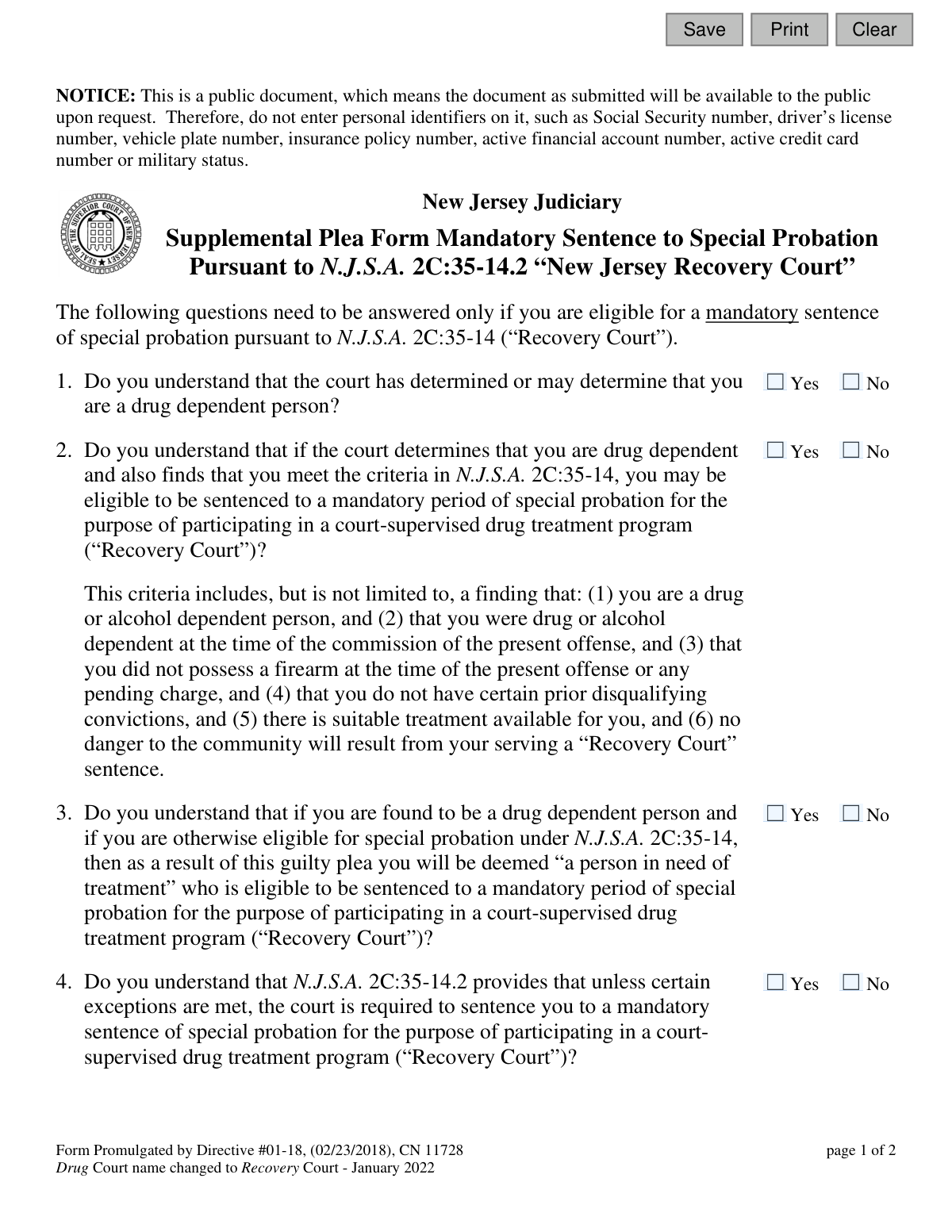
Yes! You can use AI to fill out Plea-RC (12), Supplemental Plea Form Mandatory Sentence to Special Probation Pursuant to N.J.S.A. 2C:35-14.2 "Recovery Court"

The New Jersey Plea-RC (12) is a legal document for defendants who may be sentenced to special probation under the 'Recovery Court' program as per N.J.S.A. 2C:35-14.2. It serves to confirm the defendant's understanding of their eligibility and the implications of entering this court-supervised drug treatment program as part of their guilty plea. Today, this form can be filled out quickly and accurately using AI-powered services like Instafill.ai, which can also convert non-fillable PDF versions into interactive fillable forms.
Plea-RC (12) is part of the New Jersey forms category on Instafill.
Our AI automatically handles information lookup, data retrieval, formatting, and form filling.
It takes less than a minute to fill out Plea-RC (12) using our AI form filling.
Securely upload your data. Information is encrypted in transit and deleted immediately after the form is filled out.

Form specifications

Form name: Plea-RC (12), Supplemental Plea Form Mandatory Sentence to Special Probation Pursuant to N.J.S.A. 2C:35-14.2 "Recovery Court"
Number of fields: 21
Number of pages: 1
Language: English
main-image

Instafill Demo: How to fill out PDF forms in seconds with AI

How to Fill Out Plea-RC (12) Online for Free in 2026

Are you looking to fill out a PLEA-RC (12) form online quickly and accurately? Instafill.ai offers the #1 AI-powered PDF filling software of 2026, allowing you to complete your PLEA-RC (12) form in just 37 seconds or less.
Follow these steps to fill out your PLEA-RC (12) form online using Instafill.ai:
  1. 1 Navigate to Instafill.ai and upload the Plea-RC (12) form or select it from the available templates.
  2. 2 Carefully read each question on the form, which confirms your understanding of the mandatory sentence to special probation in the 'Recovery Court' program.
  3. 3 Use the interactive fields to answer the series of 'Yes' or 'No' questions based on your legal consultation and understanding.
  4. 4 Enter the current date in the specified field.
  5. 5 Provide the required signatures for the Defendant, Defense Attorney, and Prosecutor using the digital signature tool.
  6. 6 Review the entire completed form for accuracy before saving, printing, or submitting it to the New Jersey Judiciary as directed by the court.

Our AI-powered system ensures each field is filled out correctly, reducing errors and saving you time.

Why Choose Instafill.ai for Your Fillable Plea-RC (12) Form?

Speed

Complete your Plea-RC (12) in as little as 37 seconds.

Up-to-Date

Always use the latest 2026 Plea-RC (12) form version.

Cost-effective

No need to hire expensive lawyers.

Accuracy

Our AI performs 10 compliance checks to ensure your form is error-free.

Security

Your personal information is protected with bank-level encryption.

Frequently Asked Questions About Form Plea-RC (12)

This form is a supplement to a guilty plea. It ensures that you understand you may be eligible for, and required to accept, a mandatory sentence of special probation in New Jersey's "Recovery Court" program.

This form must be completed by a defendant who is pleading guilty and who the court has determined, or may determine, is a drug-dependent person eligible for the Recovery Court program.

Yes. As noted on the form, the name of New Jersey's Drug Court program was officially changed to Recovery Court in January 2022.

It means that if you meet the legal criteria under N.J.S.A. 2C:35-14.2, the court is required to sentence you to the Recovery Court program. You do not have the option to choose a different sentence in that case.

Key criteria include being drug or alcohol dependent, not possessing a firearm during the offense, not having certain prior disqualifying convictions, and not posing a danger to the community.

This question confirms you have received legal advice about the significant consequences of entering the Recovery Court program. It is crucial to understand the program's requirements with your lawyer before pleading guilty.

Because this is a public document, you must not enter personal identifiers like your Social Security number, driver’s license number, active financial account numbers, or military status.

Checking 'No' indicates that after being advised about the mandatory Recovery Court sentence, you no longer wish to proceed with your guilty plea. You should discuss the implications of this decision with your defense attorney immediately.

The form must be dated and signed by the defendant, the defense attorney, and the prosecutor to be complete.

This supplemental form becomes part of your official plea agreement, which is then submitted to the court for the judge's review and acceptance as part of your case.

Yes, services like Instafill.ai use AI to auto-fill form fields accurately and save time. However, you must review the completed form carefully with your attorney before signing.

You can use a service like Instafill.ai to upload the PDF. The platform makes the form interactive, allowing you to fill it out online from any device before printing for physical signatures.

If you have a flat, non-fillable PDF, you can use a tool like Instafill.ai to convert it into an interactive, fillable form that you can complete electronically.

Compliance Plea-RC (12)
Validation Checks by Instafill.ai

1
Ensures All Initial Understanding Questions Are Answered
This check verifies that questions 1, 2, 3, and 4 have each been answered with either 'Yes' or 'No'. These questions are fundamental to establishing that the defendant understands the nature and consequences of the plea. A failure to answer any of these questions results in an incomplete form and prevents submission, as the defendant's understanding cannot be confirmed.
2
Validates Affirmative Understanding of Plea Consequences
This validation flags any 'No' answers for questions 1 through 4. While the form might be submittable, a 'No' response indicates a potential lack of understanding by the defendant regarding their eligibility and the mandatory nature of the special probation. This is a critical issue that must be brought to the attention of the court and legal counsel before the plea can be accepted as knowing and voluntary.
3
Verifies Attorney Consultation Question is Answered
This check ensures that question 5, regarding discussion with an attorney, is not left blank. This question is a required gateway that determines the logical flow of the form, specifically whether question 6 needs to be answered. An unanswered question 5 makes the form incomplete and prevents the system from determining the validity of the subsequent responses.
4
Enforces Conditional Logic for Question 6
This validation checks the relationship between questions 5 and 6. If the answer to question 5 is 'No', then question 6 must be answered. Conversely, if the answer to question 5 is 'Yes', question 6 must be left blank. This rule ensures the form's logic is followed correctly and prevents contradictory or unnecessary information from being collected.
5
Confirms Final Intent to Plead Guilty
This check validates that the answer to question 7 is 'Yes'. An answer of 'No' signifies that the defendant, after being advised, does not wish to plead guilty, which invalidates the entire purpose of the plea form. A 'No' response should halt the plea process and trigger a review by all parties.
6
Ensures Signature Date is Provided
This validation confirms that the 'Date' field in the signature block is not empty. The date is a critical piece of metadata that establishes when the plea form was signed and executed. A missing date can create legal challenges regarding the timeliness and context of the agreement, so the form cannot be submitted without it.
7
Validates Signature Date Format and Plausibility
This check ensures the 'Date' field contains a valid date in a recognized format (e.g., MM/DD/YYYY) and that the date is not in the future or unreasonably far in the past. This prevents data entry errors and ensures the recorded date is accurate and contemporaneous with the signing event. An invalid date format or a future date will trigger an error message requiring correction.
8
Prohibits Personal Identifiers in All Fields
This validation scans all text input fields (Defendant, Defense Attorney, Prosecutor) for patterns matching prohibited personal identifiers as stated in the form's notice. This includes Social Security numbers, driver's license numbers, and financial account numbers. This check is crucial for protecting privacy and complying with court directives on public documents; a detected identifier will block submission and prompt the user to remove it.
9
Ensures Defendant Signature/Name is Present
This check verifies that the 'Defendant' signature field is not empty. The defendant's signature is the most critical element indicating their personal agreement to the terms outlined in the plea form. Submission is impossible without this field being filled, as it would render the document legally non-binding on the defendant.
10
Ensures Defense Attorney Signature/Name is Present
This validation confirms that the 'Defense Attorney' signature field has been completed. The attorney's signature certifies that they have advised their client regarding the contents of the plea form. A missing attorney signature raises questions about whether the defendant received adequate counsel, and the form will be considered incomplete until it is provided.
11
Ensures Prosecutor Signature/Name is Present
This check verifies that the 'Prosecutor' signature field is not blank. The prosecutor's signature indicates their consent to the plea agreement as outlined in the form. Without the prosecutor's sign-off, the agreement is not mutually accepted, making the form incomplete and invalid for court submission.
12
Validates Attorney Consultation Follow-Up
This check flags a specific logical condition: when the answer to question 5 is 'No' (has not discussed with attorney) and the answer to question 6 is also 'No' (does not want the opportunity to do so). While this may not block submission, it represents a significant red flag for judicial review, as it suggests the defendant is waiving their right to discuss a mandatory sentence with counsel. This condition should generate a high-priority alert for the court.

Common Mistakes in Completing Plea-RC (12)

Including Prohibited Personal Identifiers

The form explicitly warns against including personal identifiers like Social Security or driver's license numbers because it is a public document. This mistake happens when filers overlook this notice, exposing sensitive data and creating a risk of identity theft. Submitting a form with this information will lead to its rejection and require refiling, causing significant delays in the legal process. To avoid this, carefully read all notices; AI-powered tools can also be configured to recognize and flag these sensitive data fields to prevent their entry.

Incorrectly Following Conditional Logic

The form contains conditional logic, instructing users to proceed to a specific question based on their answer to question 5. A common error is answering question 5 'Yes' and then incorrectly answering question 6 (which should be skipped), or answering 'No' and skipping question 6. This failure to follow instructions can invalidate the form's logic and requires clarification, delaying court proceedings. Always read the instructions for each question carefully to ensure you follow the correct path.

Leaving Required 'Yes/No' Questions Unanswered

Each of the seven questions requires a 'Yes' or 'No' response to confirm the defendant's understanding and intent. Filers often rush and accidentally skip a checkbox, rendering the form incomplete. An incomplete form cannot be processed by the court and will be returned, delaying the plea process until a fully completed version is submitted. Using a tool like Instafill.ai can help by highlighting required fields and validating that all necessary questions are answered before submission.

Missing or Invalid Defendant Signature

The defendant's signature legally validates the plea agreement, but it is often missed or done incorrectly. Common mistakes include forgetting to sign altogether or, when filling electronically, simply typing a name where a formal electronic signature is required. A missing or improperly formatted signature makes the document legally non-binding and will result in immediate rejection by the court. Ensure you provide a valid wet or electronic signature in the designated 'Defendant' field.

Omitting or Using an Incorrect Date

The date field is frequently overlooked or filled out incorrectly. Errors include leaving it blank, using a non-standard format, or entering the wrong date, which can create legal ambiguity about when the agreement was signed. This can cause processing delays or require the form to be re-signed and re-submitted by all parties. Always double-check that the current date is entered correctly before submission.

Providing Logically Contradictory Answers

A serious error is providing answers that contradict each other, such as answering 'No' to questions about understanding the program (Q1-4) but then answering 'Yes' to question 7 (wishing to plead guilty). Such contradictions signal a lack of comprehension and invalidate the knowing and voluntary nature of the plea. This will almost certainly lead to a judge rejecting the form and requiring further clarification in court, undermining the entire process.

Affirming Understanding Without Full Comprehension

The form contains complex legal terminology and references to New Jersey statutes. A frequent and dangerous mistake is checking 'Yes' to understanding these terms without actually comprehending their full legal weight and consequences. This can lead to a defendant unknowingly waiving rights or agreeing to conditions they don't fully grasp. It is crucial to review these questions with a defense attorney, as prompted by question 5, before signing.

Signing on the Incorrect Signature Line

The form has separate, clearly labeled signature lines for the Defendant, Defense Attorney, and Prosecutor. In a rush, a defendant might accidentally sign on the line reserved for their attorney or the prosecutor. This simple error invalidates the signature block and requires the form to be corrected and re-signed by all parties, causing unnecessary administrative delays. Carefully read the label for each signature line before signing.

Using an Outdated Version of the Form

The form notes that 'Drug Court' was renamed to 'Recovery Court' in 2022, indicating that older versions exist. A defendant or their counsel might find and use an obsolete form with outdated terminology found through a general web search. Submitting an old form can lead to rejection by the clerk's office, as courts require the most current promulgated versions for legal filings. Always obtain forms from the official New Jersey Judiciary website to ensure you are using the correct version.

Submitting an Illegible Handwritten Form

If the form is printed and filled out by hand, illegible handwriting can make it impossible for court staff to process. Unclear names, dates, or checked boxes can lead to data entry errors or outright rejection of the document. To prevent this, it is best to use the fillable PDF version. If only a non-fillable PDF is available, a tool like Instafill.ai can convert it into an electronically fillable form to ensure all entries are clear and legible.
Saved over 80 hours a year

“I was never sure if my IRS forms like W-9 were filled correctly. Now, I can complete the forms accurately without any external help.”

Kevin Martin Green

Your data stays secure with advanced protection from Instafill and our subprocessors

Robust compliance program

Transparent business model

You’re not the product. You always know where your data is and what it is processed for.

ISO 27001, HIPAA, and GDPR

Our subprocesses adhere to multiple compliance standards, including but not limited to ISO 27001, HIPAA, and GDPR.

Security & privacy by design

We consider security and privacy from the initial design phase of any new service or functionality. It’s not an afterthought, it’s built-in, including support for two-factor authentication (2FA) to further protect your account.

Fill out Plea-RC (12) with Instafill.ai

Worried about filling PDFs wrong? Instafill securely fills plea-rc-12-supplemental-plea-form-mandatory-sentence-to-special-probation-pursuant-to-njsa-2c35-142-recovery-court forms, ensuring each field is accurate.