Yes! You can use AI to fill out Request by Defendant/Juvenile for Copies of Their Own Expunged and/or Sealed Records

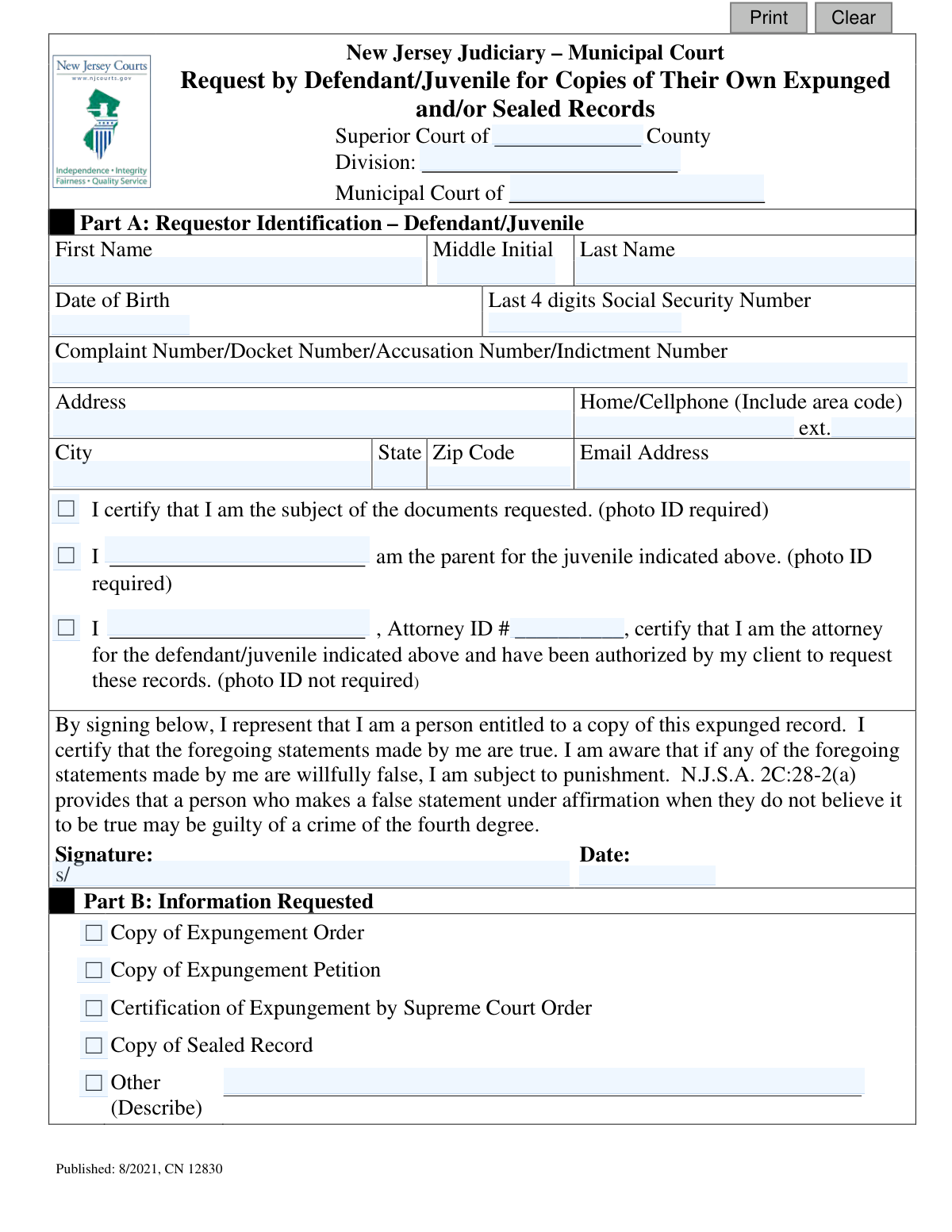
Form CN 12830 is a formal application submitted to the New Jersey court system by an individual, their parent (if a juvenile), or their attorney to obtain copies of their own court records that have been legally expunged or sealed from public view. It's essential for verifying that a record has been cleared for personal, employment, or legal reasons. Today, this form can be filled out quickly and accurately using AI-powered services like Instafill.ai, which can also convert non-fillable PDF versions into interactive fillable forms.
CN 12830 is part of the New Jersey forms category on Instafill.
Our AI automatically handles information lookup, data retrieval, formatting, and form filling.
It takes less than a minute to fill out CN 12830 using our AI form filling.
Securely upload your data. Information is encrypted in transit and deleted immediately after the form is filled out.

Form specifications

Form name: Request by Defendant/Juvenile for Copies of Their Own Expunged and/or Sealed Records
Number of fields: 37
Number of pages: 1
Language: English
main-image

Instafill Demo: How to fill out PDF forms in seconds with AI

How to Fill Out CN 12830 Online for Free in 2026

Are you looking to fill out a CN 12830 form online quickly and accurately? Instafill.ai offers the #1 AI-powered PDF filling software of 2026, allowing you to complete your CN 12830 form in just 37 seconds or less.
Follow these steps to fill out your CN 12830 form online using Instafill.ai:
  1. 1 Navigate to Instafill.ai and upload or select the 'Request by Defendant/Juvenile for Copies of Their Own Expunged and/or Sealed Records' form.
  2. 2 Allow the AI to scan the document and automatically identify all the required fields in Part A and Part B.
  3. 3 Review the AI-populated information in Part A, including your name, date of birth, case number(s), and contact details, making corrections as needed.
  4. 4 Certify your identity by checking the appropriate box, confirming you are the subject of the records, a parent, or the authorized attorney.
  5. 5 In Part B, check the boxes corresponding to the specific documents you are requesting, such as the Expungement Order or a copy of the sealed record.
  6. 6 Digitally sign and date the form to affirm the accuracy of your statements under penalty of law.
  7. 7 Download the completed form, print it, and submit it to the correct court division along with the required photo ID.

Our AI-powered system ensures each field is filled out correctly, reducing errors and saving you time.

Why Choose Instafill.ai for Your Fillable CN 12830 Form?

Speed

Complete your CN 12830 in as little as 37 seconds.

Up-to-Date

Always use the latest 2026 CN 12830 form version.

Cost-effective

No need to hire expensive lawyers.

Accuracy

Our AI performs 10 compliance checks to ensure your form is error-free.

Security

Your personal information is protected with bank-level encryption.

Frequently Asked Questions About Form CN 12830

This form is used to formally request copies of your own criminal or juvenile records that have been officially expunged (cleared) or sealed by a New Jersey court.

You can use this form if you are the defendant or juvenile whose records were expunged or sealed, the parent of that juvenile, or the attorney representing the defendant/juvenile.

You must present a valid photo ID to verify your identity when you submit the form. If you are an attorney filing for a client, you must provide your Attorney ID number instead.

You need to provide your full name, date of birth, the last four digits of your Social Security Number, and your contact information. Including the original case or docket number is also highly recommended.

While providing the case number is helpful for a faster search, you can still submit the form without it. The court will use your other personal information, like your name and date of birth, to locate the records.

In Part B, check the box next to the document you are requesting, such as the 'Copy of Expungement Order' or 'Copy of Sealed Record.' If you need a document not listed, check 'Other' and write a brief description.

You should submit this form to the records department of the Superior Court or Municipal Court that originally handled your case and issued the expungement or sealing order.

Yes, as a parent of the juvenile, you can request these records. You must check the box certifying you are the parent and provide your own photo ID when submitting the form.

A request may be denied if you do not provide proper identification, if the court has no record of your case, or if the records were never actually expunged or sealed as you believed.

Yes, services like Instafill.ai use AI to accurately auto-fill form fields from your saved profile, which can save you time and help prevent errors.

You can use a service like Instafill.ai to fill out the form on your computer. Simply upload the PDF, and the tool will allow you to type your information directly into the fields before printing for submission.

If you have a non-fillable or 'flat' PDF, you can upload it to a service like Instafill.ai. The platform can convert it into an interactive, fillable form that you can complete online.

As an attorney, you must fill out your client's information, provide your name and Attorney ID number in the certification section, and sign the form. You must certify that your client has authorized the request, but a photo ID is not required for you.

Compliance CN 12830
Validation Checks by Instafill.ai

1
Ensures Requestor Identity is Certified
This check verifies that the requestor has selected exactly one of the three certification checkboxes in Part A to establish their identity and legal standing (subject, parent of juvenile, or attorney). It is crucial for determining the requestor's right to access these confidential records. If no box is checked or multiple boxes are checked, the form submission will be rejected for ambiguity.
2
Validates Defendant/Juvenile Full Name
This validation ensures that both the 'First Name' and 'Last Name' fields for the defendant/juvenile are filled out. A full name is the primary identifier for locating the correct individual's records. Failure to provide a complete name will result in a validation error, as the request cannot be processed without this fundamental information.
3
Verifies Date of Birth Format and Logic
This check confirms that the 'Date of Birth' is entered in a valid date format (e.g., MM/DD/YYYY) and that the date is in the past. This information is critical for identity verification and distinguishing between individuals with similar names. An invalid format or a future date will prevent submission, as it indicates a data entry error.
4
Validates Format of SSN's Last 4 Digits
This validation ensures that the 'Last 4 digits Social Security Number' field contains exactly four numeric digits. This specific format is required for use as a secondary identifier while protecting the requestor's privacy. Any input that is not four numbers will be flagged as an error to ensure data quality and proper record matching.
5
Requires a Case Identification Number
This check mandates that the 'Complaint Number/Docket Number/Accusation Number/Indictment Number' field is not empty. This number is the most precise way to locate a specific court case file among potentially thousands of records. Without a case number, finding the correct expunged or sealed record is often impossible, so the form is considered incomplete without it.
6
Ensures a Record Type is Requested
This validation verifies that at least one checkbox is selected in 'Part B: Information Requested' (e.g., 'Copy of Expungement Order', 'Copy of Sealed Record'). The form's purpose is to request specific documents, so the user must indicate what they need. If no selection is made, the request is not actionable and the submission will fail.
7
Requires Detail for 'Other' Request Type
This is a conditional check that activates if the 'Other' checkbox is selected in Part B. It ensures that the corresponding description text field is filled out, providing specific details about the requested document. An 'Other' request without a description is too vague to be processed, so the form will be rejected until the details are provided.
8
Validates Attorney Information Completeness
If the requestor identifies as the attorney for the defendant/juvenile, this check ensures that both the attorney's name and their 'Attorney ID #' are provided. This information is required to verify the attorney's credentials and their authorization to act on behalf of the client. Missing either piece of information will result in a validation failure.
9
Verifies Presence of Signature and Date
This check confirms that the 'Signature' and 'Date' fields at the end of Part A are both completed. The signature and date legally certify the truthfulness of the statements made in the request, as noted by the warning about penalties for false statements. An unsigned or undated form is legally invalid and cannot be processed.
10
Requires Complete Mailing Address
This validation ensures that the primary address fields ('Address', 'City', 'State', 'Zip Code') are all filled out. A complete mailing address is essential for the court to mail the requested documents or other correspondence to the requestor. If any part of the address is missing, the submission will be blocked to prevent undeliverable mail.
11
Validates Email Address Format
This check ensures that if an email address is provided, it follows the standard format (e.g., '[email protected]'). While optional, a valid email provides an efficient communication channel for the court. An incorrectly formatted email address is useless and will be flagged to the user for correction.
12
Requires Court Location Information
This validation mandates that the 'County' and 'Municipal Court of' fields are completed. This information is absolutely critical for routing the request to the correct courthouse and jurisdiction where the records are held. A request without this information cannot be directed to the proper staff and will be rejected.
13
Validates Phone Number Format
This check verifies that the 'Home/Cellphone' number is entered in a valid 10-digit format, allowing for common separators like hyphens or parentheses. A valid phone number is a key piece of contact information for the court to quickly resolve any questions about the request. An invalid format will trigger an error to ensure the data is usable.
14
Ensures Signature Date is Not in the Future
This validation checks that the 'Date' associated with the signature is not a future date. The signature serves as an affirmation of facts at the time of signing. A future date is logically impossible and invalidates the legal affirmation, so the form will be rejected until a valid, current date is entered.

Common Mistakes in Completing CN 12830

Omitting or Mismatching the Case/Docket Number

This is the most critical piece of information for locating a specific court file. People often forget this number, cannot find it, or enter it with typos, making it impossible for court staff to find the correct expunged or sealed record. A request without a valid case, docket, or indictment number will likely be rejected with the reason 'The court has no record.' To avoid this, carefully copy the number from the original expungement order or other official court correspondence.

Leaving Court and Division Fields Blank

Requestors frequently forget to specify the 'Superior Court of County,' 'Division,' and/or 'Municipal Court of' at the top of the form. This information is essential for routing the request to the correct jurisdiction and courthouse where the records are held. An improperly routed form will cause significant delays or will be rejected and returned to the sender. Always verify and fill in the exact court that handled the original case and its expungement.

Forgetting to Sign and Date the Certification

The signature and date are not just formalities; they legally certify that the statements on the form are true under penalty of perjury. An unsigned or undated form is considered incomplete and legally invalid, and it will be immediately rejected by the judiciary staff. Always double-check that you have signed and dated the form in the designated spaces before submitting it.

Failing to Certify Requestor Status in Part A

In Part A, the requestor must check a box to certify whether they are the defendant/juvenile, the parent of the juvenile, or the attorney. Forgetting to check one of these boxes fails to establish the legal standing required to access these confidential records. This oversight leads to rejection, as the court cannot verify the requestor's right to the documents. Ensure you select the one box that accurately describes your relationship to the case.

Failing to Provide Required Photo Identification

The form explicitly states '(photo ID required)' for defendants, juveniles, and parents. People often forget to include a copy of their photo ID with a mailed-in form or fail to bring it for in-person submissions. As indicated by the 'Judiciary Use Only' section, a request will be denied for 'Proper identification not provided.' Always have a valid, government-issued photo ID ready to present or to make a copy for submission.

Using a Name That Doesn't Match the Original Court Record

Individuals may fill out the form using their current legal name, which might differ from the name on the original court record due to marriage, divorce, or a legal name change. This discrepancy can cause a mismatch when staff search for the record, leading them to conclude 'The court has no record.' It is crucial to use the full name as it appeared on the original court documents to ensure the record can be found.

Submitting a Form with Illegible Handwriting

Since this form is a PDF, many people print it and fill it out by hand. Poor or rushed handwriting can make critical information like names, addresses, and especially the case number unreadable. This can lead to data entry errors by court staff or cause the request to be rejected outright. To prevent this, print clearly in block letters or use a tool like Instafill.ai, which can convert flat PDFs into digitally fillable forms, ensuring perfect legibility.

Not Specifying Any Documents in Part B

A surprising number of people complete their personal information in Part A but forget to check any of the boxes in Part B to indicate which documents they need. This leaves court staff guessing what to provide, resulting in an incomplete or rejected request. Before submitting, review Part B and check the box for each specific document you require, such as the 'Copy of Expungement Order' or 'Copy of Sealed Record.'

Omitting Key Personal Identifiers like DOB or SSN

The Date of Birth and the last four digits of the Social Security Number are secondary identifiers used to confirm the requestor's identity, especially if the name is common. Leaving these fields blank can raise doubts about the requestor's identity and may slow down the process or lead to rejection. Always provide this information accurately to facilitate a smooth verification process. AI-powered tools like Instafill.ai can securely store and populate this data, reducing the risk of omission.

Providing a Vague Description for 'Other' Requested Information

When the needed document isn't listed in Part B, requestors may check 'Other' but then write a vague or unclear description like 'all files' or 'case info.' This ambiguity prevents staff from fulfilling the request accurately, as they may not know which specific documents to pull from the sealed file. If you must use the 'Other' category, provide a precise and detailed description of the exact document you are seeking.
Saved over 80 hours a year

“I was never sure if my IRS forms like W-9 were filled correctly. Now, I can complete the forms accurately without any external help.”

Kevin Martin Green

Your data stays secure with advanced protection from Instafill and our subprocessors

Robust compliance program

Transparent business model

You’re not the product. You always know where your data is and what it is processed for.

ISO 27001, HIPAA, and GDPR

Our subprocesses adhere to multiple compliance standards, including but not limited to ISO 27001, HIPAA, and GDPR.

Security & privacy by design

We consider security and privacy from the initial design phase of any new service or functionality. It’s not an afterthought, it’s built-in, including support for two-factor authentication (2FA) to further protect your account.

Fill out CN 12830 with Instafill.ai

Worried about filling PDFs wrong? Instafill securely fills request-by-defendantjuvenile-for-copies-of-their-own-expunged-andor-sealed-records forms, ensuring each field is accurate.