Yes! You can use AI to fill out Request for Audio Records of Appellate Division Oral Argument

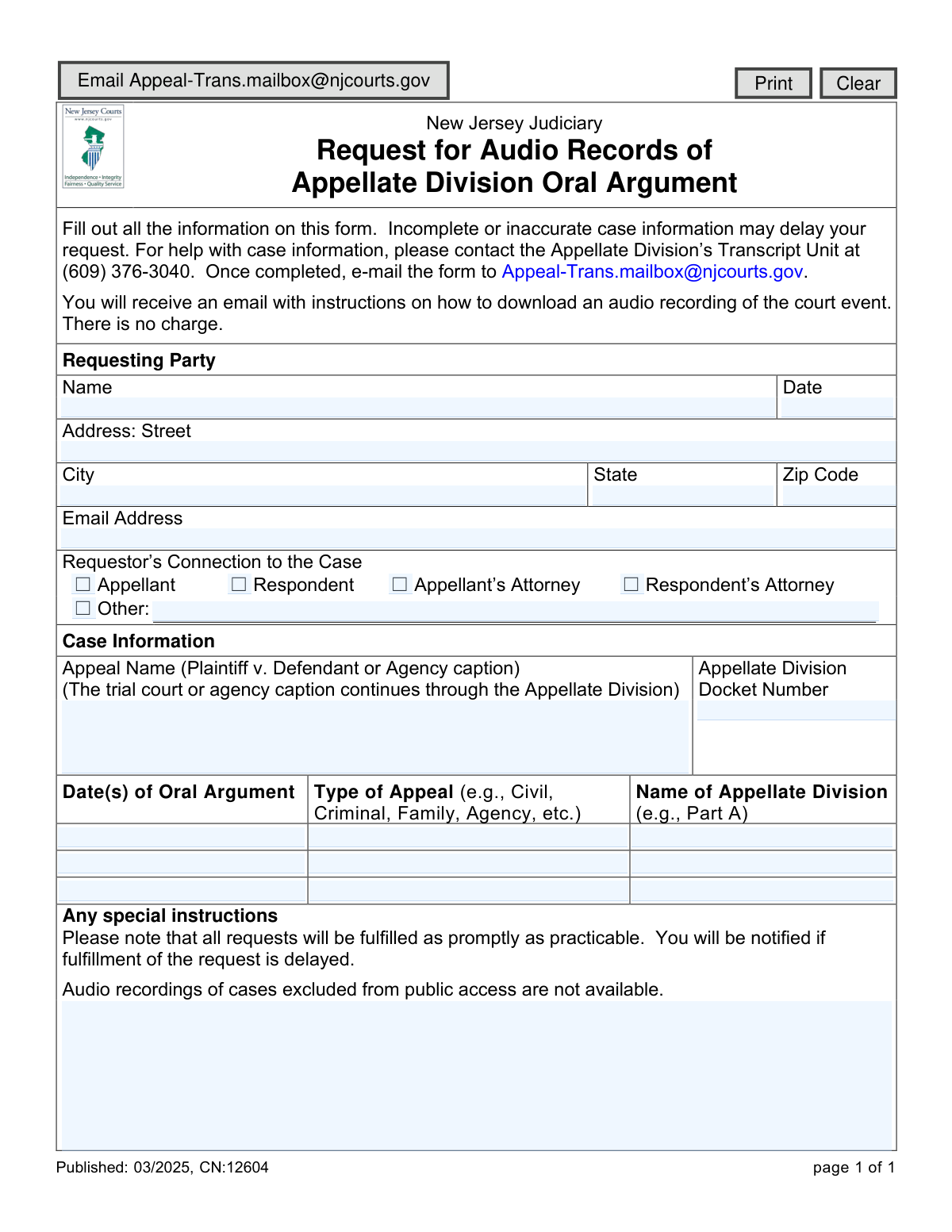
This form is used to formally request an audio recording of an oral argument held in the Appellate Division of the New Jersey Judiciary. It is essential for attorneys, parties involved in a case, or the public to obtain a record of the proceedings for review, transcription, or archival purposes. Today, this form can be filled out quickly and accurately using AI-powered services like Instafill.ai, which can also convert non-fillable PDF versions into interactive fillable forms.
CN:12604 is part of the New Jersey forms category on Instafill.
Our AI automatically handles information lookup, data retrieval, formatting, and form filling.
It takes less than a minute to fill out CN:12604 using our AI form filling.
Securely upload your data. Information is encrypted in transit and deleted immediately after the form is filled out.

Form specifications

Form name: Request for Audio Records of Appellate Division Oral Argument
Number of fields: 29
Number of pages: 1
Language: English
main-image

Instafill Demo: How to fill out PDF forms in seconds with AI

How to Fill Out CN:12604 Online for Free in 2026

Are you looking to fill out a CN:12604 form online quickly and accurately? Instafill.ai offers the #1 AI-powered PDF filling software of 2026, allowing you to complete your CN:12604 form in just 37 seconds or less.
Follow these steps to fill out your CN:12604 form online using Instafill.ai:
  1. 1 Navigate to Instafill.ai and upload or select the 'Request for Audio Records of Appellate Division Oral Argument' form.
  2. 2 Enter your personal information as the requesting party, including your full name, address, and email.
  3. 3 Specify your connection to the case by selecting the appropriate option, such as Appellant, Respondent, or Attorney.
  4. 4 Provide detailed case information, including the appeal name (caption), the Appellate Division docket number, and the date(s) of the oral argument.
  5. 5 Indicate the type of appeal (e.g., Civil, Criminal) and the specific Appellate Division part that heard the argument.
  6. 6 Carefully review all the entered information for accuracy to ensure your request is processed without delay.
  7. 7 Submit the completed form via email to the designated New Jersey Judiciary address to receive instructions for downloading the audio file.

Our AI-powered system ensures each field is filled out correctly, reducing errors and saving you time.

Why Choose Instafill.ai for Your Fillable CN:12604 Form?

Speed

Complete your CN:12604 in as little as 37 seconds.

Up-to-Date

Always use the latest 2026 CN:12604 form version.

Cost-effective

No need to hire expensive lawyers.

Accuracy

Our AI performs 10 compliance checks to ensure your form is error-free.

Security

Your personal information is protected with bank-level encryption.

Frequently Asked Questions About Form CN:12604

This form is used to request a free audio recording of an oral argument that took place in the New Jersey Judiciary's Appellate Division.

Anyone can request a recording, including the appellant, respondent, their attorneys, or any other interested party, provided the case is not excluded from public access.

No, the form clearly states that there is no charge for requesting or receiving the audio recording.

After filling out all the required information, you must email the completed form to [email protected].

You must provide the Appeal Name (Plaintiff v. Defendant), the Appellate Division Docket Number, the date(s) of the oral argument, and the type of appeal.

For help with case information, you should contact the Appellate Division’s Transcript Unit at (609) 376-3040 before submitting your request.

Requests are fulfilled as promptly as practicable, and you will receive an email with download instructions. You will be notified if there is a significant delay.

You will receive an email at the address you provide on the form. This email will contain instructions on how to download the audio recording.

No, audio recordings for cases that are excluded from public access, such as certain confidential matters, are not available for request.

The form provides fields to enter up to three different dates for the oral argument, allowing you to request recordings for all relevant sessions.

Yes, services like Instafill.ai use AI to accurately auto-fill form fields from your saved profile, which can save you time and help prevent errors.

Simply upload the form to the Instafill.ai platform. The AI will make the fields interactive, allowing you to type your information directly into the form before downloading it for submission.

You can use a service like Instafill.ai, which can convert flat, non-fillable PDFs into interactive forms that you can easily complete on your computer.

Compliance CN:12604
Validation Checks by Instafill.ai

1
Requestor Name Completeness
This check ensures the 'Name' field under 'Requesting Party' is not empty. It is a mandatory field required to identify the person making the request for internal records and communication. If the name is missing, the form submission will be rejected with a message prompting the user to provide their full name.
2
Valid Email Address Format
This validation verifies that the 'Email Address' field contains a string in a standard email format, such as [email protected]. This is the most critical field for request fulfillment, as instructions for downloading the audio are sent via email. If the format is invalid, the user will be shown an error and must correct the address before submission.
3
Full Address Completeness
This check verifies that all parts of the requesting party's address (Street, City, State, Zip Code) are filled in. Although communication is primarily by email, a complete address is often required for official records and as a secondary means of contact. If any part of the address is missing, the user will be prompted to complete it.
4
Valid ZIP Code Format
This validation ensures the 'Zip Code' field contains a valid 5-digit or 9-digit (ZIP+4) numeric format. A correctly formatted ZIP code is essential for data integrity and potential mail correspondence. An invalid entry will trigger an error message asking the user to enter a valid US ZIP code.
5
Requestor Connection Selection Required
This check ensures that at least one checkbox is selected under 'Requestor’s Connection to the Case'. This information is necessary to understand the context of the request and process it correctly. If no option is selected, the submission will fail and the user will be prompted to specify their connection to the case.
6
Conditional Requirement for 'Other' Connection
This validation rule is triggered when the 'Other' checkbox is selected for 'Requestor’s Connection to the Case'. It ensures that the corresponding text field for explaining the 'Other' connection is not left empty. This detail is crucial for the clerk's office to vet the request, and failure to provide it will prevent form submission until the details are entered.
7
Case Name Completeness
This validation ensures the 'Appeal Name' field is filled out. The case name, typically in 'Plaintiff v. Defendant' format, serves as a secondary, human-readable identifier that helps confirm the correct case is being referenced. A submission with an empty case name will be blocked to prevent ambiguity.
8
Docket Number Presence and Format
This check validates that the 'Appellate Division Docket Number' field is not empty and conforms to the expected New Jersey Judiciary format (e.g., 'A-XXXX-YY'). The docket number is the primary identifier for locating the correct case file and its associated audio records. An invalid or missing docket number will result in a validation error, as the request cannot be processed without it.
9
At Least One Oral Argument Date Required
This validation ensures that the 'Date(s) of Oral Argument' field for the first entry is not empty. A request for an audio record is meaningless without the date of the event. If this primary date field is left blank, the form cannot be submitted, and the user will be notified that at least one argument date is required.
10
Oral Argument Date Must Be in the Past
This check verifies that any date entered in the 'Date(s) of Oral Argument' fields is not a future date. Audio records can only be requested for arguments that have already occurred. If a user enters a future date, an error message will appear explaining that the date must be in the past.
11
Request Date Validity
This check ensures the 'Date' field next to the requestor's name is a valid date and is not in the future. This date serves as the official timestamp for when the request was made. Submitting a future date is illogical and would be rejected, prompting the user to enter the current date.
12
Paired Argument Information Consistency
This validation ensures that if a date is entered for a second or third oral argument, the corresponding 'Type of Appeal' and 'Name of Appellate Division' fields for that row are also filled out. This prevents incomplete entries and ensures that every requested date has all the necessary associated information. A failure would highlight the missing fields for that specific row.

Common Mistakes in Completing CN:12604

Entering the Wrong Docket Number

Requestors often confuse the Appellate Division docket number with the trial court or agency docket number. Since the docket number is the primary identifier for a case at the appellate level, providing the wrong one will make it impossible for staff to locate the correct record. This results in an immediate rejection or a significant delay while the clerk contacts you for clarification. Always reference official appellate court documents to find the correct 'A-' or 'AM-' prefixed docket number.

Providing an Incomplete or Incorrect Case Name

The form requires the full case caption (e.g., 'John Smith v. The Acme Corporation'), but people often use informal shorthand (e.g., 'Smith v. Acme'). With thousands of cases, an incomplete name makes it difficult and time-consuming to pinpoint the exact oral argument you are requesting. This ambiguity leads to delays, and you may even receive the wrong record. To prevent this, copy the complete case name exactly as it appears on court notices or filings.

Omitting or Guessing the Oral Argument Date

The exact date of the oral argument is critical for locating the specific audio file. Requestors who are unsure of the date may leave it blank or enter an incorrect one, which is a guaranteed way to delay the request. Court staff will have to manually search case histories or contact you to confirm the date. Always verify the date from your calendar, case correspondence, or the court's public docket before submitting the form.

Failing to Specify Connection to the Case

A common oversight is forgetting to check a box indicating your role (e.g., Appellant, Respondent's Attorney) or selecting 'Other' without providing an explanation. This information helps the court understand the context of the request and is required for their records. Leaving this section incomplete forces the clerk to follow up for clarification, pausing the fulfillment of your request until the information is provided.

Providing an Inaccessible or Incorrect Email Address

The court delivers the audio recording via a download link sent to the email address provided. A simple typo, or using an old email address that you no longer check, means you will never receive the link and your request will have been pointless. Always double-check the email address for accuracy and ensure it is an account you actively monitor. AI-powered form fillers like Instafill.ai can help prevent typos by autocompleting saved contact information.

Leaving the 'Appellate Division Part' Field Blank

Many requestors, especially those without legal representation, are unfamiliar with the court's internal structure (e.g., 'Part A', 'Part D') and leave this field blank. While the docket number is the most crucial piece of information, providing the correct 'Part' helps staff narrow their search much more quickly. Omitting it can slow down the process, particularly if any other case information is ambiguous or slightly incorrect.

Submitting a Poorly Hand-Filled Form

If the form is a non-fillable PDF, users must print, handwrite, and scan it, which often leads to illegible information. A smudged or poorly written docket number, name, or date can be easily misinterpreted by court staff, causing errors and significant delays. To avoid this, tools like Instafill.ai can convert flat PDFs into digitally fillable versions, ensuring all your entries are perfectly clear, legible, and accurate.

Guessing the 'Type of Appeal'

The form asks for the appeal type (Civil, Criminal, Family, etc.), which helps clerks categorize and locate the file. Non-lawyers may be unsure of the correct legal classification and either leave it blank or guess incorrectly. This can cause staff to look in the wrong database or case list, slowing down the search for your record. If unsure, it is best to find this information on previous court documents.

Improperly Submitting the Form via Email

The instructions state to email the completed form to a specific address. Common mistakes include mistyping the court's email address, sending the email with no subject line, or forgetting to attach the actual form. Any of these errors will result in your request never being received or being overlooked in a busy inbox. Always double-check the recipient's address and confirm the form is attached before sending.
Saved over 80 hours a year

“I was never sure if my IRS forms like W-9 were filled correctly. Now, I can complete the forms accurately without any external help.”

Kevin Martin Green

Your data stays secure with advanced protection from Instafill and our subprocessors

Robust compliance program

Transparent business model

You’re not the product. You always know where your data is and what it is processed for.

ISO 27001, HIPAA, and GDPR

Our subprocesses adhere to multiple compliance standards, including but not limited to ISO 27001, HIPAA, and GDPR.

Security & privacy by design

We consider security and privacy from the initial design phase of any new service or functionality. It’s not an afterthought, it’s built-in, including support for two-factor authentication (2FA) to further protect your account.

Fill out CN:12604 with Instafill.ai

Worried about filling PDFs wrong? Instafill securely fills request-for-audio-records-of-appellate-division-oral-argument forms, ensuring each field is accurate.