Yes! You can use AI to fill out Request for Permission to Photograph, Electronically Record or Broadcast a Court Proceeding

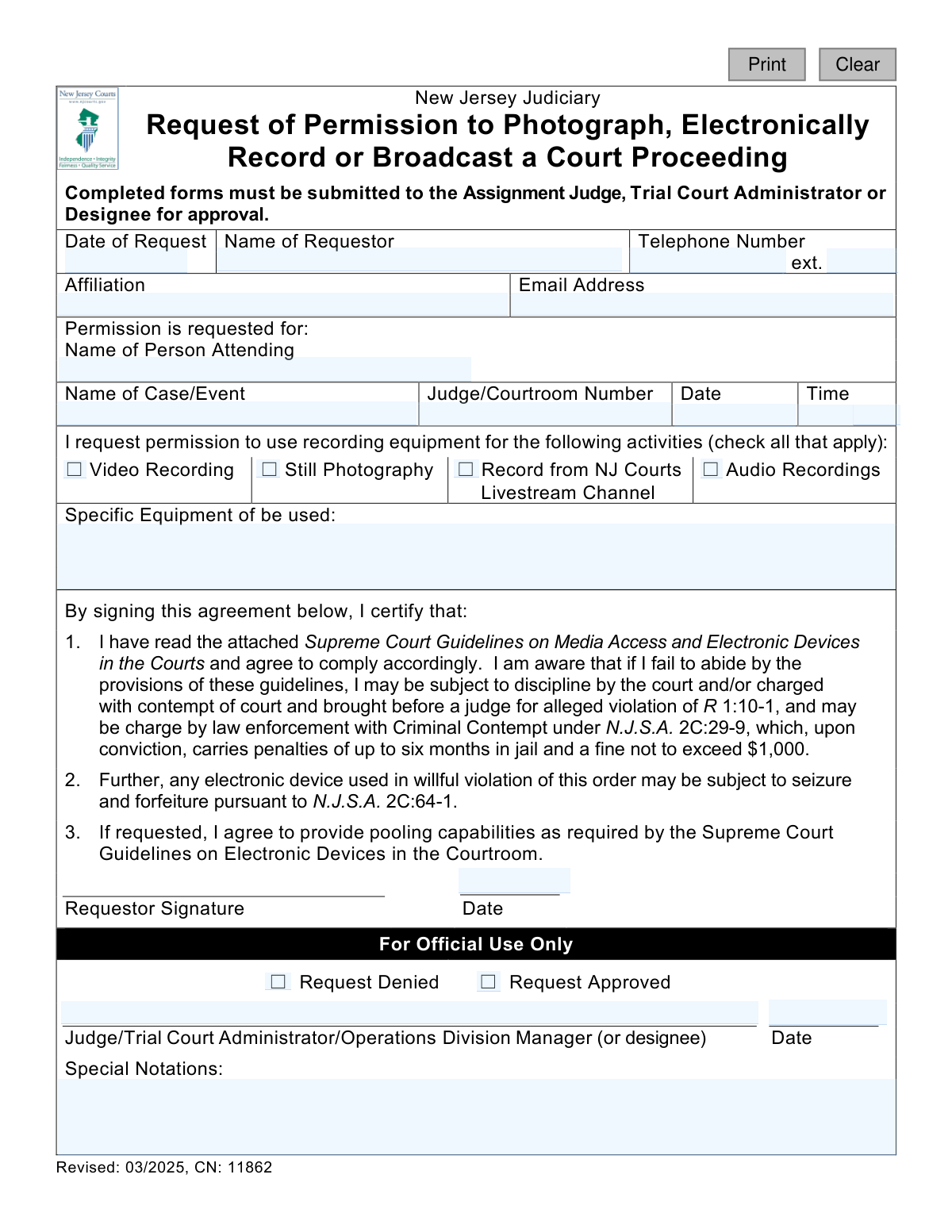
This form is a formal application to the New Jersey Judiciary for media members seeking permission to photograph, electronically record, or broadcast a court proceeding. It is a critical step to ensure that any media coverage adheres to the Supreme Court Guidelines on Media Access, thereby protecting the integrity of the judicial process and the rights of the participants. Today, this form can be filled out quickly and accurately using AI-powered services like Instafill.ai, which can also convert non-fillable PDF versions into interactive fillable forms.
NJ Judiciary CN 11862 is part of the New Jersey forms category on Instafill.
Our AI automatically handles information lookup, data retrieval, formatting, and form filling.
It takes less than a minute to fill out NJ Judiciary CN 11862 using our AI form filling.
Securely upload your data. Information is encrypted in transit and deleted immediately after the form is filled out.

Form specifications

Form name: Request for Permission to Photograph, Electronically Record or Broadcast a Court Proceeding
Number of fields: 25
Number of pages: 1
Language: English
main-image

Instafill Demo: How to fill out PDF forms in seconds with AI

How to Fill Out NJ Judiciary CN 11862 Online for Free in 2026

Are you looking to fill out a NJ JUDICIARY CN 11862 form online quickly and accurately? Instafill.ai offers the #1 AI-powered PDF filling software of 2026, allowing you to complete your NJ JUDICIARY CN 11862 form in just 37 seconds or less.
Follow these steps to fill out your NJ JUDICIARY CN 11862 form online using Instafill.ai:
  1. 1 Navigate to Instafill.ai and upload or select the 'Request for Permission to Photograph, Electronically Record or Broadcast a Court Proceeding' form.
  2. 2 Enter your personal and affiliation details, including your name, phone number, and email address.
  3. 3 Provide the specific details of the court case or event, including the case name, judge, courtroom number, date, and time.
  4. 4 Check the boxes to indicate the type of recording activity you are requesting, such as video recording, still photography, or audio recording.
  5. 5 List the specific equipment you intend to use in the designated field.
  6. 6 Carefully read the certification agreement, then digitally sign and date the form to certify your compliance with court guidelines.
  7. 7 Download the completed form to submit it to the appropriate court official for approval as instructed.

Our AI-powered system ensures each field is filled out correctly, reducing errors and saving you time.

Why Choose Instafill.ai for Your Fillable NJ Judiciary CN 11862 Form?

Speed

Complete your NJ Judiciary CN 11862 in as little as 37 seconds.

Up-to-Date

Always use the latest 2026 NJ Judiciary CN 11862 form version.

Cost-effective

No need to hire expensive lawyers.

Accuracy

Our AI performs 10 compliance checks to ensure your form is error-free.

Security

Your personal information is protected with bank-level encryption.

Frequently Asked Questions About Form NJ Judiciary CN 11862

This form is used to formally request permission from the New Jersey Judiciary to photograph, video record, audio record, or broadcast a court proceeding. It ensures that all media activities comply with court rules and guidelines.

Anyone, including members of the media or the public, who wishes to use electronic recording or broadcasting equipment during a court proceeding in New Jersey must complete and submit this form for approval.

You must submit the completed form to the Assignment Judge, Trial Court Administrator, or their designee for the specific court where the proceeding is taking place.

You need to provide your contact details, your affiliation, the specific case or event details, and a list of the equipment you plan to use. You must also specify the type of recording you wish to do, such as video, still photography, or audio.

In this section, you should list all devices you intend to bring into the courtroom, such as the model of your camera, microphone, or any other recording hardware. Being specific helps the court understand your setup.

Violating the court's rules can lead to severe penalties, including being charged with contempt of court, facing fines up to $1,000, and imprisonment for up to six months. Your equipment may also be seized.

Pooling is a process where multiple media outlets share audio and video from a single source to minimize disruption in the courtroom. By signing the form, you agree to participate in such an arrangement if required by the court.

Processing time can vary, so it is best to submit your form as far in advance of the court date as possible. This allows the court adequate time to review your request.

The 'Requestor' is the person officially submitting the form, who may be a manager or editor. The 'Person Attending' is the specific individual (e.g., photographer, reporter) who will be physically present in the courtroom operating the equipment.

The court will use the 'For Official Use Only' section to mark its decision and may add special instructions. You should be notified by the court office, likely via the email address or phone number you provided.

Yes, you can use AI-powered services like Instafill.ai to help fill out this form. These tools can accurately populate fields with your saved information, saving you time and reducing the chance of errors.

You can use a service like Instafill.ai to upload the form and fill it out directly on your computer. This allows you to type your information neatly into the fields before printing the form for submission.

If you have a non-fillable or 'flat' PDF, you can use a tool like Instafill.ai to convert it into an interactive, fillable form. This makes it easy to complete the form digitally without needing to print and write by hand.

Compliance NJ Judiciary CN 11862
Validation Checks by Instafill.ai

1
Ensures Requestor Name is Provided
This check verifies that the 'Name of Requestor' field (reqName) is not empty. The requestor's name is a fundamental piece of information required to identify who is making the request for court records and communication. If this field is left blank, the form submission will be rejected as it cannot be processed without a primary contact name.
2
Validates Request Date Format and Logic
This validation ensures the 'Date of Request' (reqDt) is entered in a valid format (e.g., MM/DD/YYYY) and that the date is not in the future. It is important for establishing an accurate timeline for the request. An invalid format or a future date would cause processing errors and make the request logically unsound, leading to rejection.
3
Validates Phone Number Format
This check confirms that the 'Telephone Number' (reqPh) is a valid 10-digit US phone number. A correctly formatted phone number is crucial for the court to contact the requestor for clarifications or to communicate a decision. Submissions with invalid phone numbers will be rejected to ensure reliable communication channels are established.
4
Validates Email Address Structure
This validation verifies that the 'Email Address' (reqEmail) follows the standard '[email protected]' format. Email is a primary method for sending notifications, approvals, or denials regarding the request. An invalid email address would prevent the requestor from receiving critical updates, so the submission will fail if the format is incorrect.
5
Ensures Affiliation is Provided
This validation checks that the 'Affiliation' field (reqAffil) is not left blank. The requestor's affiliation, such as a news agency or law firm, provides important context for the judge reviewing the request. This information can influence the decision, and its absence makes the request incomplete, leading to rejection.
6
Ensures Case or Event Name is Specified
This check ensures that the 'Name of Case/Event' field (eventName) is filled out. This information is critical for the court to identify the specific proceeding for which permission is being requested. Without a case or event name, the request is ambiguous and cannot be routed to the correct judge or courtroom for review, resulting in an immediate rejection.
7
Verifies Logical Consistency of Event Date
This validation confirms that the 'Date' of the event (eventDt) is on or after the 'Date of Request' (reqDt). It is logically impossible to request permission for an event that has already occurred. This check prevents erroneous submissions and ensures that all requests are for upcoming proceedings, and failure will result in the form being rejected.
8
Validates Event Time Format
This check ensures the 'Time' of the event (eventTime) is entered in a valid format, such as HH:MM. Precise timing is necessary for court staff to prepare for the presence of recording equipment and to ensure it aligns with the court's schedule. An improperly formatted time can cause confusion and will result in the form being rejected for correction.
9
Requires Selection of at Least One Recording Activity
This check verifies that at least one of the recording activity checkboxes (recordVideo, recordStill, recordLive, recordAudio) has been selected. The purpose of the form is to request permission for a specific activity, so a submission without any activity selected is incomplete. The form will be rejected if the requestor does not specify what they intend to do.
10
Mandates Equipment Specification for Recording Activities
This validation ensures that the 'Specific Equipment to be used' field (recordEquip) is not empty if any recording activity has been checked. The court must review and approve the specific type of equipment being brought into the courtroom for security and to minimize disruption. Failure to list the equipment will result in the request being rejected as incomplete.
11
Ensures Signature Date is Provided and Consistent
This check verifies that the requestor's signature date (sigDt) is present, is a valid date, and matches the 'Date of Request' (reqDt). The signature date legally confirms when the requestor agreed to the terms and conditions. A missing, invalid, or inconsistent signature date invalidates the agreement portion of the request, leading to its rejection.
12
Requires Name of Attending Person
This validation ensures the 'Name of Person Attending' field (attendName) is not empty. For security and record-keeping purposes, the court must know the identity of every individual who will be present to operate recording equipment. A submission without this information is considered incomplete and will be rejected.
13
Requires Judge or Courtroom Identification
This check verifies that the 'Judge/Courtroom Number' field (eventJdg) is filled out. This information is essential for routing the request to the appropriate judicial authority for approval. Without it, court administration cannot determine who needs to review the request, causing processing delays or rejection.

Common Mistakes in Completing NJ Judiciary CN 11862

Providing Vague or Incorrect Case Information

Requestors often enter a partial case name, an incorrect docket number, or misspell the judge's name. This ambiguous information can lead to the request being denied or misfiled, as court staff cannot identify the correct proceeding. To avoid this, always double-check the official case name and docket number from court records before submission. Using a tool like Instafill.ai can help prevent typos and ensure all required fields are completed before submission.

Listing Vague or Non-Specific Equipment

People frequently write generic terms like 'camera' or 'microphone' in the 'Specific Equipment' field, which is insufficient for the court's security and disruption assessment. This vagueness can result in an automatic denial or equipment being barred at the courtroom door. Be specific by listing the make, model, and type of each device. Form-filling tools like Instafill.ai can save templates of your standard equipment list to ensure consistent and detailed entries on every request.

Entering Incorrect or Incomplete Contact Details

Simple typos in an email address or forgetting a phone number's area code are extremely common. This mistake prevents the court from communicating its decision, asking for clarification, or sending updates, effectively nullifying the request. AI form fillers like Instafill.ai can automatically validate email formats and save your correct contact information to prevent data entry errors on future forms.

Failing to Sign and Date the Certification

An unsigned or undated request is legally invalid and will be rejected immediately. This often happens when people are in a hurry and overlook the signature line at the bottom. By signing, you certify that you agree to the court's guidelines, so a missing signature makes the entire application void. Tools like Instafill.ai can flag empty required fields like signatures and dates before submission.

Submitting an Illegible Handwritten Form

When the form is printed and filled out by hand, poor penmanship can render critical information like the case number or email address unreadable. If court staff cannot decipher the details, they cannot process the request. Since this form is often a flat PDF, a tool like Instafill.ai can convert it into an interactive, fillable version, allowing you to type directly onto the form for perfect legibility.

Forgetting to Check Requested Activity Boxes

The form requires users to check boxes for 'Video Recording,' 'Still Photography,' etc., but these are frequently missed. If no boxes are checked, the court does not know what permission is being sought and will likely deny the request for being incomplete. Ensure you check all boxes that apply to the activities you intend to perform to avoid ambiguity.

Using Ambiguous Date or Time Formats

Entering a date like '01/02/24' can be ambiguous, and forgetting to specify 'AM' or 'PM' for the event time can lead to staff showing up at the wrong time. These errors cause scheduling conflicts and may lead to a missed opportunity. AI tools like Instafill.ai can automatically format dates and times into a clear, standardized format, preventing any confusion.

Omitting Media Affiliation

Requestors, especially freelancers or independent journalists, often leave the 'Affiliation' field blank, assuming it doesn't apply. This can cause the reviewing judge to question the legitimacy of the request. It is better to be clear by stating 'Freelance Journalist' or the name of your publication. Tools like Instafill.ai can store your professional details and populate them automatically, ensuring this field is never left blank.

Confusion Between 'Requestor' and 'Person Attending'

People sometimes enter the same name in both fields, even if a different person, like a camera operator, will be at the proceeding. This can cause confusion and potential access issues for the attending individual on the day of the event. Clearly distinguish between the person submitting the form (Requestor) and the individual who will be physically present (Person Attending).
Saved over 80 hours a year

“I was never sure if my IRS forms like W-9 were filled correctly. Now, I can complete the forms accurately without any external help.”

Kevin Martin Green

Your data stays secure with advanced protection from Instafill and our subprocessors

Robust compliance program

Transparent business model

You’re not the product. You always know where your data is and what it is processed for.

ISO 27001, HIPAA, and GDPR

Our subprocesses adhere to multiple compliance standards, including but not limited to ISO 27001, HIPAA, and GDPR.

Security & privacy by design

We consider security and privacy from the initial design phase of any new service or functionality. It’s not an afterthought, it’s built-in, including support for two-factor authentication (2FA) to further protect your account.

Fill out NJ Judiciary CN 11862 with Instafill.ai

Worried about filling PDFs wrong? Instafill securely fills request-for-permission-to-photograph-electronically-record-or-broadcast-a-court-proceeding forms, ensuring each field is accurate.