Yes! You can use AI to fill out Roster of Statewide Parenting Coordinators Change/Update Form (CN: 13006)

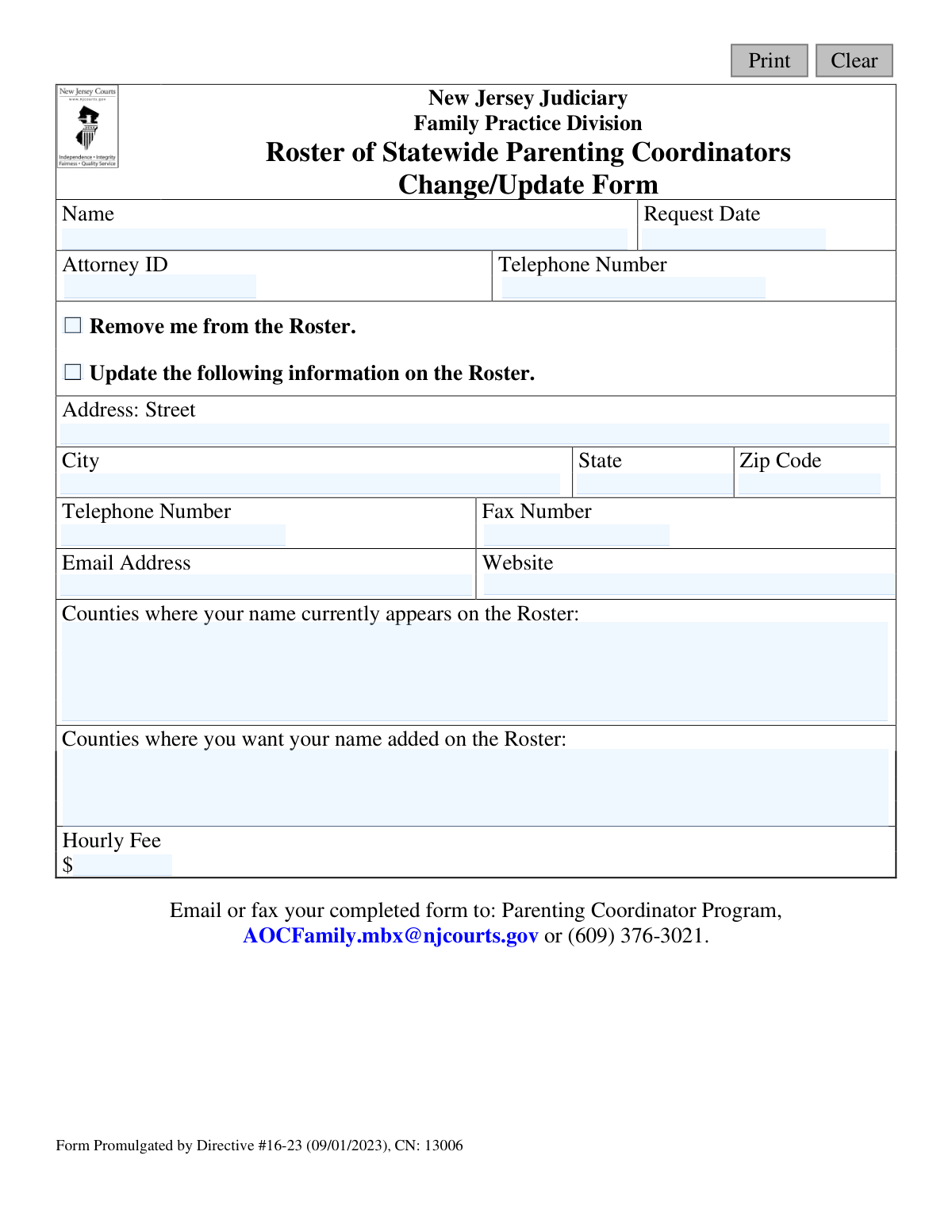
This form is an official document from the New Jersey Judiciary, Family Practice Division, for professionals listed on the Roster of Statewide Parenting Coordinators. It allows them to either request removal from the roster or update their contact information, service counties, and hourly fees. Using AI-powered services like Instafill.ai, you can quickly and accurately complete this form, and even convert non-fillable PDF versions into interactive, fillable documents.
CN 13006 is part of the New Jersey forms category on Instafill.
Our AI automatically handles information lookup, data retrieval, formatting, and form filling.
It takes less than a minute to fill out CN 13006 using our AI form filling.
Securely upload your data. Information is encrypted in transit and deleted immediately after the form is filled out.

Form specifications

Form name: Roster of Statewide Parenting Coordinators Change/Update Form (CN: 13006)
Number of fields: 19
Number of pages: 1
Language: English
main-image

Instafill Demo: How to fill out PDF forms in seconds with AI

How to Fill Out CN 13006 Online for Free in 2026

Are you looking to fill out a CN 13006 form online quickly and accurately? Instafill.ai offers the #1 AI-powered PDF filling software of 2026, allowing you to complete your CN 13006 form in just 37 seconds or less.
Follow these steps to fill out your CN 13006 form online using Instafill.ai:
  1. 1 Navigate to Instafill.ai and upload or select the 'Roster of Statewide Parenting Coordinators Change/Update Form'.
  2. 2 Enter your full name, request date, and Attorney ID number in the designated fields.
  3. 3 Select the appropriate checkbox to either request removal from the roster or to update your information.
  4. 4 If updating, provide your new address, telephone number, fax number, email address, and website.
  5. 5 List the counties where your name currently appears and the counties you wish to add to your listing.
  6. 6 Enter your current hourly fee.
  7. 7 Review all entered information for accuracy, then download the completed form to email or fax it to the Parenting Coordinator Program as instructed.

Our AI-powered system ensures each field is filled out correctly, reducing errors and saving you time.

Why Choose Instafill.ai for Your Fillable CN 13006 Form?

Speed

Complete your CN 13006 in as little as 37 seconds.

Up-to-Date

Always use the latest 2026 CN 13006 form version.

Cost-effective

No need to hire expensive lawyers.

Accuracy

Our AI performs 10 compliance checks to ensure your form is error-free.

Security

Your personal information is protected with bank-level encryption.

Frequently Asked Questions About Form CN 13006

This form is used by current members of the New Jersey Roster of Statewide Parenting Coordinators to update their contact information, service areas, and fees, or to request complete removal from the roster.

Only individuals who are already on the Roster of Statewide Parenting Coordinators for the New Jersey Judiciary should use this form to make changes to their listing.

No, this form is strictly for individuals who are already on the roster to make updates or request removal. You must follow a separate application process to join the roster.

You can submit the completed form by emailing it to [email protected] or by faxing it to (609) 376-3021.

Select 'Remove me from the Roster' if you wish to no longer be a parenting coordinator. Select 'Update the following information' if you are remaining on the roster but need to change your contact details, service counties, or fee.

Yes, you can use this form to be added to the roster in new counties. Simply list the counties you wish to be added to in the designated field.

Yes, the form includes a specific field where you can enter your new hourly fee to have it updated on the roster.

The form does not specify a processing time. For an estimate, you should contact the Parenting Coordinator Program directly using the email address provided on the form.

If you have a non-fillable PDF, services like Instafill.ai can convert it into an interactive, fillable form that you can easily complete and sign online.

Yes, services like Instafill.ai use AI to accurately auto-fill form fields with your saved information, which can save you time and help prevent errors.

To fill this form out online, you can upload it to a service like Instafill.ai. The platform will make the document interactive, allowing you to type your information directly into the fields and save the completed form.

Yes, the form requires an Attorney ID. If you are on the roster and have an ID, you must include it for proper identification.

This form is for adding counties or complete removal. To be removed from specific counties, you should contact the Parenting Coordinator Program directly via email for instructions.

Compliance CN 13006
Validation Checks by Instafill.ai

1
Ensures a Request Type is Selected
This check verifies that the user has selected either 'Remove me from the Roster' or 'Update the following information on the Roster'. This selection is mandatory as it determines the action to be taken on the user's record. If no selection is made, the form cannot be processed and the user will be prompted to choose an option before submission.
2
Validates Presence of Coordinator's Name
This validation ensures the 'Name' field is not left blank. The coordinator's full name is a primary identifier required to locate their record for either removal or update. A submission without a name is ambiguous and cannot be processed, so the user will be required to enter their name.
3
Validates Attorney ID Presence and Format
This check confirms that the 'Attorney ID' field is filled and contains a valid numeric identifier. The Attorney ID is a unique key for each coordinator in the New Jersey Judiciary system, crucial for accurate record retrieval. Failure to provide a valid ID will result in a validation error, preventing submission until a correctly formatted ID is entered.
4
Verifies Request Date is a Valid, Non-Future Date
This validation ensures the 'Request Date' field contains a date in a valid format (e.g., MM/DD/YYYY) and that the date is not in the future. This is important for maintaining accurate and logical audit trails for all changes. An invalid or future date will be rejected, and the user must correct it to reflect the actual submission date.
5
Ensures at Least One Field is Provided for an Update Request
This check is triggered if the user selects 'Update the following information'. It verifies that at least one of the subsequent fields (Address, Telephone, Email, Counties, Fee, etc.) has been filled out. Submitting an update request with no changes is an illogical action, so this check prevents empty submissions and prompts the user to specify what information they wish to update.
6
Validates Email Address Format
This check ensures that the value entered in the 'Email Address' field follows the standard '[email protected]' format. A valid email address is essential for communication and for the public-facing roster. If the format is incorrect, the submission will be blocked, and the user will be prompted to enter a valid email address.
7
Validates Telephone Number Format
This validation checks that the 'Telephone Number' fields conform to a standard 10-digit US phone number format (e.g., XXX-XXX-XXXX or (XXX) XXX-XXXX). Correctly formatted phone numbers are critical for the roster's usability and for contacting the coordinator. An invalid format will trigger an error, requiring the user to correct the entry.
8
Validates Postal Zip Code Format
This check ensures the 'Zip Code' field contains a valid 5-digit or 9-digit (ZIP+4) US postal code. An accurate zip code is necessary for correct mail delivery and for geolocation services that might use the roster data. An invalid entry will prevent submission until a valid zip code is provided.
9
Ensures Hourly Fee is a Valid Positive Number
This validation verifies that the 'Hourly Fee' field contains only a positive numeric value, optionally with a currency symbol. The fee must be a realistic, positive amount to be displayed on the roster. Negative numbers, zero, or non-numeric text will be rejected, and the user will be asked to enter a valid fee.
10
Prevents Adding Counties Already on the Roster
This check compares the list of counties in 'Counties where you want your name added' against the list in 'Counties where your name currently appears'. It prevents a user from adding a county where they are already listed. This maintains data integrity and prevents redundant information, prompting the user to remove any duplicate counties from the 'add' list.
11
Ensures Full Address is Provided if Any Part is Entered
This check validates that if a user begins to fill out the address (Street, City, State, or Zip), all other required address components are also completed. A partial address is unusable and leads to incomplete data on the roster. If one part is filled, the system will require all parts to be filled to ensure a complete and valid mailing address.
12
Validates State Field is a Valid Abbreviation
This check verifies that the 'State' field in the address section is a valid two-letter postal abbreviation. Since this is a New Jersey Judiciary roster, the system may specifically flag non-'NJ' entries for review. This ensures data consistency and prevents errors from typos, requiring the user to enter a valid state code.
13
Validates Website Field as a Proper URL
This validation ensures that the entry in the 'Website' field is a correctly formatted URL, for example, starting with http:// or https://. A valid URL is necessary so that the link on the public roster functions correctly for users. An improperly formatted string will be flagged as an error, requiring the user to correct it before submission.

Common Mistakes in Completing CN 13006

Incomplete or Ambiguous Request Type

Users often forget to check a box or, in rare cases, check both 'Remove me' and 'Update' boxes. This ambiguity forces administrative staff to halt processing and contact the applicant for clarification, delaying the entire request. To avoid this, carefully review the form and select one, and only one, option that accurately reflects your intention.

Incorrect or Missing Attorney ID

Entering an incorrect Attorney ID, or leaving it blank, is a critical error. This ID is the primary key used to locate your record in the system. A mistake here means the administration cannot find your profile to update or remove, leading to the form being rejected and requiring resubmission.

Failing to Re-enter All Information for an Update

When submitting an update, many people only fill in the fields that have changed, leaving the others blank. This can be misinterpreted as a request to delete the information in the blank fields, resulting in an incomplete public listing. To prevent this, always fill out all fields in the 'Update the following information' section with your current, correct information, even if it has not changed.

Inaccurate Listing of Counties

Applicants may incorrectly remember the counties they are currently listed in or use unofficial abbreviations for new counties. This can lead to being inadvertently removed from a county roster or having an addition request processed incorrectly, directly impacting visibility and potential referrals. Before filling, confirm your current listings on the public roster and write the full, official names for all counties.

Ambiguous Hourly Fee Formatting

The 'Hourly Fee' field is frequently filled with ranges (e.g., '$200-250'), text ('Sliding scale'), or left blank, but the system likely requires a single numerical value. This causes processing errors and requires follow-up, delaying the update. Always enter a single, specific number for your standard hourly rate to ensure it is displayed correctly on the roster.

Using a Personal or Incorrect Email Address

Typos in email addresses are common, as is the use of personal emails instead of professional ones due to browser autofill. An incorrect email address on the public roster can lead to missed client inquiries and presents an unprofessional image. Always double-check your professional email for accuracy before submitting. AI form-filling tools can help by securely storing and correctly populating your professional contact details.

Confusing the Two 'Telephone Number' Fields

The form contains two separate fields for 'Telephone Number'—one at the top and one in the main update section—which can cause confusion. Applicants might enter different numbers or leave one blank. This can result in the wrong number being used for administrative contact or, more critically, being published on the public roster. Ensure the number in the 'Update' section is the official business number you want made public.

Submitting an Illegible, Handwritten Form

Since this form is a non-fillable PDF, it is often printed and completed by hand, leading to submissions with illegible handwriting. This dramatically increases the risk of data entry errors by court staff for critical information like your name, email, or Attorney ID. To avoid this, it is best to use a tool like Instafill.ai that can convert the non-fillable PDF into a fillable format, allowing you to type your information clearly and professionally.

Incorrect Website URL Formatting

A common mistake is entering an incomplete or improperly formatted website URL, such as omitting 'https://' or including spaces. This results in a broken link on the public roster, preventing potential clients from accessing your site and reflecting poorly on your technical savviness. The best practice is to copy the full URL directly from your browser's address bar and paste it into the field.

Using an Outdated Version of the Form

Professionals may use a version of the form they previously saved to their computer, not realizing a new one has been issued (Directive #16-23). Submitting an outdated form can lead to immediate rejection, as it may lack required fields or have different submission instructions. Always download the most current version from the official NJ Judiciary website before each use.
Saved over 80 hours a year

“I was never sure if my IRS forms like W-9 were filled correctly. Now, I can complete the forms accurately without any external help.”

Kevin Martin Green

Your data stays secure with advanced protection from Instafill and our subprocessors

Robust compliance program

Transparent business model

You’re not the product. You always know where your data is and what it is processed for.

ISO 27001, HIPAA, and GDPR

Our subprocesses adhere to multiple compliance standards, including but not limited to ISO 27001, HIPAA, and GDPR.

Security & privacy by design

We consider security and privacy from the initial design phase of any new service or functionality. It’s not an afterthought, it’s built-in, including support for two-factor authentication (2FA) to further protect your account.

Fill out CN 13006 with Instafill.ai

Worried about filling PDFs wrong? Instafill securely fills roster-of-statewide-parenting-coordinators-changeupdate-form-cn-13006 forms, ensuring each field is accurate.