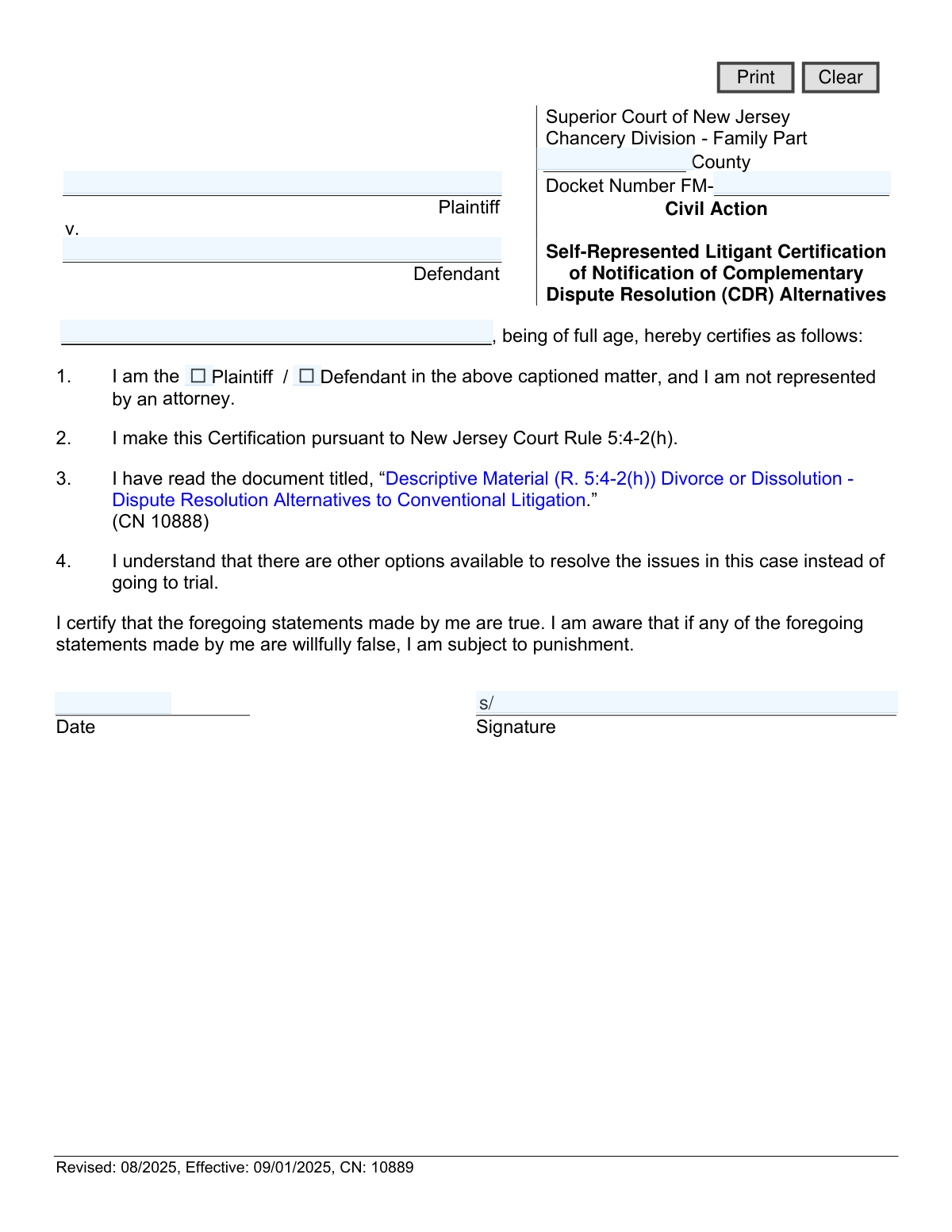
Yes! You can use AI to fill out Self-Represented Litigant Certification of Notification of Complementary Dispute Resolution (CDR) Alternatives
This form, officially titled 'Self-Represented Litigant Certification of Notification of Complementary Dispute Resolution (CDR) Alternatives', is used in the Superior Court of New Jersey's Family Part. It serves as a sworn statement by a person representing themselves (a self-represented litigant) that they have read and understood the various dispute resolution options available to them, as an alternative to a traditional court trial. Today, this form can be filled out quickly and accurately using AI-powered services like Instafill.ai, which can also convert non-fillable PDF versions into interactive fillable forms.
CN 10889 is part of the
New Jersey forms category on Instafill.
Our AI automatically handles information lookup, data retrieval, formatting, and form filling.
It takes less than a minute to fill out CN 10889 using our AI form filling.
Securely upload your data. Information is encrypted in transit and deleted immediately after the form is filled out.
Form specifications
| Form name: | Self-Represented Litigant Certification of Notification of Complementary Dispute Resolution (CDR) Alternatives |
| Number of fields: | 11 |
| Number of pages: | 1 |
| Language: | English |
Instafill Demo: How to fill out PDF forms in seconds with AI
How to Fill Out CN 10889 Online for Free in 2026
Are you looking to fill out a CN 10889 form online quickly and accurately? Instafill.ai offers the #1 AI-powered PDF filling software of 2026, allowing you to complete your CN 10889 form in just 37 seconds or less.
Follow these steps to fill out your CN 10889 form online using Instafill.ai:
- 1 Navigate to Instafill.ai and upload the CN 10889 form or select it from their template library.
- 2 Use the AI assistant to automatically fill in case details such as the County and Docket Number (FM-).
- 3 Enter the full names of the Plaintiff and Defendant in the designated fields.
- 4 Indicate your role in the case by checking the appropriate box for 'Plaintiff' or 'Defendant'.
- 5 Carefully review all the information entered by the AI for accuracy and completeness.
- 6 Electronically sign and date the certification section to attest that the statements are true.
- 7 Download the completed form to print and file with the Superior Court of New Jersey as required.
Our AI-powered system ensures each field is filled out correctly, reducing errors and saving you time.
Why Choose Instafill.ai for Your Fillable CN 10889 Form?
Speed
Complete your CN 10889 in as little as 37 seconds.
Up-to-Date
Always use the latest 2026 CN 10889 form version.
Cost-effective
No need to hire expensive lawyers.
Accuracy
Our AI performs 10 compliance checks to ensure your form is error-free.
Security
Your personal information is protected with bank-level encryption.
Frequently Asked Questions About Form CN 10889
This form certifies to the New Jersey Superior Court that you are representing yourself in a family law case and have been informed about alternatives to a traditional trial, such as mediation.
You must complete this form if you are a plaintiff or defendant in a New Jersey Family Part case and you do not have an attorney representing you.
CDR refers to methods for resolving legal disputes outside of a courtroom trial, such as mediation or arbitration. These options can often be faster, less expensive, and less confrontational than conventional litigation.
This document, which explains the different dispute resolution options, should be provided by the court when you file your case. It is also available for download on the New Jersey Courts website (njcourts.gov).
The Plaintiff is the person who initiated the lawsuit by filing the initial complaint. The Defendant is the person who is responding to the lawsuit.
The Docket Number is the unique case number assigned by the court. You can find it on any official court documents you have received regarding your case.
Submitting this form places a legal certification in your case file, confirming you are aware of your dispute resolution options. The court may then schedule a CDR event like mediation as a next step in your case.
No, signing this form does not prevent you from hiring an attorney at any time. It simply states your representation status at the moment you sign it.
By signing, you are making a formal statement to the court that you have read the required materials and that all information is true. Making a willfully false statement can subject you to punishment.
Yes, services like Instafill.ai use AI to help you accurately auto-fill form fields, which saves time and helps prevent errors. This ensures details like names and docket numbers are entered correctly.
You can upload the PDF of the form to the Instafill.ai platform. The service will make the form interactive, allowing you to type your information directly into the fields before printing for signature and submission.
If you have a non-fillable or 'flat' PDF, you can use a service like Instafill.ai. It can convert the static document into an interactive, fillable form that you can easily complete on your computer.
No, signing this form does not obligate you to choose an alternative dispute resolution method. It only confirms that you have been notified that these options exist.
You should file the signed form with the Clerk of the Superior Court for the county where your case is being heard. It is typically submitted with your initial complaint or answer.
Compliance CN 10889
Validation Checks by Instafill.ai
1
County Name Presence
This check verifies that the 'County' field has been filled in. The county is a critical piece of the case caption required to route the document to the correct courthouse within the Superior Court of New Jersey. A submission with a missing county name will be rejected or misdirected, causing delays in processing.
2
Docket Number Completeness and Format
This validation ensures the 'Docket Number' field is not empty and follows the court-mandated format, starting with 'FM-'. The docket number is the unique identifier for the case, and an absent or incorrectly formatted number will prevent the document from being associated with the correct case file. This error would lead to a filing rejection by the court clerk.
3
Plaintiff and Defendant Name Completeness
This check confirms that both the 'Plaintiff' and 'Defendant' name fields are populated. These names are essential for identifying the legal matter to which this certification applies. A form submitted without the names of the primary parties is incomplete and legally insufficient for filing.
4
Party Role Selection
This validation ensures that the user has selected one of the checkboxes to identify as either the 'Plaintiff' or the 'Defendant'. The certification must be made by a specific party in the case, and failing to make this selection renders the document ambiguous. The form submission should be blocked until a role is chosen to ensure the certification is legally valid.
5
Certifier Name Presence
This check verifies that the name of the person certifying the document is typed or printed in the 'partyName' field. This printed name clarifies the identity of the signatory, which is essential for the certification's legal validity. A certification without a clearly identified signatory is not enforceable and will be rejected.
6
Certifier Name Consistency
This validation compares the name of the person certifying ('partyName') with the name of the party they selected (Plaintiff or Defendant). If the user selected 'Plaintiff', the certifying name must match the 'PlaName' field, and vice-versa for the Defendant. This logical check ensures the form is being completed by the actual self-represented litigant and not an unauthorized third party.
7
Signature Date Completeness
This check ensures the 'Date' field next to the signature line is not empty. The signature date establishes when the statements in the certification were attested to, which is critical for procedural timelines and legal validity. A certification lacking a date may be deemed defective by the court.
8
Signature Date Format and Validity
This validation confirms the signature date is entered in a valid format (e.g., MM/DD/YYYY) and represents a real calendar day. It also checks that the date is not set in the future, which is logically impossible. This prevents data entry errors and ensures the legal record is accurate, unambiguous, and reflects a valid attestation.
9
Digital Signature Presence
For electronic submissions, this check verifies that the 'sigClient' field, representing the digital signature, has been executed. A signature is the signatory's affirmation of the document's contents and is a fundamental requirement for legal validity. The form cannot be accepted by the court without a signature.
10
County Name Validity
This check validates the entered 'County' against a predefined list of official New Jersey counties. This prevents misspellings or invalid entries from causing filing errors. An incorrect county name could lead to the document being sent to the wrong courthouse, causing significant delays.
11
Self-Representation Status Verification
This is a system-level check that verifies the filing party is listed as 'pro se' (self-represented) in the court's case management system. This form is exclusively for litigants without an attorney. If an attorney is on record for the party, this form is inappropriate and should be flagged to prevent incorrect filings.
12
Form Version Check
This validation checks the submission date against the form's effective date of 09/01/2025. It prevents the use of a future, not-yet-active version of the form. Submitting a form before its effective date can lead to rejection by the court clerk for non-compliance with approved standards.
Common Mistakes in Completing CN 10889
Litigants often enter the docket number without the required 'FM-' prefix or misformat the sequence of numbers. This happens due to unfamiliarity with court-specific formatting rules. An incorrect docket number prevents the court clerk from matching the document to the correct case file, leading to rejection and significant processing delays.
Overlooking the 'County' field is a common mistake made when filers are focused on the main body of the form. An absent county name makes the form jurisdictionally invalid, as it cannot be filed with the correct court. This results in an automatic rejection by the clerk's office, halting all progress until a corrected form is submitted.
Filers may use nicknames, initials, or spellings for the Plaintiff and Defendant that differ from the official court record. This discrepancy creates confusion and can lead to the document being rejected for not matching the case caption. To avoid this, use the full, legal names exactly as they appear on the original complaint or other formal court documents.
In section 1, self-represented parties frequently forget to check the box indicating whether they are the Plaintiff or the Defendant. This omission makes the certification legally ambiguous, as it's unclear who is making the sworn statement. The court will not accept an incomplete certification, causing delays until a properly completed form is filed.
A person might enter the date in an improper format, use a future date, or simply forget to date the document next to their signature. A legal document that is undated or improperly dated can be deemed invalid by the court. This will result in the form being returned and will delay case proceedings until it is correctly dated and resubmitted.
When filling out a PDF electronically, people sometimes type their name in the signature field instead of providing a valid signature. A typed name is not a legally binding signature in most court contexts and will cause the document to be rejected as unsigned. To avoid this, print the form to sign it physically or use a verified electronic signature tool if permitted by the court for e-filing.
Newcomers to the legal process can easily confuse the Plaintiff (the party who initiated the case) with the Defendant (the party responding). Reversing these names in the header is a fundamental error that does not match the court record. This will lead to immediate rejection of the form and requires the filer to start over.
A filer may sign this certification without actually reading the required document, “Descriptive Material (R. 5:4-2(h))… (CN 10888)”. Signing this form is a sworn statement, and attesting to reading something you haven't can damage your credibility with the court if you later claim ignorance of dispute resolution options. Always obtain and read the referenced materials before signing any certification.
People often find forms via search engines, which can lead to outdated versions. The form clearly lists a revision and effective date (e.g., 'Revised: 08/2025'), and court clerks will reject any form that is not the current version. Always download forms directly from the official New Jersey Courts website to ensure you are complying with the latest rules.
When a form is printed and filled out by hand, poor penmanship can make critical information like names and docket numbers unreadable. If the court clerk cannot decipher the data, the form will be rejected as incomplete, forcing the filer to redo the paperwork. Using a tool like Instafill.ai to convert the PDF into a fillable version ensures all information is typed and perfectly clear before printing for signature.
Saved over 80 hours a year
“I was never sure if my IRS forms like W-9 were filled correctly. Now, I can complete the forms accurately without any external help.”
Kevin Martin Green
Your data stays secure with advanced protection from Instafill and our subprocessors

Robust compliance program
Transparent business model
You’re not the product. You always know where your data is and what it is processed for.
ISO 27001, HIPAA, and GDPR
Our subprocesses adhere to multiple compliance standards, including but not limited to ISO 27001, HIPAA, and GDPR.
Security & privacy by design
We consider security and privacy from the initial design phase of any new service or functionality. It’s not an afterthought, it’s built-in, including support for two-factor authentication (2FA) to further protect your account.
Fill out CN 10889 with Instafill.ai
Worried about filling PDFs wrong? Instafill securely fills self-represented-litigant-certification-of-notification-of-complementary-dispute-resolution-cdr-alternatives forms, ensuring each field is accurate.