Yes! You can use AI to fill out Stipulation of Settlement Form Farmland Rollback

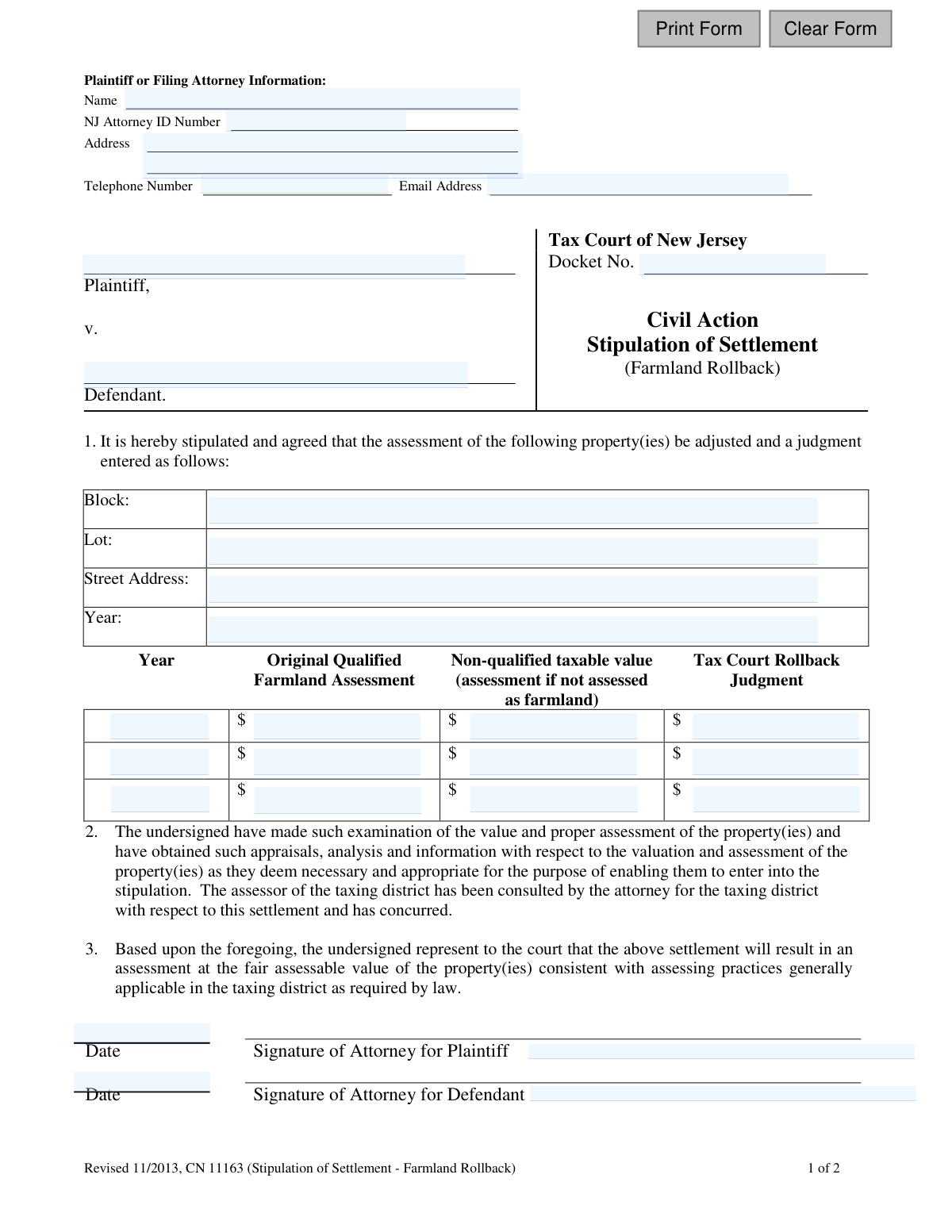
This form is a legal document used in the Tax Court of New Jersey to record a settlement between a taxpayer (plaintiff) and a taxing district (defendant) regarding farmland rollback tax assessments. It is used when a property's use changes from agricultural, triggering a reassessment, and both parties agree on the new value to avoid a trial. Today, this form can be filled out quickly and accurately using AI-powered services like Instafill.ai, which can also convert non-fillable PDF versions into interactive fillable forms.
CN 11163 is part of the New Jersey forms category on Instafill.
Our AI automatically handles information lookup, data retrieval, formatting, and form filling.
It takes less than a minute to fill out CN 11163 using our AI form filling.
Securely upload your data. Information is encrypted in transit and deleted immediately after the form is filled out.

Form specifications

Form name: Stipulation of Settlement Form Farmland Rollback
Number of fields: 31
Number of pages: 1
Language: English
main-image

Instafill Demo: How to fill out PDF forms in seconds with AI

How to Fill Out CN 11163 Online for Free in 2026

Are you looking to fill out a CN 11163 form online quickly and accurately? Instafill.ai offers the #1 AI-powered PDF filling software of 2026, allowing you to complete your CN 11163 form in just 37 seconds or less.
Follow these steps to fill out your CN 11163 form online using Instafill.ai:
  1. 1 Navigate to Instafill.ai and upload or select the Stipulation of Settlement Form Farmland Rollback.
  2. 2 Use the AI assistant to automatically fill in the Plaintiff or Filing Attorney's information, including name, NJ Attorney ID, address, and contact details.
  3. 3 Enter the Tax Court of New Jersey case details, such as the Docket Number, Plaintiff's name, and Defendant's name.
  4. 4 Provide the specific property details for the settlement, including the Block, Lot, Street Address, and the tax year being adjusted.
  5. 5 Input the financial figures for the settlement, including the Original Qualified Farmland Assessment, the Non-qualified taxable value, and the agreed-upon Tax Court Rollback Judgment for each year.
  6. 6 Review all entered information for accuracy before the attorneys for the plaintiff and defendant digitally sign and date the document.
  7. 7 Download the completed and signed form to be filed with the appropriate judge or the Tax Court Management Office.

Our AI-powered system ensures each field is filled out correctly, reducing errors and saving you time.

Why Choose Instafill.ai for Your Fillable CN 11163 Form?

Speed

Complete your CN 11163 in as little as 37 seconds.

Up-to-Date

Always use the latest 2026 CN 11163 form version.

Cost-effective

No need to hire expensive lawyers.

Accuracy

Our AI performs 10 compliance checks to ensure your form is error-free.

Security

Your personal information is protected with bank-level encryption.

Frequently Asked Questions About Form CN 11163

This form is used to formally document an agreement between a taxpayer and a taxing district to settle a dispute in the New Jersey Tax Court regarding farmland rollback tax assessments. It records the agreed-upon property values to be entered as a court judgment.

This form is completed by the parties in a Tax Court case concerning farmland rollback taxes, typically the taxpayer (plaintiff) and the municipality (defendant), or their attorneys. Both parties must agree to the terms and sign the document before submitting it to the court.

Farmland rollback refers to the additional taxes that are assessed when land previously valued as qualified farmland is converted to a different use. This form is used to settle disputes over the amount of those rollback taxes.

Yes, you can. If you are representing yourself (known as 'pro se'), you would sign the form where the attorney's signature is indicated and write the words 'pro se' after your signature.

You will need your Tax Court docket number, the property's block and lot number, the street address, and the specific assessment values that have been agreed upon for the settlement. You also need the contact information for both the plaintiff and defendant, or their attorneys.

In the table, you must enter the assessment year, the original assessment value when the land was qualified as farmland, the non-qualified taxable value, and the final agreed-upon 'Tax Court Rollback Judgment' value.

If your settlement covers multiple properties, you can attach a schedule with the required information for each one. The form can also include multiple years, but you must provide a separate copy of the stipulation for each unique docket number.

You should send the executed stipulation directly to the judge assigned to your case. If a judge has not yet been assigned, mail it to the Tax Court Management Office in Trenton, NJ.

The Freeze Act allows a Tax Court judgment to be 'frozen' and applied to the next two tax years, provided there hasn't been a change in the property's value or a town-wide revaluation. You must include specific language in the stipulation for the Freeze Act to apply.

The form provides specific legal language you must use if you agree to waive your right to statutory interest on any tax refund. If this language is altered or omitted, the court's judgment will not address the interest payment.

Yes, the notes state that the settlement can be presented in open court on the record or via a recorded telephone conference call as an alternative to filing this stipulation form.

Yes, AI-powered services like Instafill.ai can help you accurately auto-fill form fields, which saves time and reduces errors. However, the specific settlement values and legal clauses must be determined by the parties involved in the case.

Simply upload the Stipulation of Settlement form to the Instafill.ai platform. The AI will identify the fields, allowing you to easily enter your information online, and then you can download the completed, ready-to-sign document.

You can use a service like Instafill.ai to make it interactive. Upload the flat PDF, and the tool will convert it into a fillable form that you can complete on your computer.

Compliance CN 11163
Validation Checks by Instafill.ai

1
Validates Docket Number Format and Presence
This check ensures the 'Docket No.' field is not empty and follows the standard format for the Tax Court of New Jersey. The docket number is the primary identifier for a case within the court system. A missing or malformed number will result in the filing being rejected or misassociated with the wrong case.
2
Ensures Plaintiff and Defendant Names are Provided
This validation confirms that both the 'Plaintiff' and 'Defendant' name fields are completed. Identifying the primary parties in the civil action is a fundamental requirement for any legal stipulation. The form is considered invalid and cannot be processed without this information.
3
Verifies Plaintiff/Attorney Email Format
This check ensures the 'Email Address' field contains a string that conforms to the standard email address format (e.g., '[email protected]'). A valid email is essential for electronic communication and receiving official notifications from the court. An invalid format would prevent the filer from receiving critical case updates.
4
Validates NJ Attorney ID Number Format
This validation verifies that the 'NJ Attorney ID Number' field, if provided, contains a properly formatted numeric ID. This ensures the attorney is correctly identified for court records and communication. An invalid ID could lead to processing delays or questions about legal representation.
5
Ensures Complete Property Identification
This check verifies that the 'Block', 'Lot', 'Street Address', and 'Year' fields are all filled out. These details are essential for uniquely identifying the property subject to the settlement and the specific assessment year in question. Incomplete property information would make the resulting judgment ambiguous and potentially unenforceable.
6
Requires At Least One Complete Settlement Year Entry
This validation ensures that at least the first row of the settlement table ('Year', 'Original Qualified Farmland Assessment', 'Non-qualified taxable value', 'Tax Court Rollback Judgment') is fully completed. The core purpose of the form is to stipulate a settlement, which requires at least one year of assessment data. A form without this data is incomplete.
7
Validates Financial Fields are Non-Negative Numbers
This check confirms that all financial input fields for assessments and judgments contain only valid, non-negative numeric values. Monetary assessments cannot be negative, and non-numeric characters would cause calculation errors and invalidate the stipulation. This ensures data integrity for the financial judgment.
8
Ensures All Year Fields are Valid 4-Digit Years
This check validates that all fields intended for a year ('Year', 'Yr1', 'Yr2', 'Yr3', 'TxYear'), if filled, contain a valid 4-digit year within a reasonable range (e.g., 1980-2099). This maintains data consistency and prevents errors from typos like '23' instead of '2023'. An invalid year format would make the legal document ambiguous.
9
Confirms Logical Rollback Judgment Value
This validation checks that for each settlement row, the 'Tax Court Rollback Judgment' is less than or equal to the 'Non-qualified taxable value'. The rollback judgment represents the amount of the assessment reduction and cannot logically exceed the total non-qualified value. This check prevents nonsensical or erroneous financial data from being submitted.
10
Validates Signature Dates are Present and Not in the Future
This check ensures that a date is entered next to each signature and that the date is on or before the current date. A dated signature is required to execute the agreement, and a future date is invalid. This confirms when the agreement was made and prevents improper post-dating.
11
Confirms Presence of Signatures for Both Parties
This validation verifies that the signature fields for both the plaintiff's representative and defendant's representative are completed. A stipulation is a mutual agreement, and it is legally void without the consent and signature of both parties (or their authorized attorneys).
12
Ensures Settlement Years are Unique
This validation checks that the years entered in the settlement table ('Yr1', 'Yr2', 'Yr3') are not duplicates. Each row should correspond to a distinct tax year's assessment. Duplicate year entries would be redundant and could indicate a data entry error, leading to confusion in the final judgment.
13
Validates Freeze Act Year Application Logic
Based on court rules (Note 8), this check ensures that if a 'TxYear' is provided for the Freeze Act, it is for a year subsequent to the base year of the judgment. The Freeze Act applies to future years, so this logic prevents its incorrect application to past or current assessment years. An incorrect year would lead to the Freeze Act clause being rejected by the court.

Common Mistakes in Completing CN 11163

Incorrectly Formatting Statutory Clauses

The form's notes explicitly state that clauses for waiving statutory interest or applying the Freeze Act must use exact, verbatim language. Filers often paraphrase, summarize, or slightly alter this text, believing the intent is clear. However, the Tax Court will simply ignore any clause that deviates from the prescribed wording, which can lead to unintended financial consequences like the accrual of interest or the non-application of the Freeze Act to subsequent years.

Omitting 'pro se' Designation for Self-Represented Filers

Taxpayers who are not represented by an attorney (filing 'pro se') are required to write 'pro se' after their signature. Many filers overlook this instruction in Note 2, leaving the signature line as is. This omission can cause processing delays as the court clerk may need to verify whether the filer has legal representation, potentially returning the form for correction.

Entering an Incorrect or Incomplete Docket Number

The Docket Number is the primary identifier for the case in the Tax Court system. People frequently make typos, transpose digits, or omit parts of the number. An incorrect docket number can lead to the stipulation being misfiled with the wrong case or rejected entirely, causing significant delays in entering the judgment and resolving the tax appeal.

Errors in Financial Assessment Values

The table for 'Original Qualified Farmland Assessment,' 'Non-qualified taxable value,' and 'Tax Court Rollback Judgment' is prone to data entry errors. Common mistakes include typos, misplaced decimals, or transposing figures between columns. Such errors can result in a judgment that reflects an incorrect settlement amount, leading to financial loss and requiring a complex process to amend the court order.

Using Incorrect Property Identifiers (Block/Lot)

The Block and Lot numbers must precisely match the official municipal tax records for the property in question. Filers may accidentally use an internal accounting number, a deed reference, or transpose the block and lot numbers. This mistake can render the settlement void or, in a worst-case scenario, apply the judgment to the wrong property, creating significant legal and title issues.

Failing to Attach a Schedule for Multiple Properties

When a settlement covers more than one property under the same complaint, Note 5 requires attaching a separate schedule. Filers often try to squeeze multiple Block/Lot numbers into the single space provided on the main form. This will lead to the form being rejected as incomplete, delaying the settlement until it is resubmitted correctly with the proper attachments.

Including Tax Years Outside the Court's Jurisdiction

Filers sometimes list tax years in the settlement table for which an appeal was not filed or for which the court otherwise lacks jurisdiction. As stated in Note 8, the Tax Court will only issue judgments for years properly before it. Including non-jurisdictional years clutters the agreement and can create confusion, as those parts of the stipulation will be unenforceable.

Forgetting Required Condominium Schedule Attachment

If the settlement involves condominium units, Note 6 mandates that a copy of the Condominium Schedule (originally filed with the complaint) must be completed and attached. This is a frequently missed step for condo-related cases. Failure to include this specific, detailed schedule will halt the processing of the settlement, as the court cannot verify the allocation of the judgment across individual units.

Missing Signatures or Dates

A stipulation of settlement is a legal agreement that is invalid without the signatures of both parties (or their attorneys) and the date of signing. It is a simple but common oversight to forget to sign or date the document before submission. An unsigned form is legally non-binding and will be immediately returned by the court, delaying the final judgment.

Incorrectly Identifying the Defendant

In a tax appeal, the defendant is the taxing district, i.e., the municipality (e.g., 'Township of Anytown'), not an individual person like the tax assessor. Filers, especially those without legal representation, may mistakenly list the assessor's name. This error creates a mismatch with official court records and can cause filing rejections or require amendments, delaying the case. AI-powered tools like Instafill.ai can help prevent this by auto-populating correct party names based on case data.
Saved over 80 hours a year

“I was never sure if my IRS forms like W-9 were filled correctly. Now, I can complete the forms accurately without any external help.”

Kevin Martin Green

Your data stays secure with advanced protection from Instafill and our subprocessors

Robust compliance program

Transparent business model

You’re not the product. You always know where your data is and what it is processed for.

ISO 27001, HIPAA, and GDPR

Our subprocesses adhere to multiple compliance standards, including but not limited to ISO 27001, HIPAA, and GDPR.

Security & privacy by design

We consider security and privacy from the initial design phase of any new service or functionality. It’s not an afterthought, it’s built-in, including support for two-factor authentication (2FA) to further protect your account.

Fill out CN 11163 with Instafill.ai

Worried about filling PDFs wrong? Instafill securely fills stipulation-of-settlement-form-farmland-rollback forms, ensuring each field is accurate.