Yes! You can use AI to fill out Supplemental Plea Form for Non-Negotiated Pleas (Plea 02)
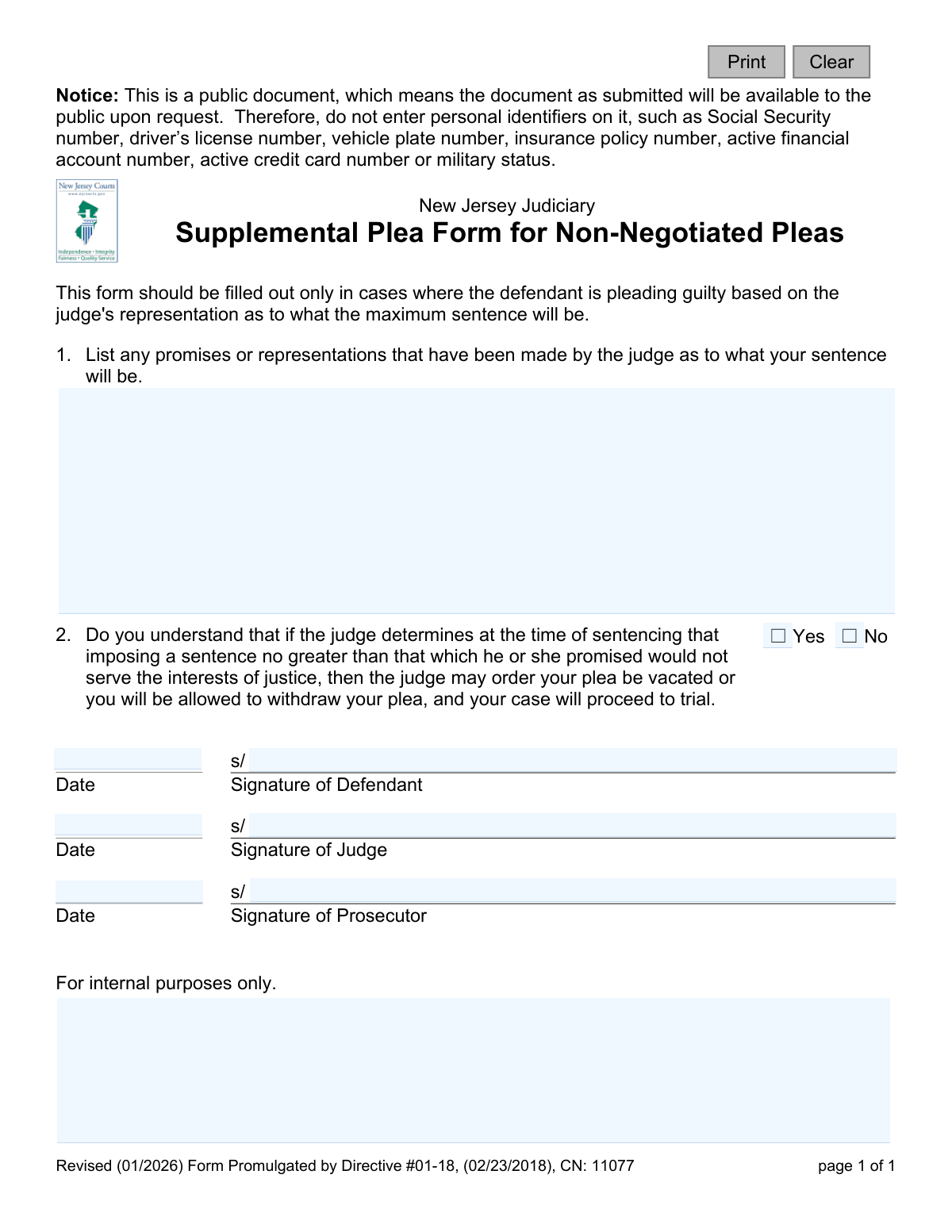
This form, officially known as the Supplemental Plea Form for Non-Negotiated Pleas (Plea 02), is a legal document used within the New Jersey Judiciary. It is completed when a defendant agrees to plead guilty based on a judge's specific promise about the maximum sentence they will receive. The form documents these judicial representations and confirms the defendant's understanding that the plea can be withdrawn if the judge later decides against the promised sentence. Today, this form can be filled out quickly and accurately using AI-powered services like Instafill.ai, which can also convert non-fillable PDF versions into interactive fillable forms.
Plea 02 is part of the
New Jersey forms category on Instafill.
Our AI automatically handles information lookup, data retrieval, formatting, and form filling.
It takes less than a minute to fill out Plea 02 using our AI form filling.
Securely upload your data. Information is encrypted in transit and deleted immediately after the form is filled out.
Form specifications
| Form name: | Supplemental Plea Form for Non-Negotiated Pleas (Plea 02) |
| Number of fields: | 12 |
| Number of pages: | 1 |
| Language: | English |
Instafill Demo: How to fill out PDF forms in seconds with AI
How to Fill Out Plea 02 Online for Free in 2026
Are you looking to fill out a PLEA 02 form online quickly and accurately? Instafill.ai offers the #1 AI-powered PDF filling software of 2026, allowing you to complete your PLEA 02 form in just 37 seconds or less.
Follow these steps to fill out your PLEA 02 form online using Instafill.ai:
- 1 Navigate to Instafill.ai and upload or select the 'Supplemental Plea Form for Non-Negotiated Pleas (Plea 02)'.
- 2 Use the AI assistant to carefully read the form's instructions and identify the key sections for completion.
- 3 In the designated area, clearly list all promises or representations made by the judge regarding your sentence.
- 4 Indicate your understanding of the plea conditions by checking the appropriate 'Yes' or 'No' box.
- 5 Review all the information you've entered, using the AI's validation checks to ensure accuracy and completeness.
- 6 Electronically sign and date the form in the defendant's signature field.
- 7 Download, print, or securely submit the completed form for the judge and prosecutor to sign as required by the court.
Our AI-powered system ensures each field is filled out correctly, reducing errors and saving you time.
Why Choose Instafill.ai for Your Fillable Plea 02 Form?
Speed
Complete your Plea 02 in as little as 37 seconds.
Up-to-Date
Always use the latest 2026 Plea 02 form version.
Cost-effective
No need to hire expensive lawyers.
Accuracy
Our AI performs 10 compliance checks to ensure your form is error-free.
Security
Your personal information is protected with bank-level encryption.
Frequently Asked Questions About Form Plea 02
This form is used to document the terms of a guilty plea when a judge, not the prosecutor, has made a promise about the maximum sentence a defendant will receive. It ensures all parties understand the specific conditions of this judicial representation.
A defendant must complete this form if they are pleading guilty based on a sentence representation made directly by a judge. This is distinct from a standard plea bargain negotiated with a prosecutor.
In Section 1, you must list the specific details of the maximum sentence the judge has promised you. This includes any terms of incarceration, probation, fines, or other conditions that were represented to you by the judge.
This question confirms your understanding that the judge's sentence promise is not final until the sentencing hearing. If the judge later decides the promised sentence is not appropriate, your plea can be cancelled, and your case will proceed to trial.
The form must be signed by three parties: the defendant entering the plea, the judge who made the sentence representation, and the prosecutor assigned to the case.
This means the completed form will be available to the public upon request. To protect your privacy, you must not include sensitive personal information like your Social Security number, driver's license number, or financial account numbers.
In a standard plea bargain, the prosecutor agrees to recommend a sentence. In this non-negotiated plea, the judge makes a direct representation about the maximum sentence, which is a specific and less common procedure.
As stated on the form, if the judge determines they cannot impose a sentence consistent with their earlier promise, you will be allowed to withdraw your guilty plea. Your case would then be set for trial.
This form is an official court document that is typically submitted in open court during your plea hearing. Your attorney will handle the process of filing it with the court clerk as part of your case record.
Yes, services like Instafill.ai use AI to help you accurately auto-fill form fields, which saves time and reduces errors. However, you must consult with your attorney for legal advice regarding the content of your plea.
You can upload the PDF of the Plea 02 form to the Instafill.ai platform. The service will make the document interactive, allowing you to type your information directly into the fields before downloading or printing the completed form.
If you have a non-fillable PDF, you can use a tool like Instafill.ai. It can convert flat, non-interactive PDFs into fillable forms that you can easily complete on your computer.
This is to protect you from identity theft and privacy violations, as the form becomes a public record. The court uses your case number and name to identify your file, not sensitive personal identifiers.
Compliance Plea 02
Validation Checks by Instafill.ai
1
Ensures Judge's Representations are Documented
This validation checks that the text field for question 1, which details the judge's promises or representations, is not empty. The entire purpose of this form is to document the specific terms of a non-negotiated plea. If this field is blank, the form is meaningless and fails to serve its legal purpose, leading to rejection of the submission.
2
Prohibits Personal Identifiers in Public Document
This check scans the text entered in question 1 for patterns matching personal identifiers like Social Security numbers, driver's license numbers, or financial account numbers. This is a critical security measure, as the form is a public document and the notice explicitly warns against including such data. A failure would prevent submission and prompt the user to redact the sensitive information.
3
Confirms Defendant Acknowledgment is Selected
This validation ensures that the defendant has selected either 'Yes' or 'No' for question 2. This question is mandatory to confirm whether the defendant understands the conditions under which their plea could be vacated. An unanswered question leaves the defendant's understanding ambiguous and renders the form legally incomplete.
4
Validates Defendant's Understanding of Plea Conditions
This is a logical check to ensure the defendant has selected 'Yes' for question 2. A 'No' response indicates the defendant does not understand a critical component of the plea agreement. The form cannot be accepted with a 'No' answer, as it would invalidate the knowing and voluntary nature of the plea, and the submission will be blocked.
5
Ensures Defendant Signature is Present
This check verifies that the defendant's signature field is not empty. The defendant's signature is the primary indicator of their agreement to the terms outlined in the plea form. Without it, the document has no legal standing as an agreement from the defendant and cannot be processed.
6
Ensures Judge Signature is Present
This validation verifies that the judge's signature field is not empty. The judge's signature confirms that the representations listed in question 1 are accurate and were indeed made by the court. This is essential for the form's validity and enforceability, and a missing signature will cause the form to be rejected.
7
Ensures Prosecutor Signature is Present
This check verifies that the prosecutor's signature field is not empty. The prosecutor's signature indicates their presence and acknowledgment of the non-negotiated plea terms being presented to the court. This is necessary for the official record of the proceedings and a missing signature will halt submission.
8
Validates All Signature Dates are in Correct Format
This validation checks that the date fields for the defendant, judge, and prosecutor are entered in a valid and consistent date format (e.g., MM/DD/YYYY). This ensures data integrity and prevents errors in the legal record. An invalid format would trigger an error message requiring the user to correct the entry before submission.
9
Prevents Entry of Future Signature Dates
This check validates that all signature dates entered on the form are not in the future. A date in the future is logically impossible and indicates a data entry error. This check maintains the chronological accuracy and integrity of the legal document, and a future date will result in a validation error.
10
Ensures Signature Dates are Logically Plausible
This validation checks that the signature dates are not unreasonably far in the past, for example, before the form's promulgation date of February 23, 2018. This prevents significant typographical errors (e.g., entering '2012' instead of '2022') and ensures the event date aligns with the case's timeline. An implausible date will be flagged for review or correction.
11
Verifies Logical Consistency Between Signature Dates
This check compares the signature dates of the defendant, judge, and prosecutor to ensure they are reasonably close in time, ideally the same day. Significant discrepancies between dates could raise questions about when the agreement was finalized. This check ensures the dates reflect a contemporaneous agreement, flagging disparities for manual review.
12
Validates Signature Fields Contain a Name
This validation checks that the signature fields contain more than just whitespace or the 's/' prefix. The validation expects a string of characters representing a name to ensure a legitimate signature has been entered. This prevents accidental submission of a blank or incomplete signature field.
Common Mistakes in Completing Plea 02
Despite a clear warning on the form, individuals sometimes include personal identifiers like Social Security or driver's license numbers out of habit. This happens because people are used to providing such information on official documents. The consequence is that this sensitive data becomes part of a public record, exposing the defendant to identity theft. To avoid this, carefully read all notices and only provide the information explicitly requested.
In the free-text section for the judge's representations, defendants may write vague or incomplete statements due to stress or a poor recollection of the exact terms. This creates ambiguity and can lead to disputes at sentencing if the defendant's understanding differs from the court's record. To prevent this, be as specific as possible, detailing the exact maximum sentence, fines, and any other conditions promised by the judge.
A defendant might mistakenly list promises or discussions they had with their attorney or the prosecutor, rather than representations made directly by the judge. This form is exclusively for documenting the judge's sentencing representations in a non-negotiated plea. Listing other promises invalidates the form's purpose and can create legal complications, potentially voiding the plea. Always confirm with your attorney that you are only listing promises made by the judge on the record.
Some individuals may leave the section detailing the judge's promises blank, assuming it's unnecessary if the terms seem simple. However, this defeats the entire purpose of the form, which is to create an official record of those representations. Without this documentation, there is no enforceable record of the judge's promise, which could be detrimental to the defendant at sentencing. Always fill this section out completely, no matter how straightforward the promise seems.
Question 2 requires the defendant to affirm they understand the plea may be vacated. A person might check 'No' or leave it blank if they are confused or hesitant. Doing so signals a lack of understanding to the court, which will prevent the judge from accepting the plea and cause significant delays. It is critical to discuss any confusion with an attorney before checking 'Yes' to confirm understanding.
The form requires signatures and dates from the defendant, judge, and prosecutor. It's common for one of these parties to inadvertently miss signing or dating the form in the haste of court proceedings. An incompletely signed form is legally invalid and cannot be processed, halting the case and requiring all parties to reconvene to correct the error. Always perform a final check to ensure all signature and date fields are filled before submission.
People often make simple data entry errors, like writing the wrong year or a date that doesn't match the other signatures. Inconsistent dates can raise legal questions about when the agreement was actually finalized and by whom. To avoid this, carefully enter the current date of the signing. Using a tool like Instafill.ai can help by auto-populating dates, ensuring consistency and accuracy across the document.
When this form is printed and filled out by hand, poor or rushed handwriting can make critical information unreadable, especially in the section for the judge's promises. This can lead to misinterpretation by court staff or rejection of the form altogether, delaying the legal process. To ensure clarity, it's best to use a fillable version; if one isn't available, a tool like Instafill.ai can convert the non-fillable PDF into a typed, legible document.
This is a 'Supplemental Plea Form for Non-Negotiated Pleas,' meaning it has a very specific use case. A defendant or even a legal professional might mistakenly use it for a standard negotiated plea agreement made with the prosecutor. This creates a legally inaccurate record of the plea, causing significant procedural confusion that must be corrected. Always confirm with legal counsel that you are using the correct form for your specific plea situation.
Saved over 80 hours a year
“I was never sure if my IRS forms like W-9 were filled correctly. Now, I can complete the forms accurately without any external help.”
Kevin Martin Green
Your data stays secure with advanced protection from Instafill and our subprocessors

Robust compliance program
Transparent business model
You’re not the product. You always know where your data is and what it is processed for.
ISO 27001, HIPAA, and GDPR
Our subprocesses adhere to multiple compliance standards, including but not limited to ISO 27001, HIPAA, and GDPR.
Security & privacy by design
We consider security and privacy from the initial design phase of any new service or functionality. It’s not an afterthought, it’s built-in, including support for two-factor authentication (2FA) to further protect your account.
Fill out Plea 02 with Instafill.ai
Worried about filling PDFs wrong? Instafill securely fills supplemental-plea-form-for-non-negotiated-pleas-plea-02 forms, ensuring each field is accurate.