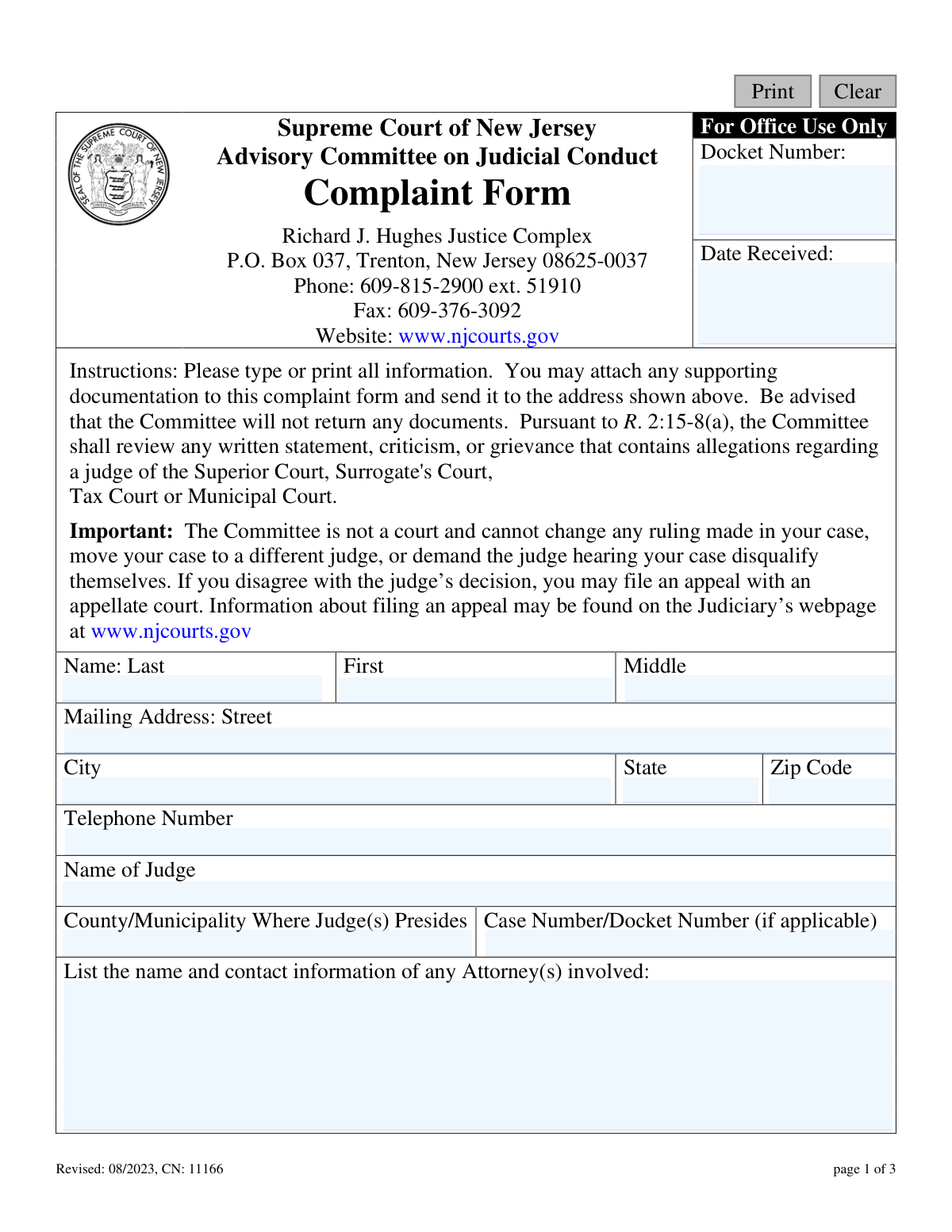
Yes! You can use AI to fill out Supreme Court of New Jersey Advisory Committee on Judicial Conduct Complaint form

This form is the official document for submitting a complaint to the Supreme Court of New Jersey's Advisory Committee on Judicial Conduct (ACJC). It is used to report alleged misconduct by a judge of the Superior Court, Surrogate's Court, Tax Court, or Municipal Court, providing a formal channel for accountability. Today, this form can be filled out quickly and accurately using AI-powered services like Instafill.ai, which can also convert non-fillable PDF versions into interactive fillable forms.
ACJC Complaint Form is part of the New Jersey forms category on Instafill.
Our AI automatically handles information lookup, data retrieval, formatting, and form filling.
It takes less than a minute to fill out ACJC Complaint Form using our AI form filling.
Securely upload your data. Information is encrypted in transit and deleted immediately after the form is filled out.

Form specifications

Form name: Supreme Court of New Jersey Advisory Committee on Judicial Conduct Complaint form
Number of fields: 19
Number of pages: 1
Language: English
main-image

Instafill Demo: How to fill out PDF forms in seconds with AI

How to Fill Out ACJC Complaint Form Online for Free in 2026

Are you looking to fill out a ACJC COMPLAINT FORM form online quickly and accurately? Instafill.ai offers the #1 AI-powered PDF filling software of 2026, allowing you to complete your ACJC COMPLAINT FORM form in just 37 seconds or less.
Follow these steps to fill out your ACJC COMPLAINT FORM form online using Instafill.ai:
  1. 1 Navigate to Instafill.ai and upload or select the New Jersey ACJC Complaint Form.
  2. 2 Use the AI assistant to accurately fill in your personal information, including your full name and mailing address.
  3. 3 Enter the full name of the judge you are filing the complaint against, along with the county or municipality where they preside.
  4. 4 Provide details about the case, including the docket number and contact information for any attorneys involved.
  5. 5 Write a detailed statement describing the specific facts of the alleged judicial misconduct, including dates and times.
  6. 6 List the names and contact information of any witnesses who observed the judge's conduct.
  7. 7 Review all entered information for accuracy, then certify the statements, sign, and date the form before submitting it to the Advisory Committee on Judicial Conduct.

Our AI-powered system ensures each field is filled out correctly, reducing errors and saving you time.

Why Choose Instafill.ai for Your Fillable ACJC Complaint Form Form?

Speed

Complete your ACJC Complaint Form in as little as 37 seconds.

Up-to-Date

Always use the latest 2026 ACJC Complaint Form form version.

Cost-effective

No need to hire expensive lawyers.

Accuracy

Our AI performs 10 compliance checks to ensure your form is error-free.

Security

Your personal information is protected with bank-level encryption.

Frequently Asked Questions About Form ACJC Complaint Form

This form is used to file a formal complaint against a New Jersey judge from the Superior, Surrogate's, Tax, or Municipal Court for alleged judicial misconduct.

No, the Committee is not a court and cannot change a judge's ruling, move your case, or force a judge to be disqualified. To challenge a legal decision, you must file an appeal with an appellate court.

Any person who believes they have witnessed or been subjected to judicial misconduct can file this complaint. You do not need to be an attorney or a party in a case to submit this form.

You will need to provide your personal contact details, the name of the judge, the case number if applicable, and a detailed factual description of the alleged misconduct, including dates and times.

No, you should only send copies of any supporting documentation. The form states that the Committee will not return any documents you submit.

Provide a clear, factual, and specific account of the judge's conduct. Include the date(s), time(s), and what was said or done that you believe constitutes misconduct.

You can still file a complaint. Simply leave the 'Case Number/Docket Number' field blank and provide all other details about the incident.

You can mail the signed form to the Advisory Committee on Judicial Conduct in Trenton, NJ, or email it to the address provided on the form, [email protected].

The form does not specify a timeline for review. The Committee will review your grievance, and you may contact their office for information on the status of your complaint.

Yes, you must sign and date the form to certify that the information you provided is true to the best of your knowledge. An unsigned complaint may not be processed.

Yes, services like Instafill.ai use AI to accurately auto-fill form fields, which saves time and helps prevent errors. This ensures all required information is entered correctly before submission.

To use Instafill.ai, you upload the PDF of the complaint form to its platform. The AI will make the form fillable online, allowing you to type your information directly into the fields and save the completed document.

If you have a non-fillable or 'flat' PDF, you can use a service like Instafill.ai. It can convert the static PDF into an interactive, fillable form that you can easily complete on your computer.

Compliance ACJC Complaint Form
Validation Checks by Instafill.ai

1
Ensures Complainant's Last Name is Provided
This check verifies that the 'nameLast' field is not empty. The complainant's full name is essential for identifying the filer, processing the complaint, and for any future correspondence. If this field is left blank, the form submission will be rejected, and the user will be prompted to provide their last name.
2
Ensures Judge's Name is Provided
Validates that the 'jdgName' field contains a value. The name of the judge is the primary subject of the complaint and is absolutely critical for the Advisory Committee to begin any review or investigation. A submission without the judge's name cannot be processed and will be rejected.
3
Validates Complaint Description is Substantive
This check ensures the 'complaintDesc' field is not empty and meets a minimum character count (e.g., 50 characters). A detailed description of the alleged misconduct is the core of the complaint, providing the necessary facts for the Committee's review. An empty or overly brief description would render the complaint unactionable, so the submission will be blocked until sufficient detail is provided.
4
Validates Signature Date is Present and Correctly Formatted
This check verifies that the 'sigDt' field contains a date and that it conforms to a standard format, such as MM/DD/YYYY. The signature date is required to certify the statement and establishes the timeline of the complaint filing. An invalid or missing date will cause the submission to fail, requiring the user to enter a valid date.
5
Ensures Signature Date is Not in the Future
This validation confirms that the date entered in the 'sigDt' field is not a future date. The signature certifies that the statements are true as of the date of signing, which cannot logically be a day that has not yet occurred. If a future date is entered, the user will receive an error and must correct it to today's date or a past date.
6
Validates US Phone Number Format
This check examines the 'phoneNumbers' field to ensure it matches a standard 10-digit US phone number format, allowing for common separators like parentheses, hyphens, or spaces. A valid phone number is crucial for the Committee to contact the complainant for additional information. If the format is invalid, the user will be prompted to correct the entry.
7
Validates US ZIP Code Format
This check ensures the 'addrZip Code' field contains either a 5-digit or 9-digit (ZIP+4) numeric value. A valid ZIP code is essential for ensuring any mail correspondence is deliverable. An incorrectly formatted ZIP code will trigger an error, asking the user to provide a valid entry.
8
Validates State Abbreviation Format
This validation checks that the 'addrSt' field contains a valid 2-letter US state or territory abbreviation. Using a standardized abbreviation prevents ambiguity and ensures mail can be properly addressed and sorted. An invalid entry will be flagged, and the user will be asked to select or enter a valid two-letter code.
9
Ensures Full Mailing Address is Provided
This check verifies that if any part of the mailing address (Street, City, State, Zip) is filled out, all other required parts are also completed. A partial address is unusable for correspondence, which may be necessary for follow-up or official notifications. The system will prompt the user to complete all address fields if one is entered.
10
Verifies Consistency Between ZIP Code and State
This validation cross-references the 'addrZip Code' with the 'addrSt' to ensure they are a valid combination. This logical check helps catch data entry errors and prevents mail from being sent to an impossible location, improving the reliability of communication. If a mismatch is detected, an error message will suggest a correction to the user.
11
Ensures Judge's Location is Provided
This check validates that the 'jdgMuni' field, representing the County or Municipality where the judge presides, is not empty. This information is critical for correctly identifying the judge, as multiple judges may share the same name across different jurisdictions in the state. A missing location will block submission and prompt the user for the information.
12
Validates Case/Docket Number Format
This check inspects the 'jdgCaseNo' field to ensure it contains only valid characters (alphanumeric, hyphens, slashes) and is within a reasonable length. While optional, if a case number is provided, it should be well-formed to aid in retrieving relevant court records. This check helps maintain data integrity and prevents input of nonsensical data.
13
Ensures Complainant's First Name is Provided
This check verifies that the 'nameFirst' field is not empty. Along with the last name, the first name is a fundamental piece of identifying information for the person filing the complaint. Submissions without a first name will be considered incomplete and will be rejected until the field is populated.
14
Validates Name Fields for Invalid Characters
This validation scans the 'nameFirst', 'nameMiddle', and 'nameLast' fields to ensure they do not contain numbers or prohibited special characters. Names should generally consist of letters, with allowances for hyphens or apostrophes, to ensure data quality and proper record-keeping. An entry with invalid characters will be flagged for correction.

Common Mistakes in Completing ACJC Complaint Form

Misunderstanding the Committee's Purpose

Many filers mistakenly believe the Committee can overturn a judge's decision, act as an appellate court, or reassign their case. This leads to complaints focused on legal disagreements rather than judicial misconduct, which are outside the Committee's jurisdiction and will be dismissed. To avoid this, carefully read the 'Important' notice on the form and focus your complaint solely on the judge's behavior and conduct, not the legal outcome of your case.

Providing Vague or Emotional Allegations

Complainants often write generalized frustrations or emotional statements instead of detailing specific actions, which the form requires. Statements like 'the judge was unfair' are ineffective without detailing what the judge specifically said or did that constituted misconduct. To prevent this, describe the exact conduct, quoting the judge if possible, and state the date, time, and location of each incident to create a clear, fact-based record for the Committee.

Omitting the Case or Docket Number

Forgetting to include the full Case or Docket Number is a frequent error that significantly slows down the review process. This number is the primary way for the Committee to locate court records, transcripts, and audio recordings related to your complaint. Always double-check your legal documents for the correct and complete docket number and enter it accurately on the form to ensure a timely review.

Failing to Specify Dates and Times of Misconduct

The form explicitly asks for the date(s) and time(s) of the alleged misconduct, but this crucial information is often left out. Without a timeline, it is extremely difficult for the Committee to investigate the claims or cross-reference them with court records. Before submitting, review your complaint narrative to ensure every specific incident you describe is accompanied by a date and, if possible, the approximate time it occurred.

Submitting an Unsigned or Undated Form

A surprising number of complaints are submitted without a signature or date on the final page, rendering them invalid. The signature certifies that the statements are true to the best of your knowledge, and without it, the Committee cannot proceed with an investigation. Always remember to sign and date the form on page 3 before mailing or emailing it to ensure its validity.

Providing an Incorrect or Incomplete Judge's Name

Filers may misspell the judge's name or provide only a last name, making it difficult to identify the correct judicial officer. This can lead to significant delays or the complaint being misdirected, especially if multiple judges with similar names preside in the same county. To avoid this, verify the judge's full name and correct spelling from your court papers or the judiciary website before filling out the form.

Sending Original Supporting Documents

The form clearly states that the Committee will not return any submitted documents, yet people often send original evidence. This is a costly mistake, as original photos, letters, or official records will be permanently lost. Always make high-quality copies of any supporting documentation to attach to your complaint and keep all original materials for your own records.

Using Illegible Handwriting

When the form is printed and filled out by hand, illegible writing can make names, dates, and the complaint description impossible to decipher. This can lead to the complaint being rejected or key facts being misinterpreted by the review staff. To prevent this, print very clearly in block letters or use a tool like Instafill.ai, which can convert this non-fillable PDF into an interactive, typable form to ensure perfect legibility.

Incomplete Contact Information for Self or Others

Omitting a full mailing address, providing a non-working phone number, or leaving out contact details for attorneys and witnesses hinders the investigation. The Committee may need to contact you for clarification or reach out to witnesses, and incomplete information makes this impossible. AI-powered form fillers like Instafill.ai can help prevent this by auto-validating formats for phone numbers and addresses, ensuring the Committee can reach all relevant parties.
Saved over 80 hours a year

“I was never sure if my IRS forms like W-9 were filled correctly. Now, I can complete the forms accurately without any external help.”

Kevin Martin Green

Your data stays secure with advanced protection from Instafill and our subprocessors

Robust compliance program

Transparent business model

You’re not the product. You always know where your data is and what it is processed for.

ISO 27001, HIPAA, and GDPR

Our subprocesses adhere to multiple compliance standards, including but not limited to ISO 27001, HIPAA, and GDPR.

Security & privacy by design

We consider security and privacy from the initial design phase of any new service or functionality. It’s not an afterthought, it’s built-in, including support for two-factor authentication (2FA) to further protect your account.

Fill out ACJC Complaint Form with Instafill.ai

Worried about filling PDFs wrong? Instafill securely fills supreme-court-of-new-jersey-advisory-committee-on-judicial-conduct-complaint-form forms, ensuring each field is accurate.