Yes! You can use AI to fill out Supreme Court of New Jersey Disciplinary Review Board Request for Copy of DRB Decision

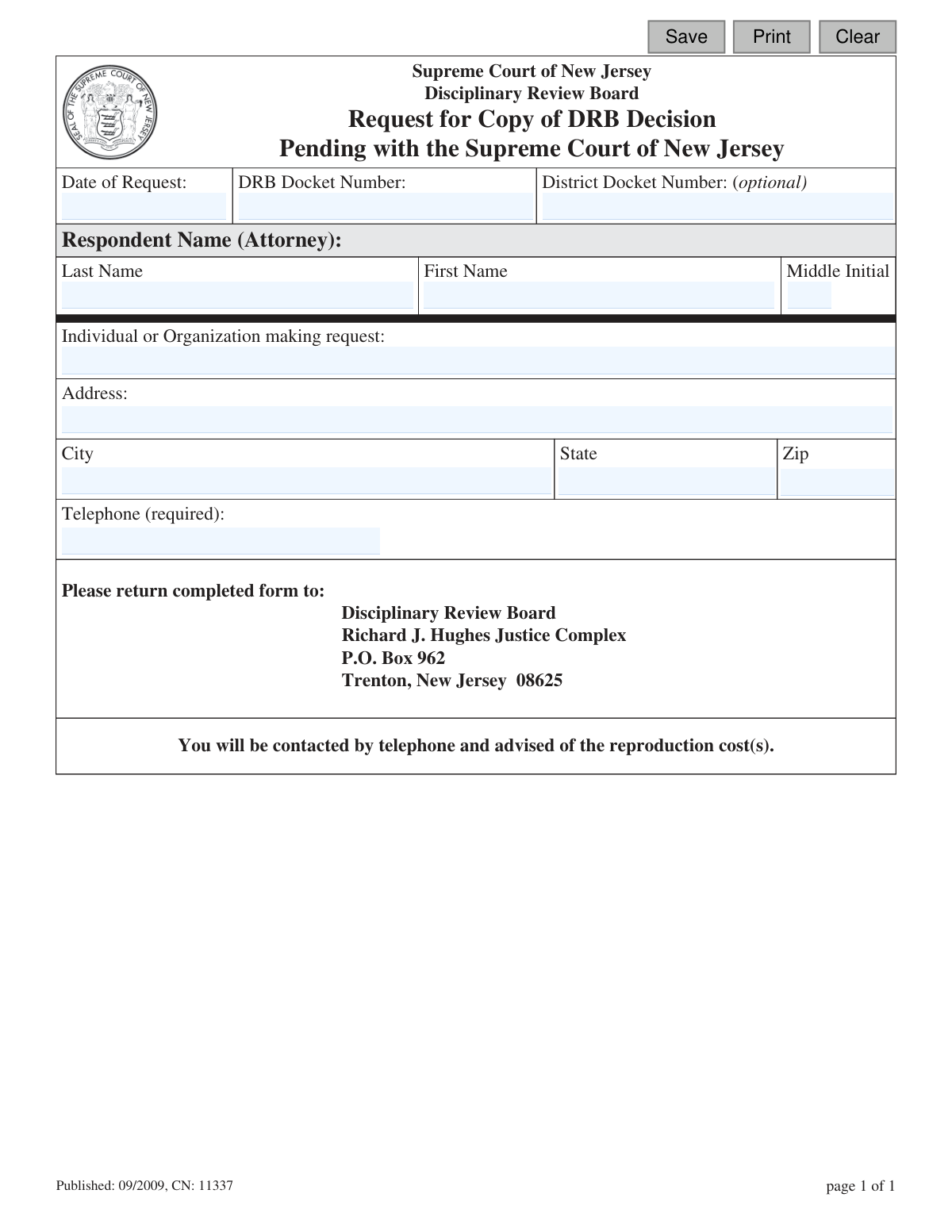
This form, officially the Request for Copy of DRB Decision, is a formal application to the Supreme Court of New Jersey's Disciplinary Review Board to obtain a copy of a decision regarding an attorney's disciplinary case. It is essential for parties involved, legal researchers, or the public to access official records of these proceedings. Today, this form can be filled out quickly and accurately using AI-powered services like Instafill.ai, which can also convert non-fillable PDF versions into interactive fillable forms.
CN 11337 is part of the New Jersey forms category on Instafill.
Our AI automatically handles information lookup, data retrieval, formatting, and form filling.
It takes less than a minute to fill out CN 11337 using our AI form filling.
Securely upload your data. Information is encrypted in transit and deleted immediately after the form is filled out.

Form specifications

Form name: Supreme Court of New Jersey Disciplinary Review Board Request for Copy of DRB Decision
Number of fields: 15
Number of pages: 1
Language: English
main-image

Instafill Demo: How to fill out PDF forms in seconds with AI

How to Fill Out CN 11337 Online for Free in 2026

Are you looking to fill out a CN 11337 form online quickly and accurately? Instafill.ai offers the #1 AI-powered PDF filling software of 2026, allowing you to complete your CN 11337 form in just 37 seconds or less.
Follow these steps to fill out your CN 11337 form online using Instafill.ai:
  1. 1 Navigate to Instafill.ai and upload the 'Request for Copy of DRB Decision' form or select it from their template library.
  2. 2 Enter the date of your request, the DRB Docket Number, and the optional District Docket Number.
  3. 3 Provide the full name (Last, First, Middle Initial) of the respondent attorney whose decision you are requesting.
  4. 4 Fill in the name of the individual or organization making the request, along with the complete mailing address.
  5. 5 Enter a required telephone number where you can be contacted regarding reproduction costs.
  6. 6 Review all the information you've entered for accuracy with the help of Instafill.ai's AI-powered validation.
  7. 7 Download, print, and mail the completed form to the Disciplinary Review Board address provided on the form.

Our AI-powered system ensures each field is filled out correctly, reducing errors and saving you time.

Why Choose Instafill.ai for Your Fillable CN 11337 Form?

Speed

Complete your CN 11337 in as little as 37 seconds.

Up-to-Date

Always use the latest 2026 CN 11337 form version.

Cost-effective

No need to hire expensive lawyers.

Accuracy

Our AI performs 10 compliance checks to ensure your form is error-free.

Security

Your personal information is protected with bank-level encryption.

Frequently Asked Questions About Form CN 11337

This form is used to request a paper copy of a specific decision made by the New Jersey Disciplinary Review Board (DRB) that is currently pending with the Supreme Court of New Jersey.

Any individual or organization can use this form to request a copy of a DRB decision. You simply need to provide your name, address, and a required telephone number.

You must provide the DRB Docket Number, the name of the respondent attorney, your contact information, and a required telephone number. The District Docket Number is listed as optional.

The 'Respondent' is the attorney who was the subject of the disciplinary hearing for which you are requesting the decision document. You should provide their full name.

The DRB Docket Number is a unique identifier for the disciplinary case. This information can typically be found in public records related to the case or by contacting the Office of Attorney Ethics.

Yes, there are reproduction costs associated with the request. After submitting the form, you will be contacted by telephone and advised of the total cost.

The completed form should be mailed to the Disciplinary Review Board, Richard J. Hughes Justice Complex, P.O. Box 962, Trenton, New Jersey 08625.

After your form is received, a representative from the Disciplinary Review Board will call you to inform you of the reproduction costs. You can then arrange for payment and delivery.

Your telephone number is required so the DRB can contact you to advise you of the reproduction costs for the document you requested. Your request cannot be processed without it.

The DRB Docket Number is crucial for locating the correct file. Submitting the form without it may cause significant delays or prevent your request from being fulfilled.

Yes, you can use AI-powered services like Instafill.ai to help you accurately auto-fill form fields. This can save time and help prevent common errors.

To fill this form out online, you can upload the PDF to Instafill.ai. Their platform allows you to complete all the necessary fields digitally before you print the form for mailing.

If you have a non-fillable or 'flat' PDF, you can use a service like Instafill.ai. It can convert the static PDF into an interactive, fillable form that you can easily complete on your computer.

Compliance CN 11337
Validation Checks by Instafill.ai

1
Date of Request Format and Validity
This validation checks that the 'Date of Request' field is entered in a valid date format, such as MM/DD/YYYY, and that the date is not in the future. This is important for maintaining accurate, chronological records of requests and preventing data entry errors. If the date is invalid or in the future, the system should reject the entry and prompt the user to provide a correct date.
2
DRB Docket Number Required
This check ensures the 'DRB Docket Number' field is not empty. The DRB Docket Number is the primary unique identifier for a specific disciplinary decision. Without this number, it is extremely difficult to locate the correct document, making the request unserviceable. If the field is empty, the form submission should be blocked and the user notified of the requirement.
3
DRB Docket Number Format
This validation verifies that the entered 'DRB Docket Number' conforms to the expected structural format for New Jersey Disciplinary Review Board cases. Enforcing a specific format helps prevent simple typos and ensures the submitted data is plausible before it is sent for processing. An invalid format should trigger an error message that provides an example of a correctly formatted number.
4
Respondent Attorney's Last Name Required
This check validates that the 'Last Name' field for the respondent attorney is not left blank. The attorney's name serves as a critical secondary identifier for the case file. It helps confirm the correct case has been found and is essential if the docket number is missing or incorrect. Submission should fail if this field is empty.
5
Respondent Attorney's First Name Required
This validation ensures the 'First Name' field for the respondent attorney is filled out. Providing a full name is crucial for distinguishing between attorneys who may share the same last name, especially within a large legal system. This reduces ambiguity and helps staff locate the correct decision more efficiently.
6
Requestor Name Completeness
This check ensures the 'Individual or Organization making request' field is not empty. This information is fundamental for record-keeping and identifying who initiated the request. Without the requestor's name, the office cannot process the request or follow up if needed.
7
Requestor Address Completeness
This validation verifies that the street address, city, state, and ZIP code fields for the requestor are all filled out. A complete address is essential for billing purposes and in the event that documents need to be mailed. An incomplete address would prevent the form from being submitted, ensuring all necessary contact information is captured.
8
Requestor State Abbreviation Format
This check validates that the 'State' field contains a valid, two-letter US state or territory abbreviation. Using standardized state codes is crucial for data integrity and ensuring mail deliverability. The system should reject non-standard entries and could offer a dropdown list to prevent errors.
9
Requestor ZIP Code Format
This validation ensures the 'Zip' field contains a correctly formatted 5-digit or 9-digit (ZIP+4) US postal code. A valid ZIP code is critical for the accuracy of the address and is required for mailing and location verification. The system should reject any entry that does not match the standard numerical format.
10
Required Telephone Number
This check confirms that the 'Telephone' field is not left empty, as it is explicitly marked '(required)' on the form. The form states the requestor will be contacted by telephone regarding costs, making this the primary communication method. A submission must be blocked if this mandatory field is blank.
11
Telephone Number Format
This validation verifies that the value entered in the 'Telephone' field is a valid 10-digit number, regardless of formatting characters like parentheses or hyphens. This ensures the number is functional and can be used to contact the requestor about the reproduction costs. An invalid number would prevent successful communication and delay the request.
12
Primary Case Identifier Presence
This is a logical check to ensure that the user has provided enough information to identify the specific case. It validates that either the 'DRB Docket Number' is filled out, or both the 'First Name' and 'Last Name' of the respondent attorney are provided. A request is impossible to fulfill without at least one of these key identifiers, so the form should not be submittable if both are missing.

Common Mistakes in Completing CN 11337

Illegible Handwriting on a Static Form

This form is a non-fillable PDF, often leading people to print it and fill it out by hand with poor handwriting. This can cause clerks to misread critical information like names, addresses, and docket numbers, leading to processing errors or outright rejection of the request. To avoid this, write clearly in block letters with a black pen, or use a tool like Instafill.ai which can convert static PDFs into fillable digital forms, ensuring all entries are typed and perfectly legible.

Omitting or Incorrectly Entering the Telephone Number

Requesters often transpose digits, forget the area code, or provide a number where they are unreachable during business hours. Since the form explicitly states the board will call to advise of reproduction costs, an incorrect or missing phone number will halt the entire process. Always double-check the required telephone number for accuracy and provide a direct line where you can be reliably contacted for payment information.

Entering an Incorrect DRB Docket Number

The DRB Docket Number is the primary identifier for the case file, but typos and transposed digits are common. Entering the wrong number means the staff cannot locate the specific decision you are requesting, resulting in significant delays or a rejected request. Carefully cross-reference the docket number from an official source document before entering it on the form to ensure accuracy.

Misspelling the Respondent Attorney's Name

Mistakes happen when a requester misspells the attorney's name or reverses the first and last name fields. This makes it difficult for the board to cross-reference the case, especially if the attorney has a common name, potentially leading them to pull the wrong file. Always verify the exact spelling and order of the attorney's full name from official court records before filling out the form.

Providing an Incomplete or Inaccurate Address

People frequently forget to include apartment or suite numbers, or enter an incorrect ZIP code, especially if they have moved recently. While the board calls for payment, an incorrect address on file can cause issues with record-keeping or future correspondence. Ensure your full mailing address is entered correctly, including any secondary unit designators, to prevent any delivery or administrative problems.

Leaving the DRB Docket Number Blank

Some requesters may not have the docket number handy and submit the form with only the attorney's name, assuming it is sufficient information. However, the DRB Docket Number is the most crucial piece of information for locating the correct file quickly and accurately. Submitting a request without it forces a manual, time-consuming search that may fail, leading to your request being denied.

Misunderstanding the Form's Purpose

A common error is using this form to request a decision that is not from the Disciplinary Review Board (DRB) or is not currently pending with the Supreme Court. This happens when people see "Request for Copy of Decision" and ignore the specific context. This misapplication wastes everyone's time, as the request will be rejected and must be resubmitted to the correct entity.

Confusing DRB and District Docket Numbers

Requesters sometimes enter the District Docket Number in the field for the DRB Docket Number, or vice-versa. The District Docket Number is optional and refers to an earlier stage of the proceeding, while the DRB number is essential for this request. Confusing the two can send clerks searching in the wrong system, causing delays; prioritize finding and entering the correct DRB number.

Using an Incorrect or Ambiguous Date Format

The 'Date of Request' field is often filled out using non-standard formats (e.g., DD-MM-YYYY) or left ambiguous (e.g., 01-02-2024), which can cause confusion about the timeline of the request. This can be problematic for record-keeping and tracking the request's age. Always use the standard U.S. format of MM/DD/YYYY to ensure clarity and prevent any administrative confusion.

Entering an Informal Name for the Requester

When filling out the 'Individual or Organization making request' field, people may use a nickname, an abbreviated company name, or an informal variation. This can lead to confusion and create an unprofessional record, potentially causing issues if the request is part of a formal legal or business process. Always use the full, legal name of the individual or the complete, official name of the organization.
Saved over 80 hours a year

“I was never sure if my IRS forms like W-9 were filled correctly. Now, I can complete the forms accurately without any external help.”

Kevin Martin Green

Your data stays secure with advanced protection from Instafill and our subprocessors

Robust compliance program

Transparent business model

You’re not the product. You always know where your data is and what it is processed for.

ISO 27001, HIPAA, and GDPR

Our subprocesses adhere to multiple compliance standards, including but not limited to ISO 27001, HIPAA, and GDPR.

Security & privacy by design

We consider security and privacy from the initial design phase of any new service or functionality. It’s not an afterthought, it’s built-in, including support for two-factor authentication (2FA) to further protect your account.

Fill out CN 11337 with Instafill.ai

Worried about filling PDFs wrong? Instafill securely fills supreme-court-of-new-jersey-disciplinary-review-board-request-for-copy-of-drb-decision forms, ensuring each field is accurate.