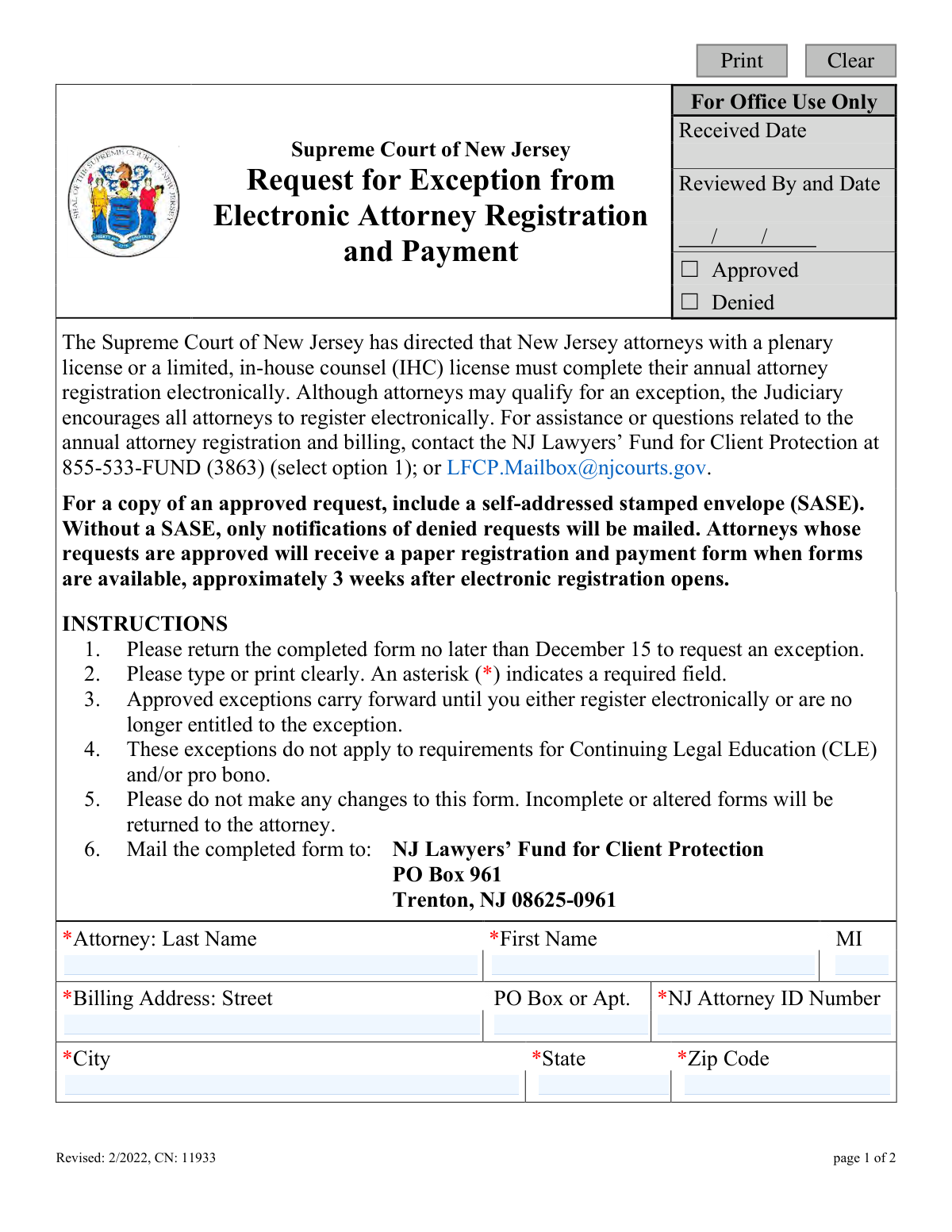
Yes! You can use AI to fill out Supreme Court of New Jersey Request for Exception from Electronic Attorney Registration and Payment
This form is a formal request to the Supreme Court of New Jersey for attorneys seeking an exception from the mandatory electronic annual registration and payment process. Attorneys may request this exception for reasons such as being admitted before 1966, having a disability inactive status, a verifiable medical condition, or lack of internet access. Today, this form can be filled out quickly and accurately using AI-powered services like Instafill.ai, which can also convert non-fillable PDF versions into interactive fillable forms.
NJ CN: 11933 is part of the
New Jersey forms category on Instafill.
Our AI automatically handles information lookup, data retrieval, formatting, and form filling.
It takes less than a minute to fill out NJ CN: 11933 using our AI form filling.
Securely upload your data. Information is encrypted in transit and deleted immediately after the form is filled out.
Form specifications
| Form name: | Supreme Court of New Jersey Request for Exception from Electronic Attorney Registration and Payment |
| Number of fields: | 20 |
| Number of pages: | 1 |
| Language: | English |
Instafill Demo: How to fill out PDF forms in seconds with AI
How to Fill Out NJ CN: 11933 Online for Free in 2026
Are you looking to fill out a NJ CN: 11933 form online quickly and accurately? Instafill.ai offers the #1 AI-powered PDF filling software of 2026, allowing you to complete your NJ CN: 11933 form in just 37 seconds or less.
Follow these steps to fill out your NJ CN: 11933 form online using Instafill.ai:
- 1 Navigate to Instafill.ai and upload the 'Request for Exception from Electronic Attorney Registration and Payment' form.
- 2 Provide your personal details in the designated fields, including your full name, NJ Attorney ID number, billing address, email, and phone number.
- 3 Select the checkbox or checkboxes that correspond to your reason(s) for requesting an exception from electronic registration.
- 4 If you selected the exception for being in a location without internet access, provide the specific location details in the provided space.
- 5 Certify the form by applying your digital signature and entering the current date.
- 6 Review all the information you have entered for accuracy to ensure the form is complete and unaltered as per the instructions.
- 7 Download the completed form, print it, and mail it to the NJ Lawyers’ Fund for Client Protection at the address provided.
Our AI-powered system ensures each field is filled out correctly, reducing errors and saving you time.
Why Choose Instafill.ai for Your Fillable NJ CN: 11933 Form?
Speed
Complete your NJ CN: 11933 in as little as 37 seconds.
Up-to-Date
Always use the latest 2026 NJ CN: 11933 form version.
Cost-effective
No need to hire expensive lawyers.
Accuracy
Our AI performs 10 compliance checks to ensure your form is error-free.
Security
Your personal information is protected with bank-level encryption.
Frequently Asked Questions About Form NJ CN: 11933
This form is for New Jersey attorneys to request an exemption from the mandatory electronic annual registration and payment process. If your request is approved, you will receive a paper registration form by mail instead.
This form is for New Jersey attorneys with a plenary or limited, in-house counsel (IHC) license who cannot register electronically and meet one of the specific criteria listed on the form, such as age, disability status, or lack of internet access.
The completed form must be returned no later than December 15 to request an exception for the upcoming registration period.
You must mail the completed form to the NJ Lawyers’ Fund for Client Protection, PO Box 961, Trenton, NJ 08625-0961. The form cannot be submitted electronically.
If your request is approved, you will be mailed a paper registration and payment form about three weeks after electronic registration opens. Approved exceptions automatically carry forward to future years.
You will only be mailed a notification if your request is denied. To receive a copy of an approved request, you must include a self-addressed stamped envelope (SASE) with your submission.
No, an approved exception will carry forward to subsequent years. You do not need to reapply unless you register electronically one year, which would void the exception for the future.
No, the form explicitly states that you should not send any supporting documentation for a medical condition or disability. You only need to check the appropriate box and sign the certification.
No, this exception is strictly for the annual attorney registration and payment. It does not apply to any requirements for Continuing Legal Education (CLE) or pro bono reporting.
You must provide your full name, NJ Attorney ID number, billing address, email, and phone number. You also need to select a reason for the exception and provide your signature and the date.
Yes, services like Instafill.ai use AI to accurately auto-fill form fields with your personal information, which can save you time and help prevent errors.
Simply upload the form to the Instafill.ai platform, and its AI will identify the fields and automatically populate them with your saved information. You can then review, edit, and download the completed form for mailing.
Services like Instafill.ai can convert flat, non-fillable PDFs into interactive, fillable forms. Just upload the document, and the platform will make the fields editable online so you can type your information directly.
For assistance or questions about annual attorney registration and billing, contact the NJ Lawyers’ Fund for Client Protection at 855-533-FUND (3863) and select option 1.
Compliance NJ CN: 11933
Validation Checks by Instafill.ai
1
Ensures NJ Attorney ID Number is in the correct format
This check validates that the 'NJ Attorney ID Number' field contains a value that conforms to the expected format (e.g., a specific number of digits). It is crucial for correctly identifying the attorney in the Judiciary's database. If the format is incorrect, the system cannot process the request, and the form will be returned to the user for correction.
2
Verifies at least one exception reason is selected
This validation ensures that the attorney has selected at least one of the four available checkboxes to justify their request for an exception. A request cannot be processed without a stated reason. If no reason is selected, the form submission will be rejected with a message prompting the user to choose an applicable reason for the exception.
3
Validates Email Address format and length
This check confirms that the provided email address follows the standard '[email protected]' format and does not exceed the 60-character limit specified on the form. A valid email is essential for communication regarding the request status. An invalid or overly long email address will trigger an error, preventing form submission until corrected.
4
Requires Location Details if 'No Internet Access' is claimed
This is a conditional logic check that requires the 'Identify location' text field to be filled out if the attorney selects the exception reason 'I am located in a geographic area or facility where no internet access is possible or allowed.' This detail is necessary to verify the claim. If the box is checked but the location is not provided, the submission will fail with an error message.
5
Ensures all required Attorney Name fields are complete
This check verifies that the 'Last Name', 'First Name', and 'MI' (Middle Initial) fields for the attorney's name are all filled in, as they are marked as required. Full legal identification is necessary for official records and processing. An incomplete name will result in a validation error, and the form will be considered incomplete.
6
Validates the format of the Telephone Number
This validation ensures the 'Telephone Number' field is entered in a recognizable format and includes an area code as requested. A valid phone number is a critical point of contact for any questions regarding the submission. If the number is missing an area code or does not match a standard format (e.g., 10 digits), the user will be prompted to correct it.
7
Checks for a valid Signature Date
This check validates that the 'Date' field next to the signature is a real, correctly formatted date (e.g., MM/DD/YYYY) and is not a future date. The signature date legally attests to when the certification was made. An invalid or future date would invalidate the certification and cause the form submission to be rejected.
8
Verifies completeness of the Billing Address
This validation ensures that all required components of the billing address ('Street' or 'PO Box', 'City', 'State', 'Zip Code') are provided. A complete address is mandatory for mailing the paper registration form if the exception is approved or a denial notification. Missing any of these fields will block submission and prompt the user to complete the address.
9
Validates the ZIP Code format
This check ensures the 'Zip Code' field contains a valid 5-digit or 9-digit (ZIP+4) US postal code. An accurate ZIP code is essential for the mailability of any correspondence, including the paper registration form or denial letters. An incorrectly formatted ZIP code will result in a validation error.
10
Ensures the Attorney Signature field is not empty
This validation confirms that the 'Signature of Attorney' field has been filled out, representing a legal signature. The signature certifies that the statements on the form are true, and its absence makes the document invalid. The form cannot be submitted without a value in this required field.
11
Validates the State field uses a proper abbreviation
This check ensures the 'State' field in the address contains a valid two-letter US state or territory abbreviation. Using a standardized abbreviation prevents ambiguity and ensures mail can be correctly routed by the postal service. An invalid entry will trigger an error, requiring the user to correct it before submission.
12
Cross-validates Location Detail field against its checkbox
This check ensures that if the 'Identify location' text field contains any information, the corresponding 'no internet access' checkbox is also selected. This prevents orphaned data and ensures the user's intent is clear. If text is present without the checkbox being selected, an error will prompt the user to either check the box or clear the text field.
Common Mistakes in Completing NJ CN: 11933
Applicants often overlook fields marked with an asterisk (*), such as the Middle Initial, NJ Attorney ID Number, or email address. This usually happens due to haste or distraction. An incomplete form will be returned to the attorney, delaying the exception request process and potentially causing them to miss the paper registration window.
The instruction to 'print clearly' is frequently ignored, leading to unreadable names, addresses, or ID numbers. This makes it impossible for staff to accurately process the request, resulting in data entry errors or the form being sent back. To avoid this, use a typewriter or an AI-powered tool like Instafill.ai, which can convert this non-fillable PDF into a typed, perfectly legible document.
Entering an incorrect or incomplete NJ Attorney ID Number is a critical error that prevents the request from being matched to the correct attorney's record. Attorneys may accidentally transpose digits or confuse this ID with another number. This mistake will lead to the form being returned or the request being denied, as verification is impossible.
The primary purpose of the form is to state a reason for an exception, yet some filers forget to check any of the boxes. Without a selected reason, the request is invalid and has no basis for approval. This will result in the form being returned or denied, forcing the attorney to resubmit or register electronically.
When claiming an exception due to being in a location without internet access, attorneys must identify the specific location. Many check the box but fail to fill in the required detail in the 'Identify location' field. This omission makes the claim unverifiable and is a common reason for denial of the request.
The signature and date certify that the statements made are true and are often the last items to be completed, making them easy to forget. An unsigned or undated form is legally invalid and cannot be processed. It will be immediately returned to the sender, causing significant delays and requiring the attorney to mail it again.
The instructions explicitly state not to make any changes to the form, but people sometimes cross out text or add their own notes. Any alteration, including using correction fluid, can lead to the form being automatically rejected. To avoid this, always start with a fresh, clean copy of the form if a mistake is made.
The billing address is broken into multiple fields (Street, PO Box/Apt, City, State, Zip), but filers may cram the entire address into one line or misplace the apartment number. This can cause important correspondence, such as the paper registration form or a denial notice, to be returned as undeliverable. AI form-filling tools like Instafill.ai can help prevent this by automatically parsing and placing address components into the correct fields.
The form specifies that a copy of an approved request will only be mailed if a SASE is included, but this is an easy step to overlook. Without it, the attorney will not receive direct confirmation of their approval and must wait for the paper registration form to arrive. To avoid this, prepare the SASE while filling out the form and clip them together before mailing.
For the medical condition exception, the form explicitly states, '(Please do not send any supporting documentation.)'. However, attorneys accustomed to providing evidence may mistakenly include sensitive medical records. This creates an unnecessary administrative burden and risks the privacy of their personal health information, as the Judiciary does not require or want these documents.
Saved over 80 hours a year
“I was never sure if my IRS forms like W-9 were filled correctly. Now, I can complete the forms accurately without any external help.”
Kevin Martin Green
Your data stays secure with advanced protection from Instafill and our subprocessors

Robust compliance program
Transparent business model
You’re not the product. You always know where your data is and what it is processed for.
ISO 27001, HIPAA, and GDPR
Our subprocesses adhere to multiple compliance standards, including but not limited to ISO 27001, HIPAA, and GDPR.
Security & privacy by design
We consider security and privacy from the initial design phase of any new service or functionality. It’s not an afterthought, it’s built-in, including support for two-factor authentication (2FA) to further protect your account.
Fill out NJ CN: 11933 with Instafill.ai
Worried about filling PDFs wrong? Instafill securely fills supreme-court-of-new-jersey-request-for-exception-from-electronic-attorney-registration-and-payment forms, ensuring each field is accurate.