Yes! You can use AI to fill out Tax Court of New Jersey Notice of Motion Packet (CN 11283)

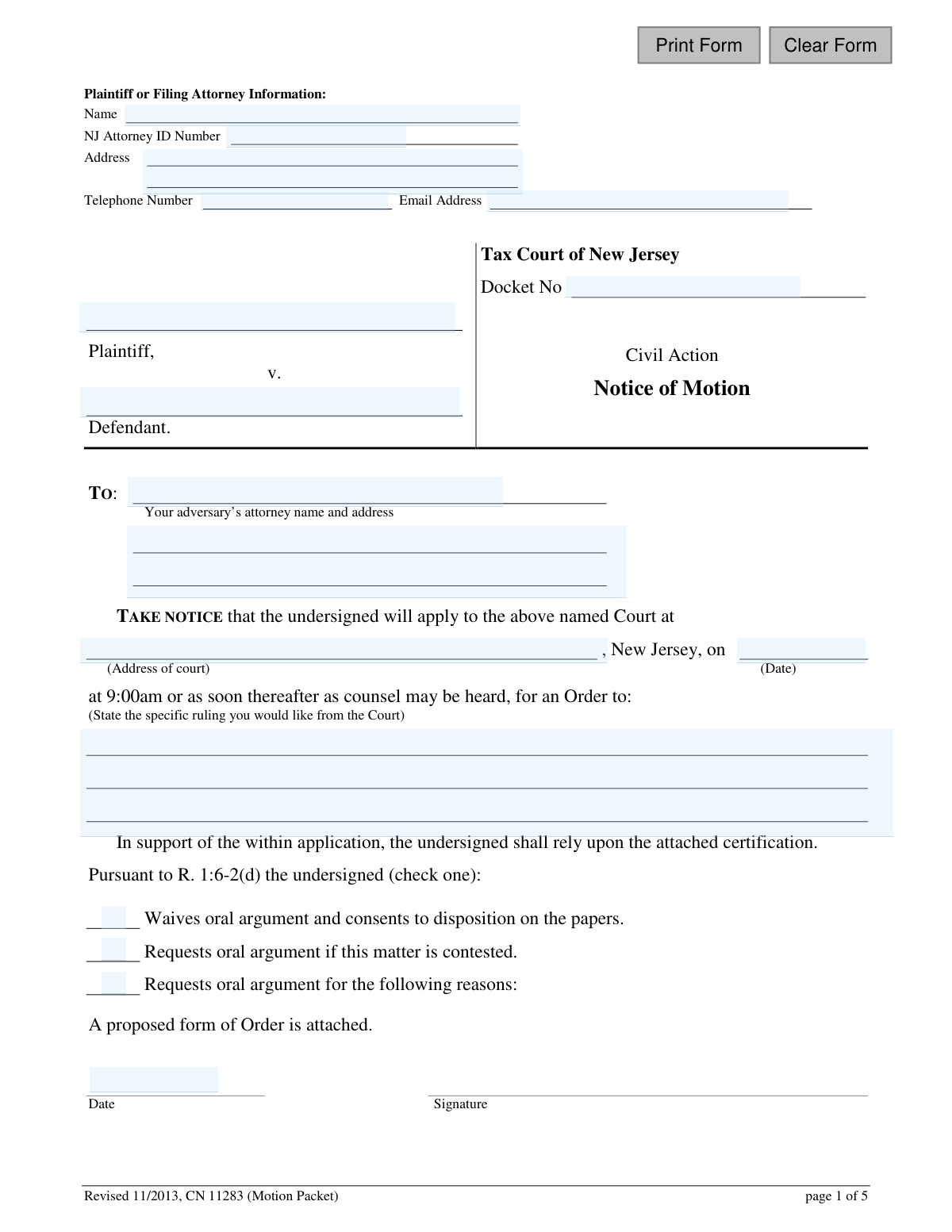
This packet is a collection of legal documents required to file a motion in the Tax Court of New Jersey, including the Notice of Motion, Certification in Support, Certification of Service, and a proposed Order. It is used by a plaintiff or defendant to formally ask the court to make a specific ruling on an issue before the trial begins. Today, this form can be filled out quickly and accurately using AI-powered services like Instafill.ai, which can also convert non-fillable PDF versions into interactive fillable forms.
CN 11283 is part of the New Jersey forms category on Instafill.
Our AI automatically handles information lookup, data retrieval, formatting, and form filling.
It takes less than a minute to fill out CN 11283 using our AI form filling.
Securely upload your data. Information is encrypted in transit and deleted immediately after the form is filled out.

Form specifications

Form name: Tax Court of New Jersey Notice of Motion Packet (CN 11283)
Number of fields: 69
Number of pages: 1
Language: English
main-image

Instafill Demo: How to fill out PDF forms in seconds with AI

How to Fill Out CN 11283 Online for Free in 2026

Are you looking to fill out a CN 11283 form online quickly and accurately? Instafill.ai offers the #1 AI-powered PDF filling software of 2026, allowing you to complete your CN 11283 form in just 37 seconds or less.
Follow these steps to fill out your CN 11283 form online using Instafill.ai:
  1. 1 Navigate to Instafill.ai and upload or select the New Jersey Notice of Motion Packet.
  2. 2 Use the AI assistant to automatically populate your information, including your name, attorney ID, address, and the case details like the docket number and party names.
  3. 3 In the 'Notice of Motion' section, clearly state the specific ruling you are requesting from the court and indicate your preference for oral argument.
  4. 4 Complete the 'Certification in Support of Motion' by providing a detailed explanation of the facts and legal basis for your request.
  5. 5 Fill out the 'Certification of Service' to document that you have sent copies of the motion packet to all opposing parties, specifying the method of delivery.
  6. 6 Prepare the 'Proposed form of Order' by describing the relief you are asking the judge to grant.
  7. 7 Carefully review all completed sections for accuracy, digitally sign where required, and download the final packet for filing with the appropriate judge and serving to the other parties.

Our AI-powered system ensures each field is filled out correctly, reducing errors and saving you time.

Why Choose Instafill.ai for Your Fillable CN 11283 Form?

Speed

Complete your CN 11283 in as little as 37 seconds.

Up-to-Date

Always use the latest 2026 CN 11283 form version.

Cost-effective

No need to hire expensive lawyers.

Accuracy

Our AI performs 10 compliance checks to ensure your form is error-free.

Security

Your personal information is protected with bank-level encryption.

Frequently Asked Questions About Form CN 11283

This packet is used to formally ask the New Jersey Tax Court to take a specific action or make a ruling in your case before a trial occurs. It is a formal request for a court order on a pre-trial matter.

Either the plaintiff or the defendant in a Tax Court case, or their attorney, can file this packet to request a court order.

Yes, you must file all four original documents included: the Notice of Motion, the Certification in Support of Motion, the Certification of Service, and the proposed form of Order.

You must file the motion directly with the judge assigned to your case. If a judge has not yet been assigned, file it with the judge responsible for the geographic area where your property is located.

You can obtain the name and address of the assigned judge by contacting the Tax Court Management Office or by looking up the information on the New Jersey Courts website (njcourts.com).

This is where you must explain the factual and legal reasons why the court should grant your request. You are certifying that these statements are true under penalty of punishment.

This is a draft of the order you are asking the judge to sign. You fill out the part describing the action you want the court to take, and the judge will complete the rest if your motion is granted.

This form is your sworn statement confirming that you have sent a copy of all motion documents to the opposing party or their attorney. It proves to the court that you have properly notified the other side of your motion.

Requesting oral argument means you want to appear in court to argue your motion in person. Waiving it means you agree to let the judge decide based only on the written documents filed by both parties.

Motion return dates are typically every other Friday. You should call the assigned judge's chambers to find out the exact dates available for scheduling your motion.

Yes, services like Instafill.ai use AI to help you accurately auto-fill form fields with your personal information, saving time and reducing errors. However, AI cannot provide the legal arguments for your motion.

You can upload the Notice of Motion Packet PDF to the Instafill.ai platform. The AI will make the fields interactive, allowing you to easily type and auto-fill your information directly onto the form.

You can use a tool like Instafill.ai, which can convert flat, non-fillable PDFs into interactive forms. This will allow you to type your information into the fields online before printing the completed packet.

Yes, the 'Plaintiff or Filing Attorney Information' section appears on pages 1, 2, and 4. You must complete this section on each of those pages to ensure all documents are correctly associated with your case.

Compliance CN 11283
Validation Checks by Instafill.ai

1
NJ Attorney ID Format Validation
This check ensures the 'NJ Attorney ID Number' field is present and follows the standard format for New Jersey attorney identification numbers. This is crucial for verifying the attorney's credentials and standing with the bar. A failed validation would prevent submission until a correctly formatted ID is entered, ensuring the filing is made by a recognized legal representative.
2
Case Information Consistency Across Pages
This validation verifies that the 'Docket No', 'Plaintiff' name, and 'Defendant' name are identical on all pages of the packet (Notice of Motion, Certification, Order). Inconsistent information can lead to clerical errors, confusion, and potential rejection of the filing. If a mismatch is found, the user must correct the information to ensure it is uniform throughout the document.
3
Motion Hearing Date Must Be in the Future
This check validates that the date entered for the motion hearing ('NoticeCourtDt') is a valid calendar date that occurs in the future. A motion cannot be scheduled for a past date. This prevents nonsensical submissions and ensures the motion is scheduled for a valid court session, and if validation fails, the user is prompted to select a future date.
4
Mandatory Oral Argument Selection
This validation ensures that the user has selected exactly one of the three options regarding oral argument ('Waives oral argument', 'Requests oral argument if contested', 'Requests oral argument for the following reasons'). The court needs to know the filer's preference to properly schedule its calendar. A failure to select an option would halt submission and require the user to make a choice.
5
Completeness of Motion's Purpose
This check ensures that the text fields describing the purpose of the motion ('NoticeRulingDesc', 'CertSuppRulingDesc', 'OrderReliefDesc') are not empty. These fields explain to the court what action is being requested and are the core of the motion. An empty field would make the filing meaningless, so validation failure would require the user to provide the necessary descriptions.
6
Certification of Service Method Selection
This validation confirms that at least one method of service (e.g., 'Regular mail', 'Certified mail') has been checked on the 'Certification of Service' page. This certification is a sworn statement that the other parties have been notified, and the method of notification is a required detail. If no method is selected, the form is incomplete and cannot be filed.
7
Completeness of Served Party Information
This check verifies that the information for at least one served party is fully completed on the 'Certification of Service' page, including their name, address, and their role ('Attorney for: Plaintiff/Defendant'). Proper service is a cornerstone of due process, and incomplete information invalidates the certification. The system should require at least one full party record to proceed.
8
Logical Date Sequence for Service and Filing
This validation checks that the 'Certification of Service' date ('CertSvcDt') is on or before the signature date of the certification ('CertSvcSigDt'). A person cannot certify that they have served a document on a future date. This logical check prevents inaccurate or fraudulent certifications of service and maintains the integrity of the legal process.
9
Filing Attorney Contact Information Completeness
This check ensures that the primary 'Plaintiff or Filing Attorney Information' block is fully completed, including Name, Address, Telephone Number, and Email. This contact information is essential for the court and opposing counsel to communicate with the filer. Missing information can cause significant delays and communication breakdowns, so the form should not be accepted if this section is incomplete.
10
Case Parties Named
This validation ensures that both the 'Plaintiff' and 'Defendant' name fields in the case caption are filled out. A legal action requires at least two opposing parties. Submitting a form with a missing plaintiff or defendant would be a fundamental error, and the system must prevent this by making both fields required.
11
Judge's Order Section Must Be Blank
This check verifies that the fields reserved for the judge on the 'Order' page (such as the order date 'day of', 'month', '20__', and the final order description) are left empty by the filer. Filers should not pre-fill the court's decision or the date of the order. This validation prevents inappropriate submissions and ensures the integrity of the judicial order.
12
Certifier Role Selection
On the 'Certification in Support of Motion' page, this validation ensures that the user has checked one of the boxes to identify themselves as either the 'Plaintiff' or 'Defendant'. This clarifies who is making the sworn statements in the certification. Failure to select a role makes the certification ambiguous and legally insufficient.
13
Email Address Format
This check validates that the value entered in the 'Email Address' field ('attyEmail') conforms to a standard email format (e.g., [email protected]). An invalid email address will prevent electronic communication and service from the court. This validation ensures that the provided contact method is usable.
14
Telephone Number Format
This validation ensures the 'Telephone Number' ('TeleNo') is entered in a recognizable format, such as a 10-digit number with an optional area code in parentheses. Correct formatting is important for data consistency and for ensuring the court or other parties can successfully contact the filer. The system should reject entries with too few or too many digits.

Common Mistakes in Completing CN 11283

Inconsistent Case Information Across Pages

This form requires repeating the Docket Number, Plaintiff, and Defendant names on multiple pages. Filers often make typos or use slight variations, which happens during manual data entry. These inconsistencies can cause confusion, processing delays, or even rejection of the filing by the court clerk. To prevent this, carefully proofread all repeated information for consistency before filing, or use a tool that auto-populates these fields across the document.

Vague or Unclear Statement of Relief

The form asks filers to 'State the specific ruling you would like' on three separate pages. A common mistake is being too general, for example, writing 'To grant my motion' instead of the precise legal action desired. This ambiguity forces the judge to guess the filer's intent, which can lead to the motion being denied or delayed for clarification. Be explicit, such as 'An Order to compel Defendant to produce responses to Plaintiff's First Set of Interrogatories.'

Insufficient Factual or Legal Justification

In the 'Certification in Support of Motion,' filers must explain why the motion should be granted. Many people, especially those without legal counsel, submit emotional pleas or personal opinions instead of a structured argument based on facts and law. Without a proper legal and factual basis, the judge has no grounds to grant the request, leading to an almost certain denial. Your justification should clearly state the facts and explain how they legally support your request for relief.

Omitting the Proposed Form of Order

The motion packet includes a 'Proposed form of Order' (page 4) that must be filled out and submitted with the motion. Filers frequently forget to include this page, assuming the court will draft its own order. A missing proposed order makes the filing incomplete and will likely cause it to be rejected by the judge's chambers, delaying the entire motion process. Always ensure this page is completed and included in your submission.

Incorrect or Incomplete Certification of Service

The 'Certification of Service' is a sworn statement that you have sent the motion to the other party, and errors here are common. Mistakes include forgetting to date or sign it, failing to check the method of delivery, or listing the wrong party/attorney. An improper certification can invalidate your motion, as the court cannot proceed without proof of service, violating the other party's due process rights.

Missing or Incorrect Docket Number

The Docket Number is the case's unique identifier and is required on pages 1, 2, and 4. This critical piece of information is often entered incorrectly or omitted entirely due to simple oversight. An incorrect docket number can lead to the court clerk misfiling or rejecting the document, causing significant delays and potentially making you miss your hearing date. AI-powered form filling tools like Instafill.ai can prevent this by populating the number consistently across all pages after a single entry.

Illegible Handwritten Entries

This form is often available as a non-fillable PDF, leading many to print it and fill it out by hand. Poor handwriting can make names, addresses, and crucial details unreadable to court staff. If the clerk or judge cannot decipher your information, your filing may be rejected outright. To avoid this, use a typewriter or an AI tool like Instafill.ai, which can convert flat PDFs into fillable digital forms, ensuring every entry is clear and legible.

Incorrect Filing Location

The instructions on page 5 state that motions must be filed directly with the assigned judge, not a central court clerk's office. Many filers miss this instruction and send their packet to the wrong address. This error guarantees the motion will not reach the judge in time for the hearing, causing it to be postponed or go unheard. Always verify the correct judge and their specific filing address before sending your documents.

Missing Signatures or Dates

This packet requires signatures and dates on the Notice of Motion, the Certification in Support, and the Certification of Service. It is very easy to overlook one of these signature lines when dealing with a multi-page document. An unsigned motion or certification is legally invalid and will be rejected by the court, forcing you to restart the filing process and miss your original motion date. Before filing, do a final review of each page specifically to check for all required signatures.

Improperly Addressing the Opposing Party

The Notice of Motion requires you to list your 'adversary’s attorney name and address.' A frequent error is to list the opposing party's name directly, even when they are represented by a lawyer. Court rules require that all communications go through a party's attorney if they have one. Failing to do so is a procedural error that can result in your motion being deemed improperly served, causing delays and friction with the court and opposing counsel.
Saved over 80 hours a year

“I was never sure if my IRS forms like W-9 were filled correctly. Now, I can complete the forms accurately without any external help.”

Kevin Martin Green

Your data stays secure with advanced protection from Instafill and our subprocessors

Robust compliance program

Transparent business model

You’re not the product. You always know where your data is and what it is processed for.

ISO 27001, HIPAA, and GDPR

Our subprocesses adhere to multiple compliance standards, including but not limited to ISO 27001, HIPAA, and GDPR.

Security & privacy by design

We consider security and privacy from the initial design phase of any new service or functionality. It’s not an afterthought, it’s built-in, including support for two-factor authentication (2FA) to further protect your account.

Fill out CN 11283 with Instafill.ai

Worried about filling PDFs wrong? Instafill securely fills tax-court-of-new-jersey-notice-of-motion-packet-cn-11283 forms, ensuring each field is accurate.