Yes! You can use AI to fill out Tax Court of New Jersey Withdrawal of Complaint

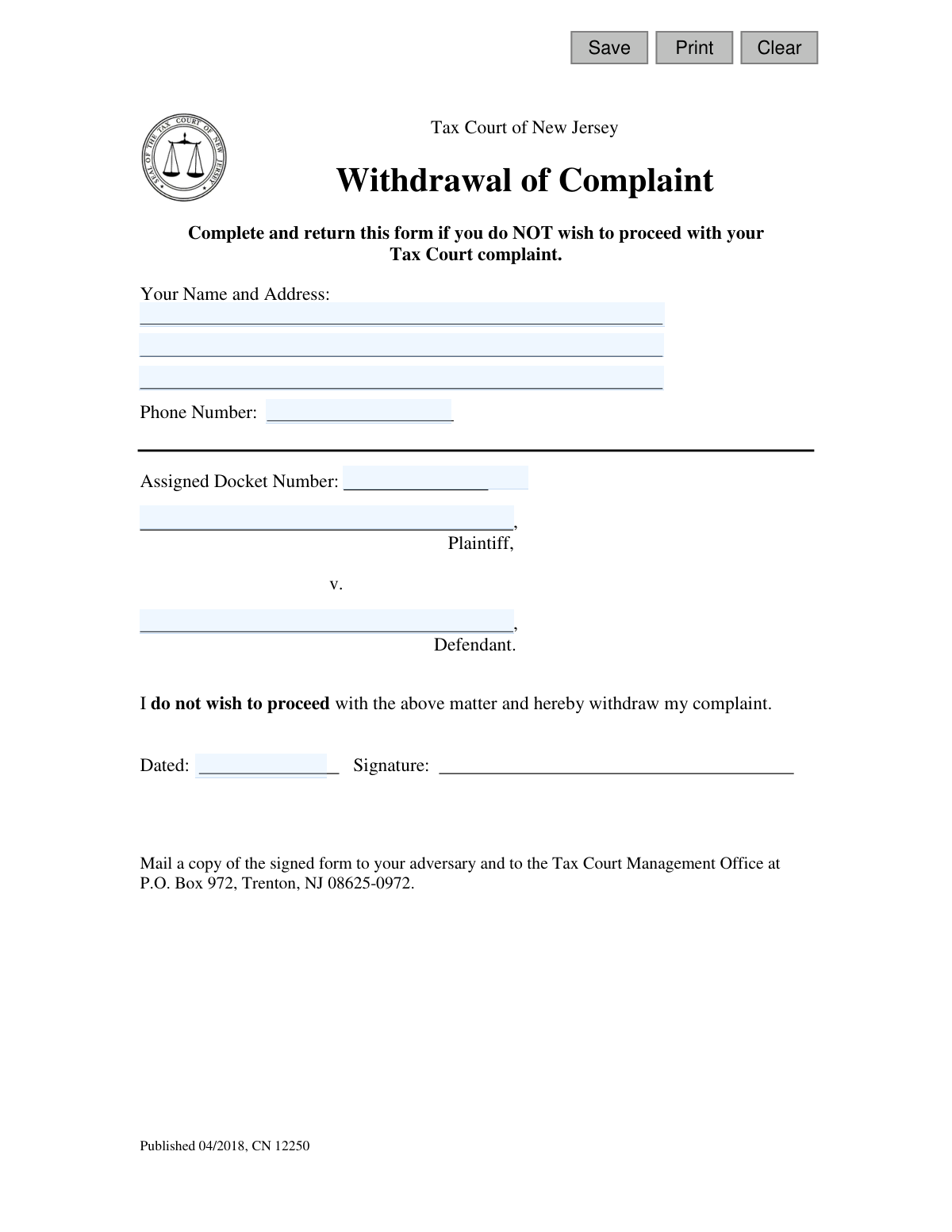
This form is an official document used to notify the Tax Court of New Jersey that a plaintiff wishes to withdraw their complaint and no longer proceed with the legal matter. Submitting this form is a crucial step to formally close a case you have initiated. Today, this form can be filled out quickly and accurately using AI-powered services like Instafill.ai, which can also convert non-fillable PDF versions into interactive fillable forms.
CN 12250 is part of the New Jersey forms category on Instafill.
Our AI automatically handles information lookup, data retrieval, formatting, and form filling.
It takes less than a minute to fill out CN 12250 using our AI form filling.
Securely upload your data. Information is encrypted in transit and deleted immediately after the form is filled out.

Form specifications

Form name: Tax Court of New Jersey Withdrawal of Complaint
Number of fields: 11
Number of pages: 1
Language: English
main-image

Instafill Demo: How to fill out PDF forms in seconds with AI

How to Fill Out CN 12250 Online for Free in 2026

Are you looking to fill out a CN 12250 form online quickly and accurately? Instafill.ai offers the #1 AI-powered PDF filling software of 2026, allowing you to complete your CN 12250 form in just 37 seconds or less.
Follow these steps to fill out your CN 12250 form online using Instafill.ai:
  1. 1 Navigate to Instafill.ai and upload or select the New Jersey Tax Court 'Withdrawal of Complaint' form.
  2. 2 Provide your full name, current address, and phone number in the designated fields.
  3. 3 Enter the assigned docket number for your Tax Court case.
  4. 4 Identify the plaintiff (your name) and the defendant in the case.
  5. 5 Review all the information auto-filled by the AI to ensure it is correct and complete.
  6. 6 Date and digitally sign the form to certify your request to withdraw the complaint.
  7. 7 Download the completed form, print it, and mail copies to the Tax Court Management Office and your adversary as instructed.

Our AI-powered system ensures each field is filled out correctly, reducing errors and saving you time.

Why Choose Instafill.ai for Your Fillable CN 12250 Form?

Speed

Complete your CN 12250 in as little as 37 seconds.

Up-to-Date

Always use the latest 2026 CN 12250 form version.

Cost-effective

No need to hire expensive lawyers.

Accuracy

Our AI performs 10 compliance checks to ensure your form is error-free.

Security

Your personal information is protected with bank-level encryption.

Frequently Asked Questions About Form CN 12250

This form is used to officially notify the Tax Court of New Jersey that you no longer wish to proceed with a complaint you have filed. Submitting this form will result in the dismissal of your case.

You should fill out this form if you are the plaintiff who filed a complaint with the Tax Court and have decided to drop the case before a final judgment.

You will need your personal contact information, the case's assigned docket number, and the names of the plaintiff (you) and the defendant.

Your Docket Number is assigned by the court when you first file your complaint. It can be found on any official correspondence or notices you have received from the Tax Court regarding your case.

The Plaintiff is the person who filed the complaint, which is you. The Defendant is the municipality or government entity your tax complaint is against.

You must mail a signed copy to the Tax Court Management Office in Trenton, NJ. You are also required to mail a copy to your 'adversary,' who is the other party in the case.

Your adversary is the opposing party in your lawsuit, which is typically the legal representative for the defendant municipality. You must send them a copy of the signed withdrawal form.

After the court processes your form, your complaint will be dismissed, and your case will be officially closed. This action is generally final.

Withdrawing a complaint is typically a final action, and it is very difficult to have a case reopened once it has been dismissed. Be certain of your decision before you sign and mail the form.

Yes, the form requires your physical signature and the date you signed it. An unsigned form will not be processed by the court.

Yes, services like Instafill.ai use AI to help you accurately auto-fill form fields. This can save you time and help prevent common errors.

You can upload the Withdrawal of Complaint PDF to the Instafill.ai platform. The service will make the form fillable online, allowing you to type in your information before printing it for signature and mailing.

If you have a non-fillable PDF, you can use a service like Instafill.ai to convert it into an interactive, fillable form. Simply upload the file, and the platform will allow you to enter your information digitally.

Compliance CN 12250
Validation Checks by Instafill.ai

1
Docket Number Presence
This check verifies that the 'Assigned Docket Number' field is not empty. The docket number is the unique identifier for a case in the Tax Court system. Without it, the court cannot locate the specific complaint to be withdrawn, making the submission invalid and unprocessed.
2
Docket Number Format Validation
This validation ensures the 'Assigned Docket Number' conforms to a plausible format for the New Jersey Tax Court, such as an alphanumeric string. An incorrectly formatted docket number could lead to processing errors or the inability to match the withdrawal to the correct case file. If the format is invalid, the user should be prompted to correct it.
3
Plaintiff Name Presence
This check ensures that the 'Plaintiff' field in the case caption is filled out. The plaintiff is a primary party to the legal action, and their name is essential for correctly identifying the case being withdrawn. An empty plaintiff field would render the form incomplete and ambiguous.
4
Defendant Name Presence
This validation confirms that the 'Defendant' field in the case caption is not left blank. The defendant's name is a crucial component of the case identification, along with the plaintiff and docket number. Submitting the form without this information would prevent the court from confirming the correct case record.
5
Submitter's Name Presence
This check verifies that the 'Your Name' field is completed by the person submitting the form. This identifies the individual authorizing the withdrawal of the complaint. This is a mandatory field for establishing the authority and identity of the person making the request.
6
Submitter and Plaintiff Name Consistency
This logical check compares the 'Your Name' field with the 'Plaintiff' field. As the person withdrawing the complaint is typically the plaintiff, this validation helps prevent fraudulent or mistaken withdrawals. If the names do not match, a warning or an additional verification step may be required.
7
Primary Address Line Presence
This validation ensures that the first line of the submitter's address ('addr1') is not empty. A physical address is required for official correspondence and to verify the identity of the party submitting the form. While the second address line may be optional, the primary line is essential for mailing and record-keeping.
8
Phone Number Format
This check validates that the entered 'Phone Number' follows a standard North American format (e.g., 10 digits, optionally with parentheses, spaces, or hyphens). A valid phone number is important so the court can contact the submitter if there are any questions. An invalid format would be rejected to ensure data quality.
9
Signature Date Presence
This validation confirms that the 'Dated' field ('sigDt') has been filled out. The date of signature is legally significant, as it establishes the precise moment the complaint was withdrawn. A missing date can create legal ambiguity and may cause the court to reject the form.
10
Signature Date Format Validation
This check ensures the value entered in the 'Dated' field is a valid date and follows a recognized format (e.g., MM/DD/YYYY). This prevents the entry of nonsensical data and ensures the date can be correctly interpreted and recorded by the court's system. An invalid format would trigger an error message prompting the user for correction.
11
Signature Date Plausibility
This validation checks that the 'Dated' field does not contain a future date. A withdrawal cannot be post-dated, as the action is effective from the date of signing. This check prevents logical errors and ensures the legal validity of the document's effective date.
12
Submitter Name Character Validation
This check ensures the 'Your Name' field contains only valid characters for a person's name (letters, spaces, hyphens, apostrophes). It prevents the entry of numbers or excessive special characters that would indicate an invalid or incorrectly entered name. This maintains data integrity for the court's records.

Common Mistakes in Completing CN 12250

Incorrect or Missing Docket Number

Filers often mistype the docket number or leave it blank if they are unsure where to find it. Without the correct docket number, the court cannot identify the specific case to be withdrawn, causing the form to be rejected and the case to remain active. Always double-check the docket number against official court notices and enter it exactly as it appears.

Forgetting to Sign the Form

A common and critical error is forgetting to physically sign the document after filling it out. A withdrawal of complaint is a legal document that is invalid without a 'wet' signature, and a typed name is not sufficient. The court will reject an unsigned form, meaning your case will not be withdrawn and will continue to proceed.

Failing to Serve the Adversary

The form instructions require sending a copy to the defendant (adversary), a step that is frequently missed. This procedural failure means the opposing party is not officially notified of the withdrawal, which can lead to legal complications or the court refusing to process the request. Always make a copy of the signed form and mail it to the defendant's legal representative.

Incorrect Plaintiff or Defendant Information

People sometimes confuse the plaintiff (the party who filed the complaint) and the defendant (the municipality) or misspell their names. This mismatch with court records can cause significant processing delays or rejection, as the court must be certain which case is being closed. Carefully copy the names exactly as they appear on the original complaint document.

Using Illegible Handwriting

When filling out the form by hand, illegible writing can cause court clerks to misread critical data like names or the docket number. This can lead to data entry errors on the court's end or outright rejection of the form if it's unreadable. To prevent this, it's best to type the information; tools like Instafill.ai can convert non-fillable PDFs into fillable versions to ensure all text is clear before you print for signature.

Providing Outdated Contact Information

Filers may enter an old address or phone number, especially if they have recently moved. This prevents the court from sending confirmation that the case has been closed or contacting you if there are problems with your form. Always provide your current, complete mailing address and a reliable phone number to ensure you receive all correspondence.

Leaving the Date Field Blank

It's easy to overlook the 'Dated' field next to the signature line. While not as severe as a missing signature, an undated form is technically incomplete and may cause minor processing delays or require clarification from the court. To avoid this, simply date the form on the same day you sign it.

Mailing to the Wrong Court Address

Filers might use a generic courthouse address found online instead of the specific one listed on the form. This can cause the document to be lost or severely delayed in reaching the Tax Court Management Office. To ensure timely processing, mail the form exclusively to the P.O. Box address provided: P.O. Box 972, Trenton, NJ 08625-0972.

Incomplete Personal Address

Omitting details like an apartment number, city, or ZIP code is a frequent data entry error. An incomplete address means any mail from the court, such as a confirmation of withdrawal, may be returned as undeliverable. AI-powered form fillers like Instafill.ai can help prevent this by auto-completing and validating addresses to ensure they are complete and correctly formatted.
Saved over 80 hours a year

“I was never sure if my IRS forms like W-9 were filled correctly. Now, I can complete the forms accurately without any external help.”

Kevin Martin Green

Your data stays secure with advanced protection from Instafill and our subprocessors

Robust compliance program

Transparent business model

You’re not the product. You always know where your data is and what it is processed for.

ISO 27001, HIPAA, and GDPR

Our subprocesses adhere to multiple compliance standards, including but not limited to ISO 27001, HIPAA, and GDPR.

Security & privacy by design

We consider security and privacy from the initial design phase of any new service or functionality. It’s not an afterthought, it’s built-in, including support for two-factor authentication (2FA) to further protect your account.

Fill out CN 12250 with Instafill.ai

Worried about filling PDFs wrong? Instafill securely fills tax-court-of-new-jersey-withdrawal-of-complaint forms, ensuring each field is accurate.