Yes! You can use AI to fill out Uniform Arbitration Statement of Facts - Appendix XXII-A
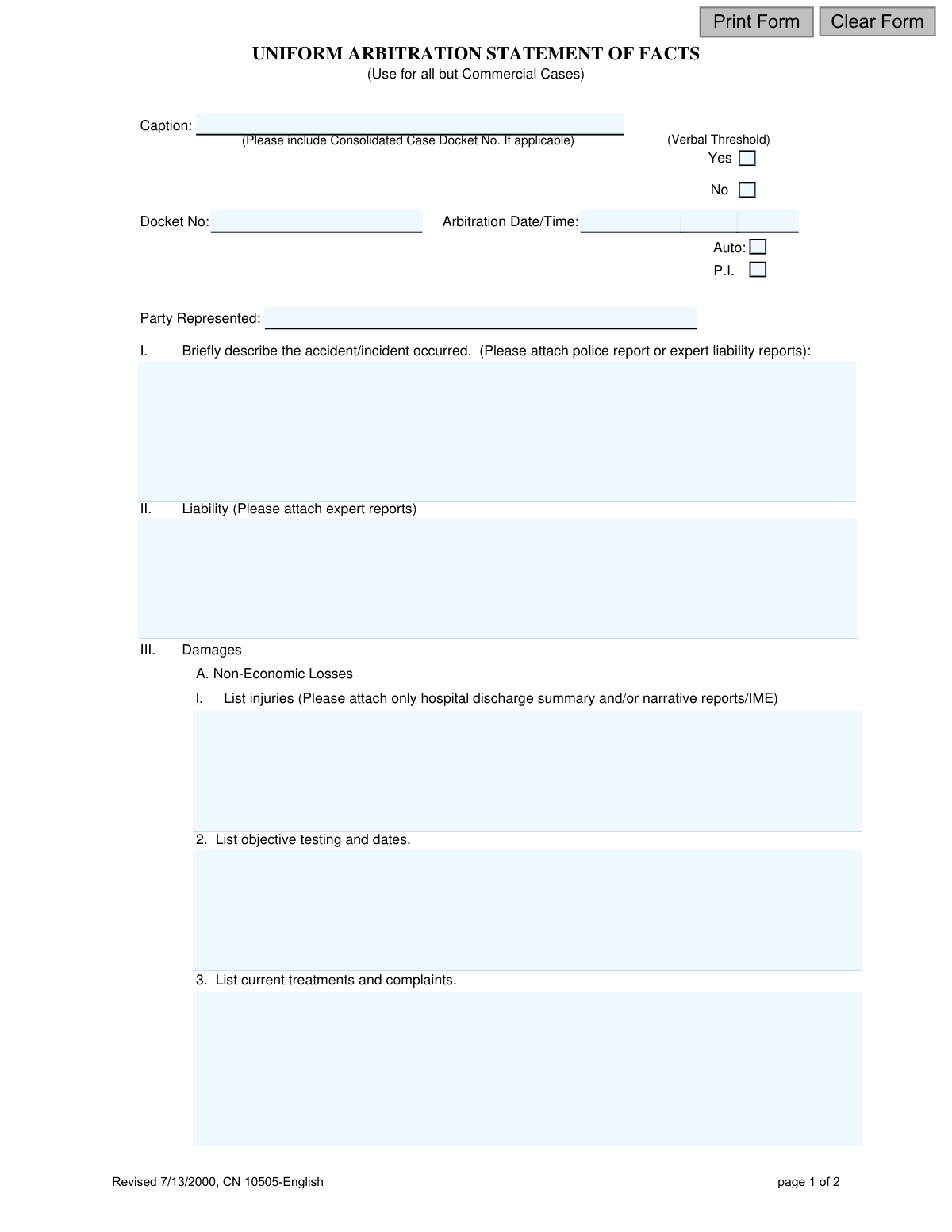
The Uniform Arbitration Statement of Facts, also known as Appendix XXII-A, is a legal document used to provide a concise summary of a case's facts, liability, and damages for an arbitration proceeding. It is specifically used for all cases except commercial ones, helping to streamline the arbitration process by presenting key information to the arbitrator in a standardized format. Today, this form can be filled out quickly and accurately using AI-powered services like Instafill.ai, which can also convert non-fillable PDF versions into interactive fillable forms.
Appendix XXII-A is part of the
New Jersey forms category on Instafill.
Our AI automatically handles information lookup, data retrieval, formatting, and form filling.
It takes less than a minute to fill out Appendix XXII-A using our AI form filling.
Securely upload your data. Information is encrypted in transit and deleted immediately after the form is filled out.
Form specifications
| Form name: | Uniform Arbitration Statement of Facts - Appendix XXII-A |
| Number of fields: | 48 |
| Number of pages: | 1 |
| Language: | English |
Instafill Demo: How to fill out PDF forms in seconds with AI
How to Fill Out Appendix XXII-A Online for Free in 2026
Are you looking to fill out a APPENDIX XXII-A form online quickly and accurately? Instafill.ai offers the #1 AI-powered PDF filling software of 2026, allowing you to complete your APPENDIX XXII-A form in just 37 seconds or less.
Follow these steps to fill out your APPENDIX XXII-A form online using Instafill.ai:
- 1 Navigate to Instafill.ai and upload or select the Uniform Arbitration Statement of Facts form.
- 2 Provide the case caption, docket number, arbitration date, and the party you represent.
- 3 Use the AI assistant to briefly describe the incident and the basis for liability, referencing attached police or expert reports.
- 4 Detail the damages by listing injuries, objective testing, current treatments, and itemizing economic losses like medical bills and lost wages.
- 5 List any applicable workers' compensation liens and any other issues you want the arbitrator to consider.
- 6 Review all the information populated by the AI across the form for accuracy and completeness.
- 7 Certify the information by signing and dating the form before serving it to all parties as required.
Our AI-powered system ensures each field is filled out correctly, reducing errors and saving you time.
Why Choose Instafill.ai for Your Fillable Appendix XXII-A Form?
Speed
Complete your Appendix XXII-A in as little as 37 seconds.
Up-to-Date
Always use the latest 2026 Appendix XXII-A form version.
Cost-effective
No need to hire expensive lawyers.
Accuracy
Our AI performs 10 compliance checks to ensure your form is error-free.
Security
Your personal information is protected with bank-level encryption.
Frequently Asked Questions About Form Appendix XXII-A
This form is used to provide a summary of the facts, liability, and damages of your case to the arbitrator before your hearing. It is required for most arbitration cases, except for commercial ones.
Each party involved in a non-commercial arbitration case, or their attorney, must complete and submit this form. This includes individuals representing themselves (Pro Se Litigants).
You should not use this form for a commercial case. You will need to find the specific form designated for commercial arbitration in your jurisdiction.
The 'Verbal Threshold' is a legal standard in auto insurance cases in some states that determines whether you can sue for non-economic damages like pain and suffering. You should consult with your attorney to determine if it applies to your case.
In the 'Liability' section, you should briefly explain why you believe the other party is legally responsible for the accident or incident. You should also attach any expert liability reports if you have them.
Economic losses are your specific, out-of-pocket expenses like medical bills and lost wages. Non-economic losses refer to non-monetary damages such as pain, suffering, and emotional distress resulting from your injuries.
You must itemize your medical bills in the space provided on the form itself, but do not attach the actual bill documents when you submit the form. However, you should be prepared to bring copies of the bills with you to the arbitration hearing as evidence.
This means you are required to send a copy of your completed form to the opposing party (or their lawyer) by the deadline set by court rule R. 4:21A-4. This ensures all parties have seen the information before the arbitration.
No, the form explicitly states that the information provided on it cannot be used for evidentiary purposes in any subsequent trial of the matter. It is intended for the arbitration hearing only.
Yes, AI-powered services like Instafill.ai can help you fill out this form more efficiently. These tools can accurately auto-fill fields with your information, saving you time and reducing errors.
You can use a service like Instafill.ai to fill out the form online. Simply upload the PDF, and the platform will make it interactive, allowing you to type your information directly into the fields and save or print the completed document.
If you have a non-fillable or 'flat' PDF, you can use a tool like Instafill.ai to convert it into an interactive, fillable form. This allows you to easily type your answers instead of printing and filling it out by hand.
Compliance Appendix XXII-A
Validation Checks by Instafill.ai
1
Ensures Docket Number Format is Valid
This check validates that the 'Docket No' field conforms to the standard court-mandated format, which often includes letters, numbers, and hyphens (e.g., ABC-L-1234-23). Correct formatting is essential for accurate case filing and retrieval within the judicial system. A failure would prevent the form from being associated with the correct case file, causing administrative delays.
2
Verifies Arbitration Date is in the Future
This validation ensures that the 'Arbitration Date/Time' is set to a future date and time. Scheduling an arbitration for a past date is a logical impossibility and indicates a significant data entry error. If the date is in the past, the user will be prompted to correct it before submission is allowed.
3
Validates Signature Date is Not in the Future
This check confirms that the signature 'Date' is the current date or a past date, but not a future date. The signature certifies the accuracy of the information at the time of signing, so a future date is invalid and would call the document's authenticity into question. The form will be rejected if a future date is entered.
4
Ensures Exclusive Selection for Verbal Threshold
This validation confirms that exactly one option, either 'Yes' or 'No', is selected for the 'Verbal Threshold' question. A case cannot simultaneously meet and not meet the threshold, and leaving it blank fails to classify the case properly for the arbitrator. The form cannot be submitted without a single, valid selection.
5
Requires Case Type Selection (Auto or P.I.)
This check ensures that a case type, either 'Auto' or 'P.I.' (Personal Injury), has been selected. This information is critical as it dictates which sections of the form are most relevant and may trigger other validation rules, such as requiring injury details for P.I. cases. Submission is blocked until a selection is made.
6
Confirms Unpaid Medical Bill Amount is Logical
This validation checks that for each medical bill listed, the 'Unpaid Bills' amount is less than or equal to the 'Total Amount'. It is logically impossible for the unpaid portion of a bill to exceed the total amount of the bill itself. This check prevents common clerical errors and ensures the financial data presented to the arbitrator is accurate.
7
Validates Consistency of Medical Bill Entries
For each row in the 'Itemized list of all medical bills', this check ensures that if a 'Treating Doctor/Hospital' is listed, the corresponding 'Total Amount' and 'Unpaid Bills' fields contain valid, non-negative currency values. This prevents incomplete or nonsensical financial data from being submitted. An incomplete row will trigger an error, requiring the user to either complete the data or clear the row.
8
Ensures Miscellaneous Expense Data Integrity
This check verifies that if a description is entered for a 'Miscellaneous expense', the corresponding amount field contains a valid, positive numeric value. This prevents claims for expenses without a specified cost, which would be ambiguous for the arbitrator. The system will flag any expense description that is missing its corresponding monetary value.
9
Requires 'Attorney for' if Signed by Counsel
This validation ensures that if the form is signed by an attorney (as opposed to a 'Pro Se Litigant'), the 'Attorney for' field is completed to identify the party they represent. This is crucial for legal clarity, proper service of documents, and communication. If the signatory is an attorney, this field is mandatory.
10
Mandates Injury Details for Personal Injury (P.I.) Cases
If the case type is marked as 'P.I.', this validation ensures that the 'List injuries' section under 'Non-Economic Losses' is not empty. Details of the injuries sustained are fundamental to any personal injury claim and their absence would render the statement of facts incomplete. The user will be prompted to provide this information before proceeding.
11
Verifies Completeness of Signature Section
This check confirms that the signature section is fully completed, requiring the signature date and the printed or typed name of the signatory. The printed name is essential for legibility and formally identifying the person certifying the document, as a handwritten signature may be illegible. An incomplete signature block will prevent submission.
12
Ensures Caption and Docket Number are Provided
This validation mandates that the 'Caption' and 'Docket No' fields are both filled out. These two fields are the primary identifiers for the legal case to which this document pertains. Submitting a form without this information would make it impossible to file correctly and associate it with the proper court record.
Common Mistakes in Completing Appendix XXII-A
Users often forget or mistype the Docket Number, Arbitration Date/Time, or fail to check the correct case type (Auto/P.I.). This typically happens due to rushing or clerical error. The consequences are significant, as the form may be rejected, misfiled, or cause serious delays in the arbitration process while staff try to locate the correct case. To avoid this, meticulously double-check all identifiers against official court notices before submission. AI-powered tools like Instafill.ai can help by flagging empty required fields and ensuring data formats for dates are correct.
The form explicitly states what to attach (e.g., 'police report,' 'expert reports,' 'hospital discharge summary') and what NOT to attach ('bills, deposition transcripts'). A frequent mistake is ignoring these instructions and either attaching everything or omitting required summaries. This can lead to the submission being deemed incomplete or frustrate the arbitrator with excessive, unrequested paperwork, reflecting poorly on the filer. Since this form is a non-fillable PDF, a tool like Instafill.ai can convert it into an interactive, fillable version, making it easier to navigate and notice these important instructions.
In sections like 'Briefly describe the accident' and 'Liability,' users often write lengthy, argumentative narratives instead of the concise summaries requested. This occurs when they attempt to argue their entire case on the form itself. The consequence is that key facts become buried, and the arbitrator may overlook the main points. A proper summary should be a few clear sentences that reference the more detailed attached reports.
The 'Economic Losses' section is highly prone to mathematical errors, especially when itemizing medical bills or calculating net wage loss. People often confuse gross vs. net wages or simply miscalculate the column totals for medical bills. These errors undermine the credibility of the damages claim and require correction later, causing delays and extra work. To prevent this, use a calculator and double-check all figures; advanced form-filling tools like Instafill.ai can be configured to perform these calculations automatically, reducing the risk of human error.
In the 'Workers’ Compensation and Other Liens' section, filers sometimes forget or intentionally omit liens from health insurers, Medicare/Medicaid, or workers' comp carriers. This is a critical error, as these entities often have a legal right to be repaid from any settlement or award. Failure to disclose can lead to serious legal complications, sanctions, and significant delays in distributing funds to the client after the case is resolved.
The form specifically asks for both 'Total Amount' and 'Unpaid Bills' for medical expenses. A common mistake is to enter the same number in both columns or to list the gross amount billed by the provider as the 'Unpaid' amount. This confusion misrepresents the actual financial impact on the litigant and can weaken the damages argument by presenting inaccurate data to the arbitrator.
When asked to 'List injuries' or 'List objective testing,' filers may write subjective complaints like 'my back hurts constantly' instead of diagnosed injuries ('L4-L5 herniation') or specific tests ('MRI of lumbar spine, 01/15/2023'). This happens when filers misunderstand the need for formal medical evidence. This weakens the claim, as arbitrators give far more weight to objective, verifiable medical findings than to subjective statements of pain.
It is surprisingly common for an attorney or pro se litigant to complete the entire two-page form but forget to sign and date the certification at the end. This simple oversight invalidates the entire submission. The form will be rejected by the clerk, requiring resubmission and potentially causing the filer to miss a critical deadline, which could have severe consequences for the case.
Despite a clear, capitalized warning on the second page, people frequently submit prohibited documents like copies of bills, full deposition transcripts, or photographs. This mistake often stems from a misguided desire to be 'extra thorough,' but it directly violates the form's instructions. This creates unnecessary administrative work and can signal to the arbitrator that the filer lacks attention to detail.
The 'Verbal Threshold' (Yes/No) checkbox is a critical element in many auto accident cases, as it determines the type of damages that can be recovered. Filers, especially those without legal representation, may not understand its significance or simply overlook it. Failing to correctly indicate whether the case is subject to the threshold can lead to fundamental misunderstandings about the case's value and legal basis from the very beginning of the arbitration process.
Saved over 80 hours a year
“I was never sure if my IRS forms like W-9 were filled correctly. Now, I can complete the forms accurately without any external help.”
Kevin Martin Green
Your data stays secure with advanced protection from Instafill and our subprocessors

Robust compliance program
Transparent business model
You’re not the product. You always know where your data is and what it is processed for.
ISO 27001, HIPAA, and GDPR
Our subprocesses adhere to multiple compliance standards, including but not limited to ISO 27001, HIPAA, and GDPR.
Security & privacy by design
We consider security and privacy from the initial design phase of any new service or functionality. It’s not an afterthought, it’s built-in, including support for two-factor authentication (2FA) to further protect your account.
Fill out Appendix XXII-A with Instafill.ai
Worried about filling PDFs wrong? Instafill securely fills uniform-arbitration-statement-of-facts-appendix-xxii-a forms, ensuring each field is accurate.