Yes! You can use AI to fill out Verified Complaint to Appoint Guardian of the Person and Estate (Property)

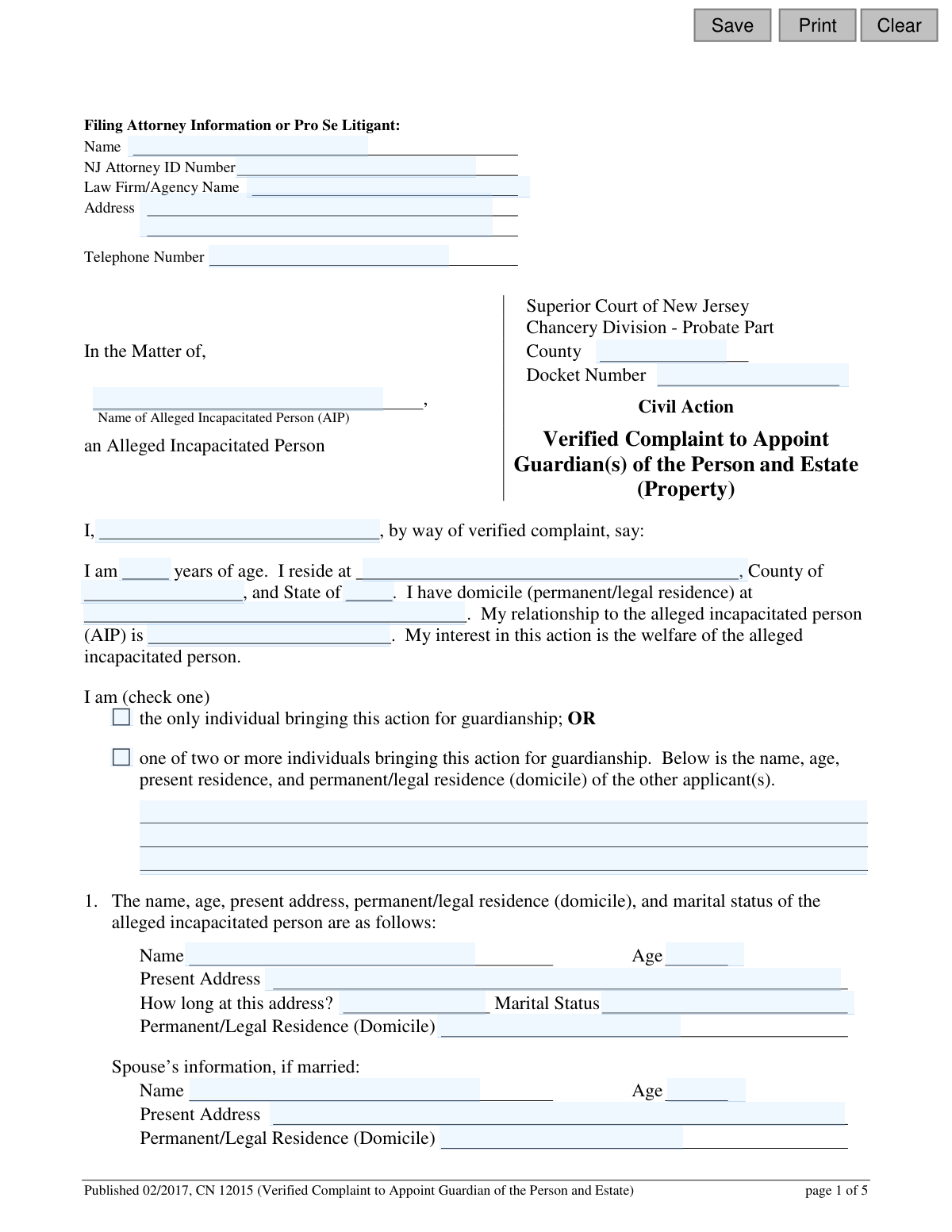
This is a legal document filed in the Superior Court of New Jersey, Chancery Division - Probate Part, to request the appointment of a guardian for an individual alleged to be incapacitated. The complaint details the person's condition, assets, and family, and specifies whether a general or limited guardianship is sought for their personal affairs and/or their property (estate). Today, this form can be filled out quickly and accurately using AI-powered services like Instafill.ai, which can also convert non-fillable PDF versions into interactive fillable forms.
CN 12015 is part of the New Jersey forms category on Instafill.
Our AI automatically handles information lookup, data retrieval, formatting, and form filling.
It takes less than a minute to fill out CN 12015 using our AI form filling.
Securely upload your data. Information is encrypted in transit and deleted immediately after the form is filled out.

Form specifications

Form name: Verified Complaint to Appoint Guardian of the Person and Estate (Property)
Number of fields: 145
Number of pages: 1
Language: English
main-image

Instafill Demo: How to fill out PDF forms in seconds with AI

How to Fill Out CN 12015 Online for Free in 2026

Are you looking to fill out a CN 12015 form online quickly and accurately? Instafill.ai offers the #1 AI-powered PDF filling software of 2026, allowing you to complete your CN 12015 form in just 37 seconds or less.
Follow these steps to fill out your CN 12015 form online using Instafill.ai:
  1. 1 Navigate to Instafill.ai and upload or select the 'Verified Complaint to Appoint Guardian of the Person and Estate' form.
  2. 2 Provide your personal information as the plaintiff (filing person), including your name, address, and relationship to the alleged incapacitated person (AIP).
  3. 3 Enter the required details for the AIP, such as their name, age, address, marital status, and information about their closest relatives.
  4. 4 Indicate and attach the necessary supporting documents, like medical affidavits or certifications from physicians or psychologists, which detail the AIP's condition.
  5. 5 List the names, addresses, and contact information for the proposed guardian(s) you wish to be appointed.
  6. 6 Specify the type of guardianship requested by checking the appropriate boxes for General (Full) or Limited guardianship of the Person and/or Estate, detailing any specific powers the AIP should retain.
  7. 7 Review all the information populated by the AI for accuracy, then e-sign and date the verification section before filing the complaint with the appropriate New Jersey Superior Court.

Our AI-powered system ensures each field is filled out correctly, reducing errors and saving you time.

Why Choose Instafill.ai for Your Fillable CN 12015 Form?

Speed

Complete your CN 12015 in as little as 37 seconds.

Up-to-Date

Always use the latest 2026 CN 12015 form version.

Cost-effective

No need to hire expensive lawyers.

Accuracy

Our AI performs 10 compliance checks to ensure your form is error-free.

Security

Your personal information is protected with bank-level encryption.

Frequently Asked Questions About Form CN 12015

This form is a legal document used to ask a New Jersey court to appoint a guardian for an individual who is allegedly incapacitated and unable to manage their personal, medical, or financial affairs.

Anyone with an interest in the welfare of an allegedly incapacitated person, such as a family member, friend, or caregiver, can file this complaint with the court to initiate guardianship proceedings.

A 'Guardian of the Person' makes decisions about personal welfare, like healthcare and housing. A 'Guardian of the Estate' manages the person's finances, property, and assets. You can request one or both types of guardianship on this form.

General (or full) guardianship grants the guardian authority over all of the person's affairs. Limited guardianship specifies certain areas where the guardian can make decisions, allowing the individual to retain control in other aspects of their life.

You must attach an affidavit from a physician or psychologist, a second document detailing functional capacity (like an IEP or another medical certification), and a 'Certification of Assets' that lists the person's income and property.

No, the form explicitly states that it is not a public document and the information you provide, including Social Security numbers or bank accounts, will be kept confidential by the court.

After filing the complaint, the court will appoint an attorney for the alleged incapacitated person and schedule a hearing. The judge will then review all evidence and testimony to decide whether a guardianship is necessary.

You must list any existing Power of Attorney, Health Care Representative, or Trustee on the form. The court will consider these existing legal arrangements when making a determination about guardianship.

Yes, you must provide the names, addresses, and ages of the person's closest living relatives, such as parents, children, and siblings. The court requires this to ensure all interested parties are properly notified of the proceedings.

Yes, services like Instafill.ai use AI to help you accurately auto-fill form fields, which can save you time and help prevent errors on complex legal documents like this one.

To fill this form out online, you can upload the PDF to the Instafill.ai platform. Their service will make the document interactive, and its AI can assist you in filling out the required information before you print it for signature and filing.

If you have a non-fillable PDF, you can use a service like Instafill.ai. It can convert flat PDFs into interactive, fillable forms that you can easily complete on your computer.

A 'Verified' Complaint requires you to sign a certification at the end, confirming that the statements you've made in the document are true to the best of your knowledge. Making a false statement can have legal consequences.

Compliance CN 12015
Validation Checks by Instafill.ai

1
Conditional Requirement for Spouse Information
This check verifies that if the Alleged Incapacitated Person's (AIP) marital status is marked as 'Married', then the corresponding fields for the spouse's name, age, and address are filled out. This is important for ensuring all interested parties are properly notified and accounted for in the legal proceeding. If validation fails, the user is prompted to either provide the spouse's information or change the marital status.
2
Exclusive Choice for Functional Capacity Documentation
Validates that in Section 4, exactly one of the five document types (IEP, DDD affidavit, second physician affidavit, etc.) is selected. The form requires one specific type of supporting evidence for the AIP's functional capacity. This check prevents ambiguity or incomplete submissions by ensuring a single, clear choice is made, and an error message is shown if zero or more than one option is selected.
3
Exclusive Choice for AIP Legal Representation
Ensures that in Section 8, the filer selects exactly one option for the AIP's legal representation, either the Public Defender or a private attorney. This is a critical choice that affects how the case proceeds and how legal fees are handled. The system must prevent the user from selecting both or neither option to avoid a filing defect.
4
Limited Guardianship of Person Specificity
This check is triggered if 'Request for Limited Guardianship of the Person' is selected in Section 9. It verifies that at least one sub-checkbox (e.g., medical, legal, residential) is checked to specify the exact capacities the AIP retains. This detail is legally required for a limited guardianship order, and failure to provide it would make the request legally insufficient.
5
Limited Guardianship of Estate Description Requirement
If 'Request for Limited Guardianship of the Estate' is selected in Section 10, this validation ensures the corresponding text area describing the specific financial capacities the AIP retains is not empty. A vague request for limited guardianship is not permissible; the court needs to know the exact scope. If this field is blank, the submission is halted until a description is provided.
6
Valid NJ Attorney ID Format
Verifies that the 'NJ Attorney ID Number' field, if filled, matches the expected format for New Jersey attorney identification numbers. This check is likely conditional and only applies if the filer is an attorney, not 'Pro Se'. This ensures that if an attorney is listed, they are valid and can be easily looked up in the state bar directory, maintaining the integrity of the filing.
7
Age Field Numerical Validation
Ensures that all fields designated for age (e.g., 'guardianAge', 'aipAge', 'propGuardAge') contain only positive integer values. The validation should also check for a reasonable range, for example, between 0 and 130. This prevents data entry errors like text or negative numbers and maintains data quality for all individuals listed in the complaint.
8
Phone Number Format Validation
This check confirms that all telephone number fields ('attyPh', 'propGuardPh') adhere to a standard US phone number format (e.g., 10 digits, with or without parentheses and hyphens). Correctly formatted phone numbers are essential for the court and other parties to make contact regarding the case. An invalid format would trigger an error, prompting the user to correct the entry.
9
Date Field Format and Plausibility
Validates that all date fields (e.g., 'dddSvcsDt', 'sigPersonDt', 'sigEstateDt') are entered in a valid format like MM/DD/YYYY. Furthermore, it checks that the dates are logical; for instance, a signature date cannot be in the future. This ensures data accuracy and prevents nonsensical or invalid dates from being entered into the legal record.
10
Completeness of Proposed Guardian Information
Verifies that at least one proposed guardian is listed in Section 6 with all required information: name, address, relationship, age, and telephone number. The entire purpose of the complaint is to appoint a guardian, so this information is fundamental. If the first proposed guardian's details are incomplete, the form cannot be submitted.
11
Plaintiff Action Type Consistency
This validation checks the logic of the plaintiff section. If the filer checks the box indicating they are 'one of two or more individuals bringing this action', the system must then verify that the subsequent fields for additional applicants are filled out. This ensures the complaint accurately reflects all parties initiating the action.
12
Verification Section Completeness
Ensures that the 'Verification' section at the end of the form has been completed with a printed name and date. This section is a sworn statement that the contents of the complaint are true. An unverified complaint is legally invalid, so this check is critical for a successful filing.
13
Required Plaintiff Information
This check ensures that the name, age, and address of the primary plaintiff (the person filing the complaint) are provided. As the individual initiating a legal action, their identity and contact information are mandatory for the court record. The form submission will be blocked if this core information is missing.
14
Required AIP Information
Validates that the name, age, and present address of the Alleged Incapacitated Person (AIP) are filled out in Section 1. This information is the absolute minimum required to identify the subject of the guardianship proceeding. Without it, the complaint is fundamentally flawed and cannot be processed.

Common Mistakes in Completing CN 12015

Inconsistent Naming of Individuals

People often enter names slightly differently across the form, such as using a middle initial in one spot but not another for the Alleged Incapacitated Person (AIP) or proposed guardian. This ambiguity can create legal confusion and challenges, potentially delaying the guardianship process. To avoid this, use the full, legal name consistently in every field where it is requested, ensuring it matches across all pages and supporting documents.

Confusing Present Address with Legal Domicile

Filers frequently enter the same address for both 'Present Address' and 'Permanent/Legal Residence (Domicile),' failing to recognize the legal distinction. The present address is where the person currently lives (e.g., a care facility), while the domicile is their legal, permanent home which affects court jurisdiction. This error can impact legal notices and venue, so it's crucial to accurately report both addresses, even if they are the same.

Failure to Attach or Reference Supporting Documents

The complaint is legally insufficient without required attachments like medical certifications, a Certification of Assets, or an IEP. Filers often forget to include these documents or fail to check the correct box on page 2 indicating which document is attached. This will lead to an immediate rejection or dismissal of the complaint, requiring a complete and costly refiling. Always create a checklist of required documents before submission.

Omitting or Providing Incomplete Information for Relatives

Section 5 requires a complete list of the AIP's closest living relatives (parents, children, siblings), including their addresses and ages. People may omit estranged relatives or fail to track down current addresses, but this is a critical error. The court requires this information to ensure all legally interested parties are properly notified of the proceedings; failure to do so can invalidate the entire process and require starting over.

Contradictory Selections for Guardianship Type

A common mistake is selecting 'General (Full) Guardianship' while also checking boxes in the 'Limited Guardianship' section that specify areas where the AIP retains capacity. This creates a logical contradiction that confuses the court about the plaintiff's request. You must choose either General or Limited guardianship for the Person (page 4) and the Estate (page 5) and only fill out the details for the single option selected.

Missing Required Signatures and Dates

This form requires multiple signatures: one for the guardianship of the person request, another for the estate request, and a final verification signature. Filers often overlook one or more of these signature blocks, especially if there are multiple plaintiffs. An unsigned or undated complaint is invalid and will be rejected by the court clerk, causing significant delays.

Leaving 'Not Applicable' Sections Blank

The form contains several sections with a 'Not Applicable' checkbox, such as those concerning DDD services or institutional confinement. Filers frequently leave these entire sections blank if they don't apply, creating ambiguity for the court reviewer, who cannot be sure if the information was omitted by mistake. To avoid this, you must explicitly check the 'Not Applicable' box for any section that does not pertain to the AIP's situation.

Vague Descriptions in Limited Guardianship Requests

When requesting Limited Guardianship of the Estate, the form asks filers to 'describe' the areas where the AIP retains capacity. People often provide vague descriptions like 'can manage daily money' instead of clear, specific limitations. The court needs precise language to craft an enforceable order (e.g., 'has capacity to manage a personal needs account with a balance not to exceed $500'), and ambiguous requests can lead to rejection.

Misunderstanding the Financial Implications of AIP's Counsel

Section 8 requires the plaintiff to request either a pro bono public defender or a private attorney to represent the AIP, with a warning that the plaintiff may have to pay for the private attorney. Filers sometimes choose the private attorney option without fully understanding that if the AIP's estate cannot cover the cost, the court can order the plaintiff to pay. This can lead to an unexpected financial burden, so the choice should be made with careful consideration.

Submitting an Illegible Handwritten Form

This legal document is often available as a non-fillable PDF, leading people to complete it by hand with illegible writing. This can cause critical data entry errors by court staff, as misreading a name, address, or diagnosis can have serious legal consequences. To prevent this, it is best to type the information; AI-powered tools like Instafill.ai can convert non-fillable PDFs into fillable versions to ensure all entries are clear and legible.
Saved over 80 hours a year

“I was never sure if my IRS forms like W-9 were filled correctly. Now, I can complete the forms accurately without any external help.”

Kevin Martin Green

Your data stays secure with advanced protection from Instafill and our subprocessors

Robust compliance program

Transparent business model

You’re not the product. You always know where your data is and what it is processed for.

ISO 27001, HIPAA, and GDPR

Our subprocesses adhere to multiple compliance standards, including but not limited to ISO 27001, HIPAA, and GDPR.

Security & privacy by design

We consider security and privacy from the initial design phase of any new service or functionality. It’s not an afterthought, it’s built-in, including support for two-factor authentication (2FA) to further protect your account.

Fill out CN 12015 with Instafill.ai

Worried about filling PDFs wrong? Instafill securely fills verified-complaint-to-appoint-guardian-of-the-person-and-estate-property forms, ensuring each field is accurate.