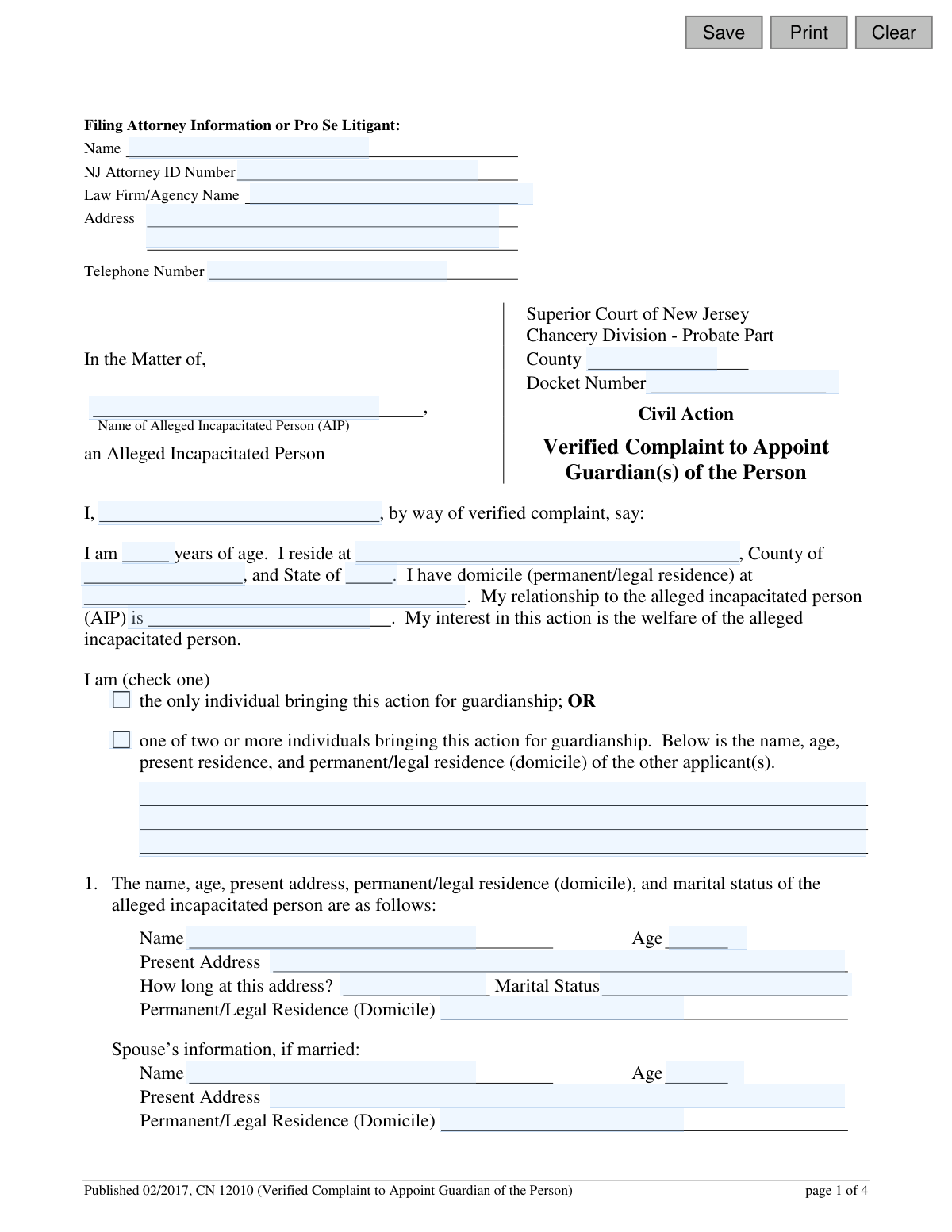
Yes! You can use AI to fill out Verified Complaint to Appoint Guardian(s) of the Person (CN 12010)

Form CN 12010 is a formal complaint filed with the Superior Court of New Jersey to request the appointment of a guardian for a person alleged to be incapacitated. It requires detailed information about the individual, their condition, their relatives, and the proposed guardian to ensure their welfare is protected. This legal action is crucial for making personal, medical, and residential decisions on behalf of someone who cannot do so for themselves. Today, this form can be filled out quickly and accurately using AI-powered services like Instafill.ai, which can also convert non-fillable PDF versions into interactive fillable forms.
CN 12010 is part of the New Jersey forms category on Instafill.
Our AI automatically handles information lookup, data retrieval, formatting, and form filling.
It takes less than a minute to fill out CN 12010 using our AI form filling.
Securely upload your data. Information is encrypted in transit and deleted immediately after the form is filled out.

Form specifications

Form name: Verified Complaint to Appoint Guardian(s) of the Person (CN 12010)
Number of fields: 130
Number of pages: 1
Language: English
main-image

Instafill Demo: How to fill out PDF forms in seconds with AI

How to Fill Out CN 12010 Online for Free in 2026

Are you looking to fill out a CN 12010 form online quickly and accurately? Instafill.ai offers the #1 AI-powered PDF filling software of 2026, allowing you to complete your CN 12010 form in just 37 seconds or less.
Follow these steps to fill out your CN 12010 form online using Instafill.ai:
  1. 1 Navigate to Instafill.ai and upload the CN 12010 form or select it from the template library.
  2. 2 Enter the filer's information, whether you are an attorney or a pro se litigant, along with court and case details.
  3. 3 Provide comprehensive personal information for the alleged incapacitated person (AIP), including their residence, marital status, and details about their condition.
  4. 4 List the names, addresses, and relationships of the AIP's closest relatives, as well as the details of the proposed guardian(s).
  5. 5 Indicate the type of guardianship being requested (General or Limited) and attach all required supporting documents, such as medical affidavits or Individualized Education Programs (IEPs).
  6. 6 Use the AI assistant to review the entire complaint for accuracy, consistency, and completeness before finalizing.
  7. 7 Download the completed form, sign the verification section, and file it with the appropriate Superior Court of New Jersey, Chancery Division - Probate Part.

Our AI-powered system ensures each field is filled out correctly, reducing errors and saving you time.

Why Choose Instafill.ai for Your Fillable CN 12010 Form?

Speed

Complete your CN 12010 in as little as 37 seconds.

Up-to-Date

Always use the latest 2026 CN 12010 form version.

Cost-effective

No need to hire expensive lawyers.

Accuracy

Our AI performs 10 compliance checks to ensure your form is error-free.

Security

Your personal information is protected with bank-level encryption.

Frequently Asked Questions About Form CN 12010

This form is used to start a legal process in the New Jersey Superior Court to appoint a guardian for an adult who is believed to be incapacitated and unable to make personal decisions.

Any person concerned with the welfare of the allegedly incapacitated person (AIP) can file this complaint. This person, known as the plaintiff, must state their relationship to the AIP and their interest in the action.

A General (Full) Guardianship is for individuals incapable of managing all personal affairs, while a Limited Guardianship is for those who retain capacity in some areas but need help in others, like medical or financial decisions.

You must attach an affidavit from a physician or psychologist, a document detailing functional capacity (like an IEP or a second medical affidavit), and a 'Certification of Assets' for the allegedly incapacitated person.

This form is a confidential court document, not for public access. The court requires this information for proper identification and to process the case securely.

You must list the names, addresses, relationships, and ages of the AIP's closest relatives, such as parents, children, and siblings. The court uses this to notify family members about the guardianship proceeding.

You must request either a pro bono public defender or a private attorney to represent the AIP. Be aware that if you choose a private attorney, the court may order you to pay their fees if the AIP cannot afford them.

Yes, the form allows for one or more individuals to file the complaint and be proposed as co-guardians. You must provide the required personal information for each proposed guardian.

This complaint should be filed with the Superior Court of New Jersey, Chancery Division - Probate Part, in the county where the allegedly incapacitated person resides.

You must disclose this on the form, including the name and role of any existing attorney-in-fact, health care representative, or trustee. This is a critical factor for the court's consideration.

Yes, services like Instafill.ai use AI to accurately auto-fill form fields, which can save you significant time and help reduce errors on complex legal forms.

You can upload the PDF to Instafill.ai to fill it out in your browser. The service allows you to type directly into the form fields, save your progress, and ensure all information is entered correctly before printing.

If you have a non-fillable or 'flat' PDF, tools like Instafill.ai can convert it into an interactive, fillable form. This allows you to easily type your information into the correct fields instead of filling it out by hand.

The Verification section is a sworn statement where you, the plaintiff, certify that all information provided in the complaint is true to the best of your knowledge. You must sign and date this section for the form to be legally valid.

Compliance CN 12010
Validation Checks by Instafill.ai

1
Proposed Guardian Age Verification
This check ensures that the value entered for the proposed guardian's age ('propGuardAge') is a number and is 18 or greater. A guardian must be a legal adult to assume the responsibilities of guardianship. If the age is below 18 or not a valid number, the form submission should be blocked with an error message indicating the age requirement.
2
AIP Marital Status Consistency
This validation checks if the Alleged Incapacitated Person's (AIP) marital status ('aipMarried') is 'Married'. If it is, the system must verify that the spouse's name, age, and address fields are all completed. This information is critical for legal notification and for understanding the AIP's immediate family situation. A failure would prompt the user to either complete the spouse's information or change the marital status.
3
Functional Capacity Document Selection
This check ensures that one of the five options under section 4 ('documentsAttached') has been selected. The form requires a specific type of supporting document to detail the AIP's functional capacity, such as an IEP or a physician's certification. Failing to select an option would make the complaint incomplete and legally insufficient, so the submission must be prevented until a choice is made.
4
Guardianship Type Selection Completeness
This validation verifies that the user has selected one of the two main guardianship options ('guardianPersonType'): 'Request for General (Full) Guardianship' or 'Request for Limited Guardianship'. This choice is fundamental to the entire legal action, as it defines the scope of authority being requested. The form cannot be processed without this selection, and an error should force the user to choose one.
5
Limited Guardianship Specification Requirement
This is a conditional check that activates if 'Request for Limited Guardianship' is selected. It verifies that at least one checkbox specifying the areas where the AIP retains capacity (e.g., 'medical decision making', 'legal decision making') is checked. If limited guardianship is requested, the court must know which specific rights the AIP is to retain. A failure to specify these areas would result in an error, requiring the user to define the limits of the guardianship.
6
Conditional 'Other' Description for Limited Guardianship
If the user selects 'Limited Guardianship' and also checks the 'other' box ('guardianPersonLimitsOther'), this validation ensures the corresponding text field ('otherPersonDesc') is not empty. The purpose is to prevent a vague selection and force the filer to explicitly state what 'other' capacities the AIP retains. An empty description field would trigger an error message prompting the user to provide details.
7
AIP Legal Representation Selection
This check ensures that a choice has been made in section 8 regarding legal representation for the AIP ('guardianStateAtty'). The filer must choose between requesting the Office of the Public Defender or a private attorney. This is a mandatory step to ensure the AIP's right to counsel is addressed, and the submission should be blocked until a selection is made.
8
Proposed Guardian Information Completeness
This validation ensures that if a name is entered for a proposed guardian ('propGuardName'), all other associated fields for that person (address, relationship, age, and phone number) are also filled out. Incomplete information for a proposed guardian would delay the legal process, as the court needs full details to evaluate their suitability. The system should flag any incomplete entries for a proposed guardian.
9
Phone Number Format Validation
This check applies to all phone number fields, such as the attorney's phone ('attyPh') and the proposed guardian's phone ('propGuardPh'). It verifies that the entered value conforms to a standard phone number format (e.g., (XXX) XXX-XXXX or XXXXXXXXXX). This ensures that contact information is valid and usable for court communications, preventing errors and delays caused by bad data.
10
Plaintiff and Verifier Name Consistency
This validation compares the name of the plaintiff listed at the beginning of the complaint ('guardianName') with the name printed in the verification section at the end ('sigNameVerify'). These names must match to confirm that the person filing the complaint is the same person certifying its contents as true. A mismatch could indicate an error or a fraudulent filing and should prevent submission until corrected.
11
NJ Attorney ID Number Format
This check validates the format of the 'NJ Attorney ID Number' ('attyId') field if a value is entered. While the exact format may vary, it typically follows a specific pattern which the system should check against. This ensures the ID is legitimate and correctly recorded for a filing attorney, which is crucial for tracking and court records. If the filer is 'Pro Se' (representing themselves), this field may be optional.
12
DDD Services Date Logic
If the checkbox indicating the AIP 'has been determined eligible for services from the New Jersey Division of Developmental Disabilities (DDD)' is checked, this validation is triggered. It ensures the 'since' date ('dddSvcsDt') is a valid date and is not in the future. This confirms the logical consistency of the information provided about the AIP's history with the DDD. An invalid or future date would prompt an error.

Common Mistakes in Completing CN 12010

Confusing 'Present Address' with 'Permanent/Legal Residence (Domicile)'

Applicants often use the same address for both fields, but they can be legally distinct. For example, an Alleged Incapacitated Person (AIP) may be temporarily residing in a care facility (present address) while their legal domicile remains their family home. This error can lead to jurisdictional issues or problems with official notices, delaying the guardianship process. To avoid this, carefully consider the legal definition of domicile (the place a person intends to be their permanent home) and list the current physical location as the present address.

Incomplete Information on Relatives and Interested Parties

Section 5 requires a complete list of the AIP's closest relatives, including their addresses, relationship, and ages. Filers may omit individuals they are not in contact with or fail to provide complete addresses. This is a critical error, as these individuals must be legally notified of the proceedings. Failure to provide complete and accurate information can lead to the complaint being rejected or the final judgment being challenged and potentially overturned.

Failing to Attach Required Supporting Documents

Section 4 requires the filer to check a box and attach a specific supporting document, such as a physician's affidavit, an IEP, or a certification from a DDD representative. A common mistake is forgetting to include the attachment or attaching a document that doesn't meet the specified criteria. This will result in an incomplete filing, causing significant delays as the court will require the correct documentation before proceeding with the case.

Incorrectly Selecting the Type of Guardianship

Page 4 presents a critical choice between requesting a 'General (Full) Guardianship' or a 'Limited Guardianship'. Filers may misunderstand the implications and select the wrong option, or worse, check boxes in both sections. Requesting a full guardianship when a limited one is more appropriate can unnecessarily strip the AIP of their rights, while requesting a limited one that is insufficient can fail to provide adequate protection. This choice has profound legal consequences and should be made carefully based on the attached professional evaluations.

Leaving 'Pro Se Litigant' Information Blank

Individuals filing without an attorney ('Pro Se') sometimes skip the top section of the form, thinking it only applies to lawyers. However, they are required to enter their own name, address, and phone number in the 'Filing Attorney Information or Pro Se Litigant' section. Omitting this information leaves the court with no primary contact for the case, leading to immediate rejection of the filing or an inability for the court clerk to communicate with the filer.

Missing or Incomplete Signatures and Verification

The form requires a signature and date on the main complaint (page 4) and a separate signature and date on the 'Verification' section at the very end. Filers often miss the second signature block or, if filing jointly, one of the plaintiffs may forget to sign. An unverified or unsigned complaint is not legally valid and will be returned by the court, halting the entire process until it is properly executed by all plaintiffs.

Inconsistent Naming of the Alleged Incapacitated Person (AIP)

The AIP's full legal name must be written consistently in numerous blanks throughout the four-page document. People often use nicknames, initials, or introduce typos in some fields but not others. This inconsistency can create legal ambiguity and may require filing amended documents to correct the record, causing unnecessary delays and administrative work. Using a tool like Instafill.ai can help autofill names consistently across the entire document to prevent this error.

Ignoring 'If applicable' Sections

The form contains several sections marked 'If applicable,' such as those for institutional stays or existing Powers of Attorney. A frequent mistake is to simply leave these sections blank if they do not apply. This creates ambiguity for the court reviewer, who cannot be sure if the information was intentionally omitted or simply forgotten. The best practice is to explicitly write 'Not Applicable' or 'N/A' in these sections to show they have been considered.

Failing to List All Proposed Co-Guardians

When two or more people are petitioning to become co-guardians, all individuals must be listed in the initial section for applicants and again in Section 6 for proposed guardians. Sometimes, filers only list the primary person, assuming the other will be added later. This is incorrect and can complicate the appointment process, as the court can only appoint individuals who are properly named in the complaint. All proposed guardians must be fully identified with their address, relationship, age, and phone number.

Ambiguity in Selecting Legal Counsel for the AIP

Section 8 requires the filer to choose how the AIP will be legally represented, by requesting either the Public Defender or a private attorney. A common error is to check both boxes or neither, which stops the process until the court can get clarification. This choice has financial implications, as the filer may be responsible for the private attorney's fees. The decision must be made deliberately by checking only one of the two mutually exclusive options.
Saved over 80 hours a year

“I was never sure if my IRS forms like W-9 were filled correctly. Now, I can complete the forms accurately without any external help.”

Kevin Martin Green

Your data stays secure with advanced protection from Instafill and our subprocessors

Robust compliance program

Transparent business model

You’re not the product. You always know where your data is and what it is processed for.

ISO 27001, HIPAA, and GDPR

Our subprocesses adhere to multiple compliance standards, including but not limited to ISO 27001, HIPAA, and GDPR.

Security & privacy by design

We consider security and privacy from the initial design phase of any new service or functionality. It’s not an afterthought, it’s built-in, including support for two-factor authentication (2FA) to further protect your account.

Fill out CN 12010 with Instafill.ai

Worried about filling PDFs wrong? Instafill securely fills verified-complaint-to-appoint-guardians-of-the-person-cn-12010 forms, ensuring each field is accurate.