Yes! You can use AI to fill out Verified Petition for Appointment of Attorney-Trustee (R. 1:20-19)

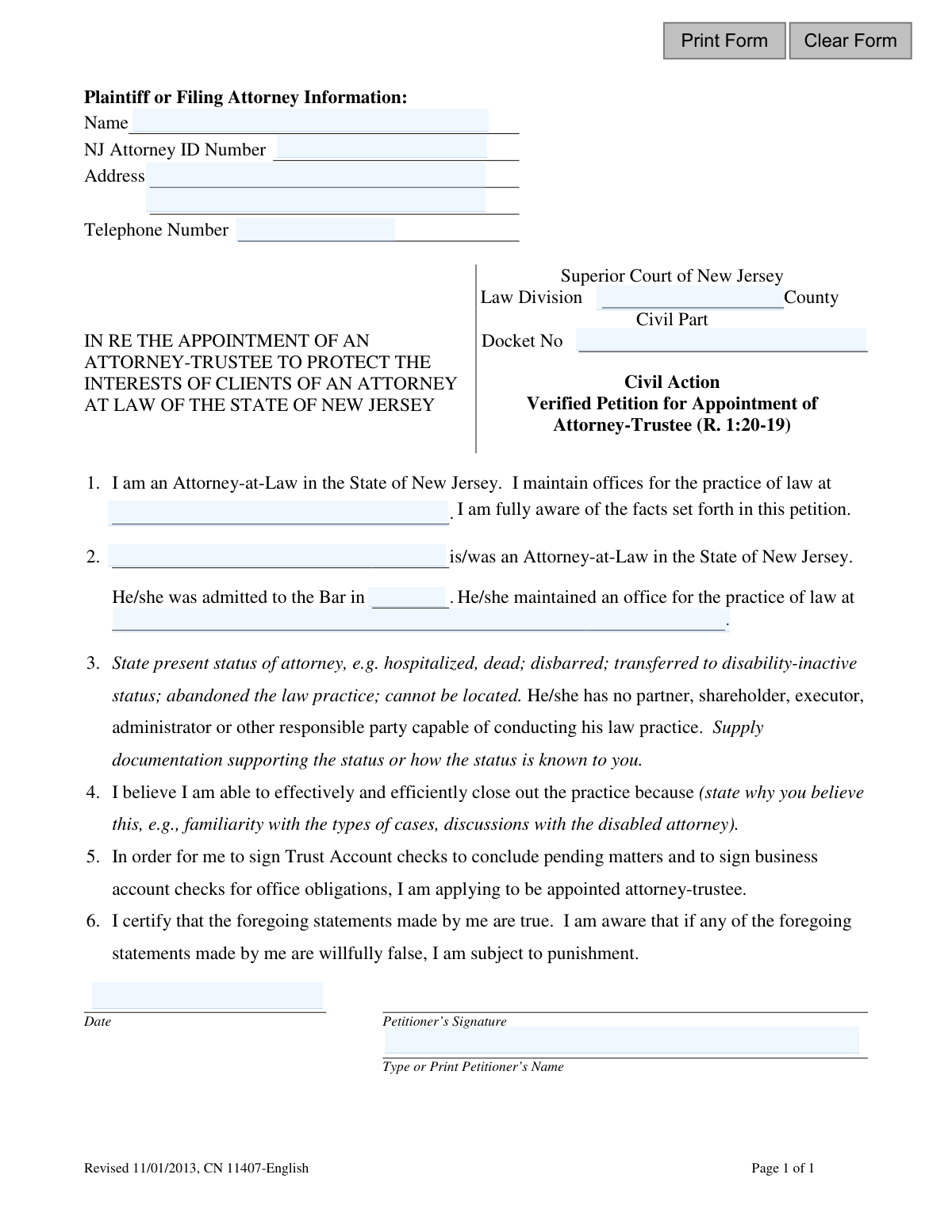
The Verified Petition for Appointment of Attorney-Trustee is a legal document filed in the Superior Court of New Jersey under Rule 1:20-19. It is used when an attorney is unable to continue their practice due to death, disbarment, disability, or abandonment, and has no one to take over. This petition allows another attorney to be appointed as a trustee to protect clients' interests and responsibly wind down the law practice. Today, this form can be filled out quickly and accurately using AI-powered services like Instafill.ai, which can also convert non-fillable PDF versions into interactive fillable forms.
CN 11407 is part of the New Jersey forms category on Instafill.
Our AI automatically handles information lookup, data retrieval, formatting, and form filling.
It takes less than a minute to fill out CN 11407 using our AI form filling.
Securely upload your data. Information is encrypted in transit and deleted immediately after the form is filled out.

Form specifications

Form name: Verified Petition for Appointment of Attorney-Trustee (R. 1:20-19)
Number of fields: 14
Number of pages: 1
Language: English
main-image

Instafill Demo: How to fill out PDF forms in seconds with AI

How to Fill Out CN 11407 Online for Free in 2026

Are you looking to fill out a CN 11407 form online quickly and accurately? Instafill.ai offers the #1 AI-powered PDF filling software of 2026, allowing you to complete your CN 11407 form in just 37 seconds or less.
Follow these steps to fill out your CN 11407 form online using Instafill.ai:
  1. 1 Navigate to Instafill.ai and upload or select the 'Verified Petition for Appointment of Attorney-Trustee' form.
  2. 2 Use the AI assistant to automatically populate your information as the petitioner, including your name, NJ Attorney ID, address, and phone number.
  3. 3 Enter the details of the attorney whose practice requires a trustee, such as their name, bar admission year, and last known office address.
  4. 4 Clearly state the status of the attorney (e.g., deceased, disbarred, abandoned practice) and follow prompts to attach any required supporting documentation.
  5. 5 Provide a statement explaining why you are qualified and able to effectively manage and close the attorney's practice.
  6. 6 Carefully review all the information entered by the AI for accuracy, make any necessary edits, and then electronically sign and date the petition.
  7. 7 Download the completed and signed document, ready for filing with the appropriate Superior Court of New Jersey.

Our AI-powered system ensures each field is filled out correctly, reducing errors and saving you time.

Why Choose Instafill.ai for Your Fillable CN 11407 Form?

Speed

Complete your CN 11407 in as little as 37 seconds.

Up-to-Date

Always use the latest 2026 CN 11407 form version.

Cost-effective

No need to hire expensive lawyers.

Accuracy

Our AI performs 10 compliance checks to ensure your form is error-free.

Security

Your personal information is protected with bank-level encryption.

Frequently Asked Questions About Form CN 11407

This form is used by a New Jersey attorney to ask the Superior Court to appoint them as a trustee to manage and close the law practice of another attorney who is unable to do so. The primary goal is to protect the interests of the unavailable attorney's clients.

A licensed New Jersey attorney who is willing to take responsibility for another attorney's practice must complete and file this petition. The person filing is known as the petitioner.

This petition is necessary when an attorney has died, been disbarred, become disabled, abandoned their practice, or cannot be located, and has no partner or other responsible party to manage their clients' affairs.

You must provide the attorney's full name, the year they were admitted to the New Jersey Bar, and the address of their law office.

You must supply documentation supporting the attorney's status, such as a death certificate, a disbarment order, or a detailed affidavit explaining how you know they have abandoned their practice or become disabled.

Explain why you are qualified, for example, by citing your familiarity with the types of cases the attorney handled, your experience in winding down a law practice, or any prior discussions you had with the attorney.

A 'Verified Petition' means you are certifying under penalty of punishment that all statements in the form are true. Knowingly providing false information can lead to severe penalties.

You must file the petition with the Superior Court of New Jersey, Law Division, Civil Part, in the county where the attorney's practice was located.

You will be granted legal authority to access client files, manage the practice's trust and business bank accounts, and take all necessary steps to protect client interests and properly wind down the law practice.

Yes, the petitioner must be an Attorney-at-Law in the State of New Jersey and must provide their own NJ Attorney ID Number on the form.

Yes, services like Instafill.ai use AI to accurately auto-fill form fields with your information, which can save time and help reduce errors.

You can use a service like Instafill.ai to upload the PDF. The platform will convert it into an interactive, fillable form that you can complete and sign electronically from any device.

If you have a non-fillable or 'flat' PDF, you can upload it to a platform like Instafill.ai. It will automatically convert the document into an interactive form that you can easily fill out online.

Compliance CN 11407
Validation Checks by Instafill.ai

Common Mistakes in Completing CN 11407

Incorrect or Missing NJ Attorney ID Number

Attorneys may accidentally mistype their ID number, enter it in an incorrect format, or forget it entirely. This error can significantly delay the petition's processing, as the court must verify the petitioner's credentials with the state bar. An incorrect ID can lead to the filing being rejected, requiring a complete resubmission. To avoid this, always double-check the ID against your official bar record before submission.

Specifying the Wrong County for Filing

The petition must be filed in the correct county, which is a critical jurisdictional requirement. Filers often mistakenly file in the county of their own practice rather than the county where the attorney in question maintained their office. This error results in the case being rejected or requiring a formal transfer, causing significant delays and additional administrative work. Always verify the proper venue based on the location of the practice being taken over.

Vague Description of Attorney's Status in Section 3

Section 3 requires a specific, factual statement about the attorney's status (e.g., deceased, disbarred, abandoned practice). A common mistake is providing a vague or unsubstantiated description like 'is unavailable' or 'has health issues.' This is insufficient and will likely cause the court to deny the petition or request more information, delaying the protection of the clients. The description must be precise and directly reference the attached supporting documentation.

Forgetting to Include Required Supporting Documentation

The form explicitly instructs the petitioner to 'Supply documentation supporting the status' of the attorney. Petitioners frequently forget to attach this crucial evidence, such as a death certificate, a copy of a disbarment order, or a doctor's letter. A petition submitted without the required proof is considered incomplete and cannot be granted, leaving the affected clients' interests unprotected. Always create a checklist of required attachments before filing to ensure nothing is missed.

Providing Insufficient Justification for Appointment in Section 4

Section 4 asks why the petitioner believes they can 'effectively and efficiently close out the practice.' Many filers provide a generic answer like 'I am a competent attorney,' which is not persuasive. A strong petition requires specific reasons, such as familiarity with the specific types of cases, a pre-existing succession plan, or logistical advantages like a nearby office. A weak justification can lead the court to question the petitioner's suitability and delay the appointment.

Omitting or Using an Incorrect Docket Number

If a case file has already been opened for the matter, the assigned Docket Number must be included on the petition. People often forget to add it or transcribe it incorrectly from other documents. This error can cause the petition to be misfiled, not associated with the correct case, or create a duplicate record, leading to significant administrative confusion and delays that must be sorted out by the clerk's office.

Submitting an Outdated Version of the Form

This form is marked 'Revised 11/01/2013,' and courts frequently update their official forms. Using an outdated version found on a local hard drive or an unofficial website can lead to immediate rejection of the filing. This forces the petitioner to start over, wasting time and effort. Always download the latest version of any form directly from the official New Jersey Courts website before you begin.

Failing to Print Name Below Signature

The signature block requires both a physical signature and a typed or printed name. An illegible signature without a clearly printed name makes it difficult or impossible for the court clerk to identify the petitioner and verify their information. This simple but common oversight can cause the document to be returned for correction. AI-powered form filling tools like Instafill.ai can prevent this by automatically populating the printed name field, ensuring clarity.

Using a Digital Signature Instead of a Wet Signature

Verified petitions and legal filings often require a 'wet' ink signature to be legally valid. When working with a PDF, filers may be tempted to type their name or insert a digital image of their signature, which may not comply with court rules for this type of filing. This can lead to rejection. After filling out the form, it should be printed for manual signing. If the form is a non-fillable PDF, a tool like Instafill.ai can convert it into a fillable version to be completed on a computer before printing and signing.

Providing an Incomplete Address for the Petitioner

The form requires the petitioner's full law office address, but filers sometimes omit suite numbers, use a PO Box instead of a physical address, or make typos. An incomplete or incorrect address can cause important mail from the court, including notices and orders, to be delayed or returned as undeliverable. This can lead to missed deadlines and other serious consequences. Using a tool like Instafill.ai can help by storing and accurately populating your complete, verified address every time.
Saved over 80 hours a year

“I was never sure if my IRS forms like W-9 were filled correctly. Now, I can complete the forms accurately without any external help.”

Kevin Martin Green

Your data stays secure with advanced protection from Instafill and our subprocessors

Robust compliance program

Transparent business model

You’re not the product. You always know where your data is and what it is processed for.

ISO 27001, HIPAA, and GDPR

Our subprocesses adhere to multiple compliance standards, including but not limited to ISO 27001, HIPAA, and GDPR.

Security & privacy by design

We consider security and privacy from the initial design phase of any new service or functionality. It’s not an afterthought, it’s built-in, including support for two-factor authentication (2FA) to further protect your account.

Fill out CN 11407 with Instafill.ai

Worried about filling PDFs wrong? Instafill securely fills verified-petition-for-appointment-of-attorney-trustee-r-120-19 forms, ensuring each field is accurate.