Yes! You can use AI to fill out Voluntary Binding Arbitration Program Consent Form

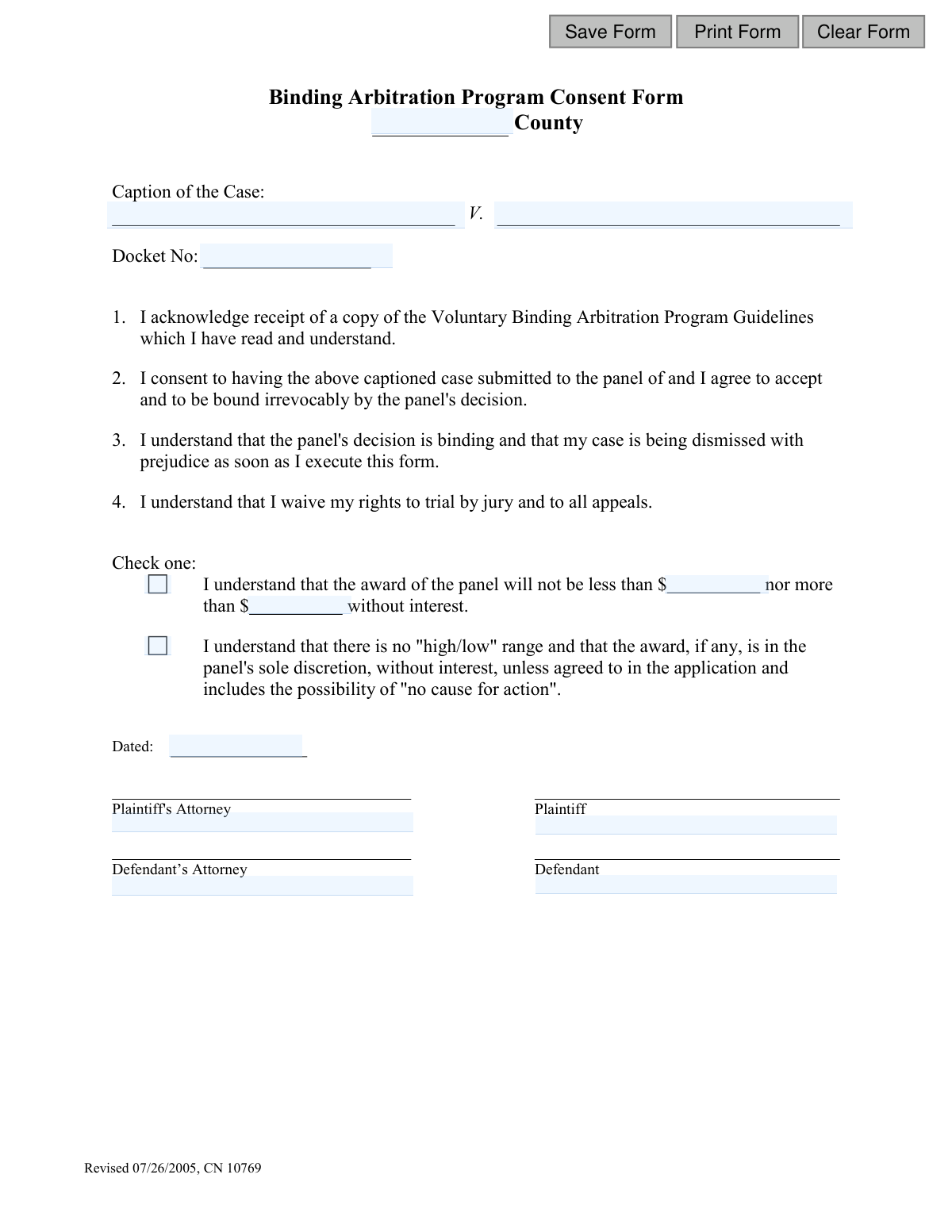
This form is a legal agreement where parties in a lawsuit consent to submit their case to a binding arbitration panel, thereby dismissing the case and waiving their rights to a trial by jury and any appeals. By signing, all parties agree to be irrevocably bound by the decision of the arbitration panel. Today, this form can be filled out quickly and accurately using AI-powered services like Instafill.ai, which can also convert non-fillable PDF versions into interactive fillable forms.
CN 10769 is part of the New Jersey forms category on Instafill.
Our AI automatically handles information lookup, data retrieval, formatting, and form filling.
It takes less than a minute to fill out CN 10769 using our AI form filling.
Securely upload your data. Information is encrypted in transit and deleted immediately after the form is filled out.

Form specifications

Form name: Voluntary Binding Arbitration Program Consent Form
Number of fields: 16
Number of pages: 1
Language: English
main-image

Instafill Demo: How to fill out PDF forms in seconds with AI

How to Fill Out CN 10769 Online for Free in 2026

Are you looking to fill out a CN 10769 form online quickly and accurately? Instafill.ai offers the #1 AI-powered PDF filling software of 2026, allowing you to complete your CN 10769 form in just 37 seconds or less.
Follow these steps to fill out your CN 10769 form online using Instafill.ai:
  1. 1 Navigate to Instafill.ai and upload the Voluntary Binding Arbitration Program Consent Form or select it from our template library.
  2. 2 Enter the case information, including the county, caption of the case (plaintiff and defendant names), and the docket number.
  3. 3 Acknowledge that you have received, read, and understood the Voluntary Binding Arbitration Program Guidelines.
  4. 4 Indicate your consent to submit the case to the panel and be bound by its decision, understanding the case will be dismissed with prejudice.
  5. 5 Select the appropriate checkbox to specify the terms of the award, either a 'high/low' range or leaving it to the panel's discretion.
  6. 6 Electronically sign and date the form. Ensure all required parties, such as plaintiffs, defendants, and their respective attorneys, also sign.
  7. 7 Review the entire form for accuracy and completeness before downloading or submitting it to the relevant legal authority.

Our AI-powered system ensures each field is filled out correctly, reducing errors and saving you time.

Why Choose Instafill.ai for Your Fillable CN 10769 Form?

Speed

Complete your CN 10769 in as little as 37 seconds.

Up-to-Date

Always use the latest 2026 CN 10769 form version.

Cost-effective

No need to hire expensive lawyers.

Accuracy

Our AI performs 10 compliance checks to ensure your form is error-free.

Security

Your personal information is protected with bank-level encryption.

Frequently Asked Questions About Form CN 10769

This form is used to formally agree to resolve your legal case through binding arbitration instead of a traditional court trial. By signing, all parties agree that the decision made by the arbitration panel will be final and legally binding.

Both the plaintiff and the defendant, as well as their respective attorneys, must sign this form. This shows that all parties involved in the case voluntarily agree to enter the binding arbitration program.

You will need to provide the county where the case is filed, the full case caption (plaintiff vs. defendant), and the court's docket number. All parties and their attorneys must also date and sign the form.

This means your court case is permanently closed once you sign this form. You cannot bring the same claim back to court for any reason in the future, as the matter will be settled by the arbitration panel.

By signing, you waive your right to a trial by jury and your right to appeal the decision to a higher court. The arbitration panel's decision is final and cannot be challenged.

The first option sets a 'high/low' range, guaranteeing the award will be within a pre-agreed minimum and maximum amount. The second option gives the panel full discretion, meaning the award could be any amount, including zero ('no cause for action').

You should discuss this critical decision with your attorney to determine the best strategy for your case. A 'high/low' agreement limits risk, while the no-range option allows for a wider range of possible outcomes.

No, the form states that you agree to be 'bound irrevocably' by the decision. Once signed, your consent cannot be withdrawn, and you are legally committed to the arbitration process.

The program guidelines should be provided to you by the court or your attorney before you sign this form. It is essential that you read and understand them, as you must acknowledge their receipt.

Once all parties have signed, the form is typically filed with the court clerk in the county where your case is docketed. Your case is then removed from the trial calendar and submitted to the arbitration panel for resolution.

Yes, services like Instafill.ai use AI to accurately auto-fill form fields like your case caption and docket number, which saves time and helps prevent errors. Always review the completed form with your attorney before signing.

You can upload the PDF of the form to the Instafill.ai platform. Its AI will make the fields interactive, allowing you to type your information directly, then download the completed document for signing and submission.

If you have a non-fillable or 'flat' PDF, you can use a service like Instafill.ai. It can convert the document into an interactive, fillable form that you can easily complete on your computer.

Compliance CN 10769
Validation Checks by Instafill.ai

1
Ensures County Field is Populated
This validation confirms that the 'County' field has been filled out. Specifying the county is crucial for correctly filing the document within the proper legal jurisdiction. A submission without a county will be rejected, causing delays in processing the arbitration agreement.
2
Validates Docket Number Presence and Format
This check ensures the 'Docket No' is entered and follows the format expected by the court system. An incorrect or missing docket number can lead to misidentification of the case file, potentially linking this binding agreement to the wrong case or causing it to be rejected by the clerk's office. The user should be prompted to correct the format if it fails validation.
3
Requires Both Plaintiff and Defendant Names
This validation verifies that both the 'Plaintiff' and 'Defendant' fields in the case caption are completed. These names are essential for identifying the primary parties involved in the litigation and are a fundamental requirement for any legal document. Failure to provide both names renders the form legally incomplete and invalid.
4
Confirms Signature Date is a Valid Date
This check validates that the 'Dated' field contains a real, correctly formatted date (e.g., MM/DD/YYYY). The signature date establishes when the agreement was executed, which is a critical piece of legal information. An invalid or improperly formatted date could call the entire agreement's validity into question.
5
Prevents Future Signature Dates
This validation ensures the date entered in the 'Dated' field is not a future date. A legal document cannot be signed on a future date, as this would be legally nonsensical and invalid. This check prevents simple data entry errors and ensures the document reflects an action that has already occurred.
6
Mandates Selection of an Award Condition
This check requires the user to select one of the two award condition checkboxes. The parties must agree on whether there is a 'high/low' range for the award or if the award is left to the panel's sole discretion. Failing to select an option leaves a critical term of the arbitration agreement undefined, making the consent form incomplete and unenforceable.
7
Verifies Logical High/Low Award Range
This validation ensures that if the 'high/low' award option is selected, the minimum award amount ('not less than') is less than or equal to the maximum award amount ('nor more than'). An inverted range is illogical and indicates a data entry error that must be corrected. This check maintains the logical integrity of the financial agreement between the parties.
8
Ensures High/Low Award Amounts are Provided
When the 'high/low' award option is checked, this validation confirms that both the minimum and maximum award amount fields are filled with numeric values. Leaving these fields blank while selecting the option creates an ambiguous and incomplete agreement. The form cannot be submitted until the agreed-upon financial parameters are entered.
9
Validates Award Amounts are Non-Negative Numbers
This check verifies that the values entered for the 'high/low' award amounts are valid, non-negative numbers. Award amounts cannot be negative, and entering text or special characters would cause processing errors. This ensures the financial data is clean, logical, and ready for legal interpretation.
10
Requires Plaintiff's Signature
This validation confirms that the Plaintiff's signature field is completed, indicating their consent to be irrevocably bound by the arbitration panel's decision. The plaintiff's consent is a non-negotiable requirement for the agreement to be valid. Without it, the form is legally meaningless and cannot be accepted by the court.
11
Requires Plaintiff's Attorney's Signature
This check ensures the Plaintiff's Attorney's signature field is completed, signifying that the plaintiff has received legal counsel regarding the waiver of their rights. This signature is crucial for demonstrating informed consent and protecting the process from future legal challenges. A missing attorney signature may invalidate the agreement.
12
Requires Defendant's Signature
This validation confirms that the Defendant's signature field is completed, indicating their consent to the binding arbitration process and its terms. Like the plaintiff's signature, the defendant's consent is fundamental to the mutual nature of the agreement. The form is invalid and cannot be processed without the defendant's signature.
13
Requires Defendant's Attorney's Signature
This check ensures the Defendant's Attorney's signature field is completed, confirming the defendant was properly advised by legal counsel before entering the binding agreement. This signature provides evidence of informed consent and procedural fairness. The absence of this signature could be grounds to challenge the validity of the arbitration agreement.

Common Mistakes in Completing CN 10769

Entering an Incorrect Docket Number

Users often mistype or transpose digits in the docket number, which serves as the case's unique identifier. An incorrect docket number can lead to the consent form being rejected or, worse, filed with the wrong case, causing significant legal delays and confusion. To prevent this, meticulously cross-reference the docket number with official court documents before submission.

Providing an Incomplete or Incorrect Case Caption

Parties may abbreviate names, misspell them, or incorrectly list the plaintiff and defendant in the 'Caption of the Case' section. This can render the form legally ambiguous and lead to its rejection by the arbitration administrator or the court. Always copy the case caption exactly as it appears on the original court complaint to ensure accuracy.

Failing to Select an Award Structure

A critical error is overlooking the 'Check one' section and failing to select either the 'high/low' range or the 'panel's sole discretion' option. This omission makes the agreement incomplete and unenforceable, as the terms for the award are undefined. It is essential to discuss and select one of the two mutually exclusive options before signing.

Entering Conflicting Award Information

Users sometimes check the box for 'no "high/low" range' but then proceed to enter monetary values in the corresponding amount fields. This contradiction creates ambiguity about the parties' intent and will cause the form to be rejected, requiring correction and re-execution. To avoid this, only fill in the dollar amount fields if you have explicitly selected the 'high/low' award option.

Submitting the Form with Missing Signatures

The form is frequently submitted without all four required signatures: Plaintiff, Defendant, and their respective attorneys. A missing signature invalidates the consent, as all parties must agree to be bound by the arbitration, rendering the agreement void. Before submission, coordinate with all parties to ensure every signature line is completed.

Omitting or Using an Incorrect Date

The 'Dated' field is often left blank or filled with an incorrect date, such as the day the form was printed rather than signed. This can create legal disputes about when the agreement took effect and when the case was officially dismissed. The form should be dated on the day the final signature is applied to ensure legal clarity.

Misinterpreting the Finality of the Agreement

Parties may sign this form without fully grasping that they are permanently giving up their right to a jury trial and all appeals, as stated in points 3 and 4. This is a binding, irreversible decision, and misunderstanding it can lead to significant regret. Before signing, it is crucial to consult with an attorney to understand that 'dismissed with prejudice' means the case can never be brought to court again.

Incorrectly Formatting Monetary Amounts

When filling out the 'high/low' award amounts, users may include dollar signs or commas, which can cause data entry errors. Furthermore, accidentally entering a 'low' value that is higher than the 'high' value will invalidate the clause. To avoid this, enter only numerals and double-check that the range is logical; AI-powered tools like Instafill.ai can help by automatically formatting numerical data and flagging such errors.

Using Invalid Signatures on a Flat PDF

If the form is a non-fillable PDF, users may try to type their name or paste an image of their signature, which may not be legally binding. This can lead to the form's rejection by the court or arbitration panel. If the form is not interactive, it should be printed and signed with ink; alternatively, tools like Instafill.ai can convert flat PDFs into securely fillable versions to simplify the process.

Entering an Abbreviated or Incorrect County Name

People sometimes enter an abbreviated or incorrect county name, especially if a case has connections to multiple locations. This simple mistake can cause the form to be misfiled, leading to processing delays and administrative headaches. Always use the full, official county name where the case is docketed, which can be verified on other case documents.
Saved over 80 hours a year

“I was never sure if my IRS forms like W-9 were filled correctly. Now, I can complete the forms accurately without any external help.”

Kevin Martin Green

Your data stays secure with advanced protection from Instafill and our subprocessors

Robust compliance program

Transparent business model

You’re not the product. You always know where your data is and what it is processed for.

ISO 27001, HIPAA, and GDPR

Our subprocesses adhere to multiple compliance standards, including but not limited to ISO 27001, HIPAA, and GDPR.

Security & privacy by design

We consider security and privacy from the initial design phase of any new service or functionality. It’s not an afterthought, it’s built-in, including support for two-factor authentication (2FA) to further protect your account.

Fill out CN 10769 with Instafill.ai

Worried about filling PDFs wrong? Instafill securely fills voluntary-binding-arbitration-program-consent-form forms, ensuring each field is accurate.