
Instafill.ai
7 days free
AI form filling · 15 fields · 2 pages · done in seconds

Yes! You can use AI to fill out Waiver of First Appearance for Indictable Offenses - For Attorney Use Only (Directive #29-21)

Don't type 15 fields by hand. Tell our AI about yourself, or upload your W-2 or last year's return, and it fills every field in seconds. You check it, then download, print or sign.
7 days free, then $19.99/month · Cancel anytime
AI fills it, no typingEncrypted, never used to train AICancel in two clicks
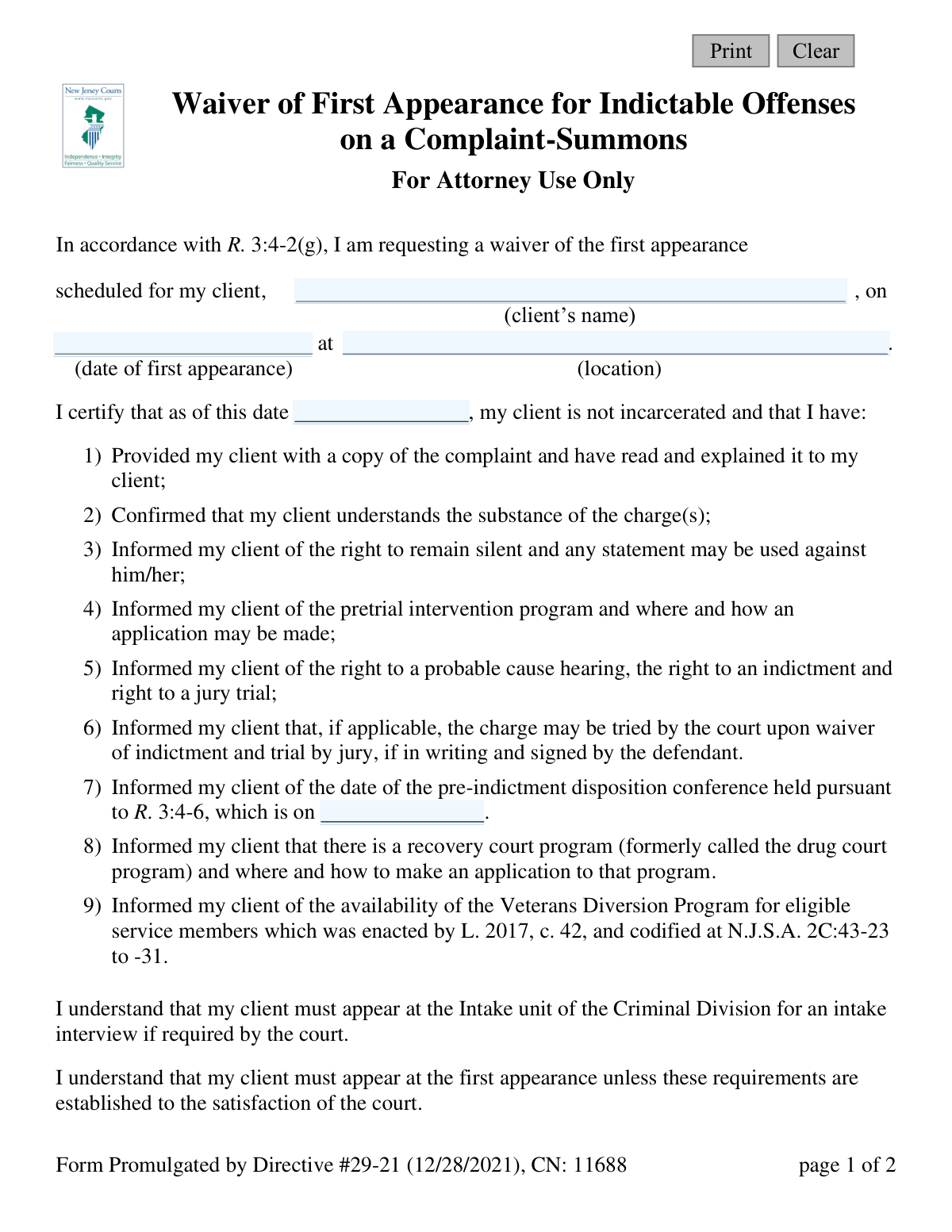
Waiver of First Appearance for Indictable Offenses - For Attorney Use Only (Directive #29-21), page 1
Simple · 28/100Form Complexity Index

The AI does the filling. You just check it.

No typing into boxes, nothing to install.

Tell the AI about youAnswer a few questions in plain words, or upload your W-2 or last year's return. That is all the typing there is.
AI fills every field in secondsIt puts each answer in the right box on every page, checkboxes included.
Check it and downloadReview every field, change anything, then download, print or sign the PDF.

What this form asks for

The AI fills all of it, from your answers or your documents.

The Waiver of First Appearance for Indictable Offenses (Directive #29-21) is a legal document for attorneys to request the waiver of their client's initial court hearing for a serious criminal charge. By submitting this form, the attorney certifies they have fully informed their client of their rights, the charges, and key court dates, as required by court rules. Today, this form can be filled out quickly and accurately using AI-powered services like Instafill.ai, which can also convert non-fillable PDF versions into interactive fillable forms.
Fillable fields15
Pages2
Form Complexity IndexSimple, 28/100

The AI checks your answers before you download

12 checks built for this form, so a wrong date or a missing answer is caught before anyone else sees it.

Client Name Completeness

Ensures the 'client's name' field (defNameFull) is not empty. This field is critical for identifying the individual for whom the waiver is being filed. A submission without the client's name is invalid and cannot be processed by the court.

Appearance Date Validity

Validates that the 'date of first appearance' (appearDt) is a valid date and is in the future. The purpose of the form is to waive an upcoming appearance, so the date cannot be in the past. If the date is invalid or has already passed, the waiver request is moot and will be rejected.

Pre-Indictment Conference Date Logic

Checks that the 'pre-indictment disposition conference' date (preIndict) is after the 'date of first appearance' (appearDt). The pre-indictment conference is a subsequent legal event. This validation ensures logical chronological order for court proceedings and prevents scheduling conflicts.

Complaint Number Presence and Format

Verifies that the 'Complaint #' (cmpltNum) field is filled and matches the expected format for a court complaint number. This number is the primary identifier for the case file. An incorrect or missing number will prevent the waiver from being correctly associated with the proper case.

Attorney Contact Information Completeness

Ensures the attorney's address (attyAddrFull) and phone number (attyPhone) are provided. This information is essential for the court and prosecutor to communicate with the attorney regarding the case. Failure to provide this information can delay proceedings and cause communication breakdowns.

Attorney Phone Number Format

Validates that the 'Phone Number' (attyPhone) is in a recognizable format (e.g., (XXX) XXX-XXXX, XXX-XXX-XXXX). This check prevents data entry errors and ensures the provided number is functional for communication. An improperly formatted number will be flagged for correction.

And 6 more checks
  • Signature and Certification Date Consistency
  • Certification Date vs. Appearance Date Logic
  • Client Address Completeness
  • Appearance Location Completeness
  • Attorney Name Completeness
  • Non-Incarceration Status Confirmation

Let AI fill out your Directive #29-21

No typing. Every field filled in seconds, checked, ready to sign.

7 days free, then $19.99/month · Cancel anytime

How to Fill Out Directive #29-21 Online for Free in 2026

What the AI walks you through.

  1. Navigate to Instafill.ai and upload or select the 'Waiver of First Appearance for Indictable Offenses' form.
  2. Provide the AI assistant with your client's full name and the date and location of the first appearance being waived.
  3. Enter your attorney details, including name, address, and phone number, along with the complaint number.
  4. Input the date of the pre-indictment disposition conference and the date of certification.
  5. Review all the information populated by the AI, ensuring the nine certification points are acknowledged and accurate.
  6. Electronically sign and date the form to finalize the waiver request before submitting it to the court and relevant parties.

Common Mistakes in Completing Directive #29-21

The ones the AI is built to catch.

Entering an Incorrect or Incomplete Complaint Number
Attorneys may accidentally transpose digits or omit parts of the complaint number due to a simple typo or by referencing an incorrect document. Since the complaint number is the primary identifier linking the waiver to the specific case, an error will cause the court to reject the filing. To prevent this, meticulously copy the number from the official complaint-summons, and use tools like Instafill.ai which can help validate common numbering formats.
Using an Incomplete or Misspelled Client Name
This error often occurs when an attorney uses a nickname or common name instead of the client's full legal name as it appears on the complaint. This mismatch can prevent the court clerk from locating the case file, leading to the waiver being rejected and a potential bench warrant for the client's failure to appear. Always verify the client's full legal name against the charging document before submission.
Omitting or Using Inconsistent Dates
The form requires multiple dates: the appearance date, certification date, pre-indictment conference date, and signature date. It's easy to leave one blank or use dates that are logically inconsistent, such as a signature date that precedes the certification date. An incomplete or inconsistent form will be rejected by the court, nullifying the waiver. A systematic review of all fields before filing is essential to catch these omissions.
Providing a Vague Court Location
An attorney might write a generic location like 'CJP' or 'Superior Court' without specifying the county or vicinage. This ambiguity can cause the waiver to be misrouted or rejected, as court staff won't know which specific court session the waiver applies to. Always provide the full, official name of the court location, including the county, to ensure the document is processed correctly.
Failing to Sign or Date the Attorney's Signature Line
In the rush to file, it is surprisingly common for an attorney to fill out the entire form but forget the final, crucial step of signing and dating it. An unsigned waiver is legally invalid and will be immediately rejected by the court clerk. This simple oversight completely defeats the purpose of the form and will result in a mandatory appearance for the client.
Submitting a Form with Illegible Handwriting
When a form is printed and filled out by hand, poor penmanship can render critical information like names, dates, and complaint numbers unreadable. If the court clerk cannot decipher the data, the form will be rejected, leading to processing delays and potential failure-to-appear consequences for the client. To avoid this, use a fillable PDF or a tool like Instafill.ai, which can convert non-fillable PDFs into typed, legible documents.
Entering the Wrong Pre-Indictment Conference Date
Attorneys sometimes confuse the 'first appearance' date with the 'pre-indictment disposition conference' date, which are two separate events. Entering the wrong date in item #7 means the client is misinformed about a critical meeting, potentially missing an early opportunity for case resolution. Carefully differentiate between these dates on all court notices to ensure the client is correctly advised.
Omitting the Client's Current Address
The field for the client's current address is sometimes left blank, perhaps because the attorney assumes it's already on file or doesn't have it handy. The court requires this information for mailing future notices, and its omission can lead to the form's rejection. More critically, it could cause the client to miss important court dates if notices are sent to an old address.
Using Outdated Attorney Contact Information
Attorneys may use an old version of the form or a template with an outdated office address or phone number. If the court or prosecutor's office cannot contact the attorney due to incorrect information, it can lead to missed communications about case updates or future hearings. Using a service like Instafill.ai can help by storing and auto-populating current, accurate contact details across all forms.
Improper Filing by a Pro Se Defendant
A defendant representing themselves (pro se) might find this form and attempt to file it, not realizing it is exclusively for attorney use. The form requires an attorney to make several legal certifications on behalf of their client, which a pro se defendant cannot do. Any such submission will be rejected, and the defendant will be marked as having failed to appear for their scheduled court date.

Frequently Asked Questions About Directive #29-21


Is it really free for 7 days?
Yes. You pay $0 today. Cancel before Nov 5 and you are never charged. Keep it, and it is $19.99 a month for 5 fills of your Directive #29-21.
Can I fill other forms too?
This plan is for your Directive #29-21: your own AI agent fills it as often as 5 times a month. To fill other forms and upload your own, choose a Professional plan from your account.
How do I cancel?
From your account, in two clicks, any time. No email, no call.
How does the AI fill out Directive #29-21?
You answer a few questions in plain words, or upload your W-2 or last year's return. The AI reads what you give it and puts each answer into the right field of Directive #29-21, on every page, in seconds. It checks the answers against the form's own rules, and you review and change anything before you download, print or sign.
What happens to my information?
It is encrypted in transit and at rest, and it is never used to train AI.
How complex is Directive #29-21 to fill out?
Directive #29-21 has a Form Complexity Index of 28 out of 100, in the simple tier: 15 fillable fields across 2 pages. Instafill.ai's AI fills it in under a minute, with every field there for you to review before you download.
What is the purpose of the 'Waiver of First Appearance for Indictable Offenses' form?
This form is used by an attorney to request that their client be excused from their initial court appearance for an indictable offense. It certifies that the attorney has fully advised the client of their rights and the charges against them.
Who is authorized to fill out and sign this form?
This form is for 'Attorney Use Only.' It must be completed and signed by the defendant's legal counsel, not by the defendant themselves.
Under what circumstances can this waiver be used?
This waiver can be used for indictable offenses when the defendant has received a complaint-summons and is not currently incarcerated. The attorney must certify they have completed several key advisory steps with their client.
Can I use this form if my client is incarcerated?
No. The form explicitly requires the attorney to certify that as of the date of signing, the client is not incarcerated.
What information do I need to have ready to complete this form?
You will need your client's full name, the date and location of the scheduled first appearance, the complaint number, and the date of the pre-indictment disposition conference. You must also provide your own contact details and your client's current address.
What am I certifying by signing this form?
By signing, you certify that you have explained the complaint, charges, and the client's rights (like the right to remain silent) to your client. You also confirm you have informed them about programs like pretrial intervention and the recovery court program.
If the waiver is granted, does my client have to appear in court at all?
Yes. While the waiver excuses the initial first appearance, the form notes the client must still appear for the pre-indictment disposition conference and may be required to attend an intake interview.
Is the waiver automatically granted upon submission?
No, the waiver is not automatic. The form states that the client must appear at the first appearance unless the waiver requirements are established to the satisfaction of the court.
Where do I send this form after completing it?
The original signed form should be filed with the court. Copies must be sent to the County Prosecutor or Attorney General and the Criminal Division Manager.
What is the 'pre-indictment disposition conference' mentioned in item 7?
This is a mandatory court date where the parties discuss a potential resolution to the case before it proceeds to a grand jury for indictment. Your client must be informed of this date and is required to attend.
Can I use an AI tool to help me fill out this form?
Yes, services like Instafill.ai use AI to accurately auto-fill form fields from your case management system or other documents, which can save time and reduce errors.
How can I fill out this Waiver of First Appearance form online?
You can use a service like Instafill.ai to upload the PDF form. The platform allows you to fill in all the required fields digitally, add your signature, and then download or share the completed document.
The PDF version of this form I have is not fillable. What can I do?
You can upload the non-fillable PDF to a platform like Instafill.ai. Their technology can convert flat, non-interactive PDFs into a fillable format that you can complete easily on your computer.
Encrypted in transit and at restNever used to train AIDelete your forms any time

Get your Directive #29-21 filled out by AI

$0 today. Cancel before Nov 5 and you pay nothing.

7 days free, then $19.99/month · Cancel anytime