Yes! You can use AI to fill out Warrant to Satisfy Judgment (New Jersey Judiciary)

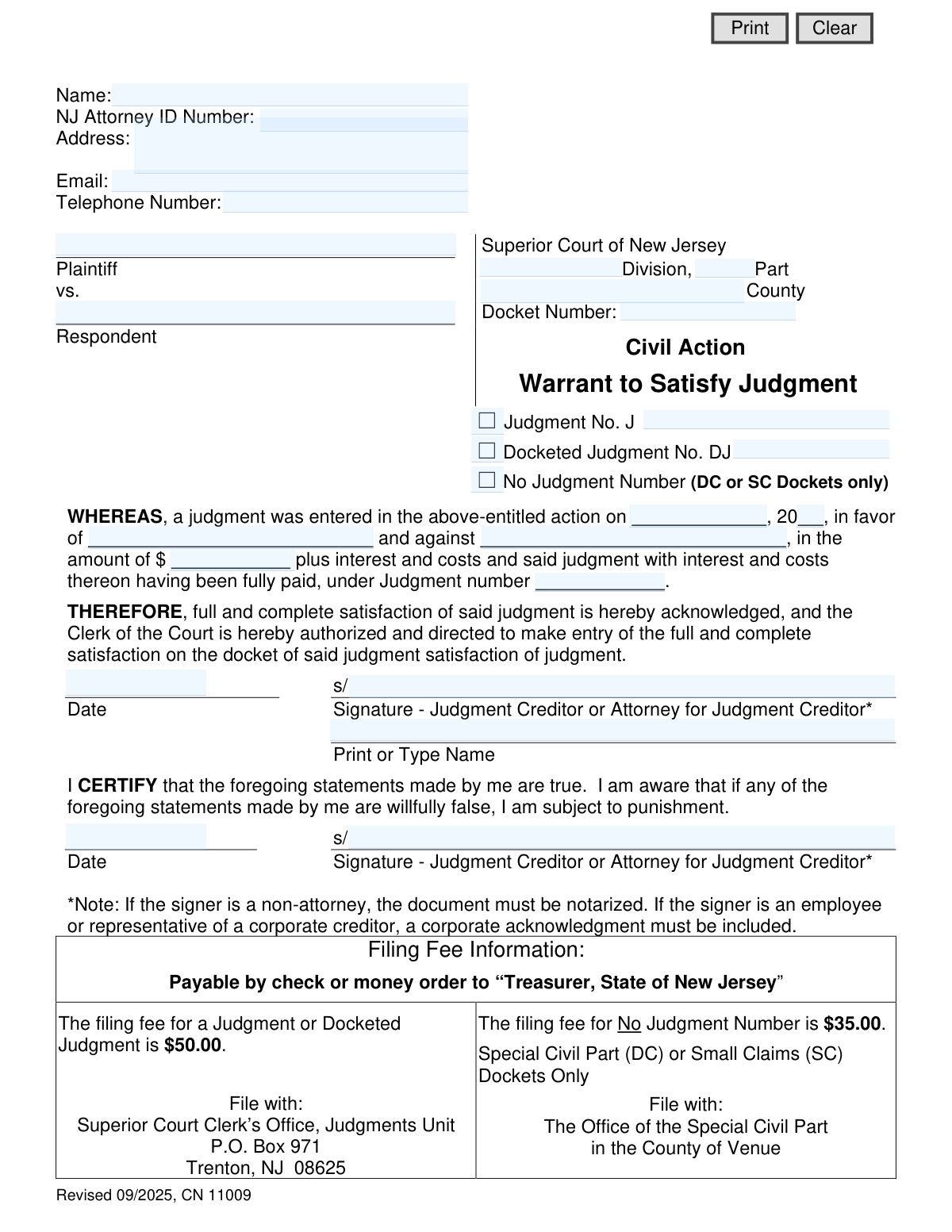
A Warrant to Satisfy Judgment is a legal document filed in New Jersey to provide official proof that a monetary judgment has been fully paid and to close the case on the Superior Court Civil Judgment and Order Docket. It is completed by the interested party but must be signed by the judgment creditor (the person who was owed money) or their attorney to be valid. Today, this form can be filled out quickly and accurately using AI-powered services like Instafill.ai, which can also convert non-fillable PDF versions into interactive fillable forms.
CN 11009 is part of the New Jersey forms category on Instafill.
Our AI automatically handles information lookup, data retrieval, formatting, and form filling.
It takes less than a minute to fill out CN 11009 using our AI form filling.
Securely upload your data. Information is encrypted in transit and deleted immediately after the form is filled out.

Form specifications

Form name: Warrant to Satisfy Judgment (New Jersey Judiciary)
Number of fields: 29
Number of pages: 1
Language: English
main-image

Instafill Demo: How to fill out PDF forms in seconds with AI

How to Fill Out CN 11009 Online for Free in 2026

Are you looking to fill out a CN 11009 form online quickly and accurately? Instafill.ai offers the #1 AI-powered PDF filling software of 2026, allowing you to complete your CN 11009 form in just 37 seconds or less.
Follow these steps to fill out your CN 11009 form online using Instafill.ai:
  1. 1 Navigate to Instafill.ai and upload or select the New Jersey Warrant to Satisfy Judgment form.
  2. 2 Use the AI assistant to automatically populate case information such as Plaintiff and Defendant names, the court Division, County, and Docket Number.
  3. 3 Enter the specific judgment details, including the Judgment Number (J or DJ), the date the judgment was entered, and the total amount that was satisfied.
  4. 4 Provide the contact information for the judgment creditor or their attorney, including name, address, and NJ Attorney ID number if applicable.
  5. 5 Review all entered information for accuracy. The judgment creditor or their attorney must then sign and date the form in the designated signature blocks.
  6. 6 Download the completed form. If the signer is not an attorney, the document must be printed and notarized before filing.
  7. 7 File the completed and signed warrant with the appropriate New Jersey court office and submit the required filing fee as instructed on the form.

Our AI-powered system ensures each field is filled out correctly, reducing errors and saving you time.

Why Choose Instafill.ai for Your Fillable CN 11009 Form?

Speed

Complete your CN 11009 in as little as 37 seconds.

Up-to-Date

Always use the latest 2026 CN 11009 form version.

Cost-effective

No need to hire expensive lawyers.

Accuracy

Our AI performs 10 compliance checks to ensure your form is error-free.

Security

Your personal information is protected with bank-level encryption.

Frequently Asked Questions About Form CN 11009

This form serves as legal proof that a monetary judgment has been fully paid. Filing it officially closes the judgment on the Superior Court's Civil Judgment and Order Docket.

Any interested party can complete the form's details, but only the judgment creditor (the person owed the money) or their attorney is authorized to sign it. The debtor does not sign this document.

You will need the plaintiff and defendant names, the court docket number, the judgment number (if applicable), the date the judgment was entered, and the original judgment amount.

If the signer is a non-attorney, their signature must be witnessed and notarized. If the signer is an employee of a corporate creditor, a corporate acknowledgment must also be included.

The filing fee is $50.00 for a Docketed Judgment (DJ or J#) or $35.00 for a judgment from the Special Civil Part or Small Claims dockets. Payment must be a check or money order payable to the 'Treasurer, State of New Jersey'.

For Docketed Judgments (DJ or J#), file with the Superior Court Clerk’s Office in Trenton. For vicinage-level judgments (Special Civil or Small Claims), file with the Office of the Special Civil Part in the county of venue.

Yes, after obtaining the required signatures, you can file the document and pay the fee electronically using the New Jersey Judiciary Electronic Document Submission (JEDS) system.

No, you should not use this form for child support matters. You must use the specific 'Warrant to Satisfy Judgment – Child Support' form (CN 12208).

You can look up judgment information, including the number, date, and amount, by using the 'Judgment Lien Search' tool on the New Jersey Judiciary website at njcourts.gov.

Once the form is signed by the creditor or their attorney, either party (the creditor or the debtor) is responsible for filing it with the appropriate court and paying the filing fee.

Yes, services like Instafill.ai use AI to accurately auto-fill form fields with your information, which can save you time and help prevent errors. The form must still be properly signed by the authorized party before filing.

You can upload the Warrant to Satisfy Judgment PDF to the Instafill.ai platform. The AI will identify the fields, allowing you to enter your information once and have it automatically and accurately placed throughout the document.

If you have a non-fillable or 'flat' PDF, you can use a service like Instafill.ai. It can convert the static document into an interactive, fillable form online, making it easy to complete on your computer.

Compliance CN 11009
Validation Checks by Instafill.ai

1
Exclusive Judgment Type Selection
This check verifies that the user has selected exactly one judgment type: 'Judgment No. J', 'Docketed Judgment No. DJ', or 'No Judgment Number'. This selection is mandatory for processing as it determines the correct filing fee ($50 or $35) and the proper court office for submission. If zero or more than one option is selected, the form submission will fail because the filing path and fee are ambiguous.
2
Conditional Judgment Number Requirement
This validation ensures that if the user selects either 'Judgment No. J' or 'Docketed Judgment No. DJ', the corresponding judgment number field is populated. This number is the primary identifier for the judgment being satisfied on the statewide docket. Failure to provide the number when its type is selected will result in the clerk being unable to locate and update the correct record, leading to rejection.
3
Valid Past Judgment Date
This check verifies that the judgment date entered is a complete and valid calendar date that occurs in the past. A judgment cannot be satisfied before it has been entered, so a future or invalid date is a critical logical error. This validation prevents nonsensical data from being submitted and ensures the historical accuracy of the legal record.
4
Judgment Amount Format Validation
This validation ensures the 'Judgment Amount' is entered as a valid positive numerical value, which can be formatted as currency. The amount is a critical piece of information identifying the specific judgment being satisfied. Submitting non-numeric text or a negative value would invalidate the document and prevent the clerk from processing the satisfaction correctly.
5
Mandatory Case Information
This check confirms that essential case identification fields, including 'Plaintiff', 'Respondent', 'County', and 'Docket Number', are all populated. This information is fundamental for the court clerk to locate the correct case file within the court's system. Missing any of these details will make it impossible to process the warrant, leading to immediate rejection of the filing.
6
Primary Signature and Printed Name Requirement
This validation ensures that the form has been signed by the judgment creditor or their attorney and that the corresponding name is printed or typed below the signature line. A signature is legally required to authorize the satisfaction of the judgment, and the printed name clarifies the signer's identity. A missing signature or printed name renders the document legally invalid.
7
Certification Signature Requirement
This check verifies that the certification statement ('I CERTIFY that the foregoing statements made by me are true...') has been signed. This signature attests to the truthfulness of the information provided, and the signer acknowledges they are subject to punishment for willfully false statements. This is a critical legal attestation, and its absence would invalidate the filing.
8
Logical Signature Date Validation
This check ensures that both signature dates are valid calendar dates that are not in the future. Furthermore, it verifies that the signature dates are on or after the original judgment date, as one cannot sign off on satisfying a judgment before it exists. This maintains the logical and chronological integrity of the legal process and prevents invalid submissions.
9
NJ Attorney ID Number Format
This check validates that the 'NJ Attorney ID Number' field, if provided, follows the official format for New Jersey attorneys (e.g., a specific number of digits). This ensures the attorney is properly identified and in good standing, which is critical for legal filings. An invalid format could lead to rejection of the filing or delays while the attorney's identity is verified.
10
Attorney Information Completeness
This validation ensures that if an 'NJ Attorney ID Number' is entered, the corresponding 'Name' and 'Address' fields for the filer are also completed. This provides a complete contact record for the attorney submitting the warrant, which is necessary for any follow-up communication from the court. An incomplete record can cause processing delays or rejection.
11
Email Address Format
This validation checks that the value entered in the 'Email' field, if provided, conforms to a standard email address format (e.g., [email protected]). A valid email is crucial for modern electronic communication from the court, including filing confirmations or deficiency notices. An invalid format would prevent the filer from receiving important updates about their submission.
12
Consistent Party Name Validation
This validation cross-references the Plaintiff and Respondent names entered in the top case caption with the names entered in the body of the warrant ('in favor of... and against...'). The names must match to ensure there is no ambiguity about which parties are involved in the judgment. Inconsistencies could lead to legal challenges or rejection of the filing for being unclear.

Common Mistakes in Completing CN 11009

Saved over 80 hours a year

“I was never sure if my IRS forms like W-9 were filled correctly. Now, I can complete the forms accurately without any external help.”

Kevin Martin Green

Your data stays secure with advanced protection from Instafill and our subprocessors

Robust compliance program

Transparent business model

You’re not the product. You always know where your data is and what it is processed for.

ISO 27001, HIPAA, and GDPR

Our subprocesses adhere to multiple compliance standards, including but not limited to ISO 27001, HIPAA, and GDPR.

Security & privacy by design

We consider security and privacy from the initial design phase of any new service or functionality. It’s not an afterthought, it’s built-in, including support for two-factor authentication (2FA) to further protect your account.

Fill out CN 11009 with Instafill.ai

Worried about filling PDFs wrong? Instafill securely fills warrant-to-satisfy-judgment-new-jersey-judiciary forms, ensuring each field is accurate.