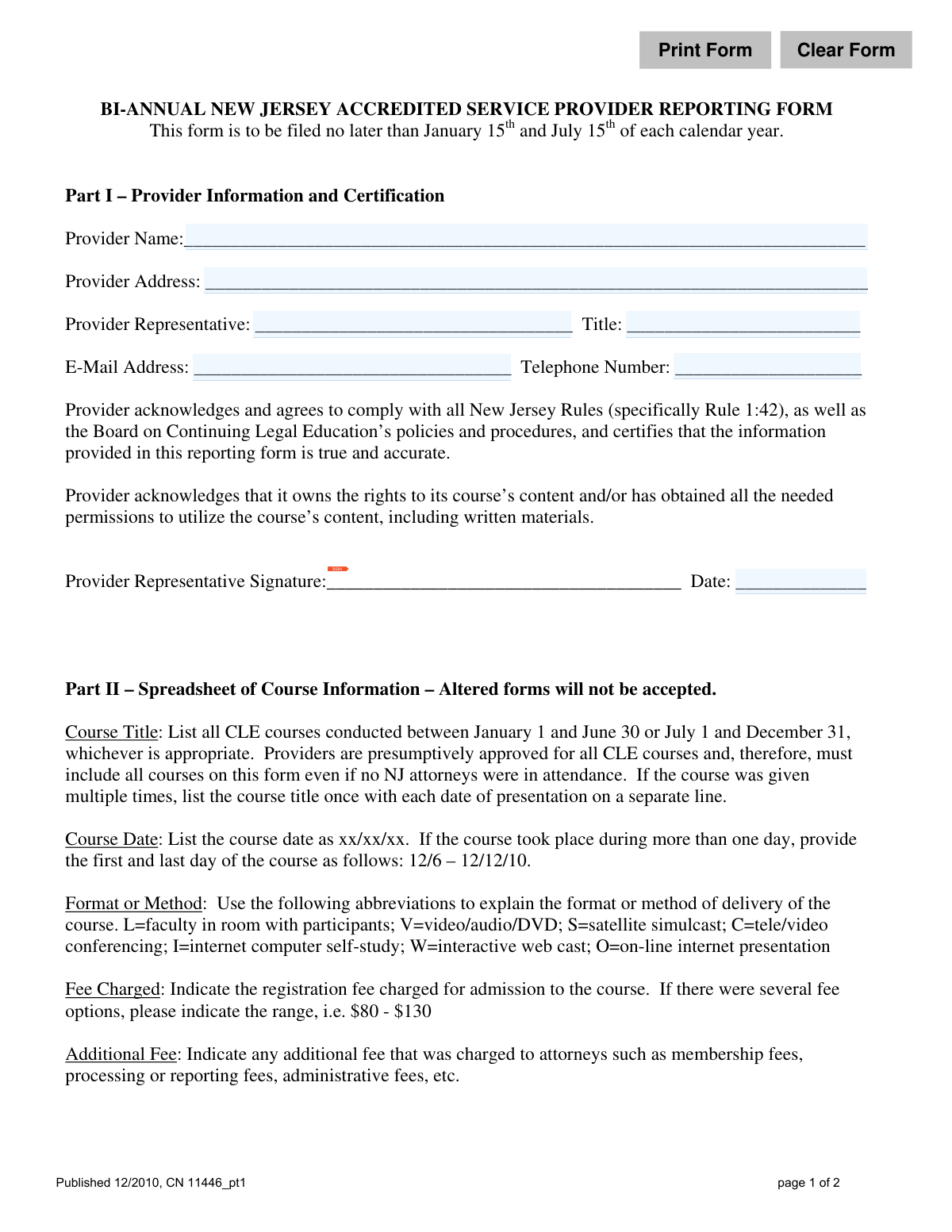
Yes! You can use AI to fill out Bi-Annual New Jersey Accredited Service Provider Reporting Form Part 1

This is the Bi-Annual New Jersey Accredited Service Provider Reporting Form, Part 1, which must be filed twice a year by providers of Continuing Legal Education (CLE). It is used to report detailed information about all CLE courses conducted, including course content, attendance, and fees, to the New Jersey Board on Continuing Legal Education. This ensures compliance with state rules and maintains the provider's accredited status. Today, this form can be filled out quickly and accurately using AI-powered services like Instafill.ai, which can also convert non-fillable PDF versions into interactive fillable forms.
CN 11446_pt1 is part of the credit report forms and New Jersey forms categories on Instafill.
Our AI automatically handles information lookup, data retrieval, formatting, and form filling.
It takes less than a minute to fill out CN 11446_pt1 using our AI form filling.
Securely upload your data. Information is encrypted in transit and deleted immediately after the form is filled out.

Form specifications

Form name: Bi-Annual New Jersey Accredited Service Provider Reporting Form Part 1
Number of fields: 10
Number of pages: 1
Language: English
main-image

Instafill Demo: How to fill out PDF forms in seconds with AI

How to Fill Out CN 11446_pt1 Online for Free in 2026

Are you looking to fill out a CN 11446_PT1 form online quickly and accurately? Instafill.ai offers the #1 AI-powered PDF filling software of 2026, allowing you to complete your CN 11446_PT1 form in just 37 seconds or less.
Follow these steps to fill out your CN 11446_PT1 form online using Instafill.ai:
  1. 1 Navigate to Instafill.ai and upload or select the Bi-Annual New Jersey Accredited Service Provider Reporting Form.
  2. 2 Use the AI assistant to automatically fill in Part I with your Provider Information, including name, address, and representative details.
  3. 3 Complete the contact information, such as email address and telephone number.
  4. 4 Proceed to Part II and input the required spreadsheet data for each course, including title, date, format, and fees charged.
  5. 5 Enter the attendance numbers, specifying the total number of attorneys and the number of NJ attorneys who received certificates.
  6. 6 Provide the total CLE minutes, the portion dedicated to ethics, and indicate if the course is appropriate for specialty certification credits.
  7. 7 Carefully review all entered information for accuracy, have the provider representative digitally sign and date the certification, and then submit the completed form.

Our AI-powered system ensures each field is filled out correctly, reducing errors and saving you time.

Why Choose Instafill.ai for Your Fillable CN 11446_pt1 Form?

Speed

Complete your CN 11446_pt1 in as little as 37 seconds.

Up-to-Date

Always use the latest 2026 CN 11446_pt1 form version.

Cost-effective

No need to hire expensive lawyers.

Accuracy

Our AI performs 10 compliance checks to ensure your form is error-free.

Security

Your personal information is protected with bank-level encryption.

Frequently Asked Questions About Form CN 11446_pt1

This form is used by New Jersey Accredited Service Providers to report all Continuing Legal Education (CLE) courses they conducted during a six-month reporting period to the Board on Continuing Legal Education.

All service providers who are accredited by the New Jersey Board on Continuing Legal Education to offer CLE courses must complete and submit this form.

The form must be filed twice a year. It is due by January 15th for courses held from July 1-December 31, and by July 15th for courses held from January 1-June 30.

Yes, as a presumptively approved provider, you must report all CLE courses conducted during the reporting period, even if no New Jersey attorneys were in attendance.

You should list the course title once in the spreadsheet, and then list each separate date the course was presented on its own line.

The 'Total Number of Attorneys' includes every attorney who attended the course, while 'Total NJ Attorneys' is a specific count of only the New Jersey attorneys who were issued a NJ Certificate of Attendance.

No, you must use the spreadsheet format as provided in the document. The form instructions clearly state that altered forms will not be accepted.

A course is appropriate for newly admitted attorneys if its content covers one of the specific subject areas listed on the form, such as NJ family law practice, NJ real estate closing procedures, or NJ law office management.

The Provider Representative is an individual authorized by the provider to certify that the information is accurate and that the provider complies with all New Jersey rules and policies.

These are single-letter codes for the course delivery method, such as 'L' for a live course with faculty in the room, 'W' for an interactive webcast, or 'I' for an internet self-study course.

Yes, services like Instafill.ai use AI to accurately auto-fill form fields from your saved data, which can save you significant time, especially when reporting many courses.

You can use a service like Instafill.ai to upload the PDF and fill it out directly on your computer. The platform allows you to easily type into fields, sign electronically, and save or print your completed form.

If your PDF is a flat, non-fillable image, you can use a tool like Instafill.ai. It can convert non-fillable PDFs into interactive, fillable forms that you can complete online.

Compliance CN 11446_pt1
Validation Checks by Instafill.ai

1
Provider Information Completeness
This check ensures that all fields in Part I (Provider Name, Provider Address, Provider Representative, and Title) are filled out. This information is essential for identifying the reporting entity and the responsible individual. A failure would prevent the form from being processed as the provider cannot be properly identified or contacted.
2
Email Address Format Validation
Verifies that the 'E-Mail Address' field contains a string in a valid email format (e.g., [email protected]). This is critical for ensuring that official communications, confirmations, and inquiries from the Board on Continuing Legal Education can be successfully delivered. An invalid format would result in a validation error, requiring the user to correct the entry before submission.
3
Telephone Number Format Validation
This check validates that the 'Telephone Number' field conforms to a standard phone number format (e.g., (xxx) xxx-xxxx or xxx-xxx-xxxx). A valid phone number is necessary for direct communication if email is insufficient or for urgent matters. If the format is incorrect, the submission will be blocked until a valid number is provided.
4
Course Date Reporting Period Consistency
Ensures that each 'Course Date' listed falls within the correct bi-annual reporting period (January 1 to June 30, or July 1 to December 31). This is fundamental to the bi-annual reporting structure and prevents data from incorrect periods from being submitted. A course date outside the expected range would be flagged as an error, requiring correction to ensure accurate reporting.
5
Course Date Format
Validates that the 'Course Date' is entered in the specified 'xx/xx/xx' format for single-day courses or 'xx/xx/xx - xx/xx/xx' for multi-day courses. Adherence to the specified format is crucial for automated data processing and consistent record-keeping. An incorrect format would trigger an error message prompting the user to correct the entry.
6
Course Format Code Validity
This check confirms that the 'Format or Method' field contains only one of the approved single-letter abbreviations (L, V, S, C, I, W, O). Using only predefined codes ensures data uniformity and allows for accurate analysis of course delivery methods. Any value other than the specified codes will result in a validation failure.
7
Financial Hardship Application Logic
Verifies that the 'Number of Financial Hardship Applications Granted' is less than or equal to the 'Number of Financial Hardship Application Received'. This is a logical consistency check to ensure the data is coherent and accurate. A submission where the number of granted applications exceeds the number received would be rejected as it is a logical impossibility.
8
Attorney Attendance Logic
This validation ensures that the 'Total NJ Attorneys Issued NJ Certificates of Attendance' is not greater than the 'Total Number of Attorneys in Attendance'. This check maintains the logical integrity of the attendance data. It is impossible for more NJ attorneys to receive certificates than the total number of attorneys who attended the course, so a failure would block submission.
9
CLE Minutes Logic
Confirms that the 'Minutes of Ethics or Professional Responsibility' is less than or equal to the 'Total Number of CLE Minutes'. Ethics minutes are a subset of the total course time, so they cannot exceed the total. This check prevents data entry errors and ensures the reported credit breakdown is logical and accurate.
10
Binary Field Validation (Yes/No)
Ensures that fields requiring a binary answer, such as 'In-House Seminar' and 'Appropriate for Newly Admitted NJ Attorneys', contain only 'yes' or 'no'. This standardization is essential for clear, unambiguous data that can be easily queried and analyzed. Any other entry would be considered invalid and require correction.
11
Numeric Fields are Non-Negative Integers
This check verifies that all fields representing a count (e.g., 'Total Number of Attorneys', 'Total Number of CLE Minutes') contain non-negative integer values. These fields cannot logically be negative or contain decimals. This validation prevents data entry errors and ensures the integrity of quantitative data.
12
Certification Credit Code Validation
Validates that the 'Appropriate for Certification Credits' field, if populated, contains only the approved abbreviations (CV, CR, MA, WC). This ensures that specialty credit data is standardized and correctly categorized. An entry with an invalid code would be flagged, requiring the user to correct it or leave it blank if not applicable.
13
Certification Signature and Date Presence
This check ensures that the 'Provider Representative Signature' and 'Date' fields are both completed. The signature and date certify that the provided information is true and accurate, which is a legal and procedural requirement. An omission of either field would render the certification incomplete and prevent the form from being accepted.

Common Mistakes in Completing CN 11446_pt1

Using Incorrect Format/Method Abbreviations

The form requires specific single-letter abbreviations for the course delivery method (e.g., 'L' for Live, 'W' for interactive web cast). Filers often write out the full word, such as 'Video' instead of 'V', or use incorrect letters. This leads to data entry errors on the receiving end and can cause the report to be rejected for non-compliance. Always refer to the key provided in the instructions to ensure you are using the exact abbreviations required.

Forgetting the Provider Representative Signature

Submitting an unsigned form is a frequent and critical error that completely invalidates the filing. This often happens due to simple oversight when rushing to meet a deadline. An unsigned form cannot be processed, leading to non-compliance penalties and requiring the provider to refile. Before submitting, always perform a final check to ensure the 'Provider Representative Signature' field is signed and dated.

Incorrect Course Date Formatting

The instructions specify a strict 'xx/xx/xx' format for single dates and a 'start – end' format for multi-day courses (e.g., '12/6 – 12/12/10'). Common mistakes include using four-digit years, writing out the month, or using different separators like hyphens. Incorrect formatting can cause data import failures and processing delays. AI-powered form fillers like Instafill.ai can help prevent this by automatically formatting dates correctly based on the form's rules.

Confusing Total Attorneys with Total NJ Attorneys

Providers sometimes enter the same number for 'Total Number of Attorneys in Attendance' and 'Total NJ Attorneys Issued NJ Certificates,' even when attendees were from various states. This misrepresents the data required for state-specific compliance tracking. It is crucial to differentiate between the total audience and the specific subset of New Jersey attorneys who received a NJ Certificate of Attendance.

Miscalculating or Misreporting CLE Minutes

A common point of confusion is how to report ethics minutes. The form requires the total CLE minutes for the course, with the ethics portion listed separately as a subset of that total. Filers may mistakenly subtract the ethics minutes from the total or list them as a separate, additional block of time. This skews the credit calculation and can lead to compliance issues for the attorneys who attended.

Altering the Form's Structure

The form explicitly states, 'Altered forms will not be accepted.' Despite this warning, some providers attempt to add or delete columns in the spreadsheet section to fit their internal reporting style. Any modification to the form's layout will result in immediate rejection, wasting time and effort. It is essential to input the data exactly as the provided structure dictates. If the form is a non-fillable PDF, tools like Instafill.ai can convert it into a fillable version without altering the required layout.

Improperly Listing Courses Given Multiple Times

The instructions require providers to list a course title once, with each presentation date on a separate line underneath. A frequent mistake is to create a new, full entry for the course each time it was offered, making the report unnecessarily long and difficult to review. This can lead to processing delays and demonstrates a failure to follow instructions. Consolidating dates under a single course title is essential for a compliant submission.

Vague or Incorrect 'Fee Charged' Information

When a course has multiple registration fees, the form requires a specific range format (e.g., '$80 - $130'). Filers often make mistakes by writing vague terms like 'Varies,' omitting the dollar signs, or using inconsistent separators. This lack of clarity can trigger questions from the board and delay the report's approval. Always provide a clear, numeric range as instructed.

Incorrectly Answering 'Appropriate for Newly Admitted NJ Attorneys'

Providers may answer 'yes' to this question without ensuring their course content aligns with the very specific subject areas listed (e.g., NJ real estate closing procedures, NJ family law practice). This mistake can mislead newly admitted attorneys looking for qualifying courses and cause compliance problems for both the provider and the attorney. Providers must carefully review the list of qualifying topics before affirming a course is appropriate.

Missing the Bi-Annual Filing Deadline

The form has firm deadlines of January 15th and July 15th. Missing these dates is a common administrative oversight that results in immediate non-compliance and potential penalties for the provider. This can happen when manual tracking systems fail or when staff are unaware of the strict deadlines. Using calendar reminders and automated compliance tools can help ensure these critical dates are never missed.
Saved over 80 hours a year

“I was never sure if my IRS forms like W-9 were filled correctly. Now, I can complete the forms accurately without any external help.”

Kevin Martin Green

Your data stays secure with advanced protection from Instafill and our subprocessors

Robust compliance program

Transparent business model

You’re not the product. You always know where your data is and what it is processed for.

ISO 27001, HIPAA, and GDPR

Our subprocesses adhere to multiple compliance standards, including but not limited to ISO 27001, HIPAA, and GDPR.

Security & privacy by design

We consider security and privacy from the initial design phase of any new service or functionality. It’s not an afterthought, it’s built-in, including support for two-factor authentication (2FA) to further protect your account.

Fill out CN 11446_pt1 with Instafill.ai

Worried about filling PDFs wrong? Instafill securely fills bi-annual-new-jersey-accredited-service-provider-reporting-form-part-1 forms, ensuring each field is accurate.