Yes! You can use AI to fill out Annual Credit Report Request Form
The Annual Credit Report Request Form is a document that allows consumers to formally request their free annual credit report as mandated by federal law. It is crucial for regularly reviewing your credit history, checking for inaccuracies, and protecting yourself against identity theft. Today, this form can be filled out quickly and accurately using AI-powered services like Instafill.ai, which can also convert non-fillable PDF versions into interactive fillable forms.
Annual Credit Report Request is part of the
credit forms and credit report forms categories on Instafill.
Rather not fill this in by hand? Instafill is an online form filler that completes PDF forms automatically — upload the blank form, answer a few questions, and the AI fills every field.
Form specifications
| Form name: | Annual Credit Report Request Form |
| Number of pages: | 1 |
| Language: | English |
Our AI automatically handles information lookup, data retrieval, formatting, and form filling.
It takes less than a minute to fill out Annual Credit Report Request using our AI form filling.
Securely upload your data. Information is encrypted in transit and deleted immediately after the form is filled out.
Instafill Demo: How to fill out PDF forms in seconds with AI
How to Fill Out Annual Credit Report Request Online for Free in 2026
Are you looking to fill out a ANNUAL CREDIT REPORT REQUEST form online quickly and accurately? Instafill.ai offers the #1 AI-powered PDF filling software of 2026, allowing you to complete your ANNUAL CREDIT REPORT REQUEST form in just 37 seconds or less.
Follow these steps to fill out your ANNUAL CREDIT REPORT REQUEST form online using Instafill.ai:
- 1 Navigate to Instafill.ai and upload or select the Annual Credit Report Request Form.
- 2 Use the AI chat to provide your personal identification details, such as full name, Social Security number, date of birth, and current/previous addresses.
- 3 Indicate which of the three credit bureaus (Equifax, Experian, TransUnion) you are requesting a report from.
- 4 Review all the information automatically populated by the AI to ensure its accuracy and completeness.
- 5 Securely sign and date the form using the platform's e-signature tools.
- 6 Download the completed form, print it, and mail it to the address provided for the Annual Credit Report Request Service.
Our AI-powered system ensures each field is filled out correctly, reducing errors and saving you time.
Why Choose Instafill.ai for Your Fillable Annual Credit Report Request Form?
Speed
Complete your Annual Credit Report Request in as little as 37 seconds.
Up-to-Date
Always use the latest 2026 Annual Credit Report Request form version.
Cost-effective
No need to hire expensive lawyers.
Accuracy
Our AI performs 10 compliance checks to ensure your form is error-free.
Security
Your personal information is protected with bank-level encryption.
Frequently Asked Questions About Annual Credit Report Request
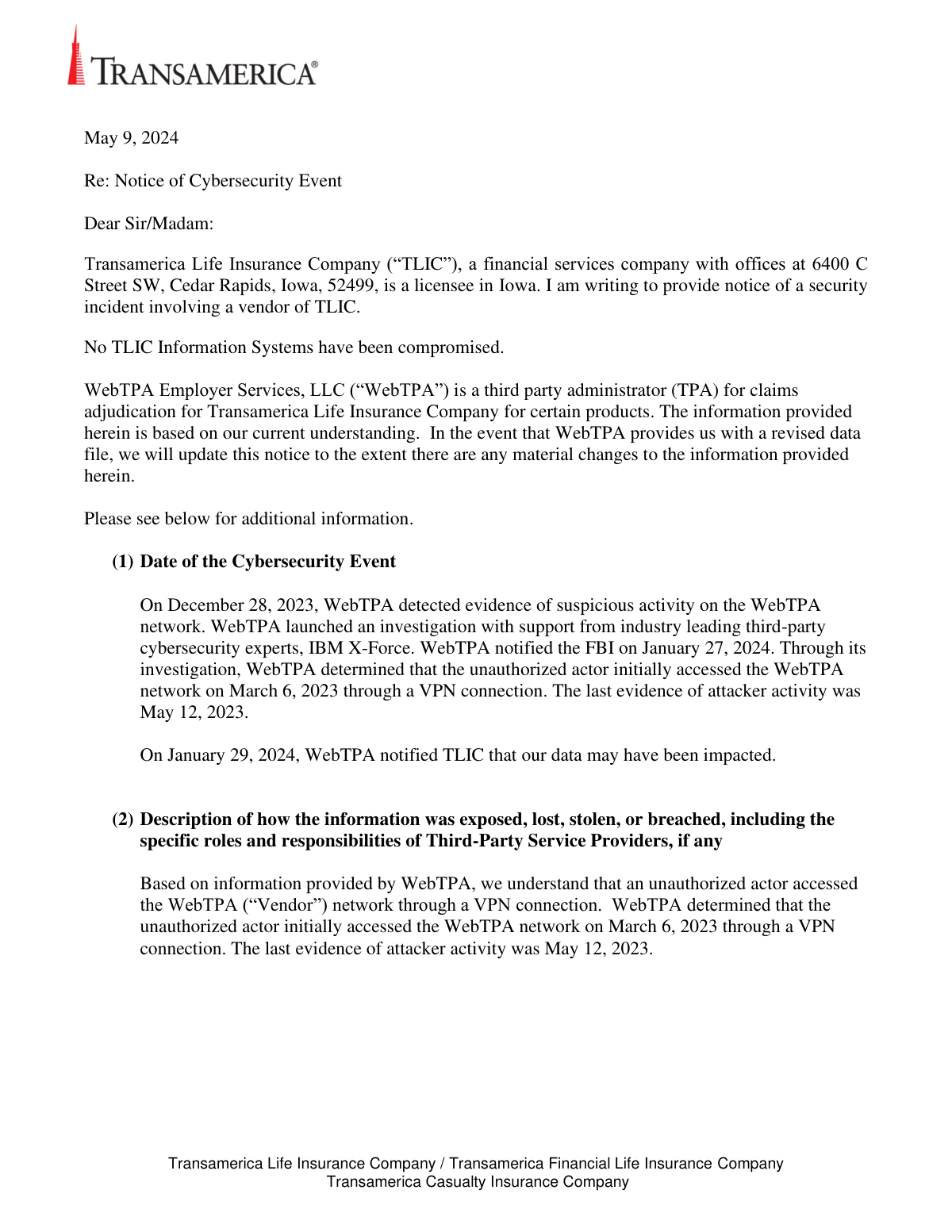
You received this notice because your personal information may have been exposed in a data security incident at WebTPA Employer Services, LLC, a vendor that provides administrative services to Transamerica Life Insurance Company.
No, Transamerica's own information systems were not compromised. The security incident occurred on the network of their third-party administrator, WebTPA.
The potentially exposed information includes your name, address, date of birth, Social Security number, and various identification numbers. Your financial information, such as credit card numbers or bank account details, was not impacted.
The most important step is to activate your two years of complimentary identity monitoring services provided by Kroll. You must visit the activation website listed in the notice and enroll before the August 1, 2024 deadline.
To activate your free services, visit https://enroll.krollmonitoring.com and enter the unique Membership Number provided in your notice letter. Remember to complete this activation process by August 1, 2024.
No, WebTPA is offering two years of identity monitoring services through Kroll completely free of charge to all affected individuals. You will not be asked for payment information to enroll in this service.
As of the date of the notice, WebTPA is not aware of any misuse of your information as a result of this incident. However, it is recommended to remain vigilant by monitoring your accounts and credit reports for any suspicious activity.
WebTPA has established a dedicated call center to answer your questions regarding the incident. You can call them at (866) 495-9179, Monday through Friday from 9:00 a.m. to 6:30 p.m. Eastern Time.
You should regularly review your credit reports and account statements for any suspicious activity. The notice also provides information on how to place a fraud alert or security freeze on your credit file for added protection.
This document is a notification, not a bill or a form that needs to be returned. Its purpose is to inform you about a data security incident and provide instructions on how to activate free identity protection services.
Yes, AI-powered services like Instafill.ai can help you accurately auto-fill related paperwork, such as the Annual Credit Report Request Form, saving you time and helping to ensure accuracy.
You can upload a related document, like a form to dispute a charge, to the Instafill.ai platform. The AI will identify the fields, allowing you to securely enter your information once and have it auto-filled correctly throughout the form.
Services like Instafill.ai can convert flat, non-fillable PDFs into interactive, fillable forms. Simply upload the document, and the platform will make it easy to type your information directly into the correct fields online.
If you do not activate your complimentary identity monitoring services by the August 1, 2024 deadline, the offer will expire. You will no longer be able to sign up for the two years of free protection being provided.
Compliance Annual Credit Report Request
Validation Checks by Instafill.ai
1
Validates Chronological Order of Event Dates
This check ensures that all dates related to the cybersecurity event are in a logical sequence. For example, the date of initial network access must occur before the date of last attacker activity, and the discovery date must precede the notification dates. This is critical for creating a coherent and credible incident timeline for regulators and affected individuals. If the dates are out of order, the report could be rejected, and the company's response could be questioned.
2
Ensures Recipient Address is Complete for Mailing
This validation verifies that all required address fields (first_name, last_name, address_1, city, state_province, postal_code) for the affected individual are populated. A complete and accurate address is essential for the physical delivery of the data breach notification letter. If any of these fields are missing, the letter cannot be mailed, failing the legal obligation to notify the individual.
3
Validates Format of State/Province Abbreviation
This check ensures the 'state_province' field contains a valid, standardized two-letter abbreviation (e.g., 'IA' for Iowa, 'CA' for California). Using correct abbreviations is crucial for mail processing and sorting, ensuring deliverability of the notification letters. An invalid code could lead to returned mail and a failure to notify affected parties in a timely manner.
4
Validates Format of Postal Code
This check verifies that the 'postal_code' field conforms to the standard format for the recipient's country, such as the 5-digit or 9-digit ZIP code in the United States. A valid postal code is essential for the mail carrier to accurately route and deliver the notification letter. An incorrect format will likely result in delivery failure, preventing the individual from receiving critical information about the breach.
5
Verifies Affected Consumer Count is a Positive Integer
This validation ensures that the 'number of total Consumers' reported in section (9) is a whole number greater than zero. Regulatory reports require a specific count of affected individuals for statistical and impact assessment purposes. Submitting a non-integer, zero, or negative value would be invalid and would likely trigger a rejection or query from the regulatory body.
6
Ensures Compromised Data Field is Populated
This check confirms that the '<>' placeholder is replaced with a specific, non-empty list of the personal information that was compromised. This is the most critical part of the notification, as it informs the individual exactly what data was exposed so they can take appropriate protective measures. Failure to populate this field would render the notification useless and non-compliant with breach notification laws.
7
Validates Presence and Format of Kroll Membership Number
This check verifies that the '<>' field is present and populated for each recipient. This unique number is required for the individual to activate the complimentary identity monitoring services being offered. If the number is missing or incorrect, the recipient will be unable to access the remediation services, undermining the company's effort to mitigate harm.
8
Ensures Activation Deadline is a Future Date
This validation confirms that the identity monitoring activation deadline (e.g., 'August 1, 2024') is a date in the future relative to the date the notification letter is mailed. The purpose is to provide recipients with a reasonable and fair amount of time to enroll in the protective services. An expired or past deadline would make the offer of assistance invalid and could be seen as a bad-faith effort.
9
Validates Format of Contact Person's Email Address
This check ensures that the email address provided for the official contact person follows the standard '[email protected]' format. A valid email is crucial for regulatory agencies or other parties to make official contact regarding the incident. An invalid email format would prevent communication, potentially delaying the investigation and response process.
10
Validates Format of Contact Person's Phone Number
This check verifies that the telephone number for the contact person is in a valid and recognizable format (e.g., XXX-XXX-XXXX). This provides a direct line of communication for regulators who may have urgent questions about the cybersecurity event. An improperly formatted number could be unusable, hindering official follow-up.
11
Verifies Completeness of Regulatory Contact Information
This validation ensures that all fields for the contact person in section (13) — Name, Title, Company, full Address, Telephone, and Email — are filled out. Regulatory bodies require a complete and authorized point of contact for official correspondence and accountability. Incomplete information can lead to report rejection or delays in the regulatory review process.
12
Validates Social Security Number Format
When processing the list of compromised data elements, this check would ensure any field identified as a Social Security Number conforms to the 9-digit format (XXXXXXXXX or XXX-XX-XXXX). Given the high sensitivity of SSNs, ensuring data integrity is paramount for correctly identifying affected individuals and preventing data corruption. Processing an incorrectly formatted SSN could lead to misidentification or system errors.
Common Mistakes in Completing Annual Credit Report Request
The data breach notice includes a unique Membership Number required to activate the complimentary identity monitoring services. Individuals often mistype this long alphanumeric code, leading to an activation failure. To avoid this, carefully transcribe the number character by character, and if possible, have someone else review it before submitting.
The offer for complimentary identity monitoring services has a strict expiration date, which is August 1, 2024, in this notice. People often set the letter aside and forget to sign up before the deadline, permanently losing the opportunity for free protection. To prevent this, you should activate the service immediately upon receiving the notice or set a prominent calendar reminder well before the deadline.
The notice provides a link to the Annual Credit Report Request Form, which is a non-fillable PDF that must be printed and filled out by hand for mail-in requests. Poor or unclear handwriting can cause processing systems to misread critical information like your name or address, leading to rejection. To avoid this, print legibly in block capital letters. Alternatively, AI-powered tools like Instafill.ai can convert flat PDFs into fillable forms, allowing you to type your information for maximum clarity before printing.
When requesting a credit report or placing a security freeze, you must provide current and previous addresses for identity verification. Many people forget exact street names, apartment numbers, or ZIP codes from past residences, causing their request to be denied. Before starting the form, gather your address history for at least the last two years to ensure you can provide complete and accurate information.
The Social Security Number (SSN) is the primary identifier for all credit-related requests, and a single transposed digit will result in an automatic failure to process the form. This error often happens due to haste or a simple typo. Always double-check your SSN before submission; reading the numbers aloud can help catch mistakes. Advanced form-filling tools like Instafill.ai can also help by validating the format and prompting you to confirm the entry.
A physical signature is required on the Annual Credit Report Request Form to authorize the credit bureaus to release your information. It is a very common and simple mistake to fill out the entire form but forget to sign it before mailing. An unsigned form is considered incomplete and will be rejected, causing significant delays. Always perform a final review of the entire form, specifically looking for the signature field, before sealing the envelope.
To place a security freeze, credit bureaus require multiple forms of identification, such as a copy of a state-issued ID and a recent utility bill, in addition to the form itself. Individuals often fail to include all the necessary supporting documents with their request. This results in the request being denied, leaving their credit file unprotected. Carefully read the instructions from each credit bureau and create a checklist of all required items before mailing your request.
This notice involves multiple entities: Transamerica (the insurance company), WebTPA (the administrator who had the breach), and Kroll (the identity monitoring provider). A common point of confusion is contacting the wrong company for help, such as calling Transamerica about activating Kroll's services. This leads to wasted time and frustration. To avoid this, carefully read the notice to understand who is responsible for what, and use the dedicated call center number provided for questions about the incident.
Instead of using the official link in the notice (annualcreditreport.com), some people may search online for a credit report request form and download an unofficial or outdated version. Using the wrong form can lead to rejection or, in a worst-case scenario, submitting personal data to a fraudulent site. Always use the specific URLs and contact information provided in the official data breach notification to ensure you are interacting with the correct entities.
Many people receive a lot of mail and may mistake an official data breach notification for a marketing letter or scam, causing them to discard it without reading. Ignoring the notice means you remain unaware that your personal information, including your Social Security number, has been compromised. This leaves you vulnerable to identity theft without taking advantage of the free protective services offered. Always open and review official-looking mail from financial service companies.
Saved over 80 hours a year
“I was never sure if my IRS forms like W-9 were filled correctly. Now, I can complete the forms accurately without any external help.”
Kevin Martin Green
Your data stays secure with advanced protection from Instafill and our subprocessors




Robust compliance program
Transparent business model
You’re not the product. You always know where your data is and what it is processed for.
ISO 27001, HIPAA, and GDPR
Our subprocesses adhere to multiple compliance standards, including but not limited to ISO 27001, HIPAA, and GDPR.
Security & privacy by design
We consider security and privacy from the initial design phase of any new service or functionality. It’s not an afterthought, it’s built-in, including support for two-factor authentication (2FA) to further protect your account.
Fill out Annual Credit Report Request with Instafill.ai
Worried about filling PDFs wrong? Instafill securely fills annual-credit-report-request-form forms, ensuring each field is accurate.
