Yes! You can use AI to fill out Certification of Retirement - Continuing Legal Education Provider

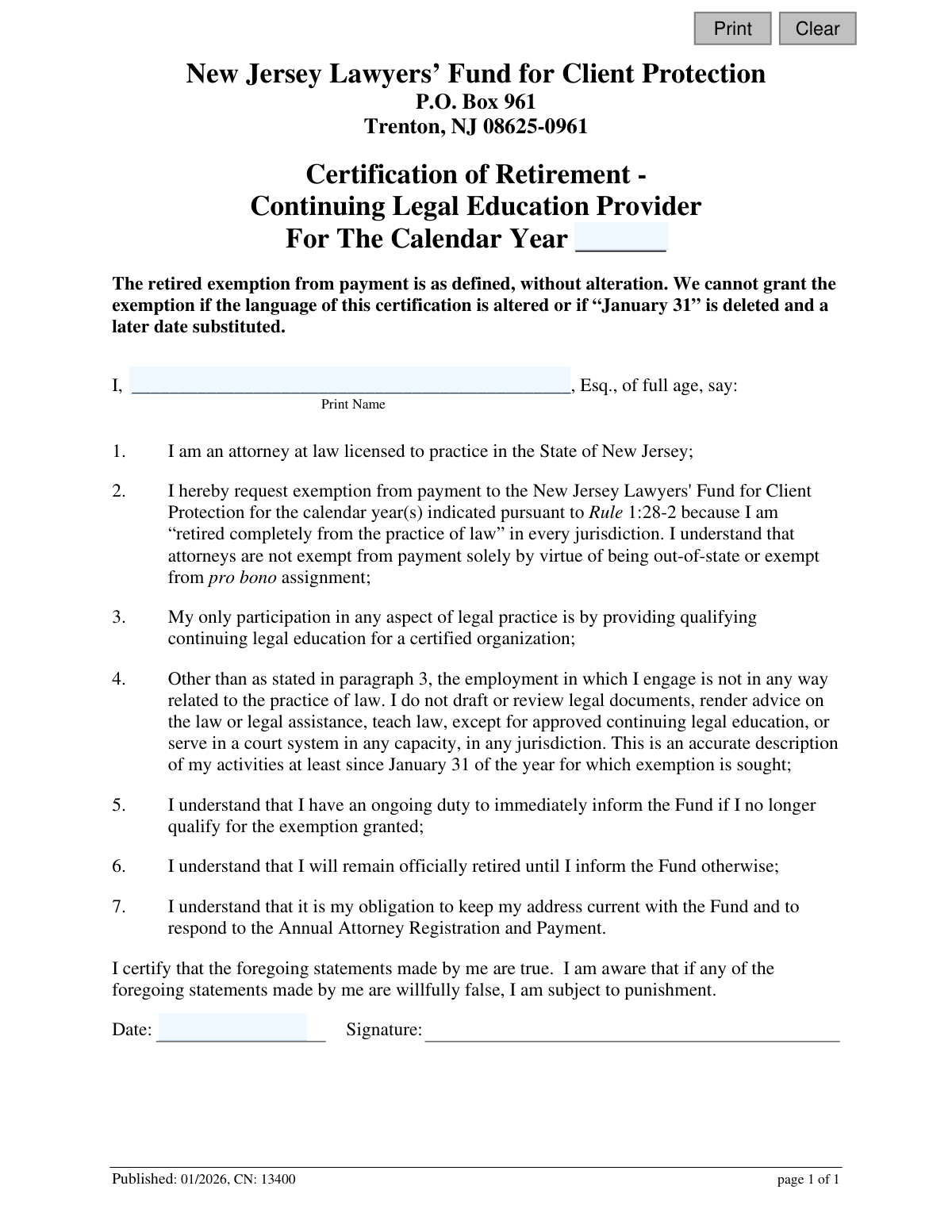
This form is a legal certification for retired New Jersey attorneys who wish to claim an exemption from payments to the New Jersey Lawyers' Fund for Client Protection. It specifically applies to those whose only participation in legal practice is providing qualifying continuing legal education. By signing, the attorney certifies their retired status and limited activities under penalty of perjury. Today, this form can be filled out quickly and accurately using AI-powered services like Instafill.ai, which can also convert non-fillable PDF versions into interactive fillable forms.
CN 13400 is part of the continuing education forms and New Jersey forms categories on Instafill.
Our AI automatically handles information lookup, data retrieval, formatting, and form filling.
It takes less than a minute to fill out CN 13400 using our AI form filling.
Securely upload your data. Information is encrypted in transit and deleted immediately after the form is filled out.

Form specifications

Form name: Certification of Retirement - Continuing Legal Education Provider
Number of fields: 5
Number of pages: 1
Language: English
main-image

Instafill Demo: How to fill out PDF forms in seconds with AI

How to Fill Out CN 13400 Online for Free in 2026

Are you looking to fill out a CN 13400 form online quickly and accurately? Instafill.ai offers the #1 AI-powered PDF filling software of 2026, allowing you to complete your CN 13400 form in just 37 seconds or less.
Follow these steps to fill out your CN 13400 form online using Instafill.ai:
  1. 1 Navigate to Instafill.ai and upload or select the Certification of Retirement - Continuing Legal Education Provider form.
  2. 2 Enter the calendar year for which you are seeking the exemption.
  3. 3 Provide your full name as a licensed attorney in New Jersey.
  4. 4 Carefully review the seven certification statements to ensure they accurately describe your retired status and limited legal activities.
  5. 5 Use the AI tool to securely e-sign and date the document, certifying that the statements are true.
  6. 6 Download the completed form and submit it to the New Jersey Lawyers’ Fund for Client Protection at the address provided.

Our AI-powered system ensures each field is filled out correctly, reducing errors and saving you time.

Why Choose Instafill.ai for Your Fillable CN 13400 Form?

Speed

Complete your CN 13400 in as little as 37 seconds.

Up-to-Date

Always use the latest 2026 CN 13400 form version.

Cost-effective

No need to hire expensive lawyers.

Accuracy

Our AI performs 10 compliance checks to ensure your form is error-free.

Security

Your personal information is protected with bank-level encryption.

Frequently Asked Questions About Form CN 13400

This form is for retired New Jersey attorneys to request an exemption from paying the annual fee to the New Jersey Lawyers' Fund for Client Protection, specifically if their only legal activity is providing approved Continuing Legal Education (CLE).

You are eligible if you are a licensed NJ attorney who is completely retired from the practice of law in all jurisdictions, with the sole exception of providing qualifying CLE for a certified organization.

You must provide the calendar year for the exemption, your full printed name, the date, and your signature certifying the statements are true.

Mail the completed and signed form to the New Jersey Lawyers’ Fund for Client Protection, P.O. Box 961, Trenton, NJ 08625-0961.

No, the form explicitly states that the exemption cannot be granted if the language is altered or if 'January 31' is replaced with a later date.

You have an ongoing duty to immediately inform the Fund if you no longer qualify for the exemption. You will need to resume paying the annual fee and update your status.

No, the form clarifies that attorneys are not exempt from payment solely because they are out-of-state. You must be completely retired from practice to qualify for this specific exemption.

No, this exemption is only for those whose sole legal activity is providing approved CLE. The form states you cannot 'teach law, except for approved continuing legal education'.

Yes, the form states you have an obligation to keep your address current with the Fund and to respond to the Annual Attorney Registration and Payment, even if you are exempt from the payment itself.

You can use a service like Instafill.ai, which can convert flat, non-fillable PDFs into interactive, fillable forms that you can complete easily online.

Yes, services like Instafill.ai use AI to accurately auto-fill form fields with your information, which can save you time and help prevent errors.

Simply upload the form to the Instafill.ai platform. The AI will make the fields fillable, allowing you to type your information, sign electronically, and download the completed document.

It means you do not draft or review legal documents, render legal advice, or serve in a court system in any capacity, in any jurisdiction. Your only permitted legal activity under this exemption is providing approved CLE.

The form includes a certification that you are aware that if any statements are willfully false, you are subject to punishment.

Compliance CN 13400
Validation Checks by Instafill.ai

1
Calendar Year is Required
This check ensures the 'For The Calendar Year' field ('calYr') is not empty. The calendar year is the primary subject of the exemption request, defining the period for which the attorney is certifying their retirement. A submission without a specified year is incomplete and cannot be processed.
2
Calendar Year Format Validation
Validates that the input for the calendar year is a valid 4-digit year (e.g., 2026). Since the form text mentions 'year(s)', this check could also be configured to accept a comma-separated list or range of years. This prevents data entry errors and ensures the year can be correctly parsed and stored by the system.
3
Attorney Name is Required
This validation confirms that the 'Print Name' field ('esqName') is not left blank. The identity of the attorney making the certification is the most critical piece of information on the form. The submission is invalid and cannot be linked to an attorney's record if the name is missing.
4
Attorney License Verification
This is a crucial backend check that cross-references the provided attorney name against the New Jersey attorney registry. It verifies the statement that the individual is a licensed attorney in New Jersey. If the name does not match an eligible attorney in the database, the submission should be rejected or flagged for manual review.
5
Signature Date is Required
Ensures the 'Date' field ('sigDt') associated with the signature is filled out. The date of certification is legally significant, as it establishes the exact moment the attorney attested to the truthfulness of the statements. An undated certification is legally incomplete.
6
Signature Date Format Validation
This check verifies that the signature date is in a valid, recognizable format (e.g., MM/DD/YYYY). Proper formatting is essential for accurate record-keeping and to prevent data corruption or processing failures. The system should reject invalid date formats and prompt the user for correction.
7
Signature Date Cannot Be in the Future
Validates that the signature date entered is not a date in the future. An individual cannot legally attest to a statement on a future date. This check prevents logical errors and potential attempts to post-date a legal document, which could have legal implications.
8
Logical Date Check Against Exemption Year
This check ensures the signature date is on or after January 31st of the calendar year for which the exemption is sought. This rule is derived from point #4 on the form, which states the description of activities is accurate 'at least since January 31 of the year for which exemption is sought'. A signature dated before this would contradict the statement being certified.
9
Certification Affirmation is Required
In a digital context, this check ensures a mandatory checkbox or digital signature field is completed to signify agreement with the certification. This action is the legal equivalent of a physical signature, confirming the attorney has read the statements and understands they are subject to punishment for false statements. The form cannot be submitted without this affirmation.
10
Attorney Status Eligibility Check
This backend validation checks the attorney's current status in the Fund's system before accepting the form. It ensures the attorney is not in a status that would make them ineligible for this specific retirement exemption, such as 'disbarred' or 'suspended'. This prevents the system from processing invalid requests and flags potential issues for administrative review.
11
Form Integrity Verification
This check ensures the submission is from the current, unaltered version of the digital form, upholding the form's explicit clause that the exemption cannot be granted if the language is altered. This can be done by validating a hidden form version ID or a hash of the form's content. It protects the legal integrity of the certification by ensuring the attorney agrees to the specific, non-negotiable text.
12
Duplicate Submission Prevention
This validation checks if a 'Certification of Retirement' has already been successfully submitted and processed for the same attorney and the same calendar year. This prevents the creation of duplicate records and avoids redundant administrative processing. If a duplicate is detected, the system should inform the user that a certification for that year is already on file.

Common Mistakes in Completing CN 13400

Altering the Certification Language

Attorneys may be tempted to cross out or modify the form's language to better fit their unique circumstances, despite explicit instructions not to. This form is a legal certification, and any alteration to its predefined statements renders it invalid. The consequence is an automatic rejection of the exemption request, forcing the applicant to start over with a clean form.

Missing or Incorrect Calendar Year

The form requires the applicant to specify the calendar year(s) for which the exemption is sought. This field is often left blank or filled with the current date's year instead of the assessment year. This ambiguity can lead to the exemption being denied or applied to the wrong period, potentially resulting in late fees or penalties for non-payment.

Misunderstanding the Definition of 'Completely Retired'

The form's definition of 'retired completely from the practice of law' is extremely strict, allowing only for CLE instruction. Many attorneys mistakenly believe that not having an office, not taking new clients, or only doing occasional pro bono work qualifies them. This misunderstanding can lead to a willfully false certification, which is subject to punishment.

Failing to Disclose Minor Legal-Related Activities

The certification requires that the attorney's only participation in legal practice is providing CLE. An applicant might forget or dismiss other activities like reviewing a contract for a family member, serving as a mediator, or teaching a law-related course that isn't certified CLE. Such activities disqualify them from this specific exemption and make their certification inaccurate, leading to rejection and potential disciplinary action.

Using an Incomplete or Informal Name

Applicants sometimes print a nickname, an initial, or forget to include the 'Esq.' suffix. The form requires the full legal name as it appears on the attorney's New Jersey license to ensure accurate record matching. An incorrect name can cause significant processing delays while the Fund attempts to verify the attorney's identity.

Missing or Invalid Signature

Forgetting to sign the form is a frequent and critical error, often happening when an applicant is in a hurry. An unsigned certification is legally void and will be rejected immediately upon receipt. This simple oversight can cause significant delays in obtaining the payment exemption, potentially pushing the applicant past important deadlines.

Illegible Handwriting

Since this is a PDF that is often printed and filled out by hand, poor handwriting can make the name, date, or calendar year unreadable. This forces administrative staff to guess the information or reject the form, delaying the process. To prevent this, one should print clearly in block letters. AI-powered tools like Instafill.ai can also convert such non-fillable PDFs into easily typable forms, ensuring perfect legibility.

Using an Incorrect or Ambiguous Date Format

When dating the signature, applicants may use ambiguous numerical formats like '2/3/24' or forget the date entirely. This can create confusion about when the certification was executed, which is legally important. To avoid this, always write out the full date (e.g., 'January 15, 2024') to eliminate any ambiguity.

Submitting an Outdated Version of the Form

The Fund may update its forms, and the 'Published: 01/2026' date indicates this is a specific version. Submitting an older version may lead to rejection if the required language or rules have changed. Applicants should always download the form directly from the official website before filling it out to ensure they are using the most current and compliant version.

Filling Out the Wrong Type of Retirement Form

This form is for a very narrow exemption: retired attorneys who *only* teach CLE. An attorney who is fully retired and engages in no legal activities at all may need a different 'full retirement' form. Using the incorrect form for one's situation will result in a rejected application and wasted time, requiring the attorney to find and submit the correct paperwork.
Saved over 80 hours a year

“I was never sure if my IRS forms like W-9 were filled correctly. Now, I can complete the forms accurately without any external help.”

Kevin Martin Green

Your data stays secure with advanced protection from Instafill and our subprocessors

Robust compliance program

Transparent business model

You’re not the product. You always know where your data is and what it is processed for.

ISO 27001, HIPAA, and GDPR

Our subprocesses adhere to multiple compliance standards, including but not limited to ISO 27001, HIPAA, and GDPR.

Security & privacy by design

We consider security and privacy from the initial design phase of any new service or functionality. It’s not an afterthought, it’s built-in, including support for two-factor authentication (2FA) to further protect your account.

Fill out CN 13400 with Instafill.ai

Worried about filling PDFs wrong? Instafill securely fills certification-of-retirement-continuing-legal-education-provider forms, ensuring each field is accurate.

Related forms by category

continuing education forms Credit by Documented Learning Form, New Jersey Judiciary, Board on Continuing Legal Education, Individual Attorney Application for CLE Credit, Supreme Court of New Jersey, Board on Continuing Legal Education, Application for an Extension of Time, Supreme Court of New Jersey Board on Continuing Legal Education Compliance Reporting Form for Reinstatement from the CLE Ineligible List
New Jersey forms State of New Jersey Alternate Benefit Program Withdrawal Request Acknowledgement Receipt, Horizon Blue Cross Blue Shield of New Jersey Applied Behavior Analysis Supplemental Information Form, State of New Jersey Application for Employment (Form DPF-663), New Jersey Judiciary Plea Form (Plea 01), Supplemental Plea Form for Certain Sexual Offenses: Megan’s Law/Parole Supervision for Life/Community Supervision for Life (Plea 05), Financial Questionnaire to Establish Indigency, New Jersey Judiciary Resource Family Information Form, Foreclosure Case Information Statement (FCIS) - Appendix XII-B2, New Jersey Judiciary Records Request Form, Superior Court of New Jersey, Application for Appeal and Order, FL Certification of Requested Background Checks for Kinship Legal Guardianship, Certification of Caregiver as to Knowledge of Identity and/or Location of Parents, FL Order Judgment for Kinship Legal Guardianship, New Jersey Judiciary Certification of Repair and Plea of Guilty, Uniform Summary Support Order (USSO), New Jersey Judiciary Volunteer Application (CN 10293), Application to Take the New Jersey Court Interpreter Oral Examination, New Jersey Judiciary Attorney Fee Arbitration Request, Order to Show Cause with Temporary Restraints Pursuant to Rule 4:52, Tax Court of New Jersey, State Tax Complaint · + 271 more →