Yes! You can use AI to fill out Credit by Documented Learning Form
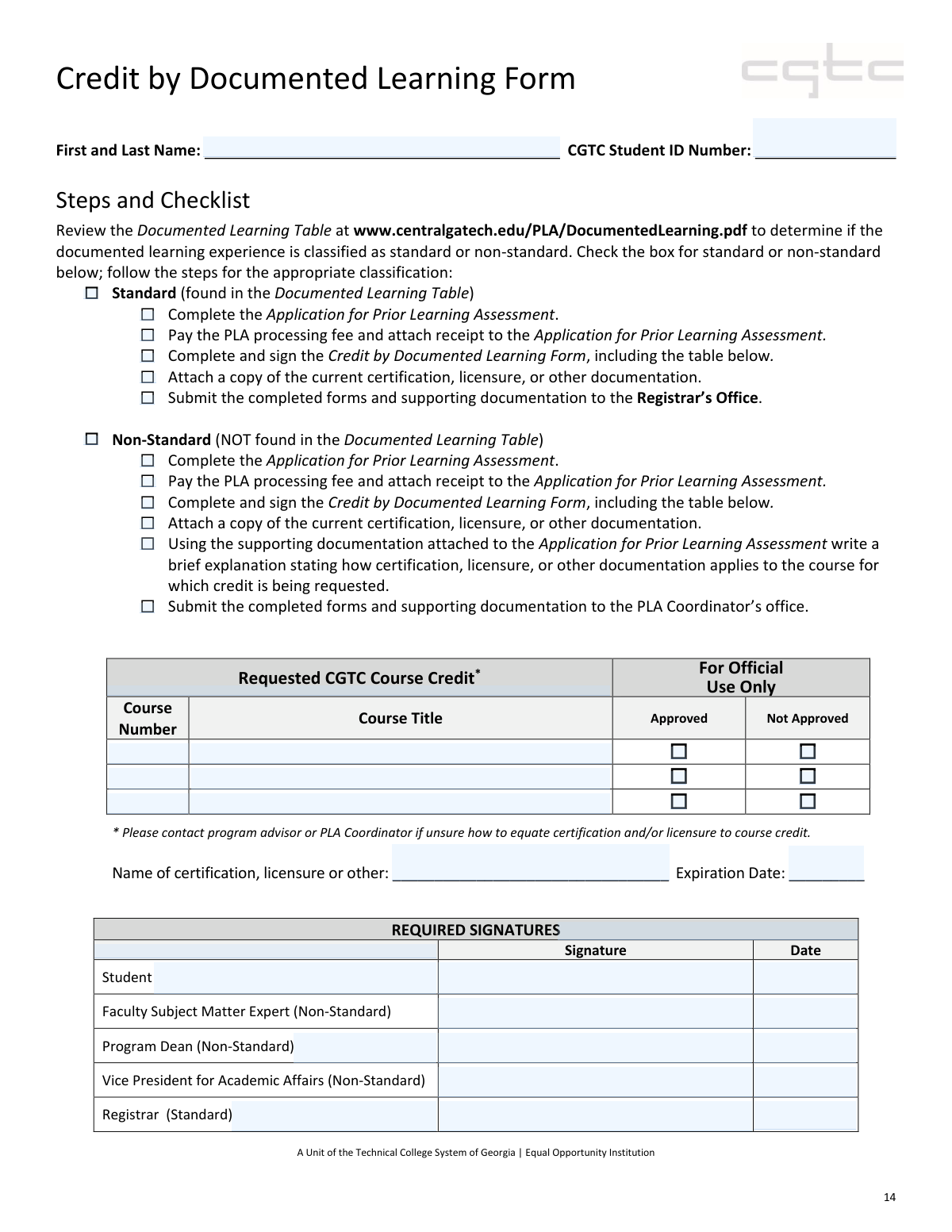
This form is an application for students at Central Georgia Technical College (CGTC) to receive course credit for prior learning documented through professional certifications, licensures, or other credentials. It allows students to formalize their existing knowledge into academic credit, potentially saving time and tuition costs by bypassing courses for which they already have demonstrated competency. Today, this form can be filled out quickly and accurately using AI-powered services like Instafill.ai, which can also convert non-fillable PDF versions into interactive fillable forms.
Our AI automatically handles information lookup, data retrieval, formatting, and form filling.
It takes less than a minute to fill out CGTC Credit by Documented Learning using our AI form filling.
Securely upload your data. Information is encrypted in transit and deleted immediately after the form is filled out.
Form specifications
| Form name: | Credit by Documented Learning Form |
| Number of pages: | 1 |
| Language: | English |
Instafill Demo: How to fill out PDF forms in seconds with AI
How to Fill Out CGTC Credit by Documented Learning Online for Free in 2026
Are you looking to fill out a CGTC CREDIT BY DOCUMENTED LEARNING form online quickly and accurately? Instafill.ai offers the #1 AI-powered PDF filling software of 2026, allowing you to complete your CGTC CREDIT BY DOCUMENTED LEARNING form in just 37 seconds or less.
Follow these steps to fill out your CGTC CREDIT BY DOCUMENTED LEARNING form online using Instafill.ai:
- 1 Navigate to Instafill.ai and upload or select the CGTC Credit by Documented Learning Form.
- 2 Provide your personal information, including your full name and CGTC Student ID Number.
- 3 Determine if your request is 'Standard' or 'Non-Standard' by consulting the Documented Learning Table, and check the appropriate box and complete the associated checklist.
- 4 In the 'Requested CGTC Course Credit' table, list the course numbers and titles for which you are seeking credit.
- 5 Enter the details of your supporting documentation, such as the name of the certification or licensure and its expiration date.
- 6 Review all the information populated by the AI for accuracy, then provide your digital signature and the date.
- 7 Download the completed form and submit it along with the Application for Prior Learning Assessment, fee receipt, and a copy of your documentation to the designated college office.
Our AI-powered system ensures each field is filled out correctly, reducing errors and saving you time.
Why Choose Instafill.ai for Your Fillable CGTC Credit by Documented Learning Form?
Speed
Complete your CGTC Credit by Documented Learning in as little as 37 seconds.
Up-to-Date
Always use the latest 2026 CGTC Credit by Documented Learning form version.
Cost-effective
No need to hire expensive lawyers.
Accuracy
Our AI performs 10 compliance checks to ensure your form is error-free.
Security
Your personal information is protected with bank-level encryption.
Frequently Asked Questions About Form CGTC Credit by Documented Learning
This form is used by Central Georgia Technical College (CGTC) students to request college credit for prior learning that has been documented through professional certifications, licensures, or other credentials.
Any current CGTC student who holds a valid professional certification or license and believes it is equivalent to the learning outcomes of a specific CGTC course should complete this form to apply for credit.
A 'Standard' request is for a certification that is already pre-approved and listed in the college's Documented Learning Table. A 'Non-Standard' request is for a credential not on that list, which requires additional review and a written explanation.
You can check the Documented Learning Table on the CGTC website at www.centralgatech.edu/PLA/DocumentedLearning.pdf. If your certification is on this list, you should follow the 'Standard' process.
You must submit the completed Application for Prior Learning Assessment, a receipt for the PLA processing fee, and a copy of your current certification or licensure. Non-standard requests also require a written explanation.
Submit 'Standard' request packets to the Registrar’s Office. 'Non-Standard' request packets should be submitted to the PLA Coordinator’s office.
The form advises you to contact your program advisor or the PLA Coordinator for assistance. They can help you identify the appropriate course to request credit for based on your certification.
Your explanation should clearly describe how the knowledge and skills gained from your certification meet the learning objectives of the specific CGTC course for which you are requesting credit.
No, this form is part of a packet. You must also complete the 'Application for Prior Learning Assessment' and pay the associated processing fee.
The student must always sign the form. For 'Standard' requests, the Registrar signs, while 'Non-Standard' requests require signatures from a Faculty Subject Matter Expert, Program Dean, and the Vice President for Academic Affairs.
Yes, services like Instafill.ai use AI to help you accurately auto-fill form fields like your name and student ID, which can save you time and help prevent errors.
Simply upload the Credit by Documented Learning Form to the Instafill.ai platform. The AI will identify the fields, allowing you to click and fill in your information quickly and easily before printing.
You can use a service like Instafill.ai, which can convert flat, non-fillable PDFs into interactive, fillable forms. This allows you to type your information directly into the document.
Compliance CGTC Credit by Documented Learning
Validation Checks by Instafill.ai
1
Student ID Number Validation
This check verifies that the 'CGTC Student ID Number' field is not empty and conforms to the expected format (e.g., a specific number of digits). It should also cross-reference the ID against the college's student database to confirm the student is active and that the provided name matches the ID on record. Failure to provide a valid, existing ID prevents the form from being processed and linked to the correct student academic record.
2
Exclusive Classification Selection
This validation ensures that the user has selected either the 'Standard' or the 'Non-Standard' checkbox, but not both. The entire workflow, including required signatures and submission office, depends on this single choice. If both or neither are selected, the form submission should be blocked with an error message prompting the user to choose exactly one classification.
3
Mandatory Classification Selection
This check confirms that at least one classification ('Standard' or 'Non-Standard') has been selected before the form can be submitted. This selection is critical as it dictates all subsequent processing steps, required documentation, and necessary approvals. An error will occur if no selection is made, as the system cannot determine the correct workflow to initiate.
4
Minimum Course Request
This validation ensures that at least one course is requested for credit by checking that the 'First Requested Course Number' and 'First Requested Course Title' fields are filled. A form submitted without any requested courses is invalid and serves no purpose. If no courses are listed, the submission should be rejected, prompting the user to specify at least one course for which they are seeking credit.
5
Course Title Dependency
This check verifies that for every 'Course Number' entered in the 'Requested CGTC Course Credit' table, a corresponding 'Course Title' is also provided. An entry with a number but no title is incomplete and can lead to processing errors or ambiguity. This rule ensures that each course request is complete and clearly identifiable, preventing processing delays.
6
Certification Name Requirement
This validation confirms that the 'Name of certification, licensure or other' field is not empty. The entire basis for the credit request is the documented learning, so the name of that documentation is essential for evaluation. If this field is left blank, the form is considered incomplete and cannot be processed, as the reviewer would have no information about the credential being submitted.
7
Certification Expiration Date Validity
This check ensures the 'Expiration Date' of the certification is a valid date and is not in the past. The form specifies that a 'current' certification is required, so an expired credential is not eligible for credit. This validation prevents the submission of outdated and invalid documentation, saving time for both the student and the reviewers.
8
Student Signature and Date Requirement
This validation ensures that the 'Student Signature' and 'Student Signature Date' fields are both completed. The student's signature legally attests to the accuracy of the information provided, and the date establishes a timeline for the request. A missing signature or date renders the document invalid and will block submission until both fields are filled.
9
Conditional Registrar Signature for Standard Path
This is a logical check performed during the approval workflow, ensuring that if the 'Standard' classification was selected, the 'Registrar Signature' and 'Date' fields are completed before the process is finalized. This enforces the official procedure where the Registrar is the designated approver for standard requests. The workflow cannot be completed for a 'Standard' application without this signature.
10
Conditional Faculty SME Signature for Non-Standard Path
This validation is part of the approval workflow and checks that if the 'Non-Standard' classification was selected, the 'Faculty Subject Matter Expert Signature' and 'Date' are present. This is a required step for non-standard requests to ensure an academic expert has reviewed the documentation. The form cannot advance to the next approval stage in the 'Non-Standard' workflow without this signature.
11
Conditional Program Dean Signature for Non-Standard Path
This check ensures that for 'Non-Standard' requests, the 'Program Dean Signature' and 'Date' fields are filled. This signature is a mandatory part of the non-standard approval chain, following the faculty expert's review. The system should prevent the form from being finalized or moving to the Vice President for Academic Affairs until the Program Dean's approval is recorded.
12
Mutually Exclusive Course Approval Status
This validation applies to the 'For Official Use Only' section and ensures that for any given course, only one of the 'Approved' or 'Not Approved' checkboxes can be selected. A course cannot be simultaneously approved and not approved. This check prevents data entry errors by approvers and maintains the logical integrity of the final decision record.
Common Mistakes in Completing CGTC Credit by Documented Learning
Students often guess whether their experience is 'Standard' or 'Non-Standard' without consulting the Documented Learning Table at the provided URL. This leads to following the wrong checklist, obtaining incorrect signatures, and submitting the entire package to the wrong office. To avoid this, always verify your certification or licensure in the official table before checking either box, as this determines the entire submission workflow.
This error is a direct consequence of misclassifying the application. Standard applications go to the Registrar’s Office, while Non-Standard ones go to the PLA Coordinator. Submitting to the wrong office causes significant processing delays and may result in the application being lost or returned after a long wait. Double-check your classification to ensure you are submitting to the correct location specified in the checklist.
Applicants frequently enter incomplete or incorrect course numbers and titles in the 'Requested CGTC Course Credit' table, such as using colloquial names like 'Intro to Psych' instead of the official 'PSYC 1101'. This ambiguity forces staff to guess the intended course, leading to delays or denial of credit. Always reference the official college catalog for the exact course number and title, and consult your advisor as the form suggests if you are unsure.
Forgetting to sign and date the form is one of the most common reasons for immediate rejection. An unsigned form is considered incomplete and cannot be processed, requiring the student to retrieve and resubmit it. Always perform a final review of the document, paying special attention to the 'Student' signature line, before submission. Using a tool like Instafill.ai can highlight required signature fields to prevent such oversights.
Students sometimes mistakenly check the 'Approved' or 'Not Approved' boxes next to the courses they are requesting, or attempt to sign in the fields reserved for faculty and administrators. These sections are strictly for internal processing by the college. Filling them in can cause confusion and may require a new, clean form to be submitted, delaying the review process.
Despite the checklist, students often forget to attach essential documents like a copy of their certification, licensure, or the PLA processing fee receipt. An application without supporting evidence cannot be evaluated and will be returned as incomplete. Use the checklist as a physical guide, gathering and attaching each document as you check the corresponding box to ensure your submission package is complete.
Applicants may submit a certification or license that has already expired, which automatically invalidates the request for credit. The form specifically asks for the expiration date to verify the credential is current. Before starting the application, confirm that your documentation is valid and will not expire during the processing period.
For Non-Standard applications, a 'brief explanation' is required, but students often provide a vague or incomplete statement that fails to connect their experience to the course learning outcomes. This is a critical component for the subject matter expert's review and a weak explanation will likely lead to denial. Your statement should clearly and concisely articulate how your specific training and skills meet the academic requirements of the course you are requesting credit for.
Entering a nickname instead of a full legal name, or making a typo in the CGTC Student ID number, can cause record-matching failures in the college's system. This can delay the application until the identity can be manually verified. To prevent this, enter your name and ID exactly as they appear on your student ID card or other official college documents. AI-powered tools like Instafill.ai can help by saving and accurately populating this information across forms.
Students may check off all the boxes on the checklist at the beginning, intending to complete the tasks later, but then forget a step like attaching a receipt. This defeats the purpose of the checklist and often results in an incomplete submission. Treat the checklist as a step-by-step guide, only checking a box after the corresponding action has been fully completed. If the form is a non-fillable PDF, a tool like Instafill.ai can convert it to a fillable version, making it easier to manage the checklist digitally.
Saved over 80 hours a year
“I was never sure if my IRS forms like W-9 were filled correctly. Now, I can complete the forms accurately without any external help.”
Kevin Martin Green
Your data stays secure with advanced protection from Instafill and our subprocessors

Robust compliance program
Transparent business model
You’re not the product. You always know where your data is and what it is processed for.
ISO 27001, HIPAA, and GDPR
Our subprocesses adhere to multiple compliance standards, including but not limited to ISO 27001, HIPAA, and GDPR.
Security & privacy by design
We consider security and privacy from the initial design phase of any new service or functionality. It’s not an afterthought, it’s built-in, including support for two-factor authentication (2FA) to further protect your account.
Fill out CGTC Credit by Documented Learning with Instafill.ai
Worried about filling PDFs wrong? Instafill securely fills credit-by-documented-learning-form forms, ensuring each field is accurate.