
Instafill.ai
7 days free
AI form filling · 29 fields · 1 page · done in seconds

Yes! You can use AI to fill out Form MC 100, Request for Exemption From Use of MiFILE and Order

Don't type 29 fields by hand. Tell our AI about yourself, or upload a document you already have, and it fills every field in seconds. You check it, then download, print or sign.
7 days free, then $19.99/month · Cancel anytime
AI fills it, no typingEncrypted, never used to train AICancel in two clicks
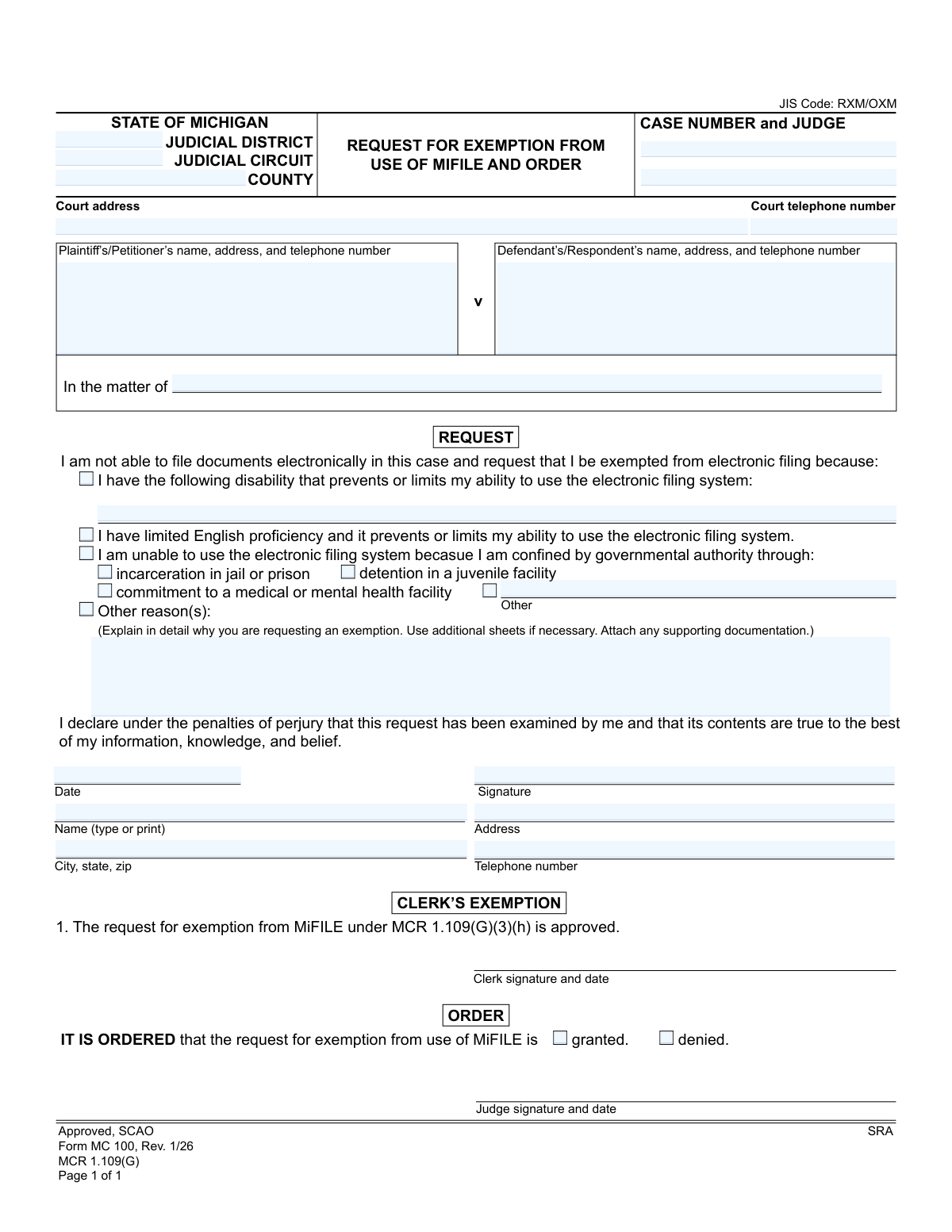
Form MC 100, Request for Exemption From Use of MiFILE and Order, page 1
Basic · 31/100Form Complexity Index

The AI does the filling. You just check it.

No typing into boxes, nothing to install.

Tell the AI about youAnswer a few questions in plain words, or upload a document you already have. That is all the typing there is.
AI fills every field in secondsIt puts each answer in the right box on every page, checkboxes included.
Check it and downloadReview every field, change anything, then download, print or sign the PDF.

What this form asks for

The AI fills all of it, from your answers or your documents.

Form MC 100 is a legal document used in the state of Michigan for individuals who are unable to file court documents electronically through the MiFILE system. It allows a party in a case to formally request an exemption due to reasons such as disability, limited English proficiency, incarceration, or other valid circumstances preventing electronic use. Today, this form can be filled out quickly and accurately using AI-powered services like Instafill.ai, which can also convert non-fillable PDF versions into interactive fillable forms.
Fillable fields29
Pages1
Form Complexity IndexBasic, 31/100

The AI checks your answers before you download

13 checks built for this form, so a wrong date or a missing answer is caught before anyone else sees it.

Case Number Presence and Format

This check ensures that the 'CASE NUMBER' field is not empty and follows the standard Michigan court case number format. The case number is critical for associating the exemption request with the correct legal case in the court's system. If the case number is missing or incorrectly formatted, the document cannot be filed, leading to processing delays or rejection.

Party Identification Requirement

Validates that the form identifies the case parties by containing entries in either the 'Plaintiff’s/Petitioner’s name' and 'Defendant’s/Respondent’s name' fields OR the 'In the matter of' field. This is essential for correctly identifying the case to which this request applies. A submission without party information is ambiguous and cannot be processed by the court clerk.

At Least One Exemption Reason Required

This validation confirms that the user has selected at least one checkbox indicating the reason for their exemption request. The entire purpose of the form is to state why an exemption is needed, so a submission without a reason is incomplete. If no reason is selected, the form should be returned to the user with an error message prompting them to select a justification.

Conditional Disability Explanation

If the checkbox for 'I have the following disability...' is selected, this check ensures the corresponding text field explaining the disability is not empty. A simple checkmark is insufficient for the court to evaluate the request; a specific explanation is required. Failure to provide this detail will result in an incomplete and likely deniable request.

Conditional 'Other' Confinement Reason

This check is triggered if the 'Other' checkbox under the 'confined by governmental authority' section is selected. It verifies that the associated text field is filled in with a specific explanation. This prevents users from selecting 'Other' without providing the necessary context for the court to understand the nature of the confinement.

Conditional 'Other Reasons' Explanation

When the checkbox next to 'Other reason(s)' is selected, this validation ensures the large text area for explaining the reasons is not blank. This rule enforces that a user who chooses this catch-all category provides a detailed justification as instructed. A submission with this box checked but no explanation is considered incomplete.

And 7 more checks
  • Requester's Name Is Mandatory
  • Requester's Contact Information Completeness
  • Valid Telephone Number Format
  • Valid and Non-Future Date
  • Signature Presence
  • Mutually Exclusive Order Status
  • Court Jurisdiction Identification

Let AI fill out your MC 100

No typing. Every field filled in seconds, checked, ready to sign.

7 days free, then $19.99/month · Cancel anytime

How to Fill Out MC 100 Online for Free in 2026

What the AI walks you through.

  1. Navigate to Instafill.ai and upload or select the Michigan Form MC 100.
  2. Enter the court and case information, including the judicial district/circuit, case number, judge, and party details.
  3. Check the box that corresponds to your reason for requesting an exemption, such as disability, limited English proficiency, or confinement.
  4. Provide a detailed written explanation in the 'Other reason(s)' section to support your request for exemption.
  5. Declare the information is true by providing your signature, printed name, and the date.
  6. Review all the information you have entered to ensure it is complete and accurate.
  7. Download the completed Form MC 100 to print and submit to the court as required.

Common Mistakes in Completing MC 100

The ones the AI is built to catch.

Incomplete or Incorrect Case Number
Filers often enter the case number with typos, or omit parts like the year or judge's initials. The case number is the primary identifier for a court file, and any error can lead to the request being rejected or misfiled, causing significant delays. To avoid this, meticulously copy the full case number from a previous official court document. AI-powered tools like Instafill.ai can help by validating number formats and saving correct case information for future use.
Vague or Insufficient Explanation for Exemption
When using the 'Other reason(s)' field, many people provide vague justifications like 'I can't use a computer' or 'It is too difficult.' These statements lack the detail a judge needs to grant an exemption, almost guaranteeing denial. To be successful, provide a specific, detailed explanation of the hardship (e.g., financial inability to own a computer, lack of reliable internet access in a rural area, travel limitations to a public library) and attach supporting documents if possible.
Filling Out the Judge's 'Order' Section
A very common error is for the filer to check the 'granted' or 'denied' box in the 'ORDER' section. This section is exclusively for the judge's use. When a filer completes it, it gives the impression they are attempting to issue their own order, which leads to automatic rejection of the form. Always leave the 'ORDER' and 'CLERK'S EXEMPTION' sections completely blank.
Forgetting to Sign or Date the Declaration
The declaration section includes a statement made 'under the penalties of perjury,' making the signature and date legally essential. Forgetting either one renders the document invalid and it will be rejected by the court clerk. This is a simple but frequent oversight. Make it a habit to perform a final check for signature and date before submitting any legal form.
Confusing Judicial District, Circuit, and County Courts
Michigan's court system has distinct levels, and filers often confuse them, putting the county name in the circuit field or leaving one blank. This can cause the form to be routed to the wrong courthouse or rejected by the clerk's office. To prevent this, confirm the exact court name (e.g., '3rd Judicial Circuit' vs. 'Wayne County Probate Court') from other case documents or the court's official website.
Failing to Check a Corresponding Reason Box
A filer may write a detailed explanation for their exemption request but forget to check the box next to the reason (e.g., writing about a disability but not checking the 'I have the following disability' box). A clerk performing a quick review may see no boxes checked and deem the form incomplete, leading to rejection without the explanation being fully read. Always ensure you check the box that corresponds to your written explanation.
Illegible Printed Name or Contact Information
While a signature can be stylized, the form requires a separate printed name and contact information that must be legible. If court staff cannot read the name, address, or phone number, they cannot process the request or contact the filer with updates or questions. This can lead to missed deadlines or communications. Using clear block letters or a form-filling tool ensures all information is perfectly readable.
Omitting the Opposing Party's Information
Self-represented litigants sometimes only fill in their own information and leave the 'Defendant's/Respondent's' section blank. The court requires complete information for all parties to the case for proper notification and record-keeping. Omitting this information will result in the form being returned for correction. Always include the full name and address of the opposing party as it appears on other court documents.
Misusing the 'In the matter of' Field
This field is for specific case types, often in probate or juvenile court, that do not have a traditional 'Plaintiff vs. Defendant' structure. Filers in standard civil or domestic cases sometimes fill this out unnecessarily, or filers in 'In the matter of' cases leave it blank. This can cause the case caption to be recorded incorrectly. Only use this field if your official case name starts with 'In the matter of...'; otherwise, use the Plaintiff and Defendant fields.
Submitting a Flat, Unfillable PDF Scan
Often, individuals find a non-fillable PDF version of the form online, print it, fill it out by hand, and then scan it. This can result in poor legibility and processing issues. If the form is only available as a flat PDF, tools like Instafill.ai can convert it into a fillable version, allowing you to type your answers directly for a clean, professional, and error-free submission.

Frequently Asked Questions About MC 100


Is it really free for 7 days?
Yes. You pay $0 today. Cancel before Nov 11 and you are never charged. Keep it, and it is $19.99 a month for 5 fills of your MC 100.
Can I fill other forms too?
This plan is for your MC 100: your own AI agent fills it as often as 5 times a month. To fill other forms and upload your own, choose a Professional plan from your account.
How do I cancel?
From your account, in two clicks, any time. No email, no call.
How does the AI fill out MC 100?
You answer a few questions in plain words, or upload a document you already have. The AI reads what you give it and puts each answer into the right field of MC 100, on every page, in seconds. It checks the answers against the form's own rules, and you review and change anything before you download, print or sign.
What happens to my information?
It is encrypted in transit and at rest, and it is never used to train AI.
How complex is MC 100 to fill out?
MC 100 has a Form Complexity Index of 31 out of 100, in the basic tier: 29 fillable fields across 1 page. Instafill.ai's AI fills it in under a minute, with every field there for you to review before you download.
What is the purpose of the Request for Exemption From Use of MiFILE form?
This form, MC 100, is used to ask the court for permission to file paper documents instead of being required to use Michigan's electronic filing system, MiFILE.
Who should fill out this form?
Anyone involved in a Michigan court case who cannot use the MiFILE e-filing system due to a disability, limited English proficiency, incarceration, or another significant reason should complete this form.
What is MiFILE?
MiFILE is the mandatory electronic filing system used by Michigan courts. It allows parties to submit and receive court documents online instead of on paper.
What are considered valid reasons for requesting an exemption?
Valid reasons include a disability that prevents system use, limited English proficiency, being confined in a jail or medical facility, or other compelling reasons like lack of internet access or necessary technology.
How do I fill out the 'Other reason(s)' section?
In this section, you should clearly and specifically explain why you are unable to use the MiFILE system. For example, you could state that you do not own a computer, have no reliable internet access, or lack the technical skills required.
Do I need to provide proof for my reason?
While not always mandatory, attaching supporting documentation for your reason, especially if you check 'Other reason(s)', can strengthen your request and help the judge understand your situation.
Where do I submit this form?
You should file the completed form with the clerk of the court where your case is located. You will likely need to submit the physical paper form in person or by mail.
What happens after I submit the form?
A judge or court clerk will review your request and either grant or deny it by completing the 'ORDER' section. If granted, you will be allowed to file and receive paper documents for your case.
What should I do if my request for an exemption is denied?
If your request is denied, you must use the MiFILE system for all your court filings. You may need to seek help from a library, legal aid, or other community resource to comply with the e-filing requirement.
Do I need a lawyer to file this form?
No, you do not need a lawyer to complete and file this request. The form is designed for individuals to request an exemption on their own behalf.
Can AI tools help me fill out this form?
Yes, services like Instafill.ai use AI to auto-fill form fields accurately and save time. This is helpful for ensuring your case number, name, and address are entered correctly.
How can I use Instafill.ai to fill this form online?
You can upload the MC 100 form to the Instafill.ai platform. The service will identify all the fields, allowing you to type in your information, check the relevant boxes, and then download the completed PDF for printing and submission.
The PDF of this form I have isn't fillable. What can I do?
If you have a non-fillable PDF, you can use a service like Instafill.ai to convert it into an interactive, fillable form. Simply upload the file, and the platform will make it possible to type your answers directly into the fields.
Encrypted in transit and at restNever used to train AIDelete your forms any time

Get your MC 100 filled out by AI

$0 today. Cancel before Nov 11 and you pay nothing.

7 days free, then $19.99/month · Cancel anytime