
Instafill.ai
7 days free
AI form filling · 43 fields · 1 page · done in seconds

Yes! You can use AI to fill out Form MC 201, Witness/Juror Certificate

Don't type 43 fields by hand. Tell our AI about yourself, or upload a document you already have, and it fills every field in seconds. You check it, then download, print or sign.
7 days free, then $19.99/month · Cancel anytime
AI fills it, no typingEncrypted, never used to train AICancel in two clicks
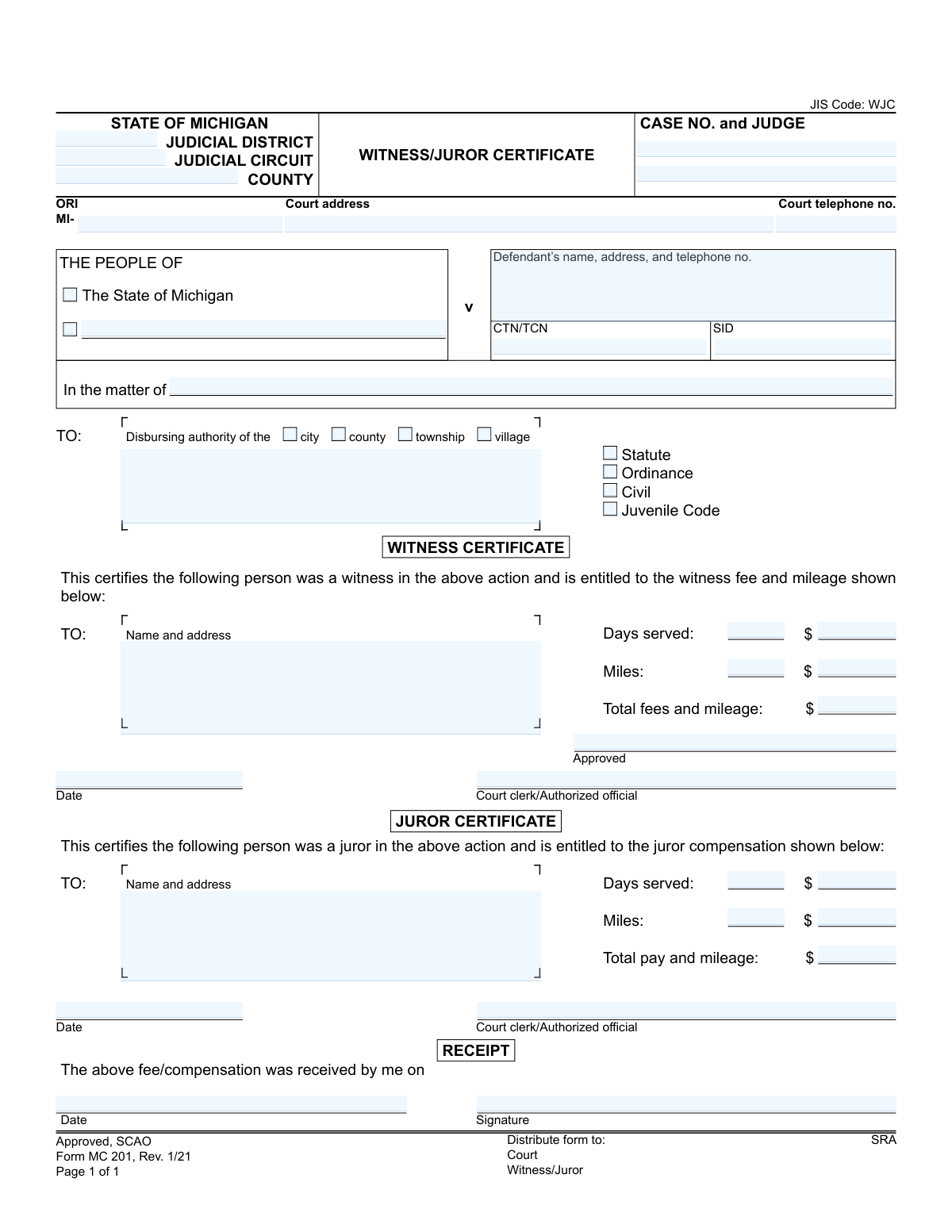
Form MC 201, Witness/Juror Certificate, page 1
Basic · 40/100Form Complexity Index

The AI does the filling. You just check it.

No typing into boxes, nothing to install.

Tell the AI about youAnswer a few questions in plain words, or upload a document you already have. That is all the typing there is.
AI fills every field in secondsIt puts each answer in the right box on every page, checkboxes included.
Check it and downloadReview every field, change anything, then download, print or sign the PDF.

What this form asks for

The AI fills all of it, from your answers or your documents.

Form MC 201, Witness/Juror Certificate, is a State of Michigan court form used to certify that an individual has served as a witness or juror in a legal proceeding. It documents the days served and miles traveled, authorizing payment of fees and mileage reimbursement from the appropriate city, county, or township. Today, this form can be filled out quickly and accurately using AI-powered services like Instafill.ai, which can also convert non-fillable PDF versions into interactive fillable forms.
Fillable fields43
Pages1
Form Complexity IndexBasic, 40/100

The AI checks your answers before you download

14 checks built for this form, so a wrong date or a missing answer is caught before anyone else sees it.

Mutually Exclusive Certificate Type

This check ensures that either the 'Witness Certificate' section or the 'Juror Certificate' section is completed, but not both on the same form. A person serves in one capacity for a given action, so filling both indicates a data entry error. If this validation fails, the form should be rejected for clarification on whether the individual was a witness or a juror.

Witness Fee Calculation Consistency

This validation verifies that the 'Total Witness fees and Mileage' field is the exact sum of 'Witness Amount for Days Served' and 'Witness Amount for Miles'. This is crucial for preventing mathematical errors and ensuring the witness is paid the correct amount. A mismatch would require manual review and correction, delaying payment.

Juror Pay Calculation Consistency

This validation verifies that the 'Total Juror pay and Mileage' field is the exact sum of 'Juror Amount for Days Served' and 'Juror Amount for Miles'. This check ensures financial accuracy and compliance with payment rules for jurors. If the total does not match the sum of its parts, the payment cannot be processed and must be flagged for correction.

Case Type Logic Validation

This check ensures consistency between the case style and the case type. If the case is 'The People of...', the form should have 'Statute' or 'Ordinance' selected. If it is 'In the matter of...', it should have 'Civil' or 'Juvenile Code' selected. This validation maintains the logical integrity of the court record and prevents misclassification of the legal action.

Single Disbursing Authority Selection

This validation ensures that exactly one checkbox is selected from the 'city', 'county', 'township', or 'village' options. Selecting the correct disbursing authority is critical for routing the payment request to the correct government entity. Failure to select one, or selecting multiple, will result in payment rejection or significant delays.

Case Number Format Validation

This check validates that the 'CASE NO.' field follows the standard Michigan court case number format (e.g., YY-######-AA). An accurate and properly formatted case number is essential for linking the payment certificate to the correct case file in the court's management system. An invalid format would cause the record to be rejected or misfiled.

And 8 more checks
  • Date Chronology Check
  • ORI Number Structure
  • Completeness of Witness Certificate Section
  • Completeness of Juror Certificate Section
  • Days Served Validity
  • Mileage Value Non-Negativity
  • Court Telephone Number Format
  • Certificate Date Presence

Let AI fill out your MC 201

No typing. Every field filled in seconds, checked, ready to sign.

7 days free, then $19.99/month · Cancel anytime

How to Fill Out MC 201 Online for Free in 2026

What the AI walks you through.

  1. Navigate to Instafill.ai and upload or select the Michigan Witness/Juror Certificate (Form MC 201).
  2. Provide the court and case information, including the judicial district/circuit, county, case number, and judge's name.
  3. Enter the defendant's name or the matter's title as appropriate for the case type (Civil, Juvenile, etc.).
  4. Select whether you are completing the 'Witness Certificate' or 'Juror Certificate' section.
  5. Input the name and address of the witness or juror, the number of days served, and the miles traveled for court appearances.
  6. The AI tool will assist in calculating the total fees and mileage based on the provided details.
  7. Review the completed form for accuracy before it is presented to the court clerk or authorized official for approval, signature, and dating.

Common Mistakes in Completing MC 201

The ones the AI is built to catch.

Filling Out the Wrong Certificate Section
This form contains two nearly identical sections: one for witnesses and one for jurors. People often fill out the wrong section in a hurry, rendering the form invalid. This requires the filer to obtain and resubmit a new form, significantly delaying payment. Always double-check that you are completing the section that corresponds to your role as either a 'Witness' or a 'Juror'.
Calculation Errors in Fees and Mileage
The form requires the user to manually calculate the total payment based on days served and miles traveled. Simple arithmetic mistakes or using incorrect per diem/mileage rates are common, leading to payment discrepancies. The disbursing authority will have to correct the form, which can delay payment or result in an incorrect amount being paid. Use a calculator and confirm the current official rates with the court clerk before filling in the amounts.
Forgetting the Court Clerk's Approval Signature
A witness or juror might fill out their portion of the form and leave the courthouse without getting the required signature from the court clerk or authorized official. A certificate without this approval is invalid and will be rejected by the paying authority. To avoid this critical error, always present the completed form to the court clerk for their signature and the official date stamp before you leave the court.
Illegible Handwriting
Since this form is often printed and filled out by hand, illegible handwriting can make names, addresses, and case numbers impossible to read. This forces court staff to guess the information, leading to data entry errors, or reject the form entirely. To prevent this, print clearly in block letters. If the form is a non-fillable PDF, a service like Instafill.ai can convert it into a fillable version, allowing you to type your information for perfect clarity.
Incomplete or Incorrect Case Number
The 'CASE NO. and JUDGE' field is crucial for linking the payment to the correct court file. People frequently omit parts of the case number or forget to include the judge's name. An incomplete identifier makes it difficult for clerks to process the certificate, causing significant delays. Carefully copy the complete case number and judge's name exactly as they appear on your summons or other official court documents.
Missing Disbursing Authority Selection
It is easy to overlook the small checkboxes indicating whether the 'city', 'county', 'township', or 'village' is responsible for payment. If this selection is missed, the form cannot be routed to the correct financial office, bringing the payment process to a halt. To avoid this, review the form carefully before submission, ensuring one of these mandatory boxes is checked. AI-powered form fillers like Instafill.ai can help by flagging required fields that have been left blank.
Using an Incorrect or Outdated Mailing Address
The payment check will be mailed to the address provided in the 'TO: Name and address' field. A simple typo, an old address, or a missing apartment number will cause the check to be lost or returned as undeliverable. This initiates a lengthy and frustrating process to cancel and reissue the payment. Always verify that you have entered your complete, current mailing address to ensure you receive your payment promptly.
Incorrect Mileage Calculation
Individuals often guess the mileage to the courthouse or use a non-standard route, resulting in an inaccurate claim. Courts have specific policies for mileage reimbursement, and an incorrect figure can lead to the claim being adjusted or flagged for review, delaying payment. Use a reliable online mapping service to calculate the exact round-trip distance and confirm with the clerk if there are any specific rules for the calculation.
Confusing Judicial District with Judicial Circuit
The form asks for both 'JUDICIAL DISTRICT' and 'JUDICIAL CIRCUIT', and many people are unsure of the difference, leading them to fill in the wrong one or leave one blank. This can cause confusion and minor delays in administrative processing. This information is always listed on your summons or other official notices from the court, so refer to those documents to ensure accuracy.

Frequently Asked Questions About MC 201


Is it really free for 7 days?
Yes. You pay $0 today. Cancel before Nov 11 and you are never charged. Keep it, and it is $19.99 a month for 5 fills of your MC 201.
Can I fill other forms too?
This plan is for your MC 201: your own AI agent fills it as often as 5 times a month. To fill other forms and upload your own, choose a Professional plan from your account.
How do I cancel?
From your account, in two clicks, any time. No email, no call.
How does the AI fill out MC 201?
You answer a few questions in plain words, or upload a document you already have. The AI reads what you give it and puts each answer into the right field of MC 201, on every page, in seconds. It checks the answers against the form's own rules, and you review and change anything before you download, print or sign.
What happens to my information?
It is encrypted in transit and at rest, and it is never used to train AI.
How complex is MC 201 to fill out?
MC 201 has a Form Complexity Index of 40 out of 100, in the basic tier: 43 fillable fields across 1 page. Instafill.ai's AI fills it in under a minute, with every field there for you to review before you download.
What is the purpose of the Witness/Juror Certificate (Form MC 201)?
This form serves as official proof from the court that you served as a witness or juror. It authorizes the payment of fees and mileage reimbursement you are entitled to for your service.
Do I need to fill out this form myself?
No, a court clerk or other authorized court official will complete the main certificate portion with all the necessary case details and payment amounts. You only need to sign the 'Receipt' section when you receive your payment.
What's the difference between the 'Witness Certificate' and 'Juror Certificate' sections?
The court will only fill out the section that applies to your service. The 'Witness Certificate' is for individuals who testified, while the 'Juror Certificate' is for those who served on a jury.
How do I get paid after receiving this certificate?
You must present this form to the 'Disbursing authority' indicated at the top of the form, which is typically the treasurer's office for the specified city, county, township, or village. They will then issue your payment.
How is the payment amount calculated?
The court calculates the total amount based on a statutory rate for each day you served, plus a set rate per mile for your travel to and from the courthouse. These amounts will be detailed on the form.
When should I sign the 'Receipt' section at the bottom?
You should only sign and date the 'Receipt' section at the moment you physically receive your payment. Your signature confirms that you have been paid the amount certified by the court.
What should I do if my name or address is wrong on the form?
If you notice any incorrect information, contact the court clerk's office that issued the certificate immediately. They will need to correct the form to ensure you can receive your payment without issues.
I lost my Witness/Juror Certificate. How can I get a new one?
You will need to contact the clerk of the court where you served. They can verify your service records and issue a replacement certificate for you.
Who is the 'Disbursing authority' mentioned on the form?
The 'Disbursing authority' is the specific government office responsible for issuing your payment. The form will indicate whether this is the city, county, township, or village.
Can I use an AI tool to help me with this form?
Yes, while the court fills out the certificate, you can use a service like Instafill.ai to manage your copy. It can help you create a digital backup, extract information for your records, or share it with an employer if needed.
How would I use Instafill.ai for this form if the court already filled it out?
You can upload the completed PDF to Instafill.ai to create a secure digital copy for your records. This is useful for tracking payments or providing proof of service to your employer without handling the original paper document.
The PDF version of the certificate I received is not fillable. Can this be fixed?
Yes, services like Instafill.ai can convert flat, non-fillable PDFs into interactive, fillable forms. This is helpful if you want to add notes or manage a digital version for your personal records.
What information does the court need to complete this certificate?
The court will use its records to fill in the case number, judge, your name and address, the number of days you served, and the miles you traveled. You do not typically need to provide this information yourself.
Encrypted in transit and at restNever used to train AIDelete your forms any time

Get your MC 201 filled out by AI

$0 today. Cancel before Nov 11 and you pay nothing.

7 days free, then $19.99/month · Cancel anytime