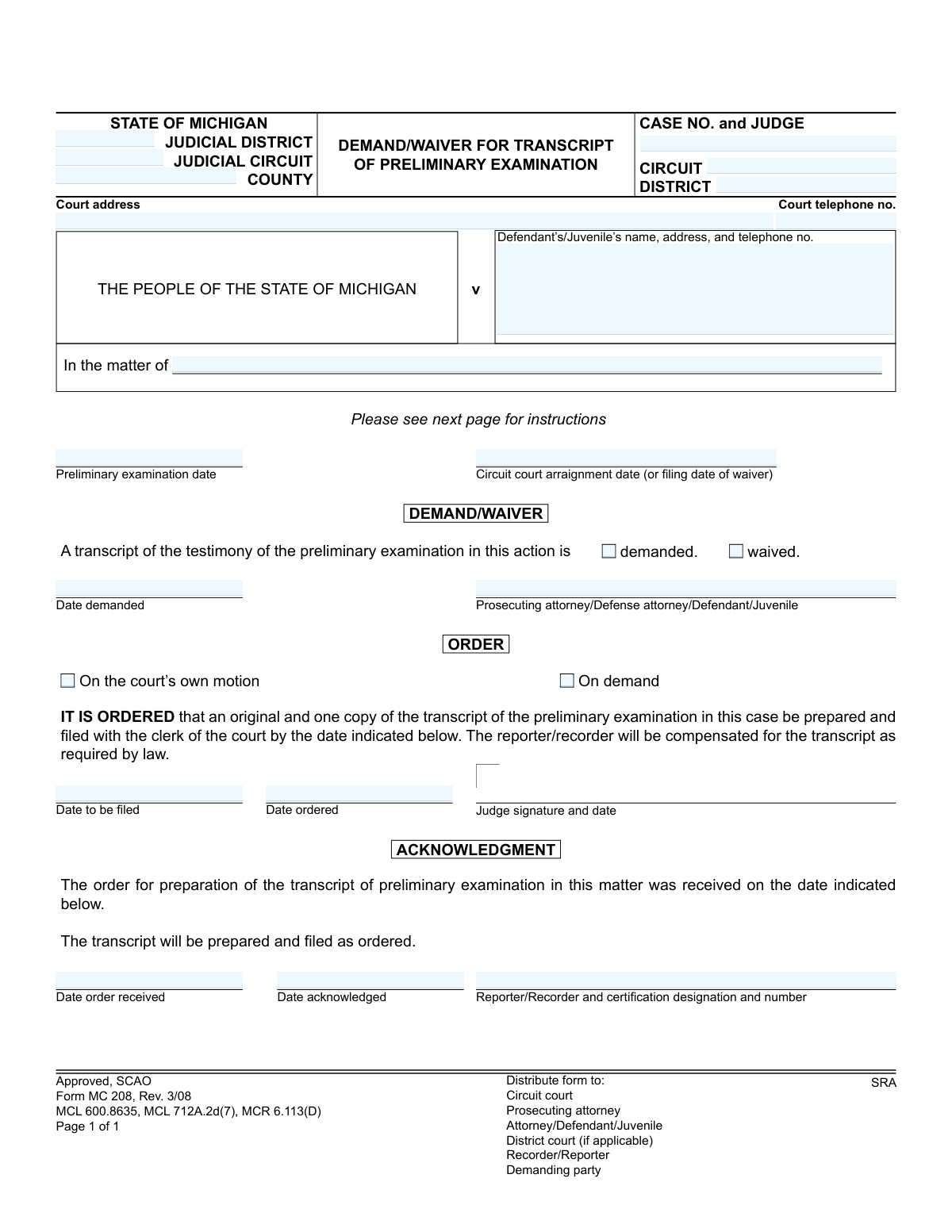
Yes! You can use AI to fill out Form MC 208, Demand/Waiver for Transcript of Preliminary Examination
Form MC 208, Demand/Waiver for Transcript of Preliminary Examination, is a legal document used in the Michigan court system. It allows a party in a case, such as the prosecution or defense, to formally request a written record of the preliminary hearing or to officially decline it. This decision is crucial for trial preparation, appeals, or other subsequent legal proceedings. Today, this form can be filled out quickly and accurately using AI-powered services like Instafill.ai, which can also convert non-fillable PDF versions into interactive fillable forms.
MC 208 is part of the
Michigan court forms category on Instafill.
Our AI automatically handles information lookup, data retrieval, formatting, and form filling.
It takes less than a minute to fill out MC 208 using our AI form filling.
Securely upload your data. Information is encrypted in transit and deleted immediately after the form is filled out.
Form specifications
| Form name: | Form MC 208, Demand/Waiver for Transcript of Preliminary Examination |
| Number of fields: | 24 |
| Number of pages: | 1 |
| Language: | English |
More forms in Michigan court forms
Instafill Demo: How to fill out PDF forms in seconds with AI
How to Fill Out MC 208 Online for Free in 2026
Are you looking to fill out a MC 208 form online quickly and accurately? Instafill.ai offers the #1 AI-powered PDF filling software of 2026, allowing you to complete your MC 208 form in just 37 seconds or less.
Follow these steps to fill out your MC 208 form online using Instafill.ai:
- 1 Navigate to Instafill.ai and upload or select the MC 208 form.
- 2 Allow the AI to scan the document and identify all the interactive fields for case information, party details, and selections.
- 3 Enter the court and case information, including the judicial district, circuit, county, case number, and judge's name.
- 4 Provide the defendant's or juvenile's name, address, and telephone number as required.
- 5 Indicate the key dates for the preliminary examination and circuit court arraignment.
- 6 Check the appropriate box to either 'demand' or 'waive' the transcript, then date and sign the form as the demanding party.
- 7 Review all entered information for accuracy before downloading the completed Form MC 208 for filing with the appropriate court.
Our AI-powered system ensures each field is filled out correctly, reducing errors and saving you time.
Why Choose Instafill.ai for Your Fillable MC 208 Form?
Speed
Complete your MC 208 in as little as 37 seconds.
Up-to-Date
Always use the latest 2026 MC 208 form version.
Cost-effective
No need to hire expensive lawyers.
Accuracy
Our AI performs 10 compliance checks to ensure your form is error-free.
Security
Your personal information is protected with bank-level encryption.
Frequently Asked Questions About Form MC 208
This form, MC 208, is used in Michigan courts to either formally request (demand) or decline (waive) a written transcript of the testimony from a preliminary examination hearing.
The process is started by the prosecuting attorney, defense attorney, or the defendant/juvenile, who completes the 'DEMAND/WAIVER' section. The circuit court and the court reporter/recorder then complete the 'ORDER' and 'ACKNOWLEDGMENT' sections, respectively.
Demanding a transcript means you are officially requesting a written copy of the court hearing's testimony. Waiving it means you are declining to receive a copy, which is allowed if the defendant pleads guilty or all parties agree it isn't necessary.
No, a transcript is not always required. It can be waived if the defendant or juvenile pleads guilty at the arraignment or if all parties in the case agree to proceed without it.
You will need the case number, court details, the date of the preliminary examination, and the circuit court arraignment date. You must then check the appropriate box, date the form, and sign it.
After completing the 'DEMAND/WAIVER' section, you must forward the original form and four copies to the circuit court. It is recommended to keep a copy for your own records.
The circuit court judge will issue an order with a specific date by which the transcript must be filed. The court reporter is required to prepare and file the transcript by that deadline.
Once all sections are filled out, copies are distributed to the circuit court file, the prosecuting attorney, the defense attorney or defendant/juvenile, and the district court file if applicable.
If you have a non-fillable or 'flat' PDF, you can use a service like Instafill.ai. It can convert the document into an interactive, fillable form that you can complete on your computer.
Yes, services like Instafill.ai use AI to accurately auto-fill form fields from your saved information. This can save time and help prevent common errors.
You can upload the PDF to a platform like Instafill.ai, which allows you to fill in all the required fields online. You can then download the completed document to print for submission.
A preliminary examination is a hearing to see if there's enough evidence for a trial. The transcript is the official, word-for-word written record of all testimony and statements made during that hearing.
The form indicates the reporter/recorder will be compensated as required by law. This cost is typically covered by the court or county as part of the case expenses.
Compliance MC 208
Validation Checks by Instafill.ai
1
Exclusive Demand or Waiver Selection
This check ensures that either the 'demanded' box or the 'waived' box is selected, but not both. It is logically impossible to both demand and waive the transcript simultaneously. If this validation fails, the form is ambiguous and cannot be processed, requiring the user to make a clear choice.
2
Mandatory Case Number
This validation confirms that at least one case number, either 'Circuit Case number' or 'District Case number,' is provided. A case number is the primary identifier for the legal proceeding and is essential for filing and tracking the document correctly. Without a case number, the form cannot be associated with the correct legal file.
3
Case Number Format Validation
This check verifies that the entered case number(s) adhere to the standard format used by the Michigan judicial system (e.g., YY-######-XX). Proper formatting is crucial for automated processing, database lookups, and preventing data entry errors. An incorrectly formatted number could lead to filing errors or an inability to locate the case.
4
Party Identification Completeness
This validation ensures that the form clearly identifies the parties involved. Either the 'Defendant’s/Juvenile’s name, address, and telephone no.' section must be filled out for a criminal case, or the 'In the matter of' field must be completed for other proceedings. This is critical for legal context and ensuring all relevant parties are correctly identified.
5
Uniform Date Format
This check verifies that all date fields on the form ('Preliminary examination date', 'Date demanded', 'Date ordered', etc.) are entered in a valid and consistent format, such as MM/DD/YYYY. This prevents data ambiguity and ensures that dates are interpreted correctly by the system and court personnel. An invalid date format would cause processing to halt until corrected.
6
Chronological Date Sequence
This validation checks the logical order of all dates entered on the form. It ensures the 'Date ordered' is on or after the 'Preliminary examination date', the 'Date order received' is on or after the 'Date ordered', and the 'Date to be filed' is after the 'Date ordered'. This maintains the integrity of the process timeline and flags entries that are chronologically impossible.
7
Conditional Requirement for 'Date Demanded'
This rule validates that the 'Date demanded' field is completed if the 'demanded' checkbox is selected. Conversely, it ensures the 'Date demanded' field is empty if 'waived' is selected. This enforces logical consistency, as a date of demand is irrelevant for a waiver and mandatory for a demand.
8
Order Trigger Consistency Check
This validation ensures consistency between the DEMAND and ORDER sections. If the transcript is 'demanded' by a party, the ORDER section should indicate the order is being made 'On demand'. This cross-field check confirms that the court's order correctly reflects the reason for its issuance as stated elsewhere on the form.
9
Valid Filing Deadline
This check ensures that the 'Date to be filed' is a future date that occurs on or after the 'Date ordered'. It is logically impossible for a transcript to be filed before the court has ordered its preparation. This validation prevents clerical errors and sets a realistic and legally sound deadline for the court reporter.
10
Jurisdiction Information Completeness
This validation confirms that the 'county', 'judicial district', and 'judicial circuit' fields are all filled in. This information is fundamental for identifying the correct jurisdiction and court where the case is being heard. Missing jurisdictional data would make it impossible to route or file the document correctly.
11
Mandatory Reporter/Recorder Identification
This check verifies that the 'Reporter/Recorder and certification designation and number' field is completed when the Acknowledgment section is filled out. This information is crucial for accountability, identifying who is responsible for preparing the transcript, and verifying their certification. An empty field would leave the responsible party unidentified.
12
Court Telephone Number Format
This check validates that the 'Court telephone no.' is entered in a standard format, such as (XXX) XXX-XXXX. Enforcing a consistent format aids in data cleanliness, enables features like click-to-call, and prevents errors from typos or incomplete numbers. An invalid number could prevent necessary communication with the court.
13
Preliminary Examination Date in Past
This validation ensures the 'Preliminary examination date' is not a future date. A preliminary examination is a past event for which a transcript is being requested. Entering a future date is a logical error and would invalidate the request, so the system should flag it for correction.
14
Requester Identification
This check ensures that the 'Prosecuting attorney/Defense attorney/Defendant/Juvenile' field is completed. This field identifies the party making the demand or waiver, which is a critical piece of information for legal standing and context. The form is invalid without a clear indication of who is submitting it.
Common Mistakes in Completing MC 208
The form has separate fields for District and Circuit case numbers, which often causes confusion. Filers may enter the same number in both fields, reverse them, or omit one, typically because the case transitions between these courts. An incorrect case number can lead to the form being rejected or misfiled, causing significant delays in obtaining the transcript. To prevent this, carefully verify both case numbers from official court documents and enter each into its designated field.
A critical error is failing to make a clear choice between demanding or waiving the transcript. Filers sometimes check both boxes, or neither, rendering the form's intent unclear. This ambiguity invalidates the submission and halts the legal process until a corrected form is filed. You must select only one option—either "demanded" or "waived"—to clearly state your legal position.
The field for the defendant's or juvenile's name, address, and telephone number is frequently left incomplete. Omitting a current phone number or address prevents the court and other parties from sending important notifications, such as notice that the transcript is complete. This can lead to missed deadlines and procedural complications. Always provide full, current contact information to ensure proper communication.
Filers often neglect to enter the 'Preliminary examination date' and 'Circuit court arraignment date.' These dates are not optional; they provide essential context for the court to verify the request's timeliness and relevance. Submitting the form with missing or inaccurate dates can lead to its rejection and require you to refile, delaying the entire process. Always reference case documents to ensure these dates are entered correctly.
The instructions clearly state that the filer must send the original and four copies to the circuit court for processing and further distribution. A common mistake is to send the form directly to the court reporter or only to the prosecuting attorney, which bypasses the official workflow. This failure to follow procedure means the transcript order is never officially placed, bringing the process to a standstill. Carefully follow the multi-step distribution plan outlined on the form.
The signature line requires the filer to specify their role (e.g., 'Defense attorney,' 'Defendant'). People often sign without circling or otherwise indicating their capacity, creating ambiguity about who is making the request and if they have the authority to do so. This can lead to the form being questioned or returned for clarification. Ensure you clearly identify your role when signing to validate the submission.
In an attempt to be thorough, filers sometimes write in the 'ORDER' or 'ACKNOWLEDGMENT' sections. These areas are strictly for use by the judge and the court reporter, respectively. Making entries in these sections can confuse court staff and may necessitate filing a new, clean form. Only fill out the top identification portion and the 'DEMAND/WAIVER' section.
The form provides a line for 'v [Defendant’s name]' for standard criminal cases and 'In the matter of' for juvenile cases. Filers in adult criminal cases sometimes incorrectly use the 'In the matter of' line, causing confusion about the case type. This field should only be completed for juvenile proceedings, as referenced by the legal citations on the form. Using the correct field ensures the case is properly categorized by the clerk.
When a form is filled out by hand, illegible handwriting can make critical data like case numbers and names unreadable. Even with digital completion, typos can lead to incorrect data entry by court clerks, resulting in misfiling and delays. This form is often a non-fillable PDF, making it prone to such errors. AI-powered tools like Instafill.ai can convert the document into a fillable version and use validated data to prevent typos and ensure perfect legibility.
Saved over 80 hours a year
“I was never sure if my IRS forms like W-9 were filled correctly. Now, I can complete the forms accurately without any external help.”
Kevin Martin Green
Your data stays secure with advanced protection from Instafill and our subprocessors
Robust compliance program
Transparent business model
You’re not the product. You always know where your data is and what it is processed for.
ISO 27001, HIPAA, and GDPR
Our subprocesses adhere to multiple compliance standards, including but not limited to ISO 27001, HIPAA, and GDPR.
Security & privacy by design
We consider security and privacy from the initial design phase of any new service or functionality. It’s not an afterthought, it’s built-in, including support for two-factor authentication (2FA) to further protect your account.
Fill out MC 208 with Instafill.ai
Worried about filling PDFs wrong? Instafill securely fills form-mc-208-demandwaiver-for-transcript-of-preliminary-examination forms, ensuring each field is accurate.