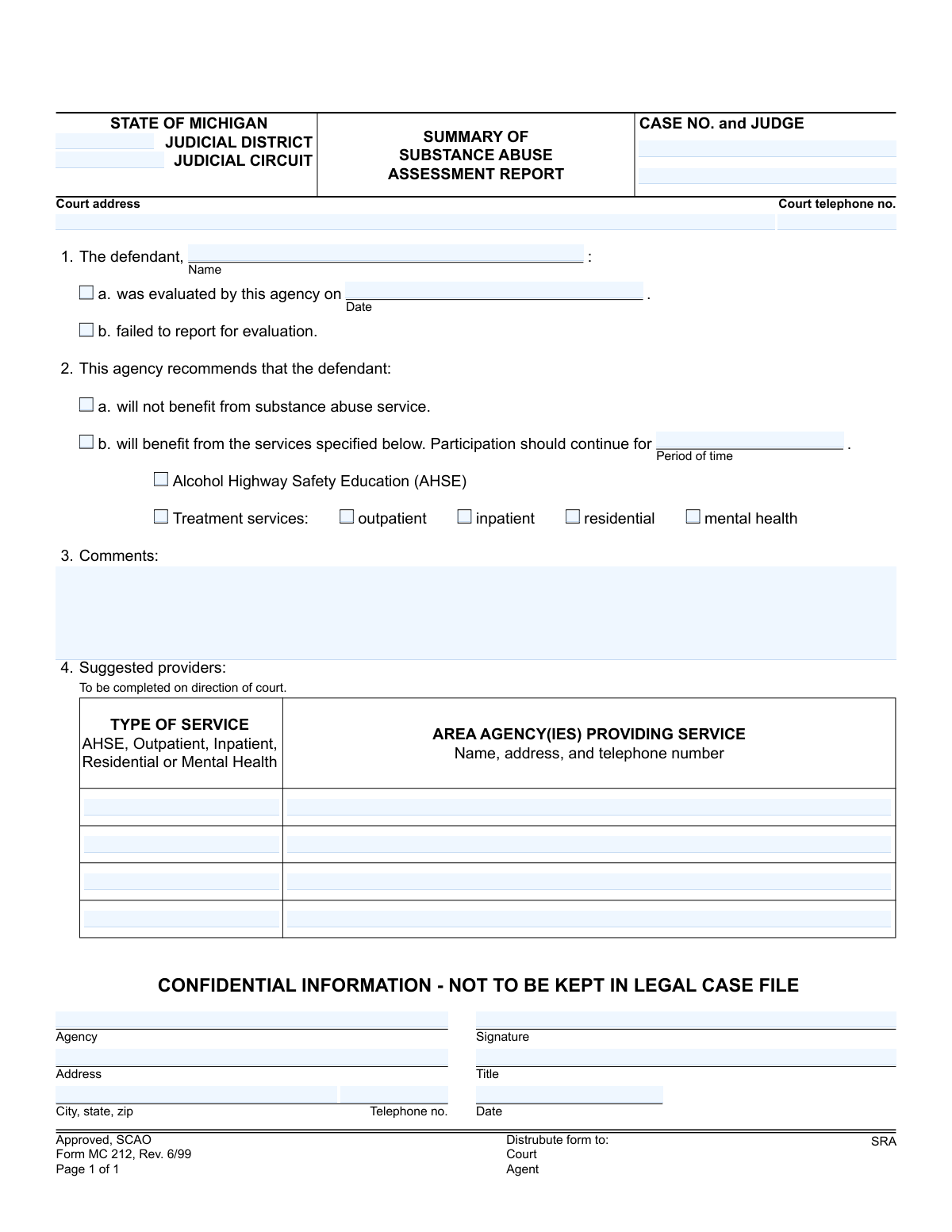
Yes! You can use AI to fill out Form MC 212, Summary of Substance Abuse Assessment Report
The Summary of Substance Abuse Assessment Report, Form MC 212, is a State of Michigan judicial form used by assessment agencies to report findings to the court. It details whether a defendant complied with an evaluation, the agency's recommendations for treatment (such as Alcohol Highway Safety Education or other services), and suggests potential service providers. Today, this form can be filled out quickly and accurately using AI-powered services like Instafill.ai, which can also convert non-fillable PDF versions into interactive fillable forms.
MC 212 is part of the
Michigan court forms category on Instafill.
Our AI automatically handles information lookup, data retrieval, formatting, and form filling.
It takes less than a minute to fill out MC 212 using our AI form filling.
Securely upload your data. Information is encrypted in transit and deleted immediately after the form is filled out.
Form specifications
| Form name: | Form MC 212, Summary of Substance Abuse Assessment Report |
| Number of fields: | 35 |
| Number of pages: | 1 |
| Language: | English |
More forms in Michigan court forms
Instafill Demo: How to fill out PDF forms in seconds with AI
How to Fill Out MC 212 Online for Free in 2026
Are you looking to fill out a MC 212 form online quickly and accurately? Instafill.ai offers the #1 AI-powered PDF filling software of 2026, allowing you to complete your MC 212 form in just 37 seconds or less.
Follow these steps to fill out your MC 212 form online using Instafill.ai:
- 1 Navigate to Instafill.ai and upload or select the MC 212, Summary of Substance Abuse Assessment Report.
- 2 Provide the court and case information, including the judicial district, circuit, case number, judge, and court address.
- 3 Enter the defendant's name and check the appropriate box to indicate if they were evaluated (and the date) or failed to report.
- 4 Specify the agency's recommendation, indicating if the defendant will benefit from services, the type of service (e.g., AHSE, outpatient, inpatient), and the recommended duration.
- 5 If applicable, list the suggested service providers with their contact information and the type of service they offer.
- 6 Add any additional clarifying information or observations in the 'Comments' section.
- 7 Review all AI-populated fields for accuracy, then enter the agency's name, address, and phone number, and have an authorized representative sign, title, and date the form.
Our AI-powered system ensures each field is filled out correctly, reducing errors and saving you time.
Why Choose Instafill.ai for Your Fillable MC 212 Form?
Speed
Complete your MC 212 in as little as 37 seconds.
Up-to-Date
Always use the latest 2026 MC 212 form version.
Cost-effective
No need to hire expensive lawyers.
Accuracy
Our AI performs 10 compliance checks to ensure your form is error-free.
Security
Your personal information is protected with bank-level encryption.
Frequently Asked Questions About Form MC 212
This form is used by assessment agencies to summarize the results of a defendant's substance abuse evaluation for the Michigan court system. It provides the court with a concise report and recommendations for treatment or other services.
A state-approved substance abuse assessment agency completes this form after evaluating the defendant. The defendant or their attorney does not fill out this form; it is an official report from the evaluator to the court.
If the defendant did not report for their scheduled evaluation, you must check box 1b, 'failed to report for evaluation.' This informs the court of the defendant's non-compliance with the assessment order.
Based on your professional assessment, check box 2a if no services are needed, or 2b if services are recommended. If you check 2b, you must also specify the type of service (e.g., AHSE, outpatient) and the recommended duration.
AHSE stands for Alcohol Highway Safety Education. It is a specific educational program often recommended in cases involving alcohol-related driving offenses.
You should only complete the 'Suggested providers' section if you are directed to do so by the court. If required, list the name, address, and phone number of agencies that provide the services you recommended.
This means the form contains sensitive personal health information and must be handled with care. It should not be kept in the public legal case file and must be distributed only to the authorized parties listed on the form (Court, Agent, SRA).
Once completed and signed, the form must be distributed to the Court, the supervising Agent (such as a probation officer), and the SRA (Substance Abuse Reporting Agency).
The Case Number and Judge's name should be on the court order or referral document that initiated the assessment. It is critical to copy this information accurately to ensure the report is filed with the correct case.
If you have a flat, non-fillable PDF, you can use a service like Instafill.ai. It uses AI to convert the document into an interactive, fillable form that you can easily complete and sign digitally.
Yes, services like Instafill.ai use AI to help you fill out forms like the MC 212 accurately and efficiently. It can auto-fill recurring information like your agency's details, saving time and reducing errors.
To fill this form online, upload the MC 212 PDF to Instafill.ai, which will make all fields interactive. You can then type in the required information, check the appropriate boxes, and add a digital signature before downloading or sharing.
Outpatient treatment allows the defendant to live at home while attending scheduled sessions. Inpatient and residential treatment are more intensive, requiring the defendant to live at the treatment facility to receive 24-hour care and support.
Compliance MC 212
Validation Checks by Instafill.ai
1
Mutually Exclusive Evaluation Status
This validation ensures that either the 'was evaluated by this agency' checkbox is checked or the 'failed to report for evaluation' checkbox is checked, but not both. It is logically impossible for a defendant to have both been evaluated and failed to report for the same assessment. A failure would require the user to correct the selection to reflect the single true outcome.
2
Conditional Evaluation Date Requirement
This check verifies that if the 'was evaluated by this agency' option is selected, the corresponding 'Date' field is populated. The evaluation date is critical for establishing the timeline of the assessment and is meaningless without the context of an actual evaluation. If the date is missing, the form is incomplete and cannot be processed.
3
Evaluation Date Format and Plausibility
This validation ensures the 'evaluated date' is entered in a valid format (e.g., MM/DD/YYYY) and represents a real date that is not in the future. An invalid or future date would compromise the integrity of the report's timeline and legal standing. The system should reject the submission and prompt the user for a valid past or present date.
4
Mutually Exclusive Service Benefit Recommendation
This validation confirms that only one of the two recommendation options, 'will not benefit' or 'will benefit,' is selected. These options are contradictory, and selecting both would create an ambiguous and unusable recommendation for the court. The form should be flagged for correction if both or neither are selected, ensuring a clear recommendation is made.
5
Conditional Service and Duration Requirement
This check ensures that if the 'will benefit from the services specified below' option is chosen, both the 'Period of time' field and at least one service type (e.g., AHSE, outpatient) are specified. A recommendation for services is incomplete without defining what those services are and for how long they should last. Failure to provide this information would render the recommendation section void and require user correction.
6
Signature Date Logic and Requirement
This validation verifies that the signature date is present, in a valid format, and occurs on or after the 'evaluated date.' It is logically impossible for a report to be signed before the evaluation it describes has taken place. This check maintains the chronological integrity of the document and prevents nonsensical data entry.
7
Case and Court Identifier Completeness
This validation ensures that essential court and case identifiers, such as 'Case No.,' 'Judge,' and 'Judicial District/Circuit,' are not left empty. This information is fundamental for correctly filing the report and associating it with the proper legal case. Without these details, the report could be lost or misfiled, causing significant administrative and legal delays.
8
Reporting Agency Information Completeness
This check confirms that all fields in the agency signature block, including 'Agency,' 'Address,' 'City, state, zip,' 'Telephone no.,' and 'Title,' are fully completed. This information is vital for verifying the source and authenticity of the assessment report. Incomplete agency details could call the report's validity into question and hinder any necessary follow-up communication.
9
Phone Number Format Validation
This validation ensures that both the 'Court telephone no.' and the agency's 'Telephone no.' are entered in a recognizable and valid format, such as (XXX) XXX-XXXX. Proper formatting is crucial for ensuring the contact numbers are usable and can be correctly parsed by digital systems. An invalid format would prevent automated dialing and could hinder communication with the court or reporting agency.
10
Provider and Recommended Service Consistency
This validation checks for logical consistency between the services recommended in Section 2 and the provider details listed in Section 4. If a provider is listed for 'Inpatient' services, for example, then 'inpatient' should be checked in Section 2. This ensures the suggested providers are relevant to the defendant's recommended plan, preventing confusion for the court.
11
Defendant Name Requirement
This validation ensures the 'Defendant Name' field is not left blank. The defendant's name is the primary identifier linking the individual to the assessment and the court case. A report without a defendant name is fundamentally incomplete and cannot be processed or filed correctly.
12
Participation Period Format
This validation checks that the 'Period of time' for service participation is entered in a logical format, such as a number followed by a time unit (e.g., '6 months,' '180 days'). This ensures the duration of the recommended service is clear and unambiguous for the court to order. An entry like 'a while' would be invalid and require the user to specify a concrete duration.
Common Mistakes in Completing MC 212
Entering an incorrect case number or misspelling the judge's name is a frequent error, often due to typos or referencing outdated documents. This critical mistake can lead to the report being misfiled with the wrong case or being rejected by the court clerk, causing significant delays in legal proceedings. Double-checking these details against official court documents before submission is essential to ensure the report is correctly associated with the defendant's case.
Assessors sometimes mistakenly check both 'will not benefit' and 'will benefit' in Section 2, or they leave both options blank, creating a logical contradiction. This ambiguity makes the core recommendation of the report unclear, forcing the court to return the form for clarification and delaying any court-ordered action. To avoid this, carefully select only one of the two options to provide a definitive recommendation.
In Section 4, a service type is often listed without the complete corresponding agency details, such as the full name, address, and telephone number. This omission renders the recommendation unactionable, as neither the court nor the defendant can follow up with the suggested provider. It is crucial to provide all required contact information for each recommended agency to facilitate the next steps in the process.
A common error in Section 1 is checking that the defendant 'was evaluated' but failing to enter the specific date, or worse, checking both 'was evaluated' and 'failed to report'. These mistakes make the report's status invalid and confusing, leading to its rejection. Ensure that only one box is checked and that the corresponding date is provided if an evaluation occurred.
When recommending services in Section 2, filers often forget to specify the 'Period of time' for which participation should continue. This leaves a critical component of the treatment plan undefined, preventing the judge from issuing a complete and enforceable order. Always include a specific duration (e.g., '90 days', '6 months') to provide the court with a clear and actionable timeframe.
When this form is printed and filled out by hand, illegible handwriting for names, addresses, or comments can make the document impossible to process correctly. This can lead to data entry errors by court staff, miscommunication, or outright rejection of the form. Using an AI-powered tool like Instafill.ai can convert this non-fillable PDF into a fillable version, ensuring all entries are typed, legible, and professional.
The signature, title, and date from the agency representative are required to authenticate the report and confirm its origin. Forgetting to sign the form or include the professional title invalidates the assessment, rendering it unofficial in the eyes of the court. This oversight requires the form to be returned for completion, halting progress on the case.
An assessor might indicate that a defendant 'will benefit' from services but then fail to check any of the specific service boxes below (e.g., AHSE, outpatient, inpatient). This leaves the recommendation too vague for the court to act upon. It is essential to select one or more specific types of treatment to create a concrete and useful recommendation.
Inputting the wrong 'Judicial District' or 'Judicial Circuit' is a common mistake, especially when an agency works with multiple courts. This error can cause the form to be mailed or filed in the wrong jurisdiction, leading to it being lost or significantly delayed in reaching the correct judge. AI form-filling tools like Instafill.ai can help prevent this by saving and auto-filling correct court profiles, reducing manual entry errors.
Saved over 80 hours a year
“I was never sure if my IRS forms like W-9 were filled correctly. Now, I can complete the forms accurately without any external help.”
Kevin Martin Green
Your data stays secure with advanced protection from Instafill and our subprocessors
Robust compliance program
Transparent business model
You’re not the product. You always know where your data is and what it is processed for.
ISO 27001, HIPAA, and GDPR
Our subprocesses adhere to multiple compliance standards, including but not limited to ISO 27001, HIPAA, and GDPR.
Security & privacy by design
We consider security and privacy from the initial design phase of any new service or functionality. It’s not an afterthought, it’s built-in, including support for two-factor authentication (2FA) to further protect your account.
Fill out MC 212 with Instafill.ai
Worried about filling PDFs wrong? Instafill securely fills form-mc-212-summary-of-substance-abuse-assessment-report forms, ensuring each field is accurate.