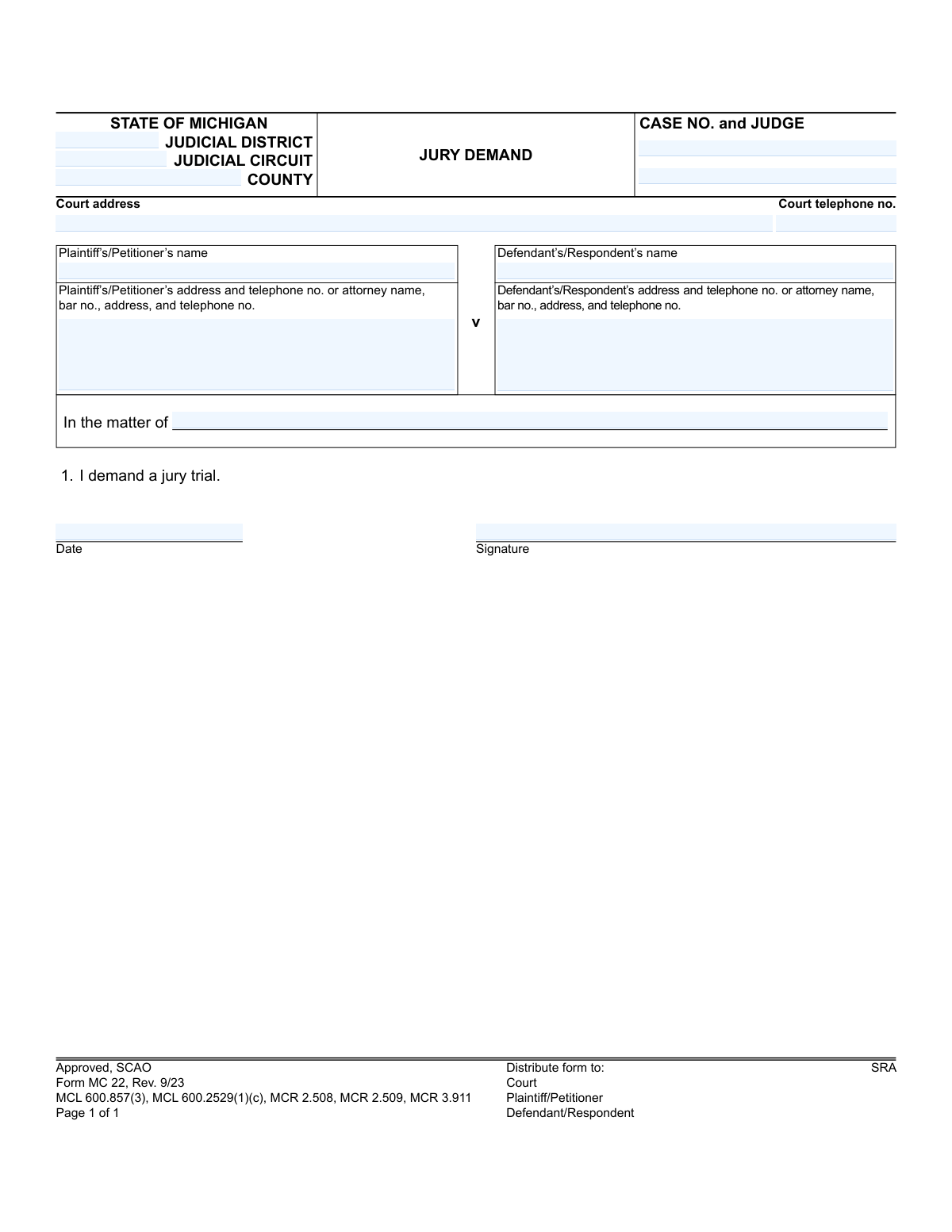
Yes! You can use AI to fill out Form MC 22, Jury Demand
Form MC 22, Jury Demand, is a legal document used in the State of Michigan to formally request a trial by jury in a specific court case. Filing this form is a critical step for a party wishing to exercise their right to have the facts of their case decided by a jury rather than solely by a judge. Today, this form can be filled out quickly and accurately using AI-powered services like Instafill.ai, which can also convert non-fillable PDF versions into interactive fillable forms.
MC 22 is part of the
Michigan court forms category on Instafill.
Our AI automatically handles information lookup, data retrieval, formatting, and form filling.
It takes less than a minute to fill out MC 22 using our AI form filling.
Securely upload your data. Information is encrypted in transit and deleted immediately after the form is filled out.
Form specifications
| Form name: | Form MC 22, Jury Demand |
| Number of fields: | 14 |
| Number of pages: | 1 |
| Language: | English |
More forms in Michigan court forms
Instafill Demo: How to fill out PDF forms in seconds with AI
How to Fill Out MC 22 Online for Free in 2026
Are you looking to fill out a MC 22 form online quickly and accurately? Instafill.ai offers the #1 AI-powered PDF filling software of 2026, allowing you to complete your MC 22 form in just 37 seconds or less.
Follow these steps to fill out your MC 22 form online using Instafill.ai:
- 1 Navigate to Instafill.ai and upload or select the Michigan Jury Demand (Form MC 22).
- 2 Provide the court and case information, such as the judicial district/circuit, county, case number, and judge's name.
- 3 Enter the full name and contact information for the plaintiff/petitioner and their attorney, if applicable.
- 4 Input the full name and contact information for the defendant/respondent and their attorney, if applicable.
- 5 Review all the information auto-filled by the AI to ensure accuracy and completeness.
- 6 Date and digitally sign the form to certify your demand for a jury trial.
- 7 Download the completed MC 22 form to file with the court and serve to the other parties involved in the case.
Our AI-powered system ensures each field is filled out correctly, reducing errors and saving you time.
Why Choose Instafill.ai for Your Fillable MC 22 Form?
Speed
Complete your MC 22 in as little as 37 seconds.
Up-to-Date
Always use the latest 2026 MC 22 form version.
Cost-effective
No need to hire expensive lawyers.
Accuracy
Our AI performs 10 compliance checks to ensure your form is error-free.
Security
Your personal information is protected with bank-level encryption.
Frequently Asked Questions About Form MC 22
This form is used in Michigan courts to formally request that the facts of a civil case be tried and decided by a jury, rather than solely by a judge.
Either the plaintiff or the defendant in a legal proceeding who wishes to exercise their right to have their case heard by a jury must file this form. It is typically filed at the beginning of a lawsuit.
You will need the court's location, the full case number, the judge's name, and the names and contact information for all parties (plaintiffs and defendants) and their attorneys.
The case number and assigned judge are provided by the court when the lawsuit is first filed. This information can be found on the summons, complaint, or any other official document related to your case.
This field is generally used for cases that don't have a standard 'plaintiff vs. defendant' structure, like probate or family law matters. If your case is a typical lawsuit, you can likely leave this blank.
Yes, Michigan law requires the payment of a jury fee when this form is filed. You must contact the clerk of the court where your case is filed to determine the current fee amount and payment procedure.
There are very strict deadlines for demanding a jury, which are set by Michigan Court Rules. You typically must file the demand with your first pleading (the complaint for the plaintiff, or the answer for the defendant) to avoid losing the right to a jury trial.
You must file the original form with the court clerk, pay the required fee, and send a copy to all other parties in the case, as indicated in the 'Distribute form to' section.
If neither party files a timely jury demand, you waive your right to a jury. The case will then proceed as a 'bench trial,' where the judge alone will hear the evidence and decide the outcome.
Yes, services like Instafill.ai use AI to help you accurately auto-fill form fields with your saved information, which saves time and reduces the chance of errors.
You can use a service like Instafill.ai to upload the form, fill it out electronically in an interactive interface, and then download the completed PDF for printing, signing, and filing.
Tools like Instafill.ai can convert flat, non-fillable PDFs into interactive forms. Simply upload your document, and the platform will automatically make the fields editable for you online.
Yes, a physical 'wet' signature is required for court filings. After filling out the form, you must print it, sign and date it, and then file the physical copy with the court.
Compliance MC 22
Validation Checks by Instafill.ai
1
Case Number Format and Structure Validation
This check validates that the 'case no' field follows the standard Michigan case number format (e.g., YY-NNNNN-XX). The case number is a critical identifier for linking the jury demand to the correct court file. An invalid format will cause the document to be rejected by the clerk's office, as it cannot be electronically or manually filed without a valid case reference.
2
Judicial Location Consistency Check
This validation ensures that the provided 'judicial district', 'judicial circuit', and 'county' are a valid and existing combination within the State of Michigan. This is crucial for routing the document to the correct court jurisdiction and ensuring it is docketed properly. A mismatch could send the demand to the wrong court, causing significant delays and potential dismissal of the demand for being filed in the wrong venue.
3
Completeness of Core Case Identifiers
This check verifies that both the 'case no' and 'judge' name fields are filled out. These fields are essential for identifying the specific case and the presiding judge to whom the jury demand applies. Submitting a form without this information makes it impossible to process, and the form will be returned to the filer for completion.
4
Plaintiff Information Completeness
This check ensures that either the Plaintiff's/Petitioner's name and address are provided, or their attorney's name, bar number, and contact information are present. The form requires at least one valid point of contact for the filing party. Failure to provide this information means the court and opposing party have no way to serve notices, leading to immediate rejection of the filing.
5
Defendant Information Completeness
This validation verifies that either the Defendant's/Respondent's name and address are provided, or their attorney's name, bar number, and contact information are present. This is crucial for ensuring proper service of the jury demand to the opposing party as required by court rules. An incomplete form prevents proper notification and could invalidate the demand, requiring the filer to start the process over.
6
Attorney Bar Number Format and Validity
If an attorney is listed, this check validates that the provided 'bar no' is in the correct format for a Michigan attorney (e.g., 'P' followed by 5 digits). It can also be cross-referenced against the state bar database to ensure the number is active and belongs to the named attorney. This prevents fraud and ensures the representative is legally authorized to practice; a failure would require correction before the filing is accepted.
7
Signature Date Format and Plausibility
This validation checks that the 'date' field is in a recognized format (e.g., MM/DD/YYYY) and represents a plausible date that is not in the future or unreasonably far in the past. This is critical for establishing the timeline of the filing, as jury demands often have strict deadlines. An invalid or impossible date could lead to the demand being considered untimely and therefore void.
8
Signature Presence Verification
This check verifies that the 'signature' field is not empty, indicating that a physical or digital signature has been applied. A signature is a legal requirement to attest to the authenticity of the demand and the filer's intent. A form submitted without a signature is legally invalid and will be rejected outright by the court clerk.
9
Case Number and Judge Cross-Validation
This advanced logical check queries a court database to confirm that the provided 'case no' is actually assigned to the specified 'judge'. This helps prevent typos and ensures the demand is reviewed by the correct judicial officer. A mismatch would flag the form for manual review to prevent it from being filed against the wrong case or judge, which could have serious legal consequences.
10
Court Telephone Number Format
This validation ensures the 'court telephone no' field contains a valid 10-digit North American phone number format, including an area code. While this information is pre-filled on official forms, data entry errors can occur in processing systems. Ensuring the format is correct maintains data integrity for the court's record of its own contact information on the document.
11
Form Revision Date Verification
This check verifies that the form being submitted is the current version, identified by 'Rev. 9/23'. Courts frequently update forms and may reject outdated versions that do not comply with current rules or statutes. Using an old form can lead to rejection and require the filer to redo their submission on the correct version, potentially missing critical deadlines.
12
Plaintiff vs. Defendant Name Distinction
This is a simple logical check to ensure the 'Plaintiff’s/Petitioner’s name' is not identical to the 'Defendant’s/Respondent’s name'. While seemingly obvious, this validation catches significant copy-paste or data entry errors. A filing where the plaintiff and defendant are the same is logically incoherent and would be flagged for immediate rejection.
Common Mistakes in Completing MC 22
Filers often make typos, transpose digits, or omit parts of the case number, such as the two-letter case type code or year. This mistake commonly happens when rushing or copying from a poor-quality document. The consequence is severe: the court clerk cannot associate the demand with the correct case file, leading to rejection and potentially causing the filer to miss the strict deadline, thereby waiving their right to a jury trial.
Many people leave the 'Judge' field blank, either because they don't know the assigned judge or they assume the case number is sufficient. This slows down processing, as court staff must manually look up the information to route the document correctly. To avoid this, always check the summons or other official court documents for the assigned judge's name and include it for proper and timely filing.
Michigan's court system has distinct District and Circuit courts, and filers often confuse the two or fill in the wrong one for their case. This error stems from a misunderstanding of court jurisdiction. Filing a demand in the wrong court system will lead to its rejection, wasting valuable time and potentially causing the jury demand deadline to be missed.
When a party is represented by an attorney, their bar number is a mandatory piece of information. This is frequently omitted, either by the attorney's own staff in a rush or by an opposing party who doesn't know it. Court clerks are very strict about this requirement, and a filing without a valid bar number is almost certain to be rejected, causing delays.
It is a surprisingly common oversight to focus on the complex case details and forget the final, crucial step of signing and dating the document. An unsigned legal filing is invalid and will be rejected by the court immediately. If the deadline for demanding a jury passes before a corrected, signed form is re-filed, the right to a jury trial is permanently forfeited.
The form explicitly states it must be distributed to the court and all parties, but self-represented litigants often only file it with the court. They forget the legal requirement to 'serve' a copy on the opposing party or their attorney. This procedural error can lead to the opposing side filing a motion to strike the jury demand, potentially invalidating it.
A jury demand is not just a form; it's a request that requires a fee. Filers are often unaware of this or forget to include payment, as the fee amount is not listed on the form itself (though a statute is cited). A demand is not considered perfected until both the form is filed and the fee is paid. Failure to pay the fee by the deadline waives the right to a jury, even if the form was filed on time.
When a form is filled out by hand, poor penmanship can make critical information like the case number or party names unreadable. Court clerks cannot guess this information and will reject any document they cannot clearly read and process. This leads to delays and reflects poorly on the filer. To prevent this, it's best to use a fillable version of the form. If the form is a non-fillable PDF, a tool like Instafill.ai can convert it, allowing you to type information for maximum clarity.
Filers may misspell names, use nicknames or abbreviations, or fail to list all plaintiffs or defendants exactly as they appear on the original complaint. This creates ambiguity and can cause filing issues or problems with legal service. It is essential to copy the full, official names of all parties from the original court filings to ensure the document is legally precise. AI-powered tools like Instafill.ai can help by storing and auto-filling correct party information, ensuring consistency across all case documents.
This field is intended for specific case types, like probate or certain family law matters, that don't follow the standard 'Plaintiff v. Defendant' caption. People in a standard civil lawsuit often get confused and either leave it blank when it should be used or try to write a case summary in it. This creates confusion for the clerk; the field should only be used if the official case caption on other court documents uses this format.
Saved over 80 hours a year
“I was never sure if my IRS forms like W-9 were filled correctly. Now, I can complete the forms accurately without any external help.”
Kevin Martin Green
Your data stays secure with advanced protection from Instafill and our subprocessors
Robust compliance program
Transparent business model
You’re not the product. You always know where your data is and what it is processed for.
ISO 27001, HIPAA, and GDPR
Our subprocesses adhere to multiple compliance standards, including but not limited to ISO 27001, HIPAA, and GDPR.
Security & privacy by design
We consider security and privacy from the initial design phase of any new service or functionality. It’s not an afterthought, it’s built-in, including support for two-factor authentication (2FA) to further protect your account.
Fill out MC 22 with Instafill.ai
Worried about filling PDFs wrong? Instafill securely fills form-mc-22-jury-demand forms, ensuring each field is accurate.