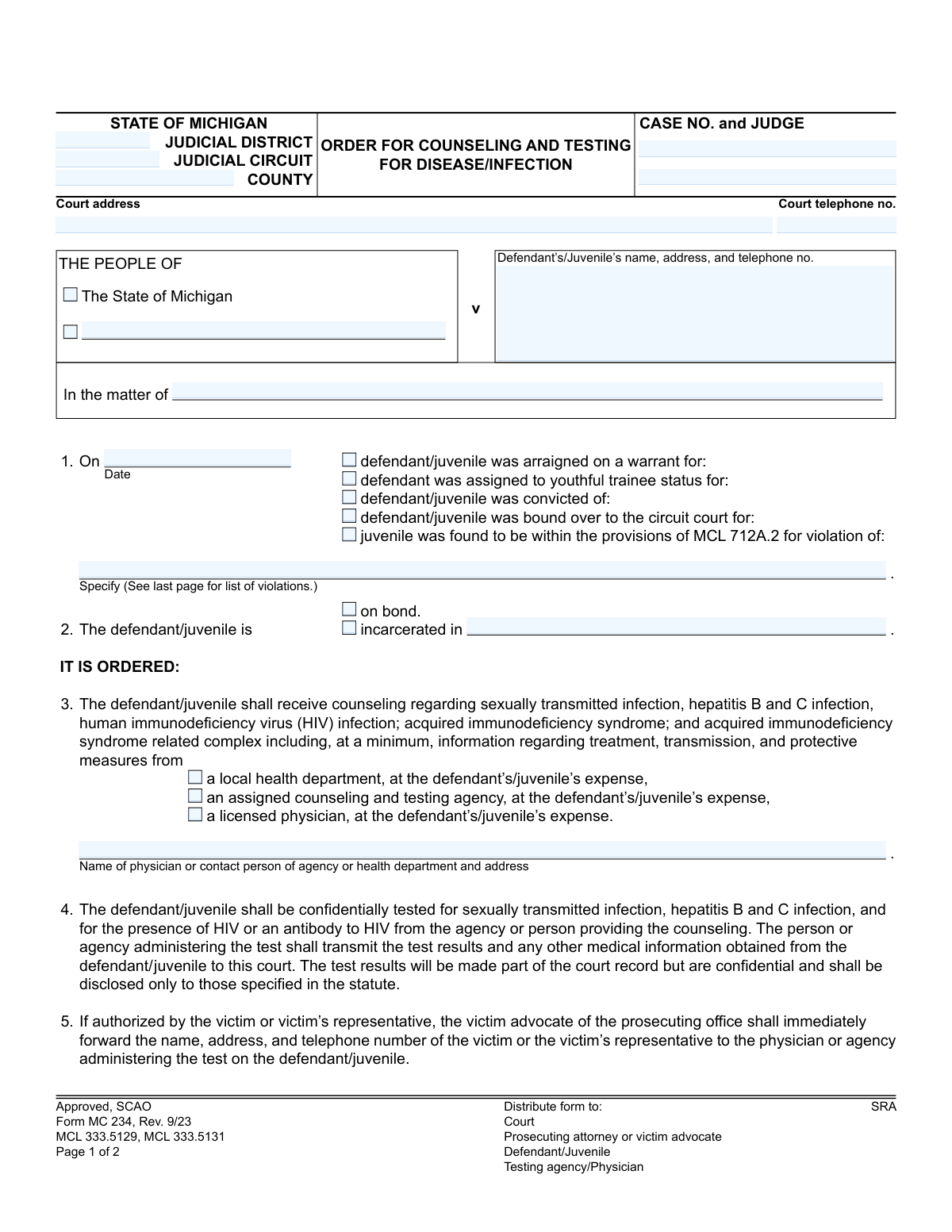
Yes! You can use AI to fill out Form MC 234, Order for Counseling and Testing for Disease/Infection

Form MC 234, Order for Counseling and Testing for Disease/Infection, is a legal document issued by Michigan courts. It mandates that individuals involved in certain legal cases (such as those related to sexual offenses or drug use) receive counseling and undergo testing for STIs, Hepatitis B and C, and HIV. This order is crucial for public health and ensures that legal proceedings are informed by relevant, confidential medical data as required by state law. Today, this form can be filled out quickly and accurately using AI-powered services like Instafill.ai, which can also convert non-fillable PDF versions into interactive fillable forms.
MC 234 is part of the Michigan court forms category on Instafill.
Our AI automatically handles information lookup, data retrieval, formatting, and form filling.
It takes less than a minute to fill out MC 234 using our AI form filling.
Securely upload your data. Information is encrypted in transit and deleted immediately after the form is filled out.

Form specifications

Form name: Form MC 234, Order for Counseling and Testing for Disease/Infection
Number of fields: 34
Number of pages: 1
Language: English
main-image

Instafill Demo: How to fill out PDF forms in seconds with AI

How to Fill Out MC 234 Online for Free in 2026

Are you looking to fill out a MC 234 form online quickly and accurately? Instafill.ai offers the #1 AI-powered PDF filling software of 2026, allowing you to complete your MC 234 form in just 37 seconds or less.
Follow these steps to fill out your MC 234 form online using Instafill.ai:
  1. 1 Navigate to Instafill.ai and upload or select the Michigan Form MC 234.
  2. 2 Use the AI assistant to input the court and case information, including the judicial district, county, case number, and judge's name.
  3. 3 Enter the full name and address of the defendant or juvenile who is the subject of the order.
  4. 4 Specify the legal grounds for the order by checking the appropriate box (e.g., arraignment, conviction) and detailing the specific violation.
  5. 5 Indicate the defendant's/juvenile's current status (on bond or incarcerated) and select the designated agency or physician for counseling and testing.
  6. 6 Define the timeline for compliance, such as the date by which testing must be completed and to which court the results must be sent.
  7. 7 Review all the auto-filled information for accuracy, make any necessary edits, and then download or print the completed form for the judge's signature and distribution.

Our AI-powered system ensures each field is filled out correctly, reducing errors and saving you time.

Why Choose Instafill.ai for Your Fillable MC 234 Form?

Speed

Complete your MC 234 in as little as 37 seconds.

Up-to-Date

Always use the latest 2026 MC 234 form version.

Cost-effective

No need to hire expensive lawyers.

Accuracy

Our AI performs 10 compliance checks to ensure your form is error-free.

Security

Your personal information is protected with bank-level encryption.

Frequently Asked Questions About Form MC 234

This form is a court order that requires a defendant or juvenile, involved in specific types of legal cases, to receive counseling and undergo testing for sexually transmitted infections (STIs), Hepatitis B/C, and HIV.

This order applies to individuals who have been arraigned, convicted, or are otherwise involved in court proceedings for specific offenses listed in Michigan law, such as certain criminal sexual conduct, prostitution-related charges, or intravenous drug use.

The form clearly states that the defendant or juvenile who is subject to the order is responsible for all expenses related to the counseling and testing.

Yes, the testing process is confidential. However, the results are transmitted to the court and become part of the confidential court record, with disclosure limited only to those specified by state law.

As specified in Section 6, you must complete all requirements before your sentencing/dispositional hearing or within 30 days of the order. Failure to meet this deadline can result in penalties for contempt of court.

The order will specify the provider in Section 3, which could be a local health department, an assigned agency, or a licensed physician. The form should include the name and address of the designated provider.

Failing to complete the required counseling and testing by the deadline is a violation of a court order. This may result in you being held in contempt of court, which can lead to additional penalties like fines or jail time.

The law allows for the victim to be notified of the test results if they wish. This only occurs if the victim or their representative gives consent and authorizes the release of their contact information to the testing agency.

To complete the order, you need the court and case details, the defendant's/juvenile's name and address, the specific violation, and the designated testing agency. The judge must also indicate the deadline for completion.

Yes, services like Instafill.ai use AI to auto-fill form fields accurately from case management systems or other data sources, which saves time and helps prevent clerical errors.

You can use a service like Instafill.ai to easily complete this form online. Simply upload the document, and the platform will make all fields interactive for you to fill, save, and print.

If you have a non-fillable or 'flat' PDF, you can upload it to Instafill.ai. The service automatically converts the document into an interactive, fillable form that you can complete on your computer.

Compliance MC 234
Validation Checks by Instafill.ai

1
Case Number Presence and Format
Checks that the 'CASE NO.' field is not empty and, if possible, conforms to the standard Michigan court case number format. This number is a critical unique identifier for linking the order to the correct court file. Failure to provide a valid number would make the order unenforceable and difficult to track.
2
Ensures a Reason for the Order is Selected
Validates that at least one checkbox is selected in section 1, indicating the legal basis for the order (e.g., 'arraigned on a warrant for', 'convicted of'). An order without a legal basis is invalid. If no reason is selected, the form submission should be rejected with an error prompting the user to specify the justification.
3
Validates Violation Specification
This check ensures that the 'Specify' text field (`violist`) is filled out when a reason for the order is checked in section 1. The specified violation is legally required to confirm the order is appropriate for the alleged or convicted offense. An empty field would make the order legally deficient.
4
Mutually Exclusive Defendant Status
Verifies that exactly one of the two checkboxes in section 2 ('on bond' or 'incarcerated in') is selected. This information is crucial for locating the defendant/juvenile for testing and for enforcement. An ambiguous or missing status would prevent the order from being carried out, so the form should not be submittable without one clear choice.
5
Conditional Requirement for Incarceration Location
This validation ensures that if the 'incarcerated in' checkbox is selected, the corresponding text field (`incarloc`) specifying the facility is filled. Without this location, authorities cannot find the individual to execute the testing order. The field should be disabled or rejected if the defendant is on bond and the incarceration field is left blank.
6
Requires Selection of a Counseling Provider
Confirms that at least one of the three provider options in section 3 (local health department, assigned agency, or licensed physician) is checked. The order is for counseling and testing, so a provider must be designated. Failure to select a provider makes the order incomplete and non-actionable.
7
Validates Provider Contact Information
Checks that the field for the provider's name and address (`physname`) is completed if any provider option is selected in section 3. This information is essential for the defendant/juvenile to know where to go for the ordered services. An empty field would render the order ineffective as the individual would not know who to contact.
8
Mutually Exclusive Deadline for Test Results
Ensures that exactly one of the two deadline options in section 6 ('before the sentencing/dispositional hearing' or 'within 30 days of this order') is selected. A clear deadline is necessary for court scheduling and compliance tracking. The form should prevent submission if zero or both options are chosen.
9
Conditional Hearing Date Requirement
Validates that if the 'before the sentencing/dispositional hearing date on' option is checked, the corresponding date field (`hdate`) is filled with a valid, future date. This specific date is critical for the court's calendar and for setting a clear deadline for the defendant. The date must be in the future relative to the order date.
10
Mutually Exclusive Destination for Test Results
Verifies that exactly one of the two destination options in section 6 ('the circuit court at' or 'this court at the address stated above') is selected. This clarifies where the confidential test results must be sent, preventing them from being lost or sent to the wrong entity. Ambiguity could lead to delays and potential privacy breaches.
11
Conditional Circuit Court Location
This check ensures that if the results are to be transmitted to 'the circuit court at', the corresponding location field (`ccourtloc`) is filled. This is necessary when the case has been bound over and the receiving court is different from the issuing court. Without this information, the results cannot be delivered correctly.
12
Validates Event Date in Section 1
This check ensures the date provided in section 1 is a valid calendar date and is not a future date. The event (arraignment, conviction, etc.) must have already occurred to serve as a basis for the order. An invalid or future date would indicate a data entry error and make the legal justification for the order questionable.
13
Court Telephone Number Format
Validates that the 'Court telephone no.' field is a valid US phone number format (e.g., (XXX) XXX-XXXX). Proper formatting ensures that contact information for the court is accurate and usable for any follow-up communication. An invalid format could hinder communication between agencies.
14
Defendant/Juvenile Information Requirement
Ensures the field for the Defendant's/Juvenile's name, address, and telephone number is not empty. This information is fundamental to identifying the subject of the order. While full parsing of the address and phone number within the single field is complex, a check for non-emptiness is the minimum requirement.

Common Mistakes in Completing MC 234

Failing to Specify the Correct MCL Violation Code

In Section 1, users often write a common name for the crime instead of the required Michigan Compiled Laws (MCL) number. The form requires the specific statutory code, which is listed on the second page, to ensure the order is legally valid for the specific offense. An incorrect or vague entry can lead to the order being rejected by the court or testing agency, causing significant delays. AI-powered tools like Instafill.ai can help by providing dropdowns with valid MCL codes, preventing this common error.

Incomplete or Incorrect Court Identification

The header section requires the precise Judicial District, Circuit, County, and Judge's name, but these fields are often left incomplete. This information is critical for routing the document and ensuring it is filed in the correct case file. Omitting these details can cause the order to be lost in the court system or misfiled, delaying the entire counseling and testing process.

Ambiguous Basis for the Order

Section 1 provides several checkboxes to indicate the legal reason for the order (e.g., 'arraigned on a warrant,' 'convicted of'). A common mistake is checking multiple boxes or none at all. This creates legal ambiguity about the grounds for the order, which can lead to legal challenges or cause the form to be returned for correction, delaying the time-sensitive testing.

Omitting the Incarceration Facility Name

When a user checks the 'incarcerated in' box in Section 2, they frequently forget to specify the name and location of the correctional facility. This information is not optional; it is essential for the testing agency to coordinate access to the defendant or juvenile. Failure to provide the location makes it impossible to execute the order, rendering it ineffective until it is corrected.

Missing Counseling Provider Contact Details

In Section 3, after selecting a provider type (e.g., 'local health department'), users must provide the specific name and address of that entity. This field is often left blank, leaving the defendant with no information on where to comply with the order. This omission halts the process and requires court staff to track down the information and amend the order.

Setting Contradictory or Missing Deadlines

Section 6 requires the user to select one clear deadline for testing: either before a specific hearing date or within 30 days. A frequent error is selecting both options, or neither, which creates an unenforceable deadline. This confusion can lead to unintentional non-compliance by the defendant and requires a new, clarified order from the judge.

Forgetting the Case Number on the Second Page

The form includes a field for the case number at the top of page two, which is very easy to overlook. Since court documents can be scanned and handled as separate pages, omitting the case number on the second page risks it being separated and lost. This can cause major administrative delays when the court tries to match test results with the correct case file.

Incorrectly Identifying Case Parties

The form distinguishes between criminal cases ('The People of... v Defendant') and juvenile proceedings ('In the matter of... Juvenile'). Users sometimes select the wrong heading for the type of case being heard. While seemingly minor, this procedural error can cause confusion and may require the form to be re-issued with the correct legal language, delaying the process.

Unclear Destination for Test Results

In Section 6, if the results are to be sent to the circuit court, its specific location must be provided. Users often check 'the circuit court at' but fail to fill in the address, or they check both 'circuit court' and 'this court'. This ambiguity can lead to confidential results being misdirected or lost, which is a serious breach of privacy and causes delays in judicial proceedings.

Providing Incomplete Defendant/Juvenile Contact Information

The field for the defendant's or juvenile's information requires a full name, address, and telephone number, but is often filled out with only a name. This complete contact information is crucial for serving notices, communicating about appointments, and ensuring the individual can be reached. Incomplete data hinders the ability of the court and testing agencies to manage the case effectively.

Manual Data Entry and Typographical Errors

Simple typographical errors in the case number, defendant's name, or MCL code are extremely common when filling out forms manually. Such mistakes can lead to the order being filed under the wrong case, test results being misattributed, or legal invalidity. Using an AI-powered tool like Instafill.ai, which can convert flat PDFs into fillable forms and validate data formats, helps eliminate these manual entry errors and ensures accuracy.
Saved over 80 hours a year

“I was never sure if my IRS forms like W-9 were filled correctly. Now, I can complete the forms accurately without any external help.”

Kevin Martin Green

Your data stays secure with advanced protection from Instafill and our subprocessors

Robust compliance program

Transparent business model

You’re not the product. You always know where your data is and what it is processed for.

ISO 27001, HIPAA, and GDPR

Our subprocesses adhere to multiple compliance standards, including but not limited to ISO 27001, HIPAA, and GDPR.

Security & privacy by design

We consider security and privacy from the initial design phase of any new service or functionality. It’s not an afterthought, it’s built-in, including support for two-factor authentication (2FA) to further protect your account.

Fill out MC 234 with Instafill.ai

Worried about filling PDFs wrong? Instafill securely fills form-mc-234-order-for-counseling-and-testing-for-diseaseinfection forms, ensuring each field is accurate.