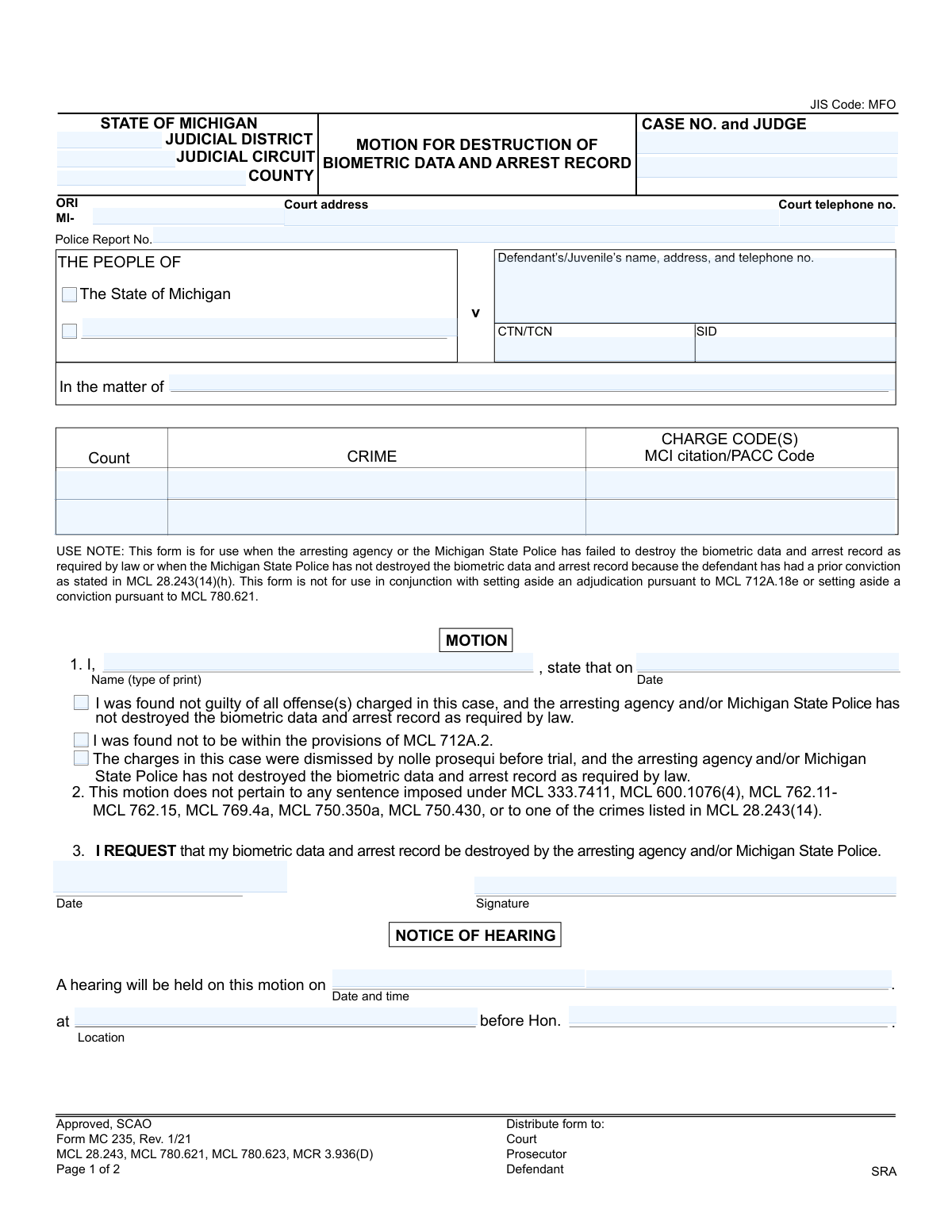
Yes! You can use AI to fill out Form MC 235, Motion for Destruction of Biometric Data and Arrest Record

Form MC 235 is a legal motion filed in Michigan courts to request the destruction of an individual's biometric data and arrest record. This is used when law enforcement has failed to destroy these records after a not-guilty verdict or dismissal of charges, as mandated by law. Filing this motion is a critical step in ensuring your record is cleared and your privacy is protected. Today, this form can be filled out quickly and accurately using AI-powered services like Instafill.ai, which can also convert non-fillable PDF versions into interactive fillable forms.
MC 235 is part of the Michigan court forms category on Instafill.
Our AI automatically handles information lookup, data retrieval, formatting, and form filling.
It takes less than a minute to fill out MC 235 using our AI form filling.
Securely upload your data. Information is encrypted in transit and deleted immediately after the form is filled out.

Form specifications

Form name: Form MC 235, Motion for Destruction of Biometric Data and Arrest Record
Number of fields: 36
Number of pages: 1
Language: English
main-image

Instafill Demo: How to fill out PDF forms in seconds with AI

How to Fill Out MC 235 Online for Free in 2026

Are you looking to fill out a MC 235 form online quickly and accurately? Instafill.ai offers the #1 AI-powered PDF filling software of 2026, allowing you to complete your MC 235 form in just 37 seconds or less.
Follow these steps to fill out your MC 235 form online using Instafill.ai:
  1. 1 Navigate to Instafill.ai and upload the MC 235 form or select it from the template library.
  2. 2 Use the AI assistant to accurately fill in the court details, case number, judge's name, and other identifying case information.
  3. 3 Input your full name, address, and contact information in the designated defendant/juvenile section.
  4. 4 Check the appropriate box to indicate the reason for the motion, such as a not-guilty verdict or dismissal of charges, and provide the relevant date.
  5. 5 Carefully review all the information entered for accuracy, then digitally sign and date the motion section.
  6. 6 If a hearing is scheduled, complete the 'Notice of Hearing' section with the date, time, location, and judge's name.
  7. 7 Finalize the document and download the completed, fillable Form MC 235, ready for filing with the court and serving to the prosecutor.

Our AI-powered system ensures each field is filled out correctly, reducing errors and saving you time.

Why Choose Instafill.ai for Your Fillable MC 235 Form?

Speed

Complete your MC 235 in as little as 37 seconds.

Up-to-Date

Always use the latest 2026 MC 235 form version.

Cost-effective

No need to hire expensive lawyers.

Accuracy

Our AI performs 10 compliance checks to ensure your form is error-free.

Security

Your personal information is protected with bank-level encryption.

Frequently Asked Questions About Form MC 235

This form is used to formally request a court order for the destruction of your biometric data (like fingerprints) and arrest record after you were found not guilty or the charges against you were dismissed.

You should use this form if you were found not guilty, charges were dismissed by nolle prosequi, or you were found not to be within juvenile court provisions, and the police agency failed to destroy your records as required by law.

Yes, this form should not be used to set aside a conviction or adjudication (expungement). It is specifically for cases that did not result in a conviction.

You will need your case number, the court's information, the police report number, details of the original charges, and the date you were found not guilty or the charges were dismissed.

You file this motion when the arresting agency or Michigan State Police has failed to destroy the records as required by law, or if they were not destroyed due to a prior conviction on your record.

Nolle prosequi is a legal term indicating that the prosecutor has decided to drop the charges against you before the trial began.

After filing, a hearing will be scheduled. A judge will then review your motion and, if approved, will issue an order for the arresting agency and/or Michigan State Police to destroy your records.

This information can typically be found on previous court documents related to your case, such as charging documents, court notices, or the final order of dismissal.

This section is your sworn statement that you have sent a copy of the motion and notice of hearing to all other parties involved, such as the prosecutor's office.

Yes, the 'Notice of Hearing' section on the form indicates that a hearing will be scheduled, which you will likely need to attend.

Yes, services like Instafill.ai use AI to help you accurately auto-fill form fields, which can save time and help prevent common errors.

You can use a service like Instafill.ai to fill out this form online. Simply upload the form to the platform, and it will guide you through filling out the required fields.

You can use a tool like Instafill.ai, which can convert flat, non-fillable PDFs into interactive forms that you can easily complete and sign on your computer.

Compliance MC 235
Validation Checks by Instafill.ai

1
Requires Selection of a Legal Basis for Motion
This validation ensures that the user has selected at least one of the checkboxes in section 1: 'found not guilty,' 'found not to be within the provisions of MCL 712A.2,' or 'charges were dismissed by nolle prosequi.' A legal basis is mandatory for the motion to be valid. Failure to select a reason will result in an incomplete and legally insufficient motion that cannot be processed by the court.
2
Ensures Case Number Matches Court Format
This check validates that the 'CASE NO.' field conforms to the specific format used by the selected Michigan Judicial Circuit or District. Correct formatting is critical for the court clerk to accurately file the motion and associate it with the existing case record. A mismatch can lead to filing rejection, delays, or the motion being lost.
3
Verifies ORI Number Structure
This check ensures the 'ORI' (Originating Agency Identifier) field begins with 'MI-' followed by the agency-specific code. The ORI is essential for identifying the correct arresting agency that holds the biometric data and arrest record. An incorrect ORI will result in the destruction order being sent to the wrong agency, failing the entire purpose of the motion.
4
Validates Logical Consistency of Dates
This check verifies that the 'Date' of finding/dismissal (section 1) is not in the future and occurs before or on the 'Date' the motion is signed (section 3). It also ensures the 'Date and time' of the hearing is in the future and after the motion date. This maintains the logical timeline of events and prevents nonsensical or impossible date entries, which would lead to immediate rejection.
5
Mandatory Motion Signature and Date
This validation confirms that both the 'Signature' and 'Date' fields in section 3 of the motion are completed. An unsigned or undated motion lacks legal standing and is considered invalid by the court. The system must prevent submission without this information to avoid automatic rejection and ensure the filer's intent is formally recorded.
6
Completeness Check for Defendant/Juvenile Information
This check verifies that the 'Defendant’s/Juvenile’s name, address, and telephone no.' field is fully populated with a name, address, and phone number. This information is fundamental for identifying the subject of the motion and for the court to send official correspondence. Incomplete data can lead to communication failures and an inability to process the motion effectively.
7
Requires at Least One Charge to be Listed
This validation ensures that information for at least one charge (i.e., 'Count,' 'CRIME,' 'CHARGE CODE(S)') has been entered. The motion must specify the arrest record and charges for which destruction is being requested. Without this information, the motion is ambiguous and cannot be acted upon by the court or the police agencies.
8
Validates Hearing Notice Information Completeness
If a hearing is scheduled, this validation ensures that the 'Date and time,' 'Location,' and 'Hon.' (Judge) fields in the 'NOTICE OF HEARING' section are all filled out. Omitting any of this information would render the notice defective, as parties would not know when, where, or before whom to appear. This prevents procedural errors and ensures all parties are properly notified.
9
Ensures Page 2 Case Number Matches Page 1
This validation cross-references the 'Case No.' field on page 2 (Certificate of Mailing) with the 'CASE NO.' entered on page 1. This consistency is crucial to ensure that the proof of service is correctly linked to the primary motion document. A mismatch could legally invalidate the service of the motion, causing significant procedural delays or dismissal.
10
Certificate of Mailing Signature and Date Requirement
This validation ensures that if the Certificate of Mailing is used, both the 'Date' and 'Signature' fields are completed. This certificate serves as sworn testimony that all relevant parties were notified of the motion and hearing, a critical procedural step. An incomplete certificate can be grounds for challenging the validity of the service, potentially delaying the hearing.
11
Validates Court Telephone Number Format
This check ensures the 'Court telephone no.' field contains a valid 10-digit phone number, allowing for common formats like (xxx) xxx-xxxx or xxx-xxx-xxxx. A valid phone number is necessary for parties to contact the court with questions about the filing. An invalid number hinders communication and reflects poorly on the accuracy of the submitted document.
12
Validates CTN/TCN/SID Format
This check validates that the 'CTN/TCN' and 'SID' fields, if entered, adhere to the specific alphanumeric formats used by the Michigan State Police. These numbers are unique identifiers for the criminal record and are critical for law enforcement to locate the correct data for destruction. Incorrectly formatted numbers will result in a failure to find the record, rendering the court order ineffective.

Common Mistakes in Completing MC 235

Incorrect Case Number or Court Identifiers

Filers often enter an incomplete Case Number or confuse the 'Judicial District' with the 'Judicial Circuit'. This mistake typically occurs when working from memory or unclear documents, leading to the motion being rejected, misfiled, or significantly delayed. To prevent this, double-check the final court order for the exact case number and court name, ensuring every digit and letter is correct. Using a tool like Instafill.ai can help store and accurately populate these critical identifiers across documents.

Omitting Agency and Tracking Numbers

Many people leave the 'ORI', 'Police Report No.', 'CTN/TCN', or 'SID' fields blank because this information is not always easy to find. These numbers are crucial for the Michigan State Police and the arresting agency to locate the specific arrest record and biometric data slated for destruction. Without them, the process can be stalled for weeks or months while officials search for the correct records, and the motion may be denied as incomplete. These numbers are usually found on original arrest paperwork or court disposition records.

Selecting the Wrong Basis for the Motion

In Paragraph 1, filers must check the correct box for why they are eligible: 'found not guilty,' 'charges were dismissed by nolle prosequi,' or a juvenile finding. People sometimes guess or check the wrong box, which misrepresents the legal basis for their request. This can cause the prosecutor to object and the judge to deny the motion outright. It is essential to review the final court order to confirm the exact disposition of the case before selecting an option.

Forgetting the Disposition Date

When completing Paragraph 1, filers frequently forget to enter the specific 'Date' on which the finding of not guilty or dismissal occurred. This date is a critical piece of evidence that proves eligibility and establishes the timeline for the required destruction of records. Omitting this date makes it impossible for the court to verify the claim without looking up the case file, causing unnecessary delays or rejection of the form. This date should be copied directly from the official court order.

Filing for an Ineligible Offense or Disposition

This form is not for every case. People make the mistake of filing it after completing a deferred sentence program (e.g., under MCL 333.7411 or 769.4a) or for certain serious crimes, as explicitly excluded in Paragraph 2. This fundamental error occurs from a misunderstanding of the law, wasting the filer's time and money, as the motion will be automatically denied. One must confirm their case disposition was a true dismissal or acquittal, not a deferred judgment that results in dismissal.

Missing Signatures or Dates

A common and fatal error is forgetting to sign and date the motion at the end of Paragraph 3, or failing to sign and date the 'Certificate of Mailing' on the second page. An unsigned motion is legally invalid and will be immediately rejected by the court clerk. Forgetting to sign the mailing certificate can also lead to dismissal for failure to provide proper notice to the prosecutor. Always perform a final review to ensure all signature and date lines are completed.

Improperly Completing the Certificate of Mailing

Filers often misunderstand the 'Certificate of Mailing,' either forgetting to actually mail a copy to the prosecutor or failing to fill out and sign this section. This certificate is a sworn statement that you have provided legal notice to the opposing party. Failure to do so violates procedural rules and will likely result in the judge dismissing the motion. The form must be sent to the prosecutor's office at their last-known address before the certificate is signed.

Using Inaccurate or Outdated Personal Information

In the 'Defendant’s/Juvenile’s name, address, and telephone no.' field, people sometimes use a nickname instead of their full legal name or provide an old address. The court and other agencies use this information to send critical notices, including the date of the hearing or the final order. Using incorrect information can lead to missed hearings and failure to receive confirmation that records were destroyed. AI-powered form fillers like Instafill.ai can help maintain and populate current, accurate personal details.

Submitting an Illegible, Handwritten Form

This form is often available as a non-fillable PDF, leading people to print it and fill it out by hand. Poor handwriting can make case numbers, names, and other critical data unreadable for court clerks and police agencies, leading to processing errors or rejection. To avoid this, it's best to use a tool that can convert the document into a fillable format. For instance, Instafill.ai can make any flat PDF fillable, ensuring all entries are clear, legible, and professional.

Vague or Incorrect Charge Information

In the section for 'CRIME' and 'CHARGE CODE(S)', filers may write a generic description like 'Drunk Driving' instead of the specific statutory name and code, such as 'Operating While Intoxicated - MCL 257.625'. This ambiguity forces court staff to look up the information, slowing down the process. An incorrect charge code could also lead to the motion being applied to the wrong offense in a multi-count case. This information should be copied precisely from the original judgment of sentence or dismissal order.
Saved over 80 hours a year

“I was never sure if my IRS forms like W-9 were filled correctly. Now, I can complete the forms accurately without any external help.”

Kevin Martin Green

Your data stays secure with advanced protection from Instafill and our subprocessors

Robust compliance program

Transparent business model

You’re not the product. You always know where your data is and what it is processed for.

ISO 27001, HIPAA, and GDPR

Our subprocesses adhere to multiple compliance standards, including but not limited to ISO 27001, HIPAA, and GDPR.

Security & privacy by design

We consider security and privacy from the initial design phase of any new service or functionality. It’s not an afterthought, it’s built-in, including support for two-factor authentication (2FA) to further protect your account.

Fill out MC 235 with Instafill.ai

Worried about filling PDFs wrong? Instafill securely fills form-mc-235-motion-for-destruction-of-biometric-data-and-arrest-record forms, ensuring each field is accurate.