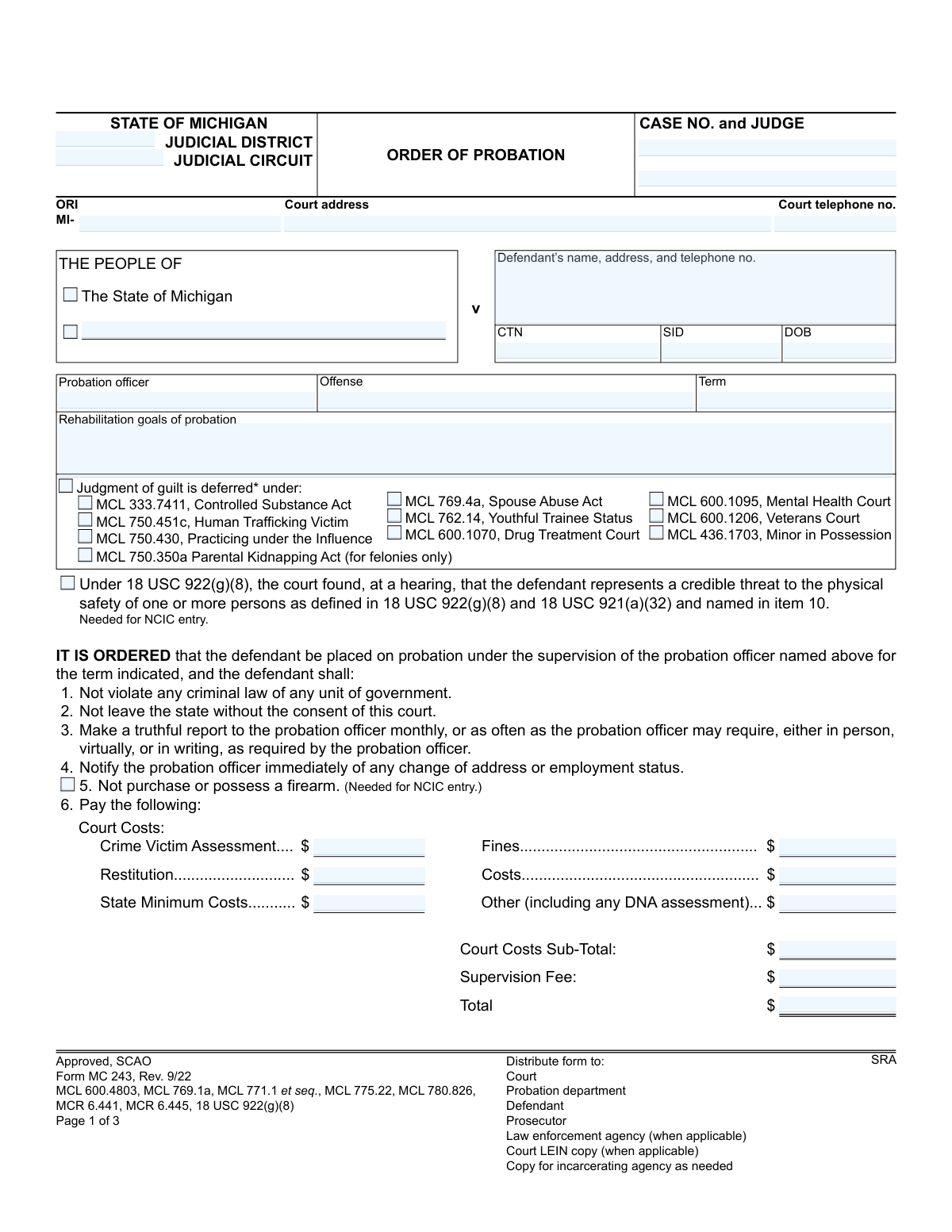
Yes! You can use AI to fill out Form MC 243, Order of Probation

Form MC 243, Order of Probation, is an official judicial document used in Michigan courts to formally place a defendant on probation. It specifies the length of the probation term, rehabilitation goals, and mandatory conditions such as reporting to a probation officer, paying fines, and refraining from criminal activity. This order is legally binding, and failure to comply can result in probation revocation and incarceration. Today, this form can be filled out quickly and accurately using AI-powered services like Instafill.ai, which can also convert non-fillable PDF versions into interactive fillable forms.
MC 243 is part of the Michigan court forms category on Instafill.
Our AI automatically handles information lookup, data retrieval, formatting, and form filling.
It takes less than a minute to fill out MC 243 using our AI form filling.
Securely upload your data. Information is encrypted in transit and deleted immediately after the form is filled out.

Form specifications

Form name: Form MC 243, Order of Probation
Number of fields: 74
Number of pages: 1
Language: English
main-image

Instafill Demo: How to fill out PDF forms in seconds with AI

How to Fill Out MC 243 Online for Free in 2026

Are you looking to fill out a MC 243 form online quickly and accurately? Instafill.ai offers the #1 AI-powered PDF filling software of 2026, allowing you to complete your MC 243 form in just 37 seconds or less.
Follow these steps to fill out your MC 243 form online using Instafill.ai:
  1. 1 Navigate to Instafill.ai and upload your Order of Probation form or select the MC 243 template.
  2. 2 Allow the AI to scan the document and automatically identify all fields for case information, defendant details, and probation terms.
  3. 3 Follow the guided prompts to enter court and case details, defendant's personal information, and the specific offense and term of probation.
  4. 4 Check the boxes for all applicable conditions of probation, such as reporting requirements, travel restrictions, and firearm prohibitions.
  5. 5 Accurately fill in the financial section, detailing court costs, restitution, fines, and supervision fees, including payment schedules.
  6. 6 Complete the LEIN section with identifying information if required, and specify any other special conditions ordered by the court.
  7. 7 Review all entered information for accuracy, then have the defendant digitally sign and date the acknowledgment before downloading and distributing the completed form to the court, probation department, and other required parties.

Our AI-powered system ensures each field is filled out correctly, reducing errors and saving you time.

Why Choose Instafill.ai for Your Fillable MC 243 Form?

Speed

Complete your MC 243 in as little as 37 seconds.

Up-to-Date

Always use the latest 2026 MC 243 form version.

Cost-effective

No need to hire expensive lawyers.

Accuracy

Our AI performs 10 compliance checks to ensure your form is error-free.

Security

Your personal information is protected with bank-level encryption.

Frequently Asked Questions About Form MC 243

This form is a legal court order that outlines the specific rules, conditions, and duration of a defendant's probation in the state of Michigan. It serves as the official record of the terms the defendant must follow to successfully complete their probationary period.

The defendant whose name and information are listed at the top of the form must comply with all the conditions detailed in this court order. The form is signed by a judge and is legally binding.

This means the court is postponing a formal judgment of guilt, giving the defendant a chance to complete probation successfully. If all conditions are met, the case may be dismissed without a conviction on the defendant's public record.

No, condition number 2 explicitly states that you may not leave the state of Michigan without first getting consent from the court.

According to condition number 4, you must notify your probation officer immediately of any change in your address or employment status.

The form advises you to contact the court immediately if you are unable to pay due to financial hardship. You can request a payment alternative to avoid the 20% late penalty.

You may be eligible for early discharge if the judge checked the corresponding box in item 11. To be considered, you must complete at least half of your probation period and all required programming, then file the proper notice with the court.

This information is required for the police or sheriff to enter the probation order into the Law Enforcement Information Network (LEIN). This ensures law enforcement officers are aware of the active order and its conditions.

Failure to comply with the order may result in a revocation of your probation. This could lead to additional penalties, including incarceration.

Yes, your signature in this section confirms that you have read or had the order explained to you, received a copy, and understand and agree to comply with all its conditions.

Section 6 of the form provides a detailed breakdown of all court costs, fines, restitution, and fees. The final 'Total' at the bottom of this section shows the full amount you are required to pay.

Yes, services like Instafill.ai use AI to auto-fill your personal information accurately and securely onto the form. This can save you time and help prevent common errors.

You can use a service like Instafill.ai to securely upload the PDF form. Their platform allows you to fill out the form fields online from any device and then download or print the completed document.

If you have a 'flat' or non-fillable PDF, you can use Instafill.ai to convert it into an interactive, fillable form. This makes it easy to type your information directly into the fields online.

Compliance MC 243
Validation Checks by Instafill.ai

1
Case Number Format and Presence
This check verifies that the 'CASE NO.' field is not empty and conforms to the standard Michigan court case number format. A valid case number is crucial for uniquely identifying the legal proceeding and linking the document to the correct file in the court's record system. A submission with an invalid or missing case number will be rejected and require manual correction to ensure proper filing.
2
LEIN Entry Prerequisite Fields
This validation ensures that if the 'This order shall be entered into LEIN' checkbox is selected, all mandatory fields for LEIN entry are completed. These fields, marked with an asterisk (Race, Sex, Date of birth, LEIN expiration date), are required by law enforcement systems for accurate record creation. Failure to provide this information will prevent the order from being entered into the system, so the form submission will be flagged as incomplete.
3
Financial Calculation Integrity
This check validates the arithmetic in the financial section by summing the individual cost items (Crime Victim Assessment, Restitution, etc.) and ensuring the result matches the 'Court Costs Sub-Total'. It also verifies that the 'Total' field correctly equals the sum of the 'Court Costs Sub-Total' and the 'Supervision Fee'. This is critical for ensuring the defendant is billed the correct amount and for maintaining accurate financial records.
4
Deferred Judgment Logical Consistency
This rule checks that if the 'Judgment of guilt is deferred' box is checked, at least one of the specific statutory deferral options (e.g., MCL 333.7411, MCL 769.4a) is also selected. This ensures the legal basis for the deferral is clearly documented on the order. A form submitted with a deferred judgment but no specified statute is legally ambiguous and will be rejected for clarification.
5
Court Cost Payment Plan Completeness
This validation triggers if the installment payment option for court costs is selected. It verifies that all related fields, including installment amount, payment frequency, start date, and final due date, are filled out. Incomplete payment plan details create ambiguity and make enforcement impossible, so the submission will be rejected until the plan is fully defined.
6
Mutually Exclusive Early Discharge Status
This check ensures that one and only one of the two options for early discharge eligibility ('may be eligible' or 'is not eligible') is selected. These options are mutually exclusive, and selecting both or neither creates a legally unclear order regarding the defendant's status. The form must be corrected to reflect a single, clear choice before it can be processed.
7
LEIN Expiration Date Validity
This validation confirms that the 'expires on' date for the LEIN entry is a valid future date. A LEIN protective order must have a clear expiration date to be valid and enforceable. An expired or improperly formatted date would render the entry invalid, so the system will reject submissions that fail this check.
8
'Other' Conditions Text Requirement
This rule ensures that if the 'Other' checkbox in item 10 is selected, the corresponding text box is not empty. This is important because checking the box indicates that special conditions apply, and these conditions must be explicitly stated to be enforceable. A submission with a checked box but no text will be flagged as incomplete, as the intended conditions are missing.
9
Date of Birth Consistency
This check compares the 'DOB' field in the defendant's information section with the 'Date of birth' field in the LEIN section. These two fields must contain the same date to ensure data integrity and accurate identification of the defendant across different parts of the form and in external systems like LEIN. A mismatch would indicate a data entry error and must be corrected.
10
Monetary Field Format Validation
This check verifies that all fields intended to hold monetary values (e.g., 'Fines', 'Restitution', 'Supervision Fee') contain valid, non-negative numerical data. This prevents data corruption from non-numeric characters and ensures that all financial calculations are based on correct inputs. Any field with invalid characters will cause the submission to fail, requiring the user to input proper currency values.
11
Supervision Fee Payment Plan Completeness
If the option to pay supervision fees in installments is selected, this validation ensures the installment amount, payment period, and start date are all provided. Similar to the court cost plan, a complete definition is required for the fee schedule to be actionable and enforceable. The submission will be considered incomplete if any of these details are missing after the installment option is chosen.
12
Logical Date Sequencing
This validation checks the logical order of dates on the form, specifically ensuring the Judge's signature date is on or before the Defendant's acknowledgment date. The defendant cannot acknowledge an order before it has been signed by the judge. This check prevents logically impossible scenarios and ensures the procedural timeline is valid.
13
Required Header Fields Completion
This check ensures that essential identifying information at the top of the form, such as the Defendant's name, Probation Officer, Offense, and Term of probation, are not left blank. This core information is fundamental to the order's purpose and identifies the parties and terms involved. A submission lacking any of this critical data is incomplete and cannot be processed.
14
Phone Number Format
This validation checks that the 'Court telephone no.' and the defendant's telephone number are entered in a recognizable format (e.g., 10 digits, with optional parentheses, spaces, or hyphens). Proper formatting ensures the data is usable for communication and can be correctly parsed by other systems. An invalid format would trigger an error, prompting the user to correct the entry.

Common Mistakes in Completing MC 243

Incorrect Case Number or Personal Identifiers

Users often mistype the Case Number, CTN (Criminal Tracking Number), or SID (State Identification Number) due to transcription errors from other legal documents. This can cause the probation order to be misfiled, delaying its implementation or linking it to the wrong person's record. To prevent this, meticulously double-check these numbers against the official Judgment of Sentence or other court records.

Miscalculating Financial Totals

The financial section (Item 6) requires summing multiple costs, fines, and fees, and errors in addition are common. An incorrect total can lead to underpayment, resulting in late penalties and violation notices, or overpayment, which is difficult to recover. Always use a calculator to sum the 'Court Costs Sub-Total' and the final 'Total', and verify the figures before submission.

Incomplete Information for LEIN Entry

Item 12 requires specific personal data like height, weight, race, and driver's license number for entry into the Law Enforcement Information Network (LEIN). People frequently leave one or more of these asterisked fields blank, which prevents the order from being entered into the system. This is a critical failure, as it hinders law enforcement's ability to enforce the order's conditions, so ensure every required field in this section is filled accurately.

Vague or Unenforceable 'Other' Conditions

The free-text field for 'Other' conditions (Item 10) is often filled with ambiguous language, such as 'stay away from the victim.' Such vague terms are difficult for the defendant to follow and for law enforcement to enforce, leading to disputes. Conditions must be specific and measurable, clearly naming persons and defining prohibited actions or distances to ensure clarity and enforceability.

Conflicting Payment Schedule Information

In Items 7 and 8, users may create conflicting payment schedules, such as setting an installment start date that precedes the order date or having installment amounts that don't align with the total due. This creates confusion and can lead to unintentional default on payments. Ensure all dates are logical and that the installment plan correctly covers the total amount owed by the final due date.

Missing Defendant Acknowledgment Signature

The defendant's signature and date on the acknowledgment section are crucial for confirming they understand and agree to the probation terms. Forgetting to sign this section can create legal challenges regarding proper notification, potentially invalidating the enforcement of the terms. Always ensure the defendant signs and dates the form in the designated area after reviewing the conditions.

Forgetting the LEIN Expiration Date

Item 12 requires an expiration date for the LEIN entry, which should align with the end of the probation term. Omitting this date can cause the entry to be rejected by the system or, worse, remain active indefinitely after probation is complete, causing future problems for the individual. This date must be clearly filled in and should match the probation term specified on the first page.

Ambiguous Early Discharge Eligibility

Item 11 presents a choice between the defendant 'may be' or 'is not' eligible for early discharge, and a common error is failing to check either box or checking both. This ambiguity creates false hope or confusion for the defendant and probation officer regarding a key aspect of the sentence. A single, clear selection must be made to reflect the court's definitive ruling on this matter.

Incorrectly Checking Deferred Judgment Status

The section listing statutes for deferred judgments (e.g., MCL 333.7411, MCL 769.4a) requires precise legal knowledge. An error here, such as checking the wrong statute or checking a box when the judgment isn't deferred, has major consequences for the defendant's criminal record. This section must be completed with extreme care, verifying the correct statutory basis for the deferral against the court's official ruling.

Entering an Incomplete or Outdated Address

The defendant's address field is frequently filled out with incomplete or old information. Since this is the primary address for all official court and probation communications, an error can cause the defendant to miss vital notices, leading to unintentional violations. It is essential to provide a complete, current mailing address and to follow the probation condition of immediately notifying the officer of any change.

Handwriting Illegibly on a Paper Form

When this form is provided as a non-fillable PDF, it must be printed and filled out by hand, often leading to illegible entries. Unclear handwriting for names, numbers, or conditions can cause serious data entry errors by court clerks, leading to misfiled orders or incorrect enforcement. To avoid this, print clearly in block letters, or use a tool like Instafill.ai, which can convert flat PDFs into digitally fillable forms to ensure perfect legibility.
Saved over 80 hours a year

“I was never sure if my IRS forms like W-9 were filled correctly. Now, I can complete the forms accurately without any external help.”

Kevin Martin Green

Your data stays secure with advanced protection from Instafill and our subprocessors

Robust compliance program

Transparent business model

You’re not the product. You always know where your data is and what it is processed for.

ISO 27001, HIPAA, and GDPR

Our subprocesses adhere to multiple compliance standards, including but not limited to ISO 27001, HIPAA, and GDPR.

Security & privacy by design

We consider security and privacy from the initial design phase of any new service or functionality. It’s not an afterthought, it’s built-in, including support for two-factor authentication (2FA) to further protect your account.

Fill out MC 243 with Instafill.ai

Worried about filling PDFs wrong? Instafill securely fills form-mc-243-order-of-probation forms, ensuring each field is accurate.