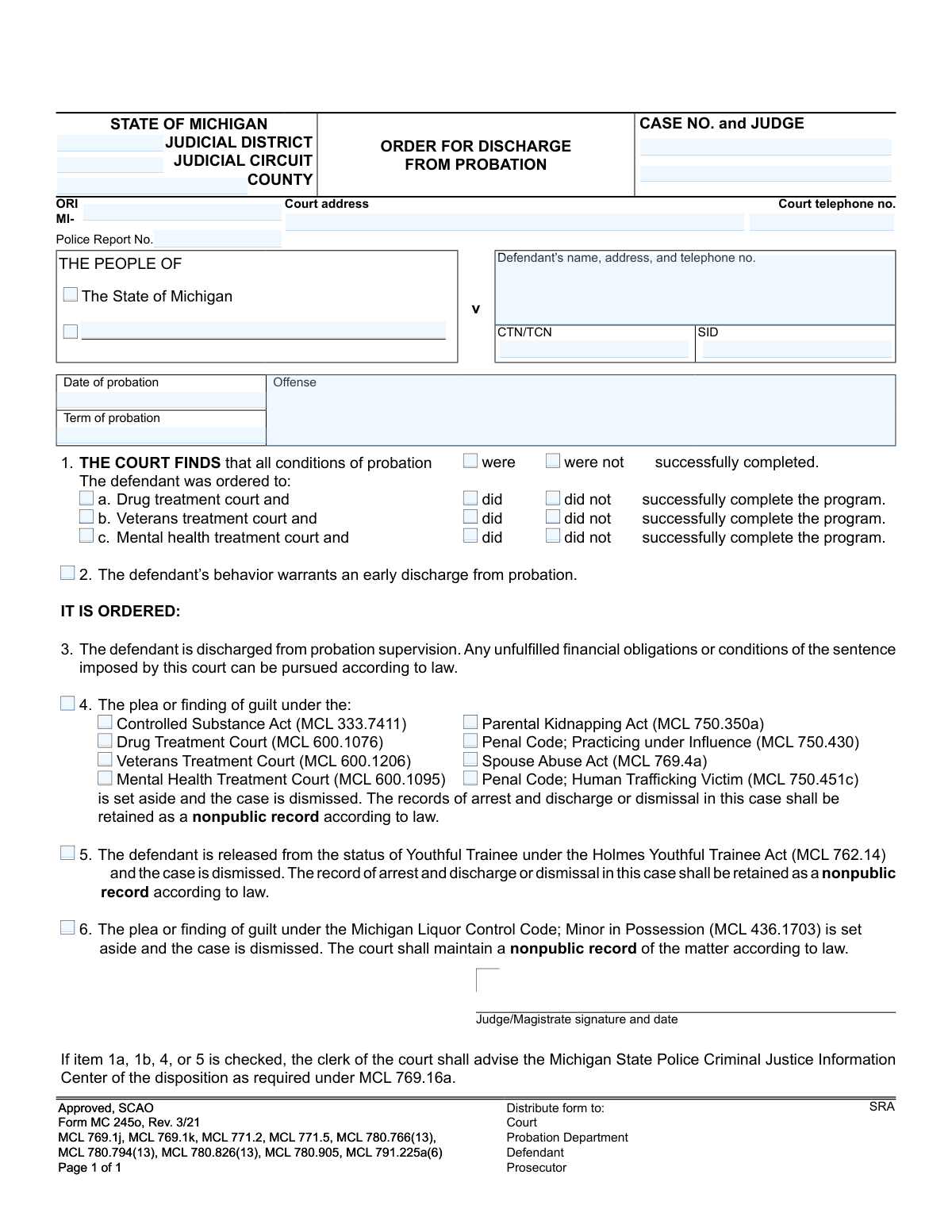
Yes! You can use AI to fill out Form MC 245o, Order for Discharge From Probation

Form MC 245o, Order for Discharge From Probation, is a legal document issued by a Michigan court to formally release a defendant from their probation sentence. It certifies whether the defendant successfully completed the terms of their probation, including any specialized programs, and orders their discharge from supervision. Today, this form can be filled out quickly and accurately using AI-powered services like Instafill.ai, which can also convert non-fillable PDF versions into interactive fillable forms.
MC 245o is part of the Michigan court forms category on Instafill.
Our AI automatically handles information lookup, data retrieval, formatting, and form filling.
It takes less than a minute to fill out MC 245o using our AI form filling.
Securely upload your data. Information is encrypted in transit and deleted immediately after the form is filled out.

Form specifications

Form name: Form MC 245o, Order for Discharge From Probation
Number of fields: 41
Number of pages: 1
Language: English
main-image

Instafill Demo: How to fill out PDF forms in seconds with AI

How to Fill Out MC 245o Online for Free in 2026

Are you looking to fill out a MC 245O form online quickly and accurately? Instafill.ai offers the #1 AI-powered PDF filling software of 2026, allowing you to complete your MC 245O form in just 37 seconds or less.
Follow these steps to fill out your MC 245O form online using Instafill.ai:
  1. 1 Navigate to Instafill.ai and upload the MC 245o form or select it from the template library.
  2. 2 Provide the court and case information, including the judicial district, county, case number, and judge's name.
  3. 3 Enter the defendant's name and contact information, along with details of the offense and the original probation term.
  4. 4 Indicate whether the conditions of probation were successfully completed and specify the outcome of any participation in drug, veterans, or mental health treatment courts.
  5. 5 Check the relevant boxes to specify the legal grounds for the discharge, such as completion under the Youthful Trainee Act or other specific statutes.
  6. 6 Review all the auto-filled information for accuracy, ensuring all case details and legal citations are correct.
  7. 7 Once verified, the form is ready for the judge or magistrate to sign and date, finalizing the order for discharge.

Our AI-powered system ensures each field is filled out correctly, reducing errors and saving you time.

Why Choose Instafill.ai for Your Fillable MC 245o Form?

Speed

Complete your MC 245o in as little as 37 seconds.

Up-to-Date

Always use the latest 2026 MC 245o form version.

Cost-effective

No need to hire expensive lawyers.

Accuracy

Our AI performs 10 compliance checks to ensure your form is error-free.

Security

Your personal information is protected with bank-level encryption.

Frequently Asked Questions About Form MC 245o

This is an official court order signed by a judge that formally ends a defendant's probation period. It documents the completion of probation, specifies the final outcome of the case, and is distributed to all relevant parties.

Receiving this form means the court has officially closed your probation case and you are no longer under supervision. Be sure to read the order, as you may still be responsible for any unpaid fines or fees.

This form is not filled out by the defendant. It is an official order completed and signed by a judge or magistrate to legally document the end of a probation sentence.

This means that even though your probation supervision has ended, you are still legally required to pay any outstanding fines, court costs, or restitution. The court can still use legal means to collect these unpaid amounts.

A regular discharge happens when you complete the full term of your probation. An early discharge, noted in item 2, is granted by a judge before your original end date, typically as a reward for excellent behavior and compliance.

This is a very positive outcome, meaning the conviction is removed from your public record and the case is dismissed. The court will maintain a nonpublic record of the matter as required by law, which is not visible on most background checks.

A nonpublic record is not accessible to the general public, unlike a standard conviction. It is retained by law enforcement and the courts for their internal use but is not typically disclosed on employment or housing background checks.

If the 'were not successfully completed' box is checked, it indicates you did not fulfill all the conditions of your probation. This may result in an unsuccessful discharge, and you should consult with an attorney to understand the implications.

The timing can vary by court, but you should generally receive the order within a few weeks of your probation end date. If you have not received it, you can contact the court clerk or your former probation officer for an update.

Typically, the discharge process is automatically initiated by your probation officer and the court once you complete all requirements. However, to be considered for an early discharge, you or your attorney may need to file a formal request with the court.

While a defendant does not fill out this form, court and legal professionals can use AI-powered services like Instafill.ai. These tools can accurately auto-fill case details and defendant information, which saves time and helps prevent clerical errors.

Court staff can use a service like Instafill.ai to upload the MC 245o form and complete it digitally. The platform allows for easy data entry into all fields and selection of checkboxes before printing the completed order for the judge's signature.

If you have a non-fillable or 'flat' PDF, you can use a tool like Instafill.ai to make it interactive. The service converts the static document into a smart, fillable form online, making it easy to complete and manage digitally.

Compliance MC 245o
Validation Checks by Instafill.ai

1
Case Number Presence and Format
This check ensures the 'CASE NO.' field is not empty and conforms to the expected format for the jurisdiction. The case number is the primary identifier for the legal proceeding, and its absence or incorrect format would make it impossible to file the order correctly or link it to the defendant's record. Failure to provide a valid case number will result in a rejection of the form submission, requiring the user to correct the entry.
2
Probation Date Validity
This validation verifies that the 'Date of probation' is a valid calendar date and occurs in the past. An invalid or future date would be logically impossible, as a discharge can only happen after probation has begun. This check prevents data entry errors that could invalidate the entire legal order, and a failed validation will prompt the user to enter a correct, historical date.
3
Probation Completion Status Exclusivity
This check ensures that exactly one of the two options for probation completion ('were' or 'were not' successfully completed) is selected. These options are mutually exclusive and one must be chosen to accurately reflect the court's finding on the defendant's performance. If neither or both are selected, the form is ambiguous and will be flagged as incomplete, preventing submission until a single choice is made.
4
Defendant Information Completeness
This validation ensures that the field for the defendant's name, address, and telephone number is not empty. This information is critical for positively identifying the individual to whom the order applies and for proper record-keeping. An order without clear defendant identification is legally deficient, so a failed validation will block submission until the required information is provided.
5
Drug Treatment Court Logical Consistency
This check validates that if the 'Drug treatment court' box (1a) is checked, then one of the subsequent 'did' or 'did not' successfully complete options must also be selected. Checking the first box indicates participation, which must be qualified by a success or failure status. An incomplete selection creates an ambiguous record, so the validation will fail and require the user to specify the outcome of the program participation.
6
Veterans Treatment Court Logical Consistency
This validation ensures that if the 'Veterans treatment court' box (1b) is checked, a corresponding 'did' or 'did not' successfully complete option is also selected. This logic maintains the integrity of the court's findings regarding specialized treatment programs. A failure to specify the outcome after indicating participation will result in a validation error, halting the process until the form is completed correctly.
7
Set Aside Act Specificity
This check verifies that if the main checkbox for item 4 ('The plea or finding of guilt...is set aside') is selected, at least one of the specific statutory acts listed below it is also checked. The order must specify the legal authority under which the plea is being set aside for it to be valid. If this condition is not met, the form will be considered incomplete and the user will be prompted to select the relevant act.
8
Judge Signature Date Logic
This validation confirms that the date entered next to the judge's signature is a valid date and is not earlier than the 'Date of probation'. A judge cannot sign a discharge order before the probation period has even started. This logical check prevents clerical errors that would render the order nonsensical and legally invalid, forcing the user to correct the date before proceeding.
9
ORI Format Validation
This check ensures the 'ORI' (Originating Agency Identifier) field, if filled, begins with the 'MI-' prefix followed by the agency code. This format is a standard for identifying law enforcement and court agencies within Michigan's systems. An incorrectly formatted ORI can lead to misrouting of information or failure to update state criminal justice databases, so the system will require the user to correct the format.
10
Offense Description Requirement
This validation ensures the 'Offense' field is not left blank. The order must clearly state the crime for which the defendant was serving probation to ensure the discharge is applied to the correct conviction. Omitting this information creates an ambiguous legal document, so the validation will fail and require the user to specify the offense.
11
Plaintiff Selection Logic
This check validates that either 'The State of Michigan' or the 'peopleof' checkbox is selected, and if 'peopleof' is chosen, its corresponding text field is not empty. This section identifies the plaintiff in the case, which is a fundamental component of any court order. An invalid or incomplete selection will cause the validation to fail, requiring the user to properly identify the plaintiff.
12
Court Telephone Number Format
This validation checks that the 'Court telephone no.' field contains a value that conforms to a standard phone number format (e.g., including area code and 7 digits). While not as critical as a case number, a valid phone number is important for administrative follow-up and contact. An invalid format could hinder communication, so the system will flag the entry and suggest correction.

Common Mistakes in Completing MC 245o

Incorrect Case Number or Judge Name

Users often transpose digits in the case number or misspell the judge's name. This typically happens due to manual data entry from another document. An incorrect case number can cause the order to be rejected by the court clerk or, worse, filed under the wrong case, creating significant legal confusion and delays. Double-checking these details against the official court record is essential before submission.

Missing State-Level Identifiers (CTN/TCN/SID)

The CTN (Complaint Tracking Number), TCN (Transaction Control Number), and SID (State Identification Number) fields are frequently left blank. These numbers are critical for the Michigan State Police to accurately update the defendant's criminal record. Without them, a dismissal or set-aside may not be properly recorded, causing the conviction to remain on the individual's public record. This information should be obtained from the original sentencing order or the probation department.

Contradictory Checkbox Selections

A common error is checking conflicting boxes, such as marking that probation conditions 'were' and 'were not' successfully completed in Item 1. This mistake stems from haste or misunderstanding the form's logic. An order with contradictory information is legally ambiguous and will be considered invalid, requiring correction and resubmission, thereby delaying the discharge process.

Incomplete Treatment Court Status

In Items 1a, 1b, and 1c, filers may check that the defendant was ordered to a treatment court but then fail to select either 'did' or 'did not' successfully complete the program. This omission leaves the defendant's status unclear and prevents the court from verifying if the conditions for a specialized discharge have been met. It is crucial to complete both parts of the selection for these items to ensure the order is processed correctly.

Forgetting to Specify the Applicable Statute

When seeking to have a plea or finding of guilt set aside, users may check the main box in Item 4 but forget to check the specific underlying statute, such as the 'Controlled Substance Act' or 'Spouse Abuse Act'. This failure to specify the legal basis makes the order legally deficient and unenforceable. The clerk cannot process the set-aside without knowing the specific law that authorizes it.

Omitting Critical Dates

The 'Date of probation' and the signature date are often overlooked. These dates are legally significant, establishing the timeline of supervision and the exact moment the discharge order becomes effective. Missing dates can render the document invalid or create ambiguity about when the probation term officially ended, potentially leading to legal challenges or rejection by the records department.

Incomplete Defendant Contact Information

Filers sometimes provide an incomplete name or leave the defendant's address and telephone number blank. This may happen if the filer, such as an attorney's office, does not have the most current information readily available. An incomplete address can prevent the defendant from receiving a copy of the order, which serves as their official proof of discharge, and can hinder any future communication.

Using an Outdated Version of the Form

This form is marked 'Rev. 3/21', but users may find and use older versions from saved files or outdated websites. Legal forms are updated to reflect changes in laws and statutes, and using an old version can lead to an immediate rejection by the court clerk. Always ensure you are using the most current version available from the official SCAO (State Court Administrative Office) website.

Illegible Information on a Printed Form

When the form is not fillable and must be printed and completed by hand, illegible handwriting is a major issue. Unclear names, numbers, or checkmarks can make the order impossible for the court clerk or state police to process accurately. This leads to the document being returned for clarification, causing unnecessary delays. AI-powered tools like Instafill.ai can convert non-fillable PDFs into fillable versions, ensuring all entries are typed and legible.

Failing to Specify the Original Offense

The 'Offense' field is sometimes left blank or filled with a non-standard abbreviation. The specific offense is crucial for record-keeping and for determining eligibility for certain types of dismissals or set-asides. An unclear offense description requires court staff to look up the case file to verify the information, slowing down the entire discharge process. Using AI form-filling tools like Instafill.ai can help by auto-populating this information from case data, ensuring accuracy and completeness.
Saved over 80 hours a year

“I was never sure if my IRS forms like W-9 were filled correctly. Now, I can complete the forms accurately without any external help.”

Kevin Martin Green

Your data stays secure with advanced protection from Instafill and our subprocessors

Robust compliance program

Transparent business model

You’re not the product. You always know where your data is and what it is processed for.

ISO 27001, HIPAA, and GDPR

Our subprocesses adhere to multiple compliance standards, including but not limited to ISO 27001, HIPAA, and GDPR.

Security & privacy by design

We consider security and privacy from the initial design phase of any new service or functionality. It’s not an afterthought, it’s built-in, including support for two-factor authentication (2FA) to further protect your account.

Fill out MC 245o with Instafill.ai

Worried about filling PDFs wrong? Instafill securely fills form-mc-245o-order-for-discharge-from-probation forms, ensuring each field is accurate.