Yes! You can use AI to fill out Form MC 246a, Request and Warrant for Probation Violation
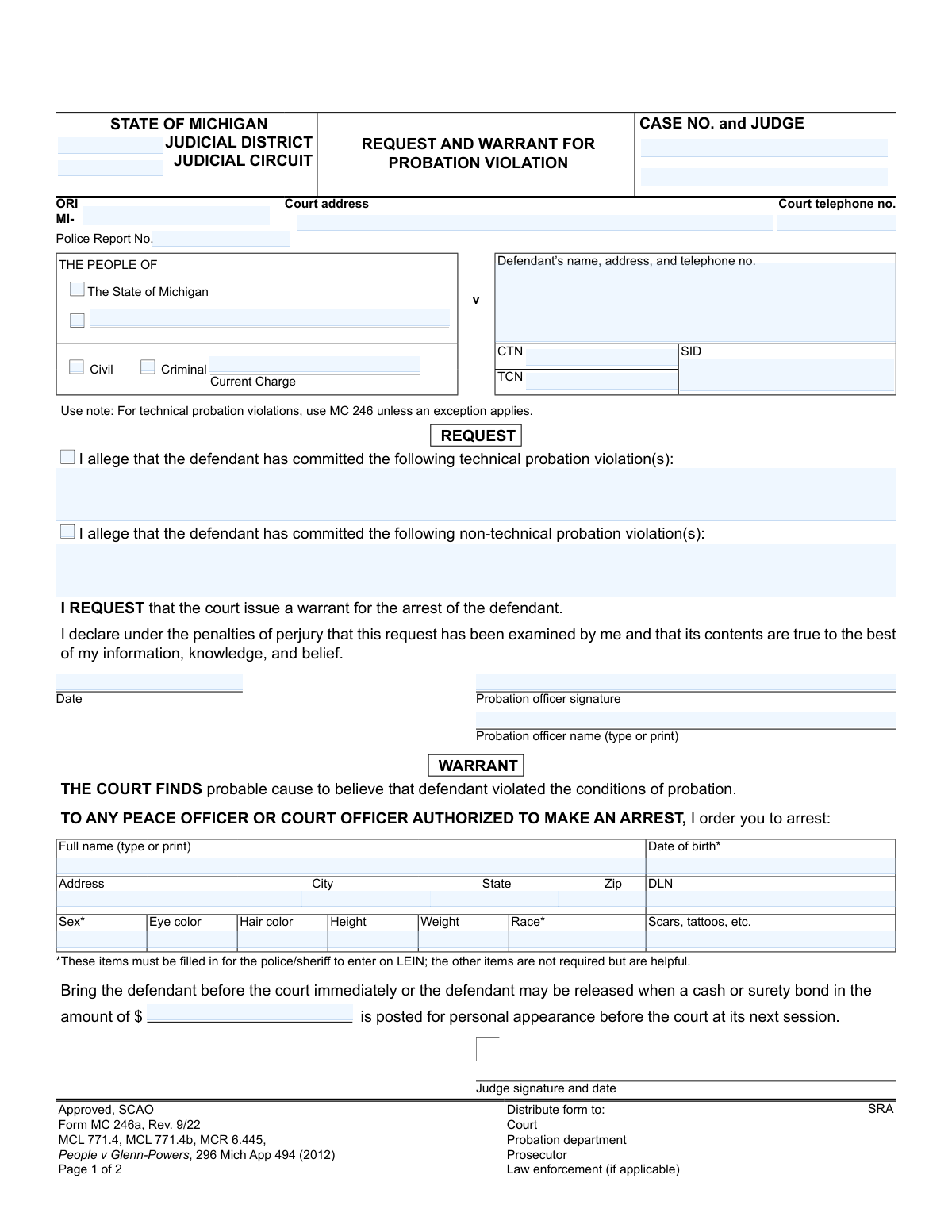
Form MC 246a is a Michigan State Court Administrative Office (SCAO) approved form used by a probation officer to formally allege that a defendant has violated the terms of their probation. It serves as both a request to the court and, upon a judge's signature, a warrant for the defendant's arrest. This form is critical for initiating legal proceedings for probation violations. Today, this form can be filled out quickly and accurately using AI-powered services like Instafill.ai, which can also convert non-fillable PDF versions into interactive fillable forms.
MC 246a is part of the
Michigan court forms category on Instafill.
Our AI automatically handles information lookup, data retrieval, formatting, and form filling.
It takes less than a minute to fill out MC 246a using our AI form filling.
Securely upload your data. Information is encrypted in transit and deleted immediately after the form is filled out.
Form specifications
| Form name: | Form MC 246a, Request and Warrant for Probation Violation |
| Number of fields: | 43 |
| Number of pages: | 1 |
| Language: | English |
More forms in Michigan court forms
Instafill Demo: How to fill out PDF forms in seconds with AI
How to Fill Out MC 246a Online for Free in 2026
Are you looking to fill out a MC 246A form online quickly and accurately? Instafill.ai offers the #1 AI-powered PDF filling software of 2026, allowing you to complete your MC 246A form in just 37 seconds or less.
Follow these steps to fill out your MC 246A form online using Instafill.ai:
- 1 Navigate to Instafill.ai and upload or select the Form MC 246a, Request and Warrant for Probation Violation.
- 2 Use the AI assistant to input the court and case details, such as the judicial district, circuit, case number, and judge's name.
- 3 Provide the defendant's complete identifying information, including name, address, date of birth, and physical descriptors required for the Law Enforcement Information Network (LEIN).
- 4 Clearly state the alleged probation violations, checking the appropriate box for technical or non-technical violations and providing a detailed description.
- 5 The requesting probation officer will digitally sign and date the request section to declare the contents are true to their knowledge.
- 6 Review all the information populated by the AI for accuracy and completeness before finalizing the document.
- 7 Download the completed form for submission to the court for a judge's review and signature on the warrant portion, and distribute copies as required.
Our AI-powered system ensures each field is filled out correctly, reducing errors and saving you time.
Why Choose Instafill.ai for Your Fillable MC 246a Form?
Speed
Complete your MC 246a in as little as 37 seconds.
Up-to-Date
Always use the latest 2026 MC 246a form version.
Cost-effective
No need to hire expensive lawyers.
Accuracy
Our AI performs 10 compliance checks to ensure your form is error-free.
Security
Your personal information is protected with bank-level encryption.
Frequently Asked Questions About Form MC 246a
This form is used by a probation officer to request an arrest warrant for a defendant who has allegedly violated their probation. A judge then uses the same form to issue the warrant if they find probable cause for the violation.
A probation officer initiates the form by filling out the defendant's information and the 'Request' section detailing the alleged violations. A judge then reviews it and, if they agree, completes and signs the 'Warrant' section to authorize the arrest.
A technical violation is failing to follow a specific rule of probation, like missing a meeting or failing a drug test. A non-technical violation typically refers to the defendant committing a new criminal offense while on probation.
These specific details are mandatory for the police or sheriff to enter the warrant into the Law Enforcement Information Network (LEIN). While other information is helpful, these items are essential for official record-keeping and identification.
Once the judge signs the warrant, it becomes active, and any peace officer is authorized to arrest the named defendant. The defendant is then brought before the court or may be released if they post the specified bond amount.
The bond amount is the sum of money the defendant can pay to be released from custody until their court hearing for the probation violation. If no amount is listed, the defendant will be held until they appear before the court.
Form MC 246a is used for non-technical violations (i.e., new crimes) or for technical violations where an immediate arrest warrant is deemed necessary. The standard form for technical violations that don't require a warrant is MC 246.
Copies of the completed and signed warrant should be distributed to the court, the probation department, the prosecutor, and the law enforcement agency responsible for the arrest.
The 'Return' section is completed by the peace officer after they have arrested the person named in the warrant. It serves as official confirmation that the warrant has been executed.
Yes, services like Instafill.ai use AI to auto-fill form fields accurately from your records, which saves time and helps prevent data entry errors.
Simply upload the MC 246a PDF to the Instafill.ai platform. The AI will make the document fillable, allowing you to type information directly into the fields or connect a data source to populate it automatically.
You can use a service like Instafill.ai, which is designed to convert flat, non-fillable PDFs into interactive, fillable forms. This allows you to easily complete and manage the document digitally.
Compliance MC 246a
Validation Checks by Instafill.ai
1
LEIN Required Fields Completion
Ensures all fields marked with an asterisk (Date of birth, Sex, Eye color, Hair color, Height, Weight, Race) are filled out. This information is mandatory for law enforcement to enter the warrant into the Law Enforcement Information Network (LEIN). Failure to provide this data will result in the rejection of the warrant for entry into the system, delaying the arrest process.
2
Date of Birth Validity
Validates that the 'Date of birth' field contains a legitimate date and that the date is in the past. An invalid or future date of birth is impossible and would invalidate the warrant and any associated records like LEIN entries. If the date is invalid, the form cannot be processed as it compromises the defendant's identity verification.
3
Case Number Consistency Across Pages
Verifies the 'CASE NO.' entered on page 1 is identical to the 'Case No.' on page 2. This is crucial for maintaining the integrity of the document and ensuring all pages are correctly associated with the same legal case. A mismatch could lead to administrative confusion, incorrect filing, or legal challenges regarding the document's validity.
4
Violation Specification Completeness
Verifies that if either the 'technical probation violation(s)' or 'non-technical probation violation(s)' checkbox is selected, the corresponding text area listing the specific violations is not empty. A warrant cannot be issued without a stated reason. This check ensures the legal basis for the warrant is clearly documented, preventing submission of an incomplete and legally insufficient request.
5
ORI Number Format
Validates that the 'ORI' (Originating Agency Identifier) field starts with 'MI-' followed by a specific sequence of characters or numbers. The ORI is a unique identifier for the law enforcement agency, and an incorrect format can lead to misrouting of information or failure to log the warrant correctly in state and national systems. This ensures proper attribution and record-keeping.
6
Case Type Selection
Confirms that exactly one of the 'Civil' or 'Criminal' checkboxes is selected. A case must be classified as one or the other for proper court docketing and procedure. Selecting neither or both would create ambiguity and lead to processing errors by the court clerk's office.
7
Defendant Name Consistency
Checks that the defendant's name entered in the main details section matches the name specified in the warrant order section ('I order you to arrest:'). This consistency is critical to ensure the warrant is issued for the correct individual. Any discrepancy could lead to a legally invalid warrant or the wrongful arrest of an unintended person.
8
Probation Officer Signature Date Logic
Validates that the 'Date' field next to the probation officer's signature is a valid date and is not set in the future. The signature date authenticates when the request was made and must reflect a real, past or present event. A future date would invalidate the perjury declaration and the entire request.
9
Bond Amount Format
Ensures the 'bond amount' field contains a valid, non-negative numeric or currency value. This amount is a critical instruction for law enforcement upon arrest. An invalid format, such as text, would make the condition for release unclear, requiring further clarification and delaying the booking process.
10
Court Telephone Number Format
Validates that the 'Court telephone no.' field contains a properly formatted 10-digit phone number. A valid phone number is essential for law enforcement or other parties to contact the court for verification or scheduling. An incorrectly formatted number hinders communication and can delay proceedings.
11
At Least One Violation Type Alleged
Verifies that at least one of the checkboxes for 'technical probation violation(s)' or 'non-technical probation violation(s)' is selected. The form's purpose is to request a warrant for a probation violation, so at least one type must be alleged. Submitting the form without specifying the nature of the violation makes the request baseless and incomplete.
12
Required Signatory Information
Checks for the presence of the probation officer's printed name and signature. The printed name ensures legibility and identifies the officer making the request, while the signature authenticates the declaration under penalty of perjury. Missing either of these elements renders the request legally insufficient and invalid.
13
ZIP Code Format
Validates that the 'Zip' code field in the defendant's address contains a 5-digit or 9-digit (ZIP+4) numeric value. A valid ZIP code is necessary for accurate mail delivery and for geolocating the address for law enforcement purposes. An incorrect format can lead to returned mail and errors in location-based record systems.
14
Judge Signature and Date Presence
Checks that if the 'WARRANT' section is filled out, the Judge's signature and date are present. The judge's signature is what transforms the request into a legally binding warrant. Without it, the document has no legal authority, and any arrest made based on it would be invalid.
Common Mistakes in Completing MC 246a
The form explicitly marks Date of Birth (DOB), Sex, and Race with an asterisk, indicating they are mandatory for entry into the Law Enforcement Information Network (LEIN). Officers often overlook these fields in a rush, which prevents law enforcement from officially logging the warrant, rendering it unenforceable. To avoid this, always double-check that all asterisked fields are completed accurately before submitting the form to the judge for signature.
A common error is having a slight variation between the defendant's name in the top section ('dname') and the name listed in the warrant section ('warrantname'). This can happen due to typos, using a nickname, or omitting a middle initial in one field but not the other. Such discrepancies can create legal challenges to the warrant's validity and cause delays. Ensure the full, official name is used consistently in all relevant fields.
Probation officers may write overly brief or unclear descriptions in the 'techlist' or 'nontechlist' fields, such as "failed to comply" or "missed appointment." This lack of specificity (e.g., dates, times, specific conditions violated) can weaken the probable cause basis for the warrant, potentially leading to a judicial rejection. Always provide concise but detailed facts for each alleged violation, citing the specific condition of probation that was broken.
Forgetting or mistyping the 'Case No.', 'Judge' name, or judicial 'District'/'Circuit' is a frequent data entry error. This mistake can cause the warrant to be misfiled, delayed, or sent to the wrong court, halting the entire violation process. To prevent this, carefully verify all case-identifying information against the official court record before submission. AI-powered tools like Instafill.ai can help by auto-populating and validating this data from previous records.
The 'REQUEST' section requires the probation officer's signature, printed name, and the date to be legally valid. An unsigned, undated, or illegibly signed request is invalid and will be immediately rejected by the court, as it constitutes an unverified petition. Always ensure a legible signature is accompanied by a clearly printed name and the current date to certify the request.
The defendant's address is critical for serving the warrant, yet officers sometimes rely on old information from the original case file. An incorrect address leads to failed attempts at service, wasting law enforcement resources and delaying the defendant's appearance in court. It is crucial to verify the defendant's most recent known address through all available means before completing this section.
The form distinguishes between 'technical' and 'non-technical' violations, and a note specifies using a different form (MC 246) for most technical violations. Incorrectly checking the box for a non-technical violation (a new crime) when the issue was technical (e.g., missing a meeting) can lead to procedural errors and rejection by the clerk. Carefully review the nature of the violation to ensure it is classified correctly according to court rules.
When the form is not filled out digitally, poor handwriting can make critical fields like names, dates, and violation details unreadable. This is a primary source of data entry errors by court clerks and can render a warrant invalid if key information cannot be deciphered. To eliminate this issue, use a tool like Instafill.ai, which can convert flat, non-fillable PDFs into digitally fillable forms, ensuring all entries are clear and legible.
Leaving the 'bondamt' field blank or writing an unclear value creates confusion for both the arresting officer and the detention facility. This can result in the defendant being held improperly or released without the court's intended financial assurance. The bond amount should be clearly written, or if no bond is to be offered, it should be explicitly stated as "No Bond" or "Cash Only" as per the judge's order.
This form is marked 'Rev. 9/22', and courts periodically update forms to comply with new laws or rules (like the cited MCL 771.4b or MCR 6.445). Submitting an obsolete version may result in rejection because it lacks required fields or contains outdated legal references. Always ensure you are using the most current version of any legal form by checking the revision date, typically found in the footer or header.
Saved over 80 hours a year
“I was never sure if my IRS forms like W-9 were filled correctly. Now, I can complete the forms accurately without any external help.”
Kevin Martin Green
Your data stays secure with advanced protection from Instafill and our subprocessors
Robust compliance program
Transparent business model
You’re not the product. You always know where your data is and what it is processed for.
ISO 27001, HIPAA, and GDPR
Our subprocesses adhere to multiple compliance standards, including but not limited to ISO 27001, HIPAA, and GDPR.
Security & privacy by design
We consider security and privacy from the initial design phase of any new service or functionality. It’s not an afterthought, it’s built-in, including support for two-factor authentication (2FA) to further protect your account.
Fill out MC 246a with Instafill.ai
Worried about filling PDFs wrong? Instafill securely fills form-mc-246a-request-and-warrant-for-probation-violation forms, ensuring each field is accurate.