
Instafill.ai
7 days free
AI form filling · 23 fields · 1 page · done in seconds

Yes! You can use AI to fill out Form MC 247, Complaint, Condemnation and Confiscation

Don't type 23 fields by hand. Tell our AI about yourself, or upload a document you already have, and it fills every field in seconds. You check it, then download, print or sign.
7 days free, then $19.99/month · Cancel anytime
AI fills it, no typingEncrypted, never used to train AICancel in two clicks
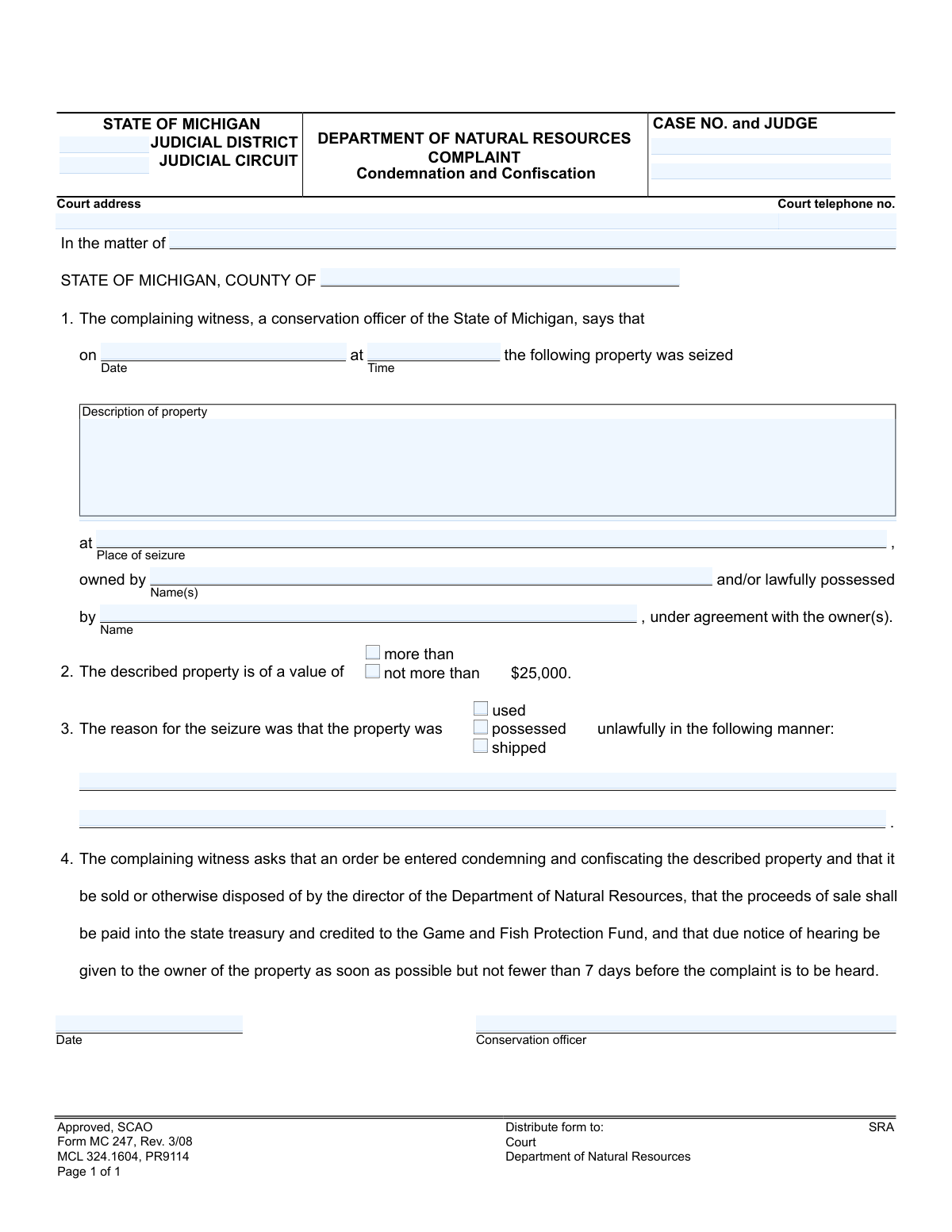
Form MC 247, Complaint, Condemnation and Confiscation, page 1
Basic · 30/100Form Complexity Index

The AI does the filling. You just check it.

No typing into boxes, nothing to install.

Tell the AI about youAnswer a few questions in plain words, or upload a document you already have. That is all the typing there is.
AI fills every field in secondsIt puts each answer in the right box on every page, checkboxes included.
Check it and downloadReview every field, change anything, then download, print or sign the PDF.

What this form asks for

The AI fills all of it, from your answers or your documents.

Form MC 247 is a legal document filed in Michigan courts by a conservation officer from the Department of Natural Resources. Its purpose is to formally initiate proceedings to condemn and confiscate property that was seized due to being unlawfully used, possessed, or shipped in violation of natural resource laws. Today, this form can be filled out quickly and accurately using AI-powered services like Instafill.ai, which can also convert non-fillable PDF versions into interactive fillable forms.
Fillable fields23
Pages1
Form Complexity IndexBasic, 30/100

The AI checks your answers before you download

14 checks built for this form, so a wrong date or a missing answer is caught before anyone else sees it.

Mutually Exclusive Property Value Selection

This validation ensures that only one of the property value checkboxes ('more than $25,000' or 'not more than $25,000') is selected. The property's value cannot be both over and under the threshold simultaneously. If both or neither are selected, the form is logically inconsistent and cannot be processed, requiring the user to select exactly one option.

Mandatory Reason for Seizure Selection

This check verifies that at least one of the checkboxes indicating the reason for seizure ('used,' 'possessed,' or 'shipped') is selected. The complaint must specify how the property was involved in an unlawful act. Failure to select a reason leaves the complaint incomplete and legally insufficient, requiring the user to choose at least one option.

Required Description for Unlawful Manner

This validation ensures that if a reason for seizure ('used,' 'possessed,' or 'shipped') is checked, the corresponding text field describing the unlawful manner is not empty. A checked box without a narrative description provides no actionable detail for the court. This check ensures the justification for the seizure is provided as required.

Logical Seizure and Signature Dates

This check verifies that the signature date is on or after the seizure date. A complaint cannot be signed and dated before the event it describes has occurred. This chronological validation prevents logical impossibilities and ensures the integrity of the timeline presented in the legal document.

Valid Seizure Date Format

This validation confirms that the seizure date is entered in a valid date format (e.g., MM/DD/YYYY). This is crucial for establishing a clear and unambiguous record of the event. An invalid format could lead to misinterpretation or rejection of the document by the court system.

Valid Court Telephone Number Format

This check ensures the court telephone number is entered in a standard, valid format, such as (XXX) XXX-XXXX. Proper formatting ensures the number is machine-readable and usable for any automated communications or for individuals needing to contact the court. An invalid format would render the contact information useless.

And 8 more checks
  • Required Property Description
  • Required Conservation Officer Identification
  • Required County of Jurisdiction
  • Valid Michigan County Name
  • Required Place of Seizure
  • Valid Case Number Format
  • Required Seizure Date and Time
  • Required Property Value Declaration

Let AI fill out your MC 247

No typing. Every field filled in seconds, checked, ready to sign.

7 days free, then $19.99/month · Cancel anytime

How to Fill Out MC 247 Online for Free in 2026

What the AI walks you through.

  1. Navigate to Instafill.ai and upload or select Form MC 247.
  2. Provide the relevant court information, including the judicial district, circuit, case number, and judge's name.
  3. Enter the specifics of the seizure, such as the date, time, place, and a detailed description of the property.
  4. Identify the owner or possessor of the seized property and state its estimated value.
  5. Clearly describe the reason for the seizure, detailing how the property was unlawfully used, possessed, or shipped.
  6. Review all the information populated by the AI for accuracy, then the conservation officer can digitally or physically sign and date the complaint.
  7. Download the completed form for distribution to the court, the Department of Natural Resources, and other required parties.

Common Mistakes in Completing MC 247

The ones the AI is built to catch.

Vague or Ambiguous Property Description
The 'Description of property' field is often filled with generic terms like 'firearm' or 'hunting equipment' instead of specific details. This ambiguity can create legal challenges in identifying the exact item being confiscated, potentially jeopardizing the case. To avoid this, always include specific identifiers such as make, model, serial number, caliber, or unique markings to ensure the property is unambiguously identified.
Incorrect Property Value Declaration
Checking the wrong box for the property's value (either 'more than' or 'not more than $25,000') is a critical error with significant legal consequences, as it can determine which court has jurisdiction. This mistake often happens due to a quick guess or misunderstanding of the item's market value. To prevent this, conduct a reasonable appraisal of the property before filling out the form to ensure the correct box is checked, as this detail dictates the legal pathway for the complaint.
Insufficient Detail on Unlawful Manner
The section describing how the property was unlawfully used is the foundation of the complaint, yet it's often left too brief or unclear. A weak description fails to establish the necessary legal grounds for confiscation, leading to the complaint being dismissed. Provide a clear, factual narrative detailing the specific actions and citing the relevant laws or regulations that were violated to build a strong case.
Imprecise 'Place of Seizure' Information
People frequently provide a general location like 'Ingham County' instead of a precise address or GPS coordinates for the 'Place of seizure'. An imprecise location can weaken the legal basis for the seizure if the jurisdiction or legality of the action at that specific spot is questioned. It's crucial to provide the most exact location possible, such as a street address, intersection, or detailed landmark description with mile markers.
Missing or Incorrect Owner/Possessor Details
Failing to list the full, correct legal name(s) of the property owner or possessor can invalidate the notice process, as due process requires notifying the correct parties. This often occurs due to misspellings, using nicknames, or not identifying all known parties with an interest in the property. Double-check spelling and use full legal names as found on official identification to ensure proper legal notice can be served.
Inaccurate or Incomplete Court Details
Users often enter the wrong judicial district/circuit or leave the case number and judge fields blank, especially if the case hasn't been formally filed yet. This can lead to misfiling, delays in processing, or rejection by the court clerk. To avoid this, verify the correct court jurisdiction for the location of the seizure and confirm with the clerk's office when possible. AI-powered tools like Instafill.ai can help by storing and correctly populating recurring court information.
Omitting the Nature of Unlawful Use
The form requires checking whether the property was 'used,' 'possessed,' or 'shipped' unlawfully, but filers sometimes forget to select one of these options. This omission leaves a critical element of the complaint undefined and can lead to the form being returned for correction, delaying the legal process. Carefully review the facts of the case and check the box that most accurately describes the illegal activity associated with the property.
Confusing County of Seizure with Court County
The form asks for the 'STATE OF MICHIGAN, COUNTY OF' at the top of the complaint section, which must be the county where the seizure occurred. Filers may mistakenly enter the county where the court is located or their office is based, creating a jurisdictional discrepancy that can be challenged. Always ensure the county listed in this section is the one where the property was physically seized.
Manual Filling of a Non-Fillable PDF
This form is often distributed as a flat, non-fillable PDF, leading to handwritten entries that are prone to being illegible, incomplete, or containing formatting errors. This can result in processing delays or rejection by the court. To avoid this, use a tool like Instafill.ai, which can convert non-fillable PDFs into interactive, fillable forms, ensuring all entries are neat, legible, and properly formatted.
Omitting the Subject in 'In the matter of'
The 'In the matter of' field is intended to clearly state the subject of the legal action, which is typically the property itself (e.g., 'One Remington 870 shotgun, serial #12345'). Leaving this blank or entering ambiguous information creates confusion about the focus of the complaint from the outset. This field should be filled out with a concise summary of the property being condemned to provide immediate clarity for the court.

Frequently Asked Questions About MC 247


Is it really free for 7 days?
Yes. You pay $0 today. Cancel before Nov 11 and you are never charged. Keep it, and it is $19.99 a month for 5 fills of your MC 247.
Can I fill other forms too?
This plan is for your MC 247: your own AI agent fills it as often as 5 times a month. To fill other forms and upload your own, choose a Professional plan from your account.
How do I cancel?
From your account, in two clicks, any time. No email, no call.
How does the AI fill out MC 247?
You answer a few questions in plain words, or upload a document you already have. The AI reads what you give it and puts each answer into the right field of MC 247, on every page, in seconds. It checks the answers against the form's own rules, and you review and change anything before you download, print or sign.
What happens to my information?
It is encrypted in transit and at rest, and it is never used to train AI.
How complex is MC 247 to fill out?
MC 247 has a Form Complexity Index of 30 out of 100, in the basic tier: 23 fillable fields across 1 page. Instafill.ai's AI fills it in under a minute, with every field there for you to review before you download.
What is the purpose of the Complaint, Condemnation and Confiscation form?
This form is a legal complaint filed by a Michigan Department of Natural Resources (DNR) conservation officer. It asks a court to officially take ownership of property that was allegedly used, possessed, or shipped unlawfully.
Why did I receive a copy of this form?
You likely received this form because you are the owner or possessor of property that has been seized by a conservation officer. This document serves as official notice of the legal proceedings against your property.
Who fills out this form?
A DNR conservation officer completes and files this form with the court. It is not a form for the property owner to fill out.
What does 'condemnation and confiscation' mean?
Condemnation is the legal process of declaring property was used illegally, and confiscation is the act of the state taking permanent ownership of it. This form initiates that legal process.
What happens to my property if it is confiscated?
If the court approves the confiscation, the DNR director will sell or dispose of the property. Proceeds from any sale are paid to the state's Game and Fish Protection Fund.
Do I have to go to court?
Yes, the form requests a court hearing, and you must be notified at least 7 days in advance. This hearing is your opportunity to contest the seizure of your property.
What should I do if I disagree with the seizure?
You should attend the scheduled court hearing to present your case. It is strongly recommended that you consult with an attorney to understand your legal rights and options.
What information is included in this complaint?
The form includes a description of the seized property, the date and location of the seizure, your name as the owner/possessor, and the specific reason the officer believes it was used unlawfully.
What is the Game and Fish Protection Fund?
This is a state fund dedicated to financing the conservation and management of Michigan's fish and wildlife resources. Money from the sale of confiscated property helps support these efforts.
How long does this process take?
The form specifies that a hearing must be scheduled as soon as possible, but you will receive notice no fewer than 7 days before the hearing date. The overall timeline will depend on the court's schedule.
Can AI help me fill out forms related to my case?
Yes, services like Instafill.ai use AI to accurately auto-fill various legal and official forms. This can save you time and help avoid errors when preparing documents for your case.
How can I fill out a related court form online?
You can use a service like Instafill.ai to complete your forms online. Simply upload the document, and the tool will help you fill in the required fields digitally before you print it for filing.
What can I do if a form I need to complete is a non-fillable PDF?
Tools like Instafill.ai can convert flat, non-fillable PDFs into interactive, fillable forms. This allows you to type your information directly onto the document for a clean and professional submission.
Encrypted in transit and at restNever used to train AIDelete your forms any time

Get your MC 247 filled out by AI

$0 today. Cancel before Nov 11 and you pay nothing.

7 days free, then $19.99/month · Cancel anytime